
-
04.01.2007, 11:35
#1

Passat
0 Код ошибки 10..
Друзья подскажите..Решил с видеокамеры перенести изображение на комп, купил плату USB 2.0 1394,поставил ее в РС слот, комп «увидел» плату, но камера отказывается работать. Смотрю в системе, комп видет этоу плату, но пишет что она не можт быть задействована «код ошибки 10″….Кто знает как с этим боротся..?
-
04.01.2007, 14:52
#2
Всем Перцам — Перец Клуба!
0
купил плату USB 2.0 1394,поставил ее в РС слот
Ничего из вышесказанного не понял. Сцылку на плату можешь дать?
-
04.01.2007, 15:16
#3
Знатный Перец Клуба VW Passat B5!
0
Vlad-M.
после установки платы, комп написал, что оборудование установлено и готово к использованию?
С платой должны дрова были быть, они есть?
А в целом с pavel согласен, ничего непонятно.Кто думает, что он знает что-нибудь, тот ничего еще не знает так, как должно знать.(1 Кор 8:2).
-
04.01.2007, 18:41
#4
-
04.01.2007, 19:32
#5
Всем Перцам — Перец Клуба!
0
Vlad-M.
pavel А что не понятного..? ,стандартная карта которя используется при «захвате» с видеокамеры на комп., карта так и называется.. 1394PCI Card. Как мне объяснили она ставится в любой свободный РС слот,драйвера не нужны если стоит ХР.
А не понятно, при чем здесь ЮСБ 2.0? Если это контроллер Fire Wire, то вставляется он в слот PCI, а USB здесь и рядом не было.
Есть ли конфликты этого контроллера с другим железом?
Просто сейчас на рынке столько левака, что вполне возможно все что угодно.
Какая у тебя мат плата?
-
04.01.2007, 19:45
#6
-
04.01.2007, 20:21
#7
Знатный Перец Клуба VW Passat B5!
0
Vlad-M.
посмотри что написано в панель управления-администрирование-просмотр событий, должна ошибка быть, и в оборудовании сетевые платы, отображается что-нибудь?Кто думает, что он знает что-нибудь, тот ничего еще не знает так, как должно знать.(1 Кор 8:2).
-
04.01.2007, 20:24
#8
Всем Перцам — Перец Клуба!
0
С мат платой, вроде все ОК.
Теперь сделай вот что:
стукни правой мышкой на «мой компьютер»->свойства->оборудование-> диспетчер устройств-> сетевые платы.
Вот что там?
-
04.01.2007, 23:02
#9
-
05.01.2007, 09:20
#10
Всем Перцам — Перец Клуба!
0
Vlad-M.
Посмотри, есть ли еще в системе какие нибудь косяки?
Если нет, то в диспетчере устройств, удали этот контроллер (1394) из системы, затем, «Действие» -> «Обновить конфигурацию оборудования».
-
05.01.2007, 10:04
#11
-
05.01.2007, 10:48
#12
Всем Перцам — Перец Клуба!
0
Просто у меня было такое, вылечилось именно тем способом, который я тебе описал.
Драйверов к ней тоже не пришло?Можно попробовать поставить эту железку на другую машину.
-
05.01.2007, 10:52
#13
-
06.01.2007, 00:51
#14
Phaeton
0
Сообщение от Vlad-M.Драйверов не было…, а другой машины нет..
Можно пойти другим путем.
Вынь плату из компьютера и посмотри на нее. Там должно быть два относительно больших чипа (микросхемы), примерно такие:Напиши тут что написано на твоих чипах, только смотри внимательно и пиши сюда все строчки.
P.S. Может аналогичную инфу можно получить каким-нибудь программным анализатором конфигурации системы, но я ими не пользуюсь и подходящих не знаю…
-
06.01.2007, 12:58
#15
-
06.01.2007, 20:29
#16
Passat
0
andrewju Посмотрел..там одна плата,точно такая как на фотке.вот ее номер:
VT 6306
0615CD TAIWAN
2HG1005563 (C)(C)(M)
на плате есть три выхода два больших,один маленький, и еще один на самой плате(он оказывается внутри компа при установке платы).



 Код ошибки 10..



 Сообщение от Vlad-M.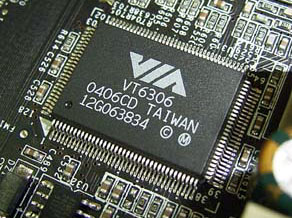

Похожие темы
-
Ответов: 13
Последнее сообщение: 21.03.2008, 23:33
-
Ответов: 2
Последнее сообщение: 24.02.2008, 13:39
-
Ответов: 1
Последнее сообщение: 29.12.2005, 09:08
-
Ответов: 4
Последнее сообщение: 03.10.2005, 16:57
-
Ответов: 18
Последнее сообщение: 16.09.2005, 17:56
Ваши права

- Вы не можете создавать новые темы
- Вы не можете отвечать в темах
- Вы не можете прикреплять вложения
- Вы не можете редактировать свои сообщения
- BB коды Вкл.
- Смайлы Вкл.
- [IMG] код Вкл.
- [VIDEO] код Вкл.
- HTML код Выкл.
Правила форума
A8AE-LE (AmberineM) 1394 Net Adapter device will not start error 10
-
Thread starterDavid1968
-
Start date
You should upgrade or use an alternative browser.
-
#1
Here are the motherboard specifications on the HP site.
http://h10025.www1.hp.com/ewfrf/wc/document?cc=us&lc=en&docname=c00496280
Thanks,
Dave

-
- Feb 18, 2010
-
- 30,531
-
- 311
-
- 107,640
-
#2
-
#3
Its a Compaq Presario SR1603WM
http://h10025.www1.hp.com/ewfrf/wc/softwareCategory?os=228&lc=en&cc=us&dlc=en&sw_lang=&product=1118242
A couple of years ago I found it in a dumpster the case was all beat up. Took it home and it worked and had a Sempron 3200+ and 256mb ram. Put in a Athlon 4800+ and 4gb of ram and a PNY 9800gt 1gb a Syba raid card with 2 Crucial 64gb SSD and 2 Seagate 1tb drives. It runs really good for a older machine. When Windows starts the blue loading bar goes across the screen once.
Dave
-
- Feb 18, 2010
-
- 30,531
-
- 311
-
- 107,640
-
#4
-
#5
Dave
-
- Feb 18, 2010
-
- 30,531
-
- 311
-
- 107,640
-
#6
-
#7
Thanks for the link. Right now I’m using my other computer. I will give it a try on Tues when I get home from work and get back to you. I have to be up at 6am.
Thanks,
Dave
-
- Feb 18, 2010
-
- 30,531
-
- 311
-
- 107,640
-
#9
I ran that ma-config and only my raid card had a driver update. I got this message under drivers
Driver name
1394 Net Adapter Manufacturer Microsoft Version 5.2.3790.1830 Date 10/1/2002 Inf path net1394.inf Event type net
Hardware ID V1394\NIC1394 Error code 10 Installed driver ok Problem with the driver and there is a red x. The only update that was listed was for my raid card. Is there a way to just delete 1394 net adapter in the registry so it is not in network connections? My x58 has a firewire port and it is not listed in the network connections?
-
- Feb 18, 2010
-
- 30,531
-
- 311
-
- 107,640
-
#10
Similar threads

- Advertising
- Cookies Policies
- Privacy
- Term & Conditions
код ошибки 10 NEC 1394-совместимый хост-контроллер OHCI в Windows 7 x64 7600, при установке драйвера хост-контроллера, совместимого с OHCI 1394 (устаревшая версия) и перезагрузке, код ошибки 10 исчезает, НО при подключении камеры panasonic nv-gs250gc-s Появляется экран BSOD, и система перезагружается. Перерыл все форумы вдоль и поперек, кроме установки драйвера устаревшей стандартной версии не нашел, ни производитель камеры, ни производитель контроллера 1394 не нашли драйверов на 7к, также обращаясь в службу поддержки panasonic нет дают результаты, создается впечатление, что есть люди, которые там работают, абсолютно не наплевать на пользователей продуктов panasonic
Отвечать
Привет.
драйвер или камера могут быть не предназначены для Windows 7 x64. Попробуйте поэкспериментировать с установкой Windows 7 x32 и протестируйте.
Если предложенные рекомендации помогли, отметьте их как ответ. Это поможет другим пользователям быстро найти решение. Все вышесказанное – мое личное мнение. Инженер службы поддержки
Источник: https://answers.microsoft.com/ru-ru/windows/forum/all/bug/d134d3bb-be9e-43d0-b57a-63fb62af882e
-
August 5th, 2004, 03:17 PM
#1
Registered User
IEEE 1394 device cannot start (code 10)
I use a Dell Inspiron 8200, running XP home (updated). The notebook has a built in IEEE 1394 connection and I have used it so far successfully with my digital camcorder. I recently bought a Fantom external firewire drive and can’t get it working. In the device manager it says: device cannot start (code 10). I uninstalled the driver, shut down the system and restarted, but it didn’t help. The IEEE 1394 was working so far, so I guess either the new drive doesn’t work or there is a software problem. Did any of you have the same problem and find a solution for it? Appreciate your help a lot.
-
August 5th, 2004, 04:24 PM
#2
Driver Terrier
Welcome to Windrivers mikoman
Code 10 usually means out of resources.
go here and download the chipset update and install it and you should also check that you have the latest bios A11 installed.
you should also check to see if you have this update
Never, ever approach a computer saying or even thinking «I will just do this quickly.»
-
August 5th, 2004, 04:47 PM
#3
Registered User
Originally Posted by NooNooThank you very much! I do have the latest bios A11, but I will update the chipset and get the microsoft patch. I will let you know, if that fixed the problem.
-
August 6th, 2004, 07:18 AM
#4
Driver Terrier
Never, ever approach a computer saying or even thinking «I will just do this quickly.»
-
August 6th, 2004, 11:14 AM
#5
Registered User
Originally Posted by NooNooand?
Well, I installed the patch and chipset, but still couldn’t get it to work. I connected the drive finally to the computer of a friend and it was working there. So after changing the cable it was working as well on my notebook. It was a bad cable and I can’t believe I spent so much time trying to figure out that problem. I trusted that cable to much. It was a brandnew retractable 4 to 6 IOGEAR cable. No good. But I’m relieved that my hadrdrive is working. Thanks again for your precious help. God bless!
-
August 6th, 2004, 02:55 PM
#6
Driver Terrier
Never, ever approach a computer saying or even thinking «I will just do this quickly.»

 IEEE 1394 device cannot start (code 10)
 Originally Posted by NooNoo
Guest
-
#1
Good morning:
I have just recently built a new PC with the following Specs:
2 — AMD Opteron 265
Tyan Tiger K8WE Motherboard (w/onboard 1394)
2 GB Corsair Ram
nVidia 6600 PCIe Graphics Card
WinXP Pro SP2
My issue lies in the fact that in the Device Manager under Network Adapters
there is the yellow «information» indicator telling me that there is some
sort of problem. There have been a number of us that have built the exact
same machine (down to the letter) and it appears that all others are working
so far. Aside from XP sp2, the only other installed drivers are the nVidia
Platform driver v6.70, and the nVidia Graphics drivers v81.98. To my
knowledge the other machines that have been built have not applied any
hotfixes or anything…just the bare SP2 install.
The onboard 1394 is enabled in the BIOS and the Fireware Adapter shows no
conflicts. There are no IRQ conflicts.
All indications show that it should be working, however, in the Control
Panel under Network Connections, I only see my Ethernet Connection. Should I
be seeing a connection for my 1394 card as well? I did come across a MS KB
article (KB317812) that spoke to this, but I’m unsure if this is the same
issue or even related.
I look forward to a reply…hopefully the MS staff or other users can shed
some light on this. My advance thanks to any and all that respond.
Regards,
Jeff Michel
Crushed Pickle Studio
Estevan, SK, Canada
Advertisements
Lanwench [MVP — Exchange]
-
#2
In
Crushed Pickle Studio said:
Good morning:
I have just recently built a new PC with the following Specs:
2 — AMD Opteron 265
Tyan Tiger K8WE Motherboard (w/onboard 1394)
2 GB Corsair Ram
nVidia 6600 PCIe Graphics Card
WinXP Pro SP2My issue lies in the fact that in the Device Manager under Network
Adapters there is the yellow «information» indicator telling me that
there is some sort of problem.
What is it complaining about specifically?
There have been a number of us that
have built the exact same machine (down to the letter) and it appears
that all others are working so far. Aside from XP sp2, the only
other installed drivers are the nVidia Platform driver v6.70, and the
nVidia Graphics drivers v81.98. To my knowledge the other machines
that have been built have not applied any hotfixes or anything…just
the bare SP2 install.The onboard 1394 is enabled in the BIOS and the Fireware Adapter
shows no conflicts. There are no IRQ conflicts.All indications show that it should be working, however, in the
Control Panel under Network Connections, I only see my Ethernet
Connection. Should I be seeing a connection for my 1394 card as
well?
Yes, but do you actually need this at all?
Have you looked at the mobo mfr’s website for drivers?
Guest
-
#3
Lanwench:
What is it complaining about specifically?
The error code that comes up is Error Code 10…telling me that the device
cannot start. So if I was hoping to connect two machines together via
Firewire to form a mini-network within my home LAN, I couldn’t due to the
fact that the Network adapter portion of my Firewire isn’t running.
Yes, but do you actually need this at all?
Have you looked at the mobo mfr’s website for drivers?
I don’t necessarily need this functionality, however what I find strange is
that of the 10-15 others that have buit the exact same machine, no one else
has run into this error yet. We all have been working off the exact same
parts list, exact same BIOS revision, and following the exact installation
steps.
None of us have installed any of the motherboard’s drivers as they seem to
introduce conflicts. Strangely enough the CD that comes with the mobo
doesn’t contain the the proper nVidia chipset drivers.
Because these machines are being built for Digital Recording Studios,
stability is of the utmost importance and before I start to install the
remaining apps, I want to make sure I have an error and conflict-free OS.
Can you look into the hotfix listed in KB317812 and see if it would apply to
this situation…if nothing else I may be interested in downloading it to try
it out, but it isn’t available for public download.
I look forward to your reply.
Regards,
Jeff Michel
Crushed Pickle Studio
Estevan, SK, Canada
Lanwench [MVP — Exchange]
-
#4
In
Crushed Pickle Studio said:
Lanwench:
The error code that comes up is Error Code 10…telling me that the
device cannot start. So if I was hoping to connect two machines
together via Firewire to form a mini-network within my home LAN
Why not use Ethernet cards for this, just out of curiosity?
, I
couldn’t due to the fact that the Network adapter portion of my
Firewire isn’t running.I don’t necessarily need this functionality, however what I find
strange is that of the 10-15 others that have buit the exact same
machine, no one else has run into this error yet. We all have been
working off the exact same parts list, exact same BIOS revision, and
following the exact installation steps.None of us have installed any of the motherboard’s drivers as they
seem to introduce conflicts. Strangely enough the CD that comes with
the mobo doesn’t contain the the proper nVidia chipset drivers.Because these machines are being built for Digital Recording Studios,
stability is of the utmost importance and before I start to install
the remaining apps, I want to make sure I have an error and
conflict-free OS.Can you look into the hotfix listed in KB317812 and see if it would
apply to this situation…if nothing else I may be interested in
downloading it to try it out, but it isn’t available for public
download.
Hmmm — I’ve never seen this myself, and for any hotfix like this you’d need
to call MS to get it.
I’m not sure this will resolve your problem, tho. The device is not showing
up properly in device manager, which to me, indicates a driver problem — or,
a hardware problem. Perhaps your mobo is not 100% identical to the ones
you’ve compared it to…. or, perhaps you’ve got gremlins. It’s hard to say.
If you’re incredibly wary about changing *anything* after all the work
you’ve put into the install already, what about imaging the system (I like
Acronis, a lot) and then installing the (correct) driver? Of course, you can
roll back a driver change, and you also have system restore, but if you’re a
belt-and-suspenders fellow, an image backup might be a good plan.
Advertisements
Guest
-
#5
As a matter of fact, I have Acronis TrueImage and have been making images of
the install thus far. Funny that you would mention that.
As for the ethernet connectivity issue…I would be more inclined to use
ethernet to network machines, but I just figured that everything whould work
out of the box. (And yes, in my world the sky is blue, too…hehe)
If all else fails, I can disable the onboard 1394 and purchase a standalone
network adapter from SIIG or ADS. Those are the only two tested to work with
the software that I’ll be using.
I will contact MS about the hotfix and see if that helps any. There’s no
way that you can provide that for me?
Thank you for you assistance.
Regards,
Jeff Michel
Crushed Pickle Studio
Estevan, SK, Canada