
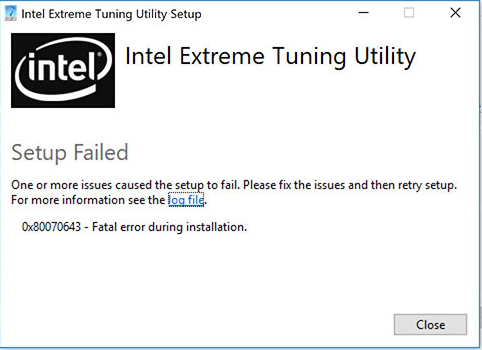
I wanted to get the Intel® Extreme Tuning Utility installed and play around with some overclocking on my 2017 HP Spectre X360 13″, which I’m currently running with an HP Omen e-gpu and an Nvidia GTX-1060Ti.
I downloaded the software from Intel (version 6.5.1.321) and it would not install: error 0x80070643 attempted to install on an unsupported platform.

I found this article and used it for the basis of this post since these instructions did not work for me, although it got me 99% there.
Note that the installer seems to have changed how it runs. It used to be that you could click Ok in the image below and the file you need would still be there. Now it appears that once you click Ok it deletes the folders and files.
Here’s what to do:
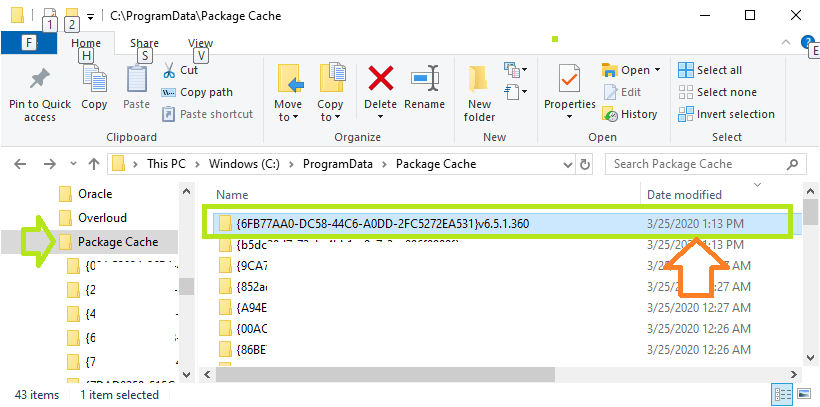
Open this folder in windows explorer C:\ProgramData\Package Cache\ and sort by date, newest at the top. Take note of the last folder date in the right pane.
Download the installer and run it. When it gives you the error, do not click Ok. Make sure it still looks like this. Do not click Ok.
- Now go back to explorer. You should see one or two new folders with the date and time close to when you ran the application.
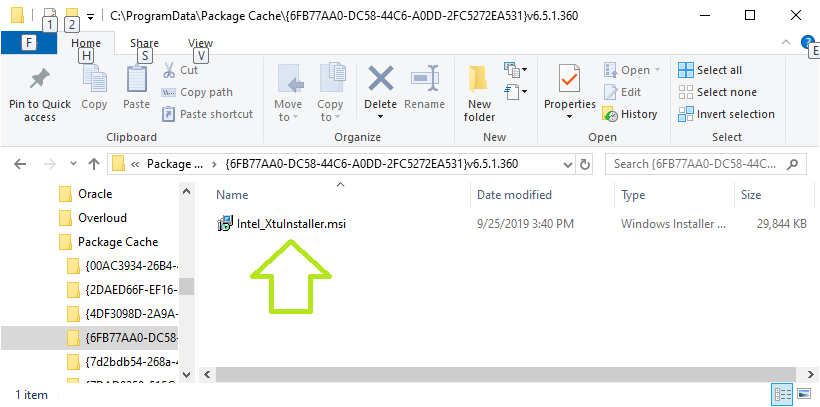
- In one of those folders you will find Intel_XtuInstaller.msi
- You must have local Admin rights.
- Copy Intel_XtuInstaller.msi to your desktop.
- In the article linked above you run the .msi from the command line, but I only got errors, so do this instead:
- Right-click on the MSI file and hold, drag a little ways onto a blank spot on your desktop and select “create shortcut here”.
- Right-click > properties of the shortcut
- In the “Target” field, at the end add a space and then the following DISABLEPLATFORMCHECK=1
- It will look something like this: “
C:\Users\your-user-name\Desktop\Intel_XtuInstaller.msi DISABLEPLATFORMCHECK=1“ - Click Ok
- Double-click the shortcut
That’s it, happy overclocking and possibly damaging your machine!
Hello. I have recently uninstalled xtu and I tried to reinstall it. However , when i tried to install it again, it came up with this error message: There is a priblem with the windows installer package. A script required for this install to complete could not be run. Contact your support personnel or package vendor.
0x80070643 — Fatal error during installation.
I tried other versions but I had no luck. My specs are: Intel (R) Core (TM) i5-4300U CPU @ 1.90GHz running at a base speed of 2.50GHz. I installed the xtu mainly to underclock my gpu because it was thermal throttling at 90 degrees celsius (the gpu was going from 1000 mhz to 200mhz which lagged my games alot. I also checked other posts but nothing worked. I need help please. Here are the logs from the installer:
[2DA4:1194][2022-12-10T16:17:09]i001: Burn v3.11.1.2318, Windows v10.0 (Build 19044: Service Pack 0), path: C:\Users\thego\AppData\Local\Temp\{65D5F80E-109B-4013-A21B-783F16FB03C4}\.cr\XTUSetup (1).exe
[2DA4:1194][2022-12-10T16:17:09]i000: Initializing string variable 'RemoveAllDataCheckboxValue' to value '[RemoveAllDataCheckbox]'
[2DA4:1194][2022-12-10T16:17:09]i000: Initializing version variable 'BundleVersionNumber' to value '6.5.2.40'
[2DA4:1194][2022-12-10T16:17:09]i009: Command Line: '"-burn.clean.room=C:\Users\thego\Downloads\XTUSetup (1).exe" -burn.filehandle.attached=708 -burn.filehandle.self=492'
[2DA4:1194][2022-12-10T16:17:09]i000: Setting string variable 'WixBundleOriginalSource' to value 'C:\Users\thego\Downloads\XTUSetup (1).exe'
[2DA4:1194][2022-12-10T16:17:09]i000: Setting string variable 'WixBundleOriginalSourceFolder' to value 'C:\Users\thego\Downloads\'
[2DA4:1194][2022-12-10T16:17:09]i000: Setting string variable 'WixBundleLog' to value 'C:\Users\thego\AppData\Local\Temp\Intel(R)_Extreme_Tuning_Utility_20221210161709.log'
[2DA4:1194][2022-12-10T16:17:09]i052: Condition 'VersionNT >= v6.1' evaluates to true.
[2DA4:1194][2022-12-10T16:17:09]i000: Setting string variable 'WixBundleName' to value 'Intel(R) Extreme Tuning Utility'
[2DA4:1194][2022-12-10T16:17:09]i000: Setting string variable 'WixBundleManufacturer' to value 'Intel Corporation'
[2DA4:0A0C][2022-12-10T16:17:10]i000: Setting version variable 'WixBundleFileVersion' to value '6.5.2.40'
[2DA4:1194][2022-12-10T16:17:10]i100: Detect begin, 1 packages
[2DA4:1194][2022-12-10T16:17:10]i000: Product or related product not found: {823C3D41-1C6E-4ECA-9923-1200278AE478}
[2DA4:1194][2022-12-10T16:17:10]i000: Setting version variable 'MsiAlreadyInstalledVersion' to value '0.0.0.0'
[2DA4:1194][2022-12-10T16:17:10]i000: Setting string variable 'NETFRAMEWORK45' to value '528372'
[2DA4:1194][2022-12-10T16:17:10]i000: Setting version variable 'WindowsDllVersion' to value '10.0.19041.1682'
[2DA4:1194][2022-12-10T16:17:10]i101: Detected package: Intel_XtuInstaller.msi, state: Absent, cached: None
[2DA4:1194][2022-12-10T16:17:10]i052: Condition 'BundleVersionNumber > MsiAlreadyInstalledVersion OR BundleVersionNumber = "0.0.0.0" OR NOT WixBundleAction = 5' evaluates to true.
[2DA4:1194][2022-12-10T16:17:10]i052: Condition 'WixBundleInstalled OR VersionNT64 = "6.1.0.0" OR WindowsDllVersion >= "10.0.14393.0" OR NOT WixBundleAction = 5' evaluates to true.
[2DA4:1194][2022-12-10T16:17:10]i052: Condition 'WixBundleInstalled OR NOT WixBundleAction = 5 OR NETFRAMEWORK45 >= 394802' evaluates to true.
[2DA4:1194][2022-12-10T16:17:10]i199: Detect complete, result: 0x0
[2DA4:0A0C][2022-12-10T16:17:11]i000: Setting numeric variable 'EulaAcceptCheckbox' to value 1
[2DA4:1194][2022-12-10T16:17:11]i200: Plan begin, 1 packages, action: Install
[2DA4:1194][2022-12-10T16:17:11]i000: Setting string variable 'WixBundleRollbackLog_Intel_XtuInstaller.msi' to value 'C:\Users\thego\AppData\Local\Temp\Intel(R)_Extreme_Tuning_Utility_20221210161709_000_Intel_XtuInstaller.msi_rollback.log'
[2DA4:1194][2022-12-10T16:17:11]i000: Setting string variable 'WixBundleLog_Intel_XtuInstaller.msi' to value 'C:\Users\thego\AppData\Local\Temp\Intel(R)_Extreme_Tuning_Utility_20221210161709_000_Intel_XtuInstaller.msi.log'
[2DA4:1194][2022-12-10T16:17:11]i201: Planned package: Intel_XtuInstaller.msi, state: Absent, default requested: Present, ba requested: Present, execute: Install, rollback: Uninstall, cache: Yes, uncache: No, dependency: Register
[2DA4:1194][2022-12-10T16:17:11]i299: Plan complete, result: 0x0
[2DA4:1194][2022-12-10T16:17:11]i300: Apply begin
[2DA4:1194][2022-12-10T16:17:12]i010: Launching elevated engine process.
[2DA4:1194][2022-12-10T16:17:13]i011: Launched elevated engine process.
[2DA4:1194][2022-12-10T16:17:13]i012: Connected to elevated engine.
[1BA8:0810][2022-12-10T16:17:13]i358: Pausing automatic updates.
[1BA8:0810][2022-12-10T16:17:13]i359: Paused automatic updates.
[1BA8:0810][2022-12-10T16:17:13]i360: Creating a system restore point.
[1BA8:0810][2022-12-10T16:17:13]w363: Could not create system restore point, error: 0x80070422. Continuing...
[1BA8:0810][2022-12-10T16:17:13]i370: Session begin, registration key: SOFTWARE\Microsoft\Windows\CurrentVersion\Uninstall\{de963bf0-619d-461f-b689-7f4079c4ac42}, options: 0x7, disable resume: No
[1BA8:0810][2022-12-10T16:17:13]i000: Caching bundle from: 'C:\Users\thego\AppData\Local\Temp\{C60A18A5-D3AB-4CEB-94E9-0AF74911142D}\.be\XTUUISetup.exe' to: 'C:\ProgramData\Package Cache\{de963bf0-619d-461f-b689-7f4079c4ac42}\XTUUISetup.exe'
[1BA8:0810][2022-12-10T16:17:13]i320: Registering bundle dependency provider: {de963bf0-619d-461f-b689-7f4079c4ac42}, version: 6.5.2.40
[1BA8:0810][2022-12-10T16:17:13]i371: Updating session, registration key: SOFTWARE\Microsoft\Windows\CurrentVersion\Uninstall\{de963bf0-619d-461f-b689-7f4079c4ac42}, resume: Active, restart initiated: No, disable resume: No
[1BA8:24D8][2022-12-10T16:17:14]i305: Verified acquired payload: Intel_XtuInstaller.msi at path: C:\ProgramData\Package Cache\.unverified\Intel_XtuInstaller.msi, moving to: C:\ProgramData\Package Cache\{2523CCCE-D2FA-47F7-B4DF-54C122222E6A}v6.5.2.40\Intel_XtuInstaller.msi.
[1BA8:0810][2022-12-10T16:17:14]i323: Registering package dependency provider: {2523CCCE-D2FA-47F7-B4DF-54C122222E6A}, version: 6.5.2.40, package: Intel_XtuInstaller.msi
[1BA8:0810][2022-12-10T16:17:14]i301: Applying execute package: Intel_XtuInstaller.msi, action: Install, path: C:\ProgramData\Package Cache\{2523CCCE-D2FA-47F7-B4DF-54C122222E6A}v6.5.2.40\Intel_XtuInstaller.msi, arguments: ' ARPSYSTEMCOMPONENT="1" MSIFASTINSTALL="7" REMOVEALLAPPDATA=""'
[1BA8:0810][2022-12-10T16:17:18]e000: Error 0x80070643: Failed to install MSI package.
[1BA8:0810][2022-12-10T16:17:18]e000: Error 0x80070643: Failed to execute MSI package.
[2DA4:1194][2022-12-10T16:17:18]e000: Error 0x80070643: Failed to configure per-machine MSI package.
[2DA4:1194][2022-12-10T16:17:18]i319: Applied execute package: Intel_XtuInstaller.msi, result: 0x80070643, restart: None
[2DA4:1194][2022-12-10T16:17:18]e000: Error 0x80070643: Failed to execute MSI package.
[1BA8:0810][2022-12-10T16:17:18]i318: Skipped rollback of package: Intel_XtuInstaller.msi, action: Uninstall, already: Absent
[2DA4:1194][2022-12-10T16:17:18]i319: Applied rollback package: Intel_XtuInstaller.msi, result: 0x0, restart: None
[1BA8:0810][2022-12-10T16:17:18]i329: Removed package dependency provider: {2523CCCE-D2FA-47F7-B4DF-54C122222E6A}, package: Intel_XtuInstaller.msi
[1BA8:0810][2022-12-10T16:17:18]i351: Removing cached package: Intel_XtuInstaller.msi, from path: C:\ProgramData\Package Cache\{2523CCCE-D2FA-47F7-B4DF-54C122222E6A}v6.5.2.40\
[1BA8:0810][2022-12-10T16:17:18]i372: Session end, registration key: SOFTWARE\Microsoft\Windows\CurrentVersion\Uninstall\{de963bf0-619d-461f-b689-7f4079c4ac42}, resume: None, restart: None, disable resume: No
[1BA8:0810][2022-12-10T16:17:18]i330: Removed bundle dependency provider: {de963bf0-619d-461f-b689-7f4079c4ac42}
[1BA8:0810][2022-12-10T16:17:18]i352: Removing cached bundle: {de963bf0-619d-461f-b689-7f4079c4ac42}, from path: C:\ProgramData\Package Cache\{de963bf0-619d-461f-b689-7f4079c4ac42}\
[1BA8:0810][2022-12-10T16:17:18]i371: Updating session, registration key: SOFTWARE\Microsoft\Windows\CurrentVersion\Uninstall\{de963bf0-619d-461f-b689-7f4079c4ac42}, resume: None, restart initiated: No, disable resume: No
[2DA4:1194][2022-12-10T16:17:19]i399: Apply complete, result: 0x80070643, restart: None, ba requested restart: No
-
#1
Hello! 
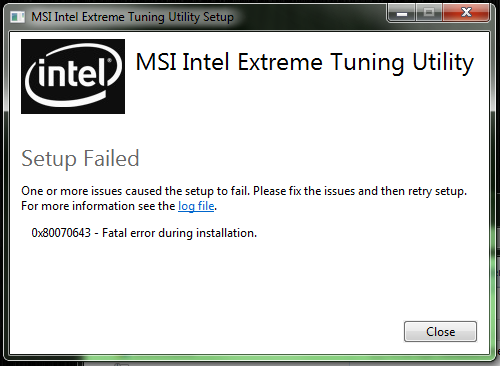
I have my motherboard is Z87 Xpower so I have try to install Extreme Tuning Utility but it failed setup! Error code 0x80070643 — Fatal error during installation!
I hope if someone who can help me! I have up date all windows Net Framework 3.5 and 4 but still fail installation! I have no clue why this cause!!
Thanks 

-
#2
Have you updated all of the drivers and bios to the latest versions:
>> BIOSes<<
http://www.msi.com/product/mb/Z87-XPOWER.html#download
-
#3
Thanks for your helping!! Yes I have update to BIOS V1.1! 
-
#4
Latest release is: E7811IMS.124
E7811IMS.11 is the latest MP release
1.10 is old
I have the newest bios’s posted at the bottom of the lists, so just scroll down.
-
#5
Ah I see thanks!! I have look latest BOIS so is that one > https://forum-en.msi.com/index.php?topic=169796.0 so this is BETA!!!
-
#6
E7811IMS.124 is the latest Beta
After installing, you need to re-install the Intel Me Drivers.
If you flashed via M-flash, you might want to re-flash using the means provided in the link.
-
#7
Got it thanks you very much! I will read through and will post here later! Cheers
-
#8
Thanks for your help and Everything update latest BIOS and Intel ME! I have try again install Extreme Tuning Utility but still same as Error Install!!!!
-
#9
What does it say in the Log file?
-
#10
Here log file below and I not sure!
[07C0:03C4][2013-10-15T21:41:44]: Burn v3.6.2803.0, Windows v6.1 (Build 7601: Service Pack 1), path: C:\Users\Coolmistry\Desktop\extreme_tuning\Setup.exe, cmdline: »
[07C0:03C4][2013-10-15T21:41:44]: Initializing string variable ‘RemoveAllDataCheckboxValue’ to value ‘[RemoveAllDataCheckbox]’
[07C0:03C4][2013-10-15T21:41:44]: Setting string variable ‘WixBundleLog’ to value ‘C:\Users\COOLMI~1\AppData\Local\Temp\MSI_Intel_Extreme_Tuning_Utility_20131015214144.log’
[07C0:03C4][2013-10-15T21:41:44]: Setting string variable ‘WixBundleOriginalSource’ to value ‘C:\Users\Coolmistry\Desktop\extreme_tuning\Setup.exe’
[07C0:03C4][2013-10-15T21:41:44]: Condition ‘VersionNT >= v6.1’ evaluates to true.
[07C0:03C4][2013-10-15T21:41:44]: Setting string variable ‘WixBundleName’ to value ‘MSI Intel Extreme Tuning Utility’
[07C0:03C4][2013-10-15T21:41:44]: Detect 3 packages
[07C0:03C4][2013-10-15T21:41:44]: Detected package: SSCERuntime_x86_ENU.msi, state: Present, cached: None
[07C0:03C4][2013-10-15T21:41:44]: Detected package: SSCERuntime_x64_ENU.msi, state: Present, cached: None
[07C0:03C4][2013-10-15T21:41:44]: Detected package: XTU_Setup.msi, state: Absent, cached: None
[07C0:03C4][2013-10-15T21:41:44]: Detect complete, result: 0x0
[07C0:03C4][2013-10-15T21:41:46]: Plan 3 packages, action: Install
[07C0:03C4][2013-10-15T21:41:46]: Condition ‘VersionNT64’ evaluates to true.
[07C0:03C4][2013-10-15T21:41:46]: Setting string variable ‘WixBundleRollbackLog_XTU_Setup.msi’ to value ‘C:\Users\COOLMI~1\AppData\Local\Temp\MSI_Intel_Extreme_Tuning_Utility_20131015214144_0_XTU_Setup.msi_rollback.log’
[07C0:03C4][2013-10-15T21:41:46]: Setting string variable ‘WixBundleLog_XTU_Setup.msi’ to value ‘C:\Users\COOLMI~1\AppData\Local\Temp\MSI_Intel_Extreme_Tuning_Utility_20131015214144_0_XTU_Setup.msi.log’
[07C0:03C4][2013-10-15T21:41:46]: Planned package: SSCERuntime_x86_ENU.msi, state: Present, default requested: Present, ba requested: Present, execute: None, rollback: None, cache: No, uncache: No, dependency: Register
[07C0:03C4][2013-10-15T21:41:46]: Planned package: SSCERuntime_x64_ENU.msi, state: Present, default requested: Present, ba requested: Present, execute: None, rollback: None, cache: No, uncache: No, dependency: Register
[07C0:03C4][2013-10-15T21:41:46]: Planned package: XTU_Setup.msi, state: Absent, default requested: Present, ba requested: Present, execute: Install, rollback: Uninstall, cache: Yes, uncache: No, dependency: Register
[07C0:03C4][2013-10-15T21:41:46]: Plan complete, result: 0x0
[07C0:03C4][2013-10-15T21:41:46]: Apply begin
[043C:1FC0][2013-10-15T21:41:48]: Creating a system restore point.
[043C:1FC0][2013-10-15T21:41:51]: Created a system restore point.
[043C:1FC0][2013-10-15T21:41:51]: Caching bundle from: ‘C:\Users\COOLMI~1\AppData\Local\Temp\{2301bb34-385a-4a57-877f-c54347957fad}\.be\xtu-setup-exe.exe’ to: ‘C:\ProgramData\Package Cache\{2301bb34-385a-4a57-877f-c54347957fad}\xtu-setup-exe.exe’
[043C:1FC0][2013-10-15T21:41:51]: Registering bundle dependency provider: {2301bb34-385a-4a57-877f-c54347957fad}, version: 4.0.6.305
[043C:1E08][2013-10-15T21:41:51]: Verified acquired payload: XTU_Setup.msi at path: C:\ProgramData\Package Cache\.unverified\XTU_Setup.msi, moving to: C:\ProgramData\Package Cache\{06669347-C150-48B8-AE9A-64F85A6384C1}v4.0.6.305\XTU-Setup.msi.
[043C:1FC0][2013-10-15T21:41:51]: Registering dependency: {2301bb34-385a-4a57-877f-c54347957fad} on package provider: {3A9FC03D-C685-4831-94CF-4EDFD3749497}, package: SSCERuntime_x86_ENU.msi
[043C:1FC0][2013-10-15T21:41:51]: Registering dependency: {2301bb34-385a-4a57-877f-c54347957fad} on package provider: {D4AD39AD-091E-4D33-BB2B-59F6FCB8ADC3}, package: SSCERuntime_x64_ENU.msi
[043C:1FC0][2013-10-15T21:41:51]: Applying execute package: XTU_Setup.msi, action: Install, path: C:\ProgramData\Package Cache\{06669347-C150-48B8-AE9A-64F85A6384C1}v4.0.6.305\XTU-Setup.msi, arguments: ‘ ARPSYSTEMCOMPONENT=»1″ MSIFASTINSTALL=»7″ REMOVEALLAPPDATA=»»‘
[043C:1FC0][2013-10-15T21:42:00]: Error 0x80070643: Failed to install MSI package.
[043C:1FC0][2013-10-15T21:42:00]: Error 0x80070643: Failed to execute MSI package.
[07C0:03C4][2013-10-15T21:42:00]: Error 0x80070643: Failed to configure per-machine MSI package.
[07C0:03C4][2013-10-15T21:42:00]: Error 0x80070643: Failed to execute MSI package.
[043C:1FC0][2013-10-15T21:42:00]: Skipped rollback of package: XTU_Setup.msi, action: Uninstall, already: Absent
[043C:1FC0][2013-10-15T21:42:00]: Removing cached package: XTU_Setup.msi, from path: C:\ProgramData\Package Cache\{06669347-C150-48B8-AE9A-64F85A6384C1}v4.0.6.305\
[043C:1FC0][2013-10-15T21:42:00]: Removing dependency: {2301bb34-385a-4a57-877f-c54347957fad} on package provider: {D4AD39AD-091E-4D33-BB2B-59F6FCB8ADC3}, package SSCERuntime_x64_ENU.msi
[043C:1FC0][2013-10-15T21:42:00]: Removing dependency: {2301bb34-385a-4a57-877f-c54347957fad} on package provider: {3A9FC03D-C685-4831-94CF-4EDFD3749497}, package SSCERuntime_x86_ENU.msi
[043C:1FC0][2013-10-15T21:42:00]: Removing bundle dependency provider: {2301bb34-385a-4a57-877f-c54347957fad}
[043C:1FC0][2013-10-15T21:42:00]: Removing cached bundle: {2301bb34-385a-4a57-877f-c54347957fad}, from path: C:\ProgramData\Package Cache\{2301bb34-385a-4a57-877f-c54347957fad}\
[07C0:03C4][2013-10-15T21:42:00]: Apply complete, result: 0x80070643, restart: None, ba requested restart: No
-
#11
Please try disabling UAC and retrying.
Have you installed all windows updates?
[043C:1FC0][2013-10-15T21:42:00]: Error 0x80070643: Failed to install MSI package.
[043C:1FC0][2013-10-15T21:42:00]: Error 0x80070643: Failed to execute MSI package.
[07C0:03C4][2013-10-15T21:42:00]: Error 0x80070643: Failed to configure per-machine MSI package.
[07C0:03C4][2013-10-15T21:42:00]: Error 0x80070643: Failed to execute MSI package.
This can either indicate that UAC has blocked the install / update of the MSI package or Net Framework needs to be updated / repaired.
Net Framework 4: http://www.microsoft.com/en-us/download/details.aspx?displaylang=en&id=17718
-
#12
Thanks but Still no change same error but I try re install Net Framework needs.. will post back soon!!
Sorry yes all windows update!!!
-
#13
All update MSI package and then Extreme Tuning Utility still fail install? just this software fail and all other are fine!!
-
#14
Try creating a new admin account and installing it from there.
Is this a fresh OS install?
-
#15
xmad said:
Try creating a new admin account and installing it from there.
Is this a fresh OS install?
Thanks for trying help me!! Yes I have try re fresh OS with full clean install but it still same error on installation! I have found error in my Generate system health report there a error please see photos below!!
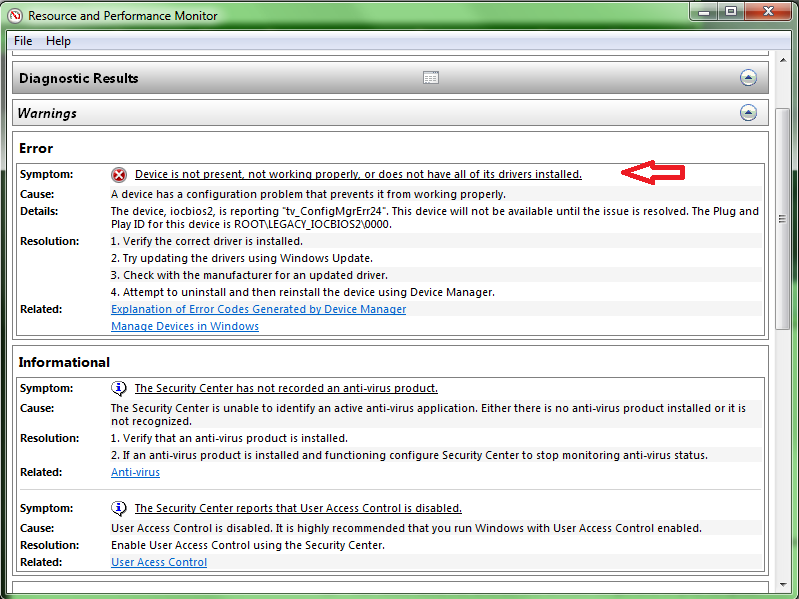
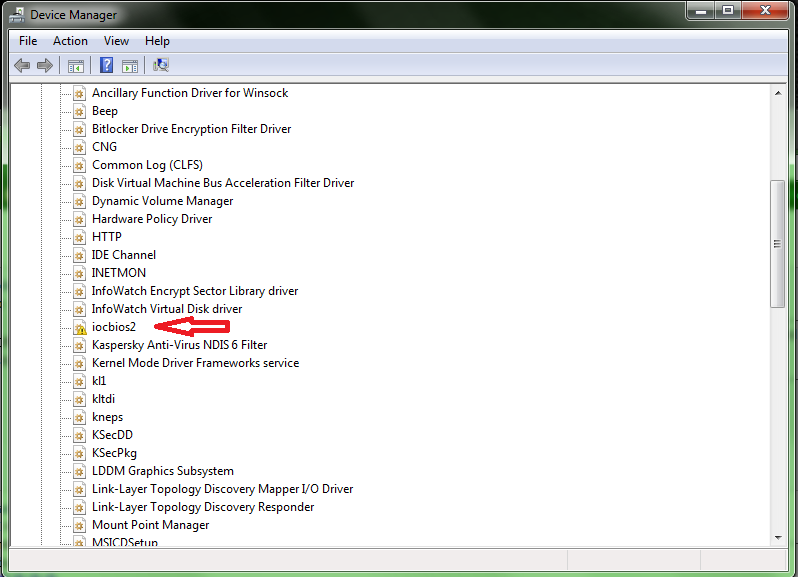
and this one to be need update driver no I not sure what driver and seem like to me BIOS 2 something? Hope you can help to solve my problem  Thanks
I have try uninstall this and restart so it solved but after restart windows again then it come back error with iocbios2..
-
#16
Thaat is the: Intel(R) Extreme Tuning Utility Performance Tuning Driver
Try this: https://downloadcenter.intel.com/Detail_Desc.aspx?agr=Y&ProdId=3483&DwnldID=23084&keyword=intel+extreme&lang=eng
-
#17
Hello again!! It same problem after I have try again format and re fresh OS! It still same error as above my post 1!
Here error logs from MSI Extreme Tuning Utility. It shame I never try use this when I got new motherboard just a month!!It seem this software is bug or maybe not!!! I have latest Update BIOS to 1.34b
here logs :-
[07BC:1070][2013-11-20T09:43:56]: Burn v3.6.2803.0, Windows v6.1 (Build 7601: Service Pack 1), path: C:\Program Files (x86)\MSI\Live Update 5\LU5\DL_FILE\Intel_Extreme_Tuning_Utility_4.0.6.305\Setup.exe, cmdline: ‘-burn.unelevated BurnPipe.{BED958F3-2A9C-4A3D-BCF5-D7F5CB7D5A5E} {83B4BF4E-30A1-42FB-8083-3A383AE01471} 1224’
[07BC:1070][2013-11-20T09:43:56]: Initializing string variable ‘RemoveAllDataCheckboxValue’ to value ‘[RemoveAllDataCheckbox]’
[07BC:1070][2013-11-20T09:43:56]: Setting string variable ‘WixBundleLog’ to value ‘C:\Users\NEELES~1\AppData\Local\Temp\MSI_Intel_Extreme_Tuning_Utility_20131120094356.log’
[07BC:1070][2013-11-20T09:43:56]: Setting string variable ‘WixBundleOriginalSource’ to value ‘C:\Program Files (x86)\MSI\Live Update 5\LU5\DL_FILE\Intel_Extreme_Tuning_Utility_4.0.6.305\Setup.exe’
[07BC:1070][2013-11-20T09:43:56]: Condition ‘VersionNT >= v6.1’ evaluates to true.
[07BC:1070][2013-11-20T09:43:56]: Setting string variable ‘WixBundleName’ to value ‘MSI Intel Extreme Tuning Utility’
[07BC:1070][2013-11-20T09:43:56]: Detect 3 packages
[07BC:1070][2013-11-20T09:43:56]: Detected package: SSCERuntime_x86_ENU.msi, state: Present, cached: None
[07BC:1070][2013-11-20T09:43:56]: Detected package: SSCERuntime_x64_ENU.msi, state: Present, cached: None
[07BC:1070][2013-11-20T09:43:56]: Detected package: XTU_Setup.msi, state: Absent, cached: None
[07BC:1070][2013-11-20T09:43:56]: Detect complete, result: 0x0
[07BC:1070][2013-11-20T09:43:58]: Plan 3 packages, action: Install
[07BC:1070][2013-11-20T09:43:58]: Condition ‘VersionNT64’ evaluates to true.
[07BC:1070][2013-11-20T09:43:58]: Setting string variable ‘WixBundleRollbackLog_XTU_Setup.msi’ to value ‘C:\Users\NEELES~1\AppData\Local\Temp\MSI_Intel_Extreme_Tuning_Utility_20131120094356_0_XTU_Setup.msi_rollback.log’
[07BC:1070][2013-11-20T09:43:58]: Setting string variable ‘WixBundleLog_XTU_Setup.msi’ to value ‘C:\Users\NEELES~1\AppData\Local\Temp\MSI_Intel_Extreme_Tuning_Utility_20131120094356_0_XTU_Setup.msi.log’
[07BC:1070][2013-11-20T09:43:58]: Planned package: SSCERuntime_x86_ENU.msi, state: Present, default requested: Present, ba requested: Present, execute: None, rollback: None, cache: No, uncache: No, dependency: Register
[07BC:1070][2013-11-20T09:43:58]: Planned package: SSCERuntime_x64_ENU.msi, state: Present, default requested: Present, ba requested: Present, execute: None, rollback: None, cache: No, uncache: No, dependency: Register
[07BC:1070][2013-11-20T09:43:58]: Planned package: XTU_Setup.msi, state: Absent, default requested: Present, ba requested: Present, execute: Install, rollback: Uninstall, cache: Yes, uncache: No, dependency: Register
[07BC:1070][2013-11-20T09:43:58]: Plan complete, result: 0x0
[07BC:1070][2013-11-20T09:43:58]: Apply begin
[04C8:0DC0][2013-11-20T09:43:58]: Creating a system restore point.
[04C8:0DC0][2013-11-20T09:44:01]: Created a system restore point.
[04C8:0DC0][2013-11-20T09:44:01]: Caching bundle from: ‘C:\Users\NEELES~1\AppData\Local\Temp\{2301bb34-385a-4a57-877f-c54347957fad}\.be\xtu-setup-exe.exe’ to: ‘C:\ProgramData\Package Cache\{2301bb34-385a-4a57-877f-c54347957fad}\xtu-setup-exe.exe’
[04C8:0DC0][2013-11-20T09:44:01]: Registering bundle dependency provider: {2301bb34-385a-4a57-877f-c54347957fad}, version: 4.0.6.305
[04C8:0B1C][2013-11-20T09:44:02]: Verified acquired payload: XTU_Setup.msi at path: C:\ProgramData\Package Cache\.unverified\XTU_Setup.msi, moving to: C:\ProgramData\Package Cache\{06669347-C150-48B8-AE9A-64F85A6384C1}v4.0.6.305\XTU-Setup.msi.
[04C8:0DC0][2013-11-20T09:44:02]: Registering dependency: {2301bb34-385a-4a57-877f-c54347957fad} on package provider: {3A9FC03D-C685-4831-94CF-4EDFD3749497}, package: SSCERuntime_x86_ENU.msi
[04C8:0DC0][2013-11-20T09:44:02]: Registering dependency: {2301bb34-385a-4a57-877f-c54347957fad} on package provider: {D4AD39AD-091E-4D33-BB2B-59F6FCB8ADC3}, package: SSCERuntime_x64_ENU.msi
[04C8:0DC0][2013-11-20T09:44:02]: Applying execute package: XTU_Setup.msi, action: Install, path: C:\ProgramData\Package Cache\{06669347-C150-48B8-AE9A-64F85A6384C1}v4.0.6.305\XTU-Setup.msi, arguments: ‘ ARPSYSTEMCOMPONENT=»1″ MSIFASTINSTALL=»7″ REMOVEALLAPPDATA=»»‘
[04C8:0DC0][2013-11-20T09:44:07]: Error 0x80070643: Failed to install MSI package.
[04C8:0DC0][2013-11-20T09:44:07]: Error 0x80070643: Failed to execute MSI package.
[07BC:1070][2013-11-20T09:44:07]: Error 0x80070643: Failed to configure per-machine MSI package.
[07BC:1070][2013-11-20T09:44:07]: Error 0x80070643: Failed to execute MSI package.
[04C8:0DC0][2013-11-20T09:44:07]: Skipped rollback of package: XTU_Setup.msi, action: Uninstall, already: Absent
[04C8:0DC0][2013-11-20T09:44:07]: Removing cached package: XTU_Setup.msi, from path: C:\ProgramData\Package Cache\{06669347-C150-48B8-AE9A-64F85A6384C1}v4.0.6.305\
[04C8:0DC0][2013-11-20T09:44:07]: Removing dependency: {2301bb34-385a-4a57-877f-c54347957fad} on package provider: {D4AD39AD-091E-4D33-BB2B-59F6FCB8ADC3}, package SSCERuntime_x64_ENU.msi
[04C8:0DC0][2013-11-20T09:44:07]: Removing dependency: {2301bb34-385a-4a57-877f-c54347957fad} on package provider: {3A9FC03D-C685-4831-94CF-4EDFD3749497}, package SSCERuntime_x86_ENU.msi
[04C8:0DC0][2013-11-20T09:44:07]: Removing bundle dependency provider: {2301bb34-385a-4a57-877f-c54347957fad}
[04C8:0DC0][2013-11-20T09:44:07]: Removing cached bundle: {2301bb34-385a-4a57-877f-c54347957fad}, from path: C:\ProgramData\Package Cache\{2301bb34-385a-4a57-877f-c54347957fad}\
[07BC:1070][2013-11-20T09:44:07]: Apply complete, result: 0x80070643, restart: None, ba requested restart: No
I hope some of you may know how to solve this problem!! Thanks

-
#18
I have the same problem with XTU. I have all newest available drivers and BIOS versions installed. I’ve made a fresh install couple of days ago when I’ve had problems with CPU usage, but when it was solved, Command Center and XTU didn’t work/install. After fresh install Command Center works properly, but still can’t install XTU.
-
#19
Nichrome said:
I have the same problem with XTU. I have all newest available drivers and BIOS versions installed. I’ve made a fresh install couple of days ago when I’ve had problems with CPU usage, but when it was solved, Command Center and XTU didn’t work/install. After fresh install Command Center works properly, but still can’t install XTU.
Thanks for telling me which I glad I am not only one as you got same problem as my!! Yeah I have all update latest versions msi and intel softwares and of course lastest BIOS to 1.34 beta!I have re install OS with full clean and try again install XTU so far same problem fail install!! I have search hours to find the solve problem with XTU but couldn’t find so I gave up and I know nothing wrong with my OS and Software maybe it do with XTU got bugs or missing driver for IOCBIOS2 in device manager play n plug still have yellow symbol!!!!!
Damn I never try using XTU
-
#20
I am also being said iocbios2 in device manager that it doesn’t work properly. But before (1st 2 weeks after bought and built my PC) everything was working properly. Might be Windows being CRAP and one of their updates just something up :o(
Windows 10: Intel Extreme Tuning Utility Setup Failed error: 0x80070643
Discus and support Intel Extreme Tuning Utility Setup Failed error: 0x80070643 in Windows 10 Ask Insider to solve the problem; I keep getting this error when I attempt to install XTU. I have had XTU installed on this PC before but later uninstalled. Now when I go to install XTU…
Discussion in ‘Windows 10 Ask Insider’ started by /u/alexphanna, Dec 23, 2019.
-
Intel Extreme Tuning Utility Setup Failed error: 0x80070643
I keep getting this error when I attempt to install XTU. I have had XTU installed on this PC before but later uninstalled. Now when I go to install XTU it gives me this error:
0x80070643 — Fatal error during installation
Btw I have tried the fix that says to uninstall Microsoft Visual C++ 2012, but it does nothing.
Log file:
https://pastebin.com/4ErDq22K
submitted by /u/alexphanna
[link] [comments]
-
intel extreme tuning utility doesnt install.
Good place to ask your questions on that might be on the Intel community forums.
Forums
this search may or may not work for you; (should be logged in)
Forums
Please keep in mind that the Intel® Extreme Tuning Utility only works on extreme processors.
-
Intel Extreme Tuning Utility Advisory Source: INTEL-SA-00162
-
Intel Extreme Tuning Utility Setup Failed error: 0x80070643
Intel Extreme Tuning Utility Advisory Source: INTEL-SA-00162
Intel Extreme Tuning Utility Setup Failed error: 0x80070643
-
Intel Extreme Tuning Utility Setup Failed error: 0x80070643 — Similar Threads — Intel Extreme Tuning
-
Error at installing Intel Extreme Tuning Utility 0x80070643
in Windows 10 Gaming
Error at installing Intel Extreme Tuning Utility 0x80070643: Hello,I recently did a format of my PC, I do one annually and I have a list of applications that I have been installing since I got this build. One of them is Intel Extreme Tuning Utility, but this time I have had for the first time a problem, if not several related to… -
Error at installing Intel Extreme Tuning Utility 0x80070643
in Windows 10 Software and Apps
Error at installing Intel Extreme Tuning Utility 0x80070643: Hello,I recently did a format of my PC, I do one annually and I have a list of applications that I have been installing since I got this build. One of them is Intel Extreme Tuning Utility, but this time I have had for the first time a problem, if not several related to… -
Error at installing Intel Extreme Tuning Utility 0x80070643
in Windows 10 Drivers and Hardware
Error at installing Intel Extreme Tuning Utility 0x80070643: Hello,I recently did a format of my PC, I do one annually and I have a list of applications that I have been installing since I got this build. One of them is Intel Extreme Tuning Utility, but this time I have had for the first time a problem, if not several related to… -
Intel Extreme Utility Engine
in Windows 10 Installation and Upgrade
Intel Extreme Utility Engine: I’m not too sure if this is a Windows thing or an Intel thing, but when I try to install the engine I get an error saying that there is a problem with the Windows Installer package, and I’ve read around and some people are saying its due to a corrupt Visual C++.I had… -
Intel® Extreme Tuning Utility (XTU) runs on UWP now
in Windows 10 Drivers and Hardware
Intel® Extreme Tuning Utility (XTU) runs on UWP now: I installed Intel® Extreme Tuning Utility version 6.5.0.114 and I noticed that it installs Component drivers now![img]
What do you think about it?
Component drivers used to cause me errors and run slower than just a service runs in the background.
130104
-
Intel® Extreme Tuning Utility (XTU) runs on UWP now
in Windows 10 News
Intel® Extreme Tuning Utility (XTU) runs on UWP now: I installed Intel® Extreme Tuning Utility version 6.5.0.114 and I noticed that it installs Component drivers now![img]
What do you think about it?
Component drivers used to cause me errors and run slower than just a service runs in the background.
130104
-
intel extreme tuning utility can’t be installed-WIN10
in Windows 10 Installation and Upgrade
intel extreme tuning utility can’t be installed-WIN10: Good Day Allsimply what is happening is the application [ intel extreme tuning utility ] not able to install itself in the system,
when you start the installer, it will show you that it’s loading and making the installation normal, and fine,
after it finished the…
-
Intel Extreme Tuning Utility Advisory
in Windows 10 News
Intel Extreme Tuning Utility Advisory: Intel ID: INTEL-SA-00162 Advisory Category: Software Impact of vulnerability: Escalation of Privilege, Denial of Service Severity rating: HIGH Original release: 09/11/2018 Last revised: 09/11/2018
Summary:Potential security vulnerabilities in Intel® Extreme Tuning Utility…
-
How to completely remove Intel® Extreme Tuning Utility?
in Windows 10 Drivers and Hardware
How to completely remove Intel® Extreme Tuning Utility?: I’ve seen that even after official uninstaller a lot of garbage is left on the HD, XTUService running etc…
Who knows exactly what and where to remove if you want to finally get rid of this tool?I deleted the service with SC DELETE but «C:\Program Files…
Users found this page by searching for:
-
intel r extreme tuning utility set up failed
,
-
intel extreme tuning utility fail
,
-
intel utility setup fail
,
- intel extreme utility setup failed 0x80070643 fatal error

With a new 8th gen i7 laptop on hand, undervolting the CPU got brought up to increase the CPU turbo/performance, battery life, and fan curve. There seems to be 3 ways of doing this, Intel XTU, ThrottleStop, and natively in BIOS.
I’ll leave you figure out how the software and solutions work in your own pace – link.
The issue at hand however is that the newer, as of writing, version 6.4.1.25 of Intel XTU is not supporting my laptop anymore, throwing error ‘0x80070643‘, ‘attempted to install on an unsupported platform‘ during the setup.

Workaround
Run the .exe and extract the .msi installer from your %temp% folder.
Run the .msi while passing the DISABLEPLATFORMCHECK=1 property.
cd C:\Users\Username\Downloads
## Run .exe installer
XTUSetup.exe
## Proceed until error message on screen - Don't exit
# Copy the .msi version of the installer package from %Programdata%\Package Cache\ location
copy C:\ProgramData\Package Cache\{275588D7-6C9D-4FB0-BBAE-2FA3F7C2DADB}v6.4.1.25\XTUInstaller.msi C:\Users\Username\Downloads\XTUInstaller.msi
## Exit the .exe installer
# Run the .msi version of the installer setting the DISABLEPLATFORMCHECK property to '1'
msiexec /i XTUInstaller.msi DISABLEPLATFORMCHECK=1
Due to the nature of this workaround, use at your own risk, and all that!
Show your work
Starting on the task of undervolting the CPU in my Huawei Matebook X Pro quickly got me to Intel XTU and ThrottleStop via the likes of /r/MatebookXPro. I decided to go for XTU mainly due to the fact that I’ve previously had contact with the software.
With the success stories over on /r/MatebookXPro and other places on the internet I knew that XTU was Supposed to work, as such, a generic ‘unsupported platform’ error has be solvable, to have a solution or workaround, and it must be found!
Software installs usually logs something to somewhere, XTU not only logs, but kindly points you to the file in the error.
Reading through the log provides a bit of information on how the process works, the lines of interest to finding the more maluable .msi version of the install however looks something like so:
[3954:3EA0][2018-12-06T22:08:07]i370: Session begin, registration key: SOFTWARE\Microsoft\Windows\CurrentVersion\Uninstall\{6a0def1c-f6f2-4a5d-81f6-a1b858352c8b}, options: 0x7, disable resume: No
[3954:3EA0][2018-12-06T22:08:07]i000: Caching bundle from: 'C:\Users\Username\AppData\Local\Temp\{121CF5FA-9A1A-42B2-837C-618F7F34F73D}\.be\XTUSetup.exe' to: 'C:\ProgramData\Package Cache\{6a0def1c-f6f2-4a5d-81f6-a1b858352c8b}\XTUSetup.exe'
[3954:3EA0][2018-12-06T22:08:08]i320: Registering bundle dependency provider: {6a0def1c-f6f2-4a5d-81f6-a1b858352c8b}, version: 6.4.1.25
[3954:3EA0][2018-12-06T22:08:08]i371: Updating session, registration key: SOFTWARE\Microsoft\Windows\CurrentVersion\Uninstall\{6a0def1c-f6f2-4a5d-81f6-a1b858352c8b}, resume: Active, restart initiated: No, disable resume: No
[3954:47BC][2018-12-06T22:08:09]i305: Verified acquired payload: XTUInstaller.msi at path: C:\ProgramData\Package Cache\.unverified\XTUInstaller.msi, moving to: C:\ProgramData\Package Cache\{275588D7-6C9D-4FB0-BBAE-2FA3F7C2DADB}v6.4.1.25\XTUInstaller.msi.
[3954:3EA0][2018-12-06T22:08:09]i323: Registering package dependency provider: {275588D7-6C9D-4FB0-BBAE-2FA3F7C2DADB}, version: 6.4.1.25, package: XTUInstaller.msi
[3954:3EA0][2018-12-06T22:08:09]i301: Applying execute package: XTUInstaller.msi, action: Install, path: C:\ProgramData\Package Cache\{275588D7-6C9D-4FB0-BBAE-2FA3F7C2DADB}v6.4.1.25\XTUInstaller.msi, arguments: ' ARPSYSTEMCOMPONENT="1" MSIFASTINSTALL="7" REMOVEALLAPPDATA=""'
[3954:3EA0][2018-12-06T22:09:33]e000: Error 0x80070643: Failed to install MSI package.
[3954:3EA0][2018-12-06T22:09:33]e000: Error 0x80070643: Failed to execute MSI package.
[476C:243C][2018-12-06T22:09:33]e000: Error 0x80070643: Failed to configure per-machine MSI package.
[476C:243C][2018-12-06T22:09:33]i319: Applied execute package: XTUInstaller.msi, result: 0x80070643, restart: None
[476C:243C][2018-12-06T22:09:33]e000: Error 0x80070643: Failed to execute MSI package.
Note the GUID {} in the log.
Navigate to the C:\ProgramData\Package Cache\{275588D7-6C9D-4FB0-BBAE-2FA3F7C2DADB}v6.4.1.25 folder and copy the XTUInstaller.msi file to any new location, for example, C:\XTU. save this for later.
Taking it one more step on the logging front, located in the %temp% (C:\Users\Username\AppData\Local\Temp) directory, another .log file shows up, Intel_Extreme_Tuning_Utility_20181206220727_000_XTUInstaller.msi.log.
Having a read, some very promising lines start showing up:
Action start 22:08:09: RunDetectPlatform.
DetectPlatform: Found unsupported device 9D21
DetectPlatform: Found unsupported device 5914
DetectPlatform: Found unsupported device 9D60
DetectPlatform: Found unsupported device 9D14
So, we’re looking to run the XTUInstaller.msi installer, but not only that, we’d need it to skip the RunDetectPlatform section.
The way you run .msi files from commandline is using the msiexec command, link
point msiexec to the .msi file using the /i flag, msiexec /i XTUInstaller.msi
follow that with the PROPERTY=value, msiexec /i XTUInstaller.msi DISABLEPLATFORMCHECK=1
C:\XTU>dir
 Volume in drive C is Windows
 Volume Serial Number is 843F-CDA6

 Directory of C:\XTU

2018-12-07  23:50    <DIR>          .
2018-12-07  23:50    <DIR>          ..
2018-12-06  22:23        23 396 352 XTUInstaller.msi
               1 File(s)     23 396 352 bytes
               2 Dir(s)  352 121 561 088 bytes free

C:\XTU>msiexec /i XTUInstaller.msi DISABLEPLATFORMCHECK=1
Where did we get the DISABLEPLATFORMCHECK property and value from?
Using OrcaMSI I was able to take a look within the .msi finding out that RunDetectPlatform runs on a condition, setting DISABLEPLATFORMCHECK to 1 skips the whole thing.

One more thing to note is that XTU runs on Microsoft SQL Server Compact 4.0, in case of more errors, a manual update to SP1 could do wonders.