
Metamask is the go-to crypto wallet of choice for most crypto enthusiasts – newbies and experienced users alike. The wallet is a non-custodial wallet that allows users to store and manage their crypto assets securely regardless of the device since it is available on PC as a browser extension and on mobile as a feature-packed mobile app on Android and iOS smartphones.
As with most software, there are bound to be a few bugs and errors which users may encounter occasionally in their day-to-day use and the Metamask wallet is no different.
Although Metamask is an open-source decentralized wallet that goes through so much testing and re-testing before any version of the software is released to the public, there may be some bugs and errors that sip through these rigorous testing processes.
One of the most common errors we have seen many Metamask users report on various online forums is the internal JSON-RPC error. It is a quite confusing and frustrating error, especially for users who use Metamask as their first-choice wallet for crypto management.
In this article, we will take a look at the Metamask internal JSON-RPC error extensively including some of the probable causes and multiple methods you can use to fix the error on your Metamask wallet.
What Is JSON-RPC?
JSON which is an abbreviation for Javascript Object Annotation is a simple and lightweight data format that is used by computers to transmit data payloads between a server and a web app or mobile app.
RPC, on the other hand, is an abbreviation for Remote Procedure Call and it is a protocol that is used by computer networks to call a function on another computer or server remotely which then returns the result of the function to the calling program.
JSON-RPC combines the power of both JSON and RPC technology. It is a protocol used for remote procedure calls between two computer programs on a network.
The protocol works by sending a message via RPC and then receiving a result from the function called in the form of a JSON result. The returned JSON result can either be a response message or an error message if the request could not be completed.
On crypto wallets like Metamask, JSON-RPC is used for efficient communication between your wallet and the DApps your wallet is connected to. In other cases, Metamask uses the JSON-RPC protocol to interact with the blockchain networks you have added to your wallet.
What Are The Causes Of Internal JSON-RPC Error On Metamask?
Now that we understand what the JSON-RPC protocol is, let’s take a look at some of the causes of the JSON-RPC error on Metamask.
There are quite a number of reasons why you might be seeing the internal JSON-RPC error on your Metamask wallet and we will outline some of these reasons below.
If you’re seeing this error on your Metamask wallet when trying to use a network, then you may have not added the network to your Metamask wallet correctly. It may be that you put in the wrong RPC-URL or chain ID when adding the network to your Metamask wallet.
Another reason why you might be facing the JSON-RPC error on your Metamask wallet is that you may not have enough tokens to settle the gas fees for your transaction.
Also, if you use an outdated version of the Metamask browser extension or mobile app, then you may face a JSON-RPC error and this may not be your fault directly because the Metamask devs may change some RPC information in the source code of the software from time to time.
Some other things that may cause the error include blockchain network congestion, firewall or security issues, and browser issues amongst others.
Since there are quite a number of reasons why you might be seeing any of the JSON-RPC error codes on your Metamask wallet, there is no single method to fix the error. The method you will use to fix the issue on your wallet will depend on the root cause of the error.
Below we have outlined some fixes you can try to get rid of the internal JSON-RPC error on your Metamask wallet.
1) Ensure you have added all the networks on your wallet correctly.
One of the major causes of the internal JSON-RPC error on Metamask adding networks incorrectly. If you have added the network to be used for a transaction to your Metamask wallet wrongly, then it is almost certain that will be faced with an RPC error when you try to execute the transaction.
To prevent this issue, we recommend copying the details of any network you’re adding to your wallet carefully to avoid errors or better still, you opt to add networks to your Metamask wallet automatically via ChainList to avoid issues.
If you’re seeing an RPC error when you try to execute a transaction on a particular network on Metamask, try removing the network from your wallet first then carefully re-add the network to Metamask manually or automatically via ChainList.
If the transaction you’re trying to execute is on Ethereum, then you can try other methods below since the Ethereum Mainnet is configured by default on your wallet and you cannot remove or re-add the network.
2) Ensure you have enough tokens to cover gas fees.
Another reason why you might be getting the internal JSON-RPC error while trying to execute a transaction on Metamask is that you may not have enough native tokens to cover the gas fees associated with the transaction.
If you’re trying to execute any transaction on any network on your Metamask wallet, you need to have enough native tokens of the said network (e.g ETH for the Ethereum network and BNB for the BNB Chain) to cover the gas fees. If the tokens on your wallet are not enough to cover the transaction’s gas fees, you will be greeted with an error on your wallet.
To fix this, simply send additional native tokens of the network you’re making a transaction on to your Metamask wallet and try to execute the transaction again.
3) Update the Metamask extension (or mobile app)
If you have enough native tokens to pay for the gas fees associated with your transaction and all networks on your wallet were added correctly, then another method you should consider to fix the JSON-RPC error on Metamask is to simply update the Metamask extension or mobile app.
To update the Metamask browser extension on Chrome and other Chromiium-based browsers, simply go to the Metamask extension page on the Chrome web store and if you see a button that says “Remove from Chrome“, then Metamask is up to date to date, else you can simply update the extension from there.
On updating the Metamask mobile app, simply visit the Metamask app page on the App Store or the Google Play Store depending on your device, and click the Update button to update the app.
4) Update your web browser.
In some cases, using an outdated browser can cause many errors when you try to use Metamask so another fix to try out if you’re trying to fix the internal JSON-RPC error is to check if your browser is up to date and update it to the latest version if it is outdated.
There are many ways to update your web browser on a desktop depending on your operating system. On Linux systems, you can simply update your browser via the terminal or any package manager of your choice.
On Windows and Mac systems, you can update your browser (Chrome in this case) by clicking Help > About Google Chrome, then wait for the update check process to complete. Allow Chrome to download the update and when it’s done, click [Relaunch] to install the update and relaunch the browser.
5) Reconnect your hardware wallet.
Another issue we have seen causing the internal JSON-RPC error on Metamask is if your hardware wallet is not connected to your Metamask wallet correctly. Metamask uses the JSON-RPC protocol to communicate with hardware wallets connected to your wallet.
If you use a Ledger hardware wallet, then we recommend enabling Ledger Live support first. To enable Ledger Live on your Metamask wallet, navigate to Settings > Advanced then toggle Use Ledger Live on. If you use another hardware wallet, you can skip this.
To reconnect your hardware wallet, plug in the device to your computer then go to Metamask, click the circular account icon and select [Connect hardware wallet] then select your wallet manufacturer from the list then follow the prompt to connect your hardware wallet to Metamask.
Wrapping Up
The Internal JSON-RPC error can be a very challenging issue to encounter while using the Metamask wallet either on desktop or mobile, especially for users who are new to the wallet.
Thankfully, there are a handful of solutions available which can be used to fix the error on your wallet.
Some of these solutions include ensuring that networks are added correctly to your wallet, adding more native tokens to your wallet to cover gas fees, updating the Metamask extension or mobile app, updating your browser, and reconnecting your hardware wallet (if you use Metamask with a hardware wallet).
Every one of these solutions have be discussed in detail in the article and if none of the solutions fixed the error on your end, then we recommend reaching out to the Metamask support team and they’ll take a deeper look at the problem and come up with a fix for you as soon as they can.
Remember never to share your Metamask Recovery Phrase with any one while seeking help to ensure your wallet and the funds on it are safe.
11 ноября 2022 г.
Внутренняя ошибка JSON, ошибка 32603, является наиболее распространенной и серьезной ошибкой, возникающей в MetaMask. Это происходит по разным причинам.
Если появляется внутренняя ошибка JSON 32603, это означает, что у MetaMask возникли трудности с обнаружением ошибки.
В этой статье мы делимся 5 передовыми практиками и 8 возможными решениями, которые могут помочь вам решить внутреннюю проблему JSON 32603. Прежде чем я начну, я хотел бы немного рассказать о JSON и JSON RPC.
Что такое JSON?
JSON известен как легкий формат, который может передавать данные быстрее, чем его конкуренты.
Полная форма JSON — это нотация объектов JavaScript, которая разбивает данные в формате до тех пор, пока их не станет легко обрабатывать. Поскольку JSON основан на JavaScript, вы найдете различные переменные, такие как строки, объекты, логические значения и нулевые символы, пытаясь понять его элемент данных.
Поскольку JSON помогает легко обрабатывать данные, данные отображаются в управляемую структуру, которая поддерживает различные языки программирования.
Формат JSON был создан Дугласом Крокфордом в 2000 году, и поэтому он способствует обмену данными между серверами и веб-приложениями.
Что такое JSON RPC?
JSON RPC — это развитие JSON, и во всем мире JSON RPC определяется как протокол удаленного вызова процедур (RPC).
JSON RPC — это новый протокол с узкой областью применения. Он приводит в действие различные структуры данных, определяя задачи для приложений на уровне разработки.
Это идеальный выбор для разработчиков для быстрой разработки или несложных вещей. Более того, JSON RPC поставляется со следующими 4 указателями —
* Это отражает ограничения, связанные с обработкой данных в сети.
* Поскольку он легкий и обрабатывает данные быстрее, эти 2 функции делают его подходящим для узлов Ethereum.
* Протокол JSON-RPC может использовать HTTPS и сокеты для взаимодействия.
* Протоколы JSON RPC — лучший вариант для разработки решений на основе Ethereum.
Кроме того, JSON RPC имеет 2 спецификации: JSON RPC 1.0 и JSON RPC 2.0.
* JSON RPC 1.0 был методом одноранговой связи. Кроме того, в нем отсутствовали параметры имени и объяснение сообщений об ошибках, что создавало дополнительные проблемы.
* Еще одна обновленная и очень продвинутая спецификация, JSON RPC 2.0, решила проблемы предыдущей версии 1.0. Обновленная версия включает сведения об ошибках, а также дополнительные расширения.
Внутренняя ошибка JSON RPC 32603 в MetaMask –
Если вы получаете внутренние ошибки JSON-RPC при взаимодействии с другими сетями, приведенные ниже указатели могут помочь решить вашу проблему —
- Убедитесь, что вы правильно добавили сеть. Вы даже можете использовать список цепочек, чтобы добавить собственную сеть или даже токены.
2. Убедитесь, что у вас достаточно нативных токенов для оплаты газа.
3. Убедитесь, что вы используете расширение последней версии MetaMask.
Внутренняя ошибка JSON RPC с пользовательской сетью или сайдчейнами —
Внутренняя ошибка JSON RPC при взаимодействии с сайдчейнами или пользовательской сетью. Вот подробное руководство по устранению внутренних ошибок —
Пользовательская сеть или сайдчейн — это технология, которая поддерживает экосистему Ethereum и совместима с ней. Он позволяет пользователям передавать криптоактивы/токены между разными сетями.
MetaMask был необходим для экосистемы Ethereum, позволяя пользователям перемещаться между сетями.
Кроме того, есть некоторые распространенные проблемы при работе с сайдчейнами, которых вам следует избегать. И мы предоставим 6 лучших практик, необходимых при работе с сайдчейнами. Следующие рекомендации являются общими рекомендациями.
5 лучших практик для сайдчейнов и пользовательских сетей —
<сильный>1. Пройдите проверку. Не все пользовательские сети безопасны, поскольку они предлагают более дешевые и быстрые транзакции; они поставляются с гарантиями надежности и другой безопасностью по сравнению с основной сетью. Прежде чем переходить на собственные сети, проанализируйте риски.
Вы должны доверять сетевому провайдеру, потому что злонамеренный сетевой провайдер может записать ваш IP-адрес и сетевую активность, а также солгать о блокчейне, удерживающем транзакции и влияющем на состояние.
<сильный>2. Убедитесь, что у вас есть точная пользовательская информация о сети — вы можете найти сеть в списке цепочек, который вы можете автоматически добавить в MetaMask. Вы даже можете добавить сеть в MetaMask вручную, но это не рекомендуется делать, пока вы не станете разработчиком программного обеспечения. Вы можете добавить пользовательскую сеть вручную в MetaMask.
Убедитесь, что вы проверили информацию о пользовательской сети. Вы можете ознакомиться с этим «Руководством по проверке», чтобы узнать больше о пользовательской сети и проанализировать ее.
<сильный>3. Используйте установленные мосты для перемещения токенов между разными сетями — MetaMask не отслеживает транзакции между разными сетями. Вам нужно понимать, как разные сети работают для транзакций. Вы должны убедиться, что доверяете оператору сети и любому адресу Ethereum, на который вы отправляете свои средства.
<сильный>4. Избегайте отправки токенов напрямую из одной сети в другую. Если вы попытаетесь отправить свои токены из одной сети/цепочки в другую сеть/цепочку, результатом, скорее всего, будет безвозвратная потеря криптоактивов.
Пользовательская сеть может быть совместима с экосистемой Ethereum, но это не то же самое, что основная сеть Ethereum. У вас может быть один и тот же адрес Ethereum для всех ваших криптоактивов, но ваши криптоактивы индивидуальны для каждой сети, и для перемещения этих криптоактивов вам потребуется разрешение от провайдера сети.
Для перемещения ваших криптоактивов вам потребуется мост или портал для переноса ваших активов из одной сети/цепочки в другую.
<сильный>5. Понимание использования газа в разных сетях. Когда вы взаимодействуете с сетью боковой цепи или сетью, отличной от Ethereum, комиссия за транзакцию всегда выплачивается в собственной криптовалюте сети.
Например, на Binance вы должны платить BNB за комиссию за газ.
У вас должно быть достаточно нативных крипто-токенов/активов для любых транзакций, над которыми вы хотите работать.
8 возможных решений для устранения внутренней ошибки JSON RPC 32603 в MetaMask —
Внутренняя ошибка JSON RPC 32603 возникает в основном при создании смарт-контрактов, и это происходит из-за оценки газа Ganache.
Нет, проблема не может быть решена ограничением газа, так как с ним экспериментировали многие люди, и никто не смог этого сделать.
Байт-код правильно работает в тестовой сети Ropsten и Rinkeby, но проблема возникает при запуске байт-кода в основной сети.
Даже проблема не решается изменением разных URL-адресов RPC.
Вы можете проверить 8 возможных скриншотов решения, взятых с разных форумов, и их внутренние ошибки JSON RPC 32603 были устранены.
- Снимок экрана ниже взят из Github
.
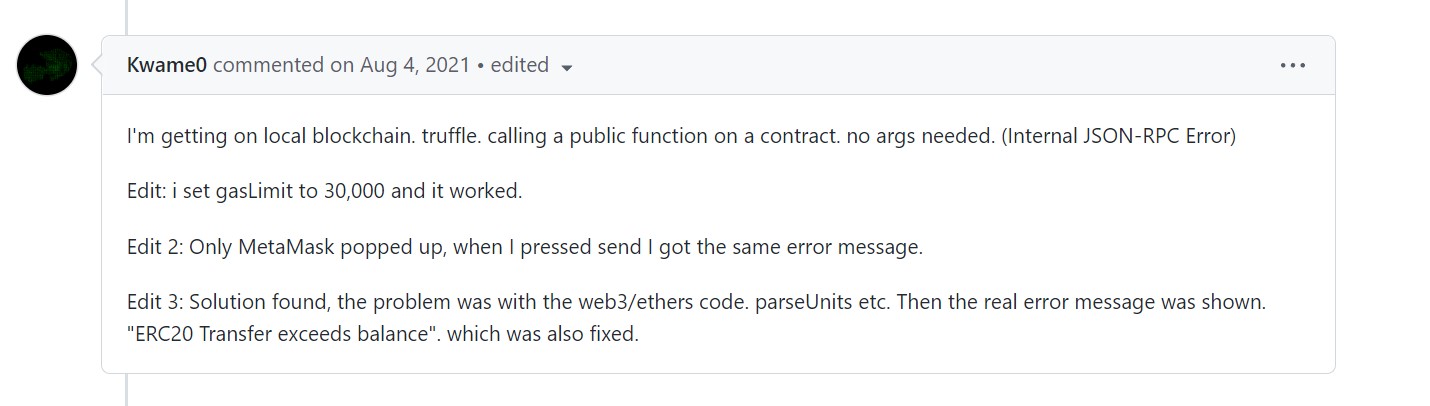
2. Скриншот ниже взят из Github
.
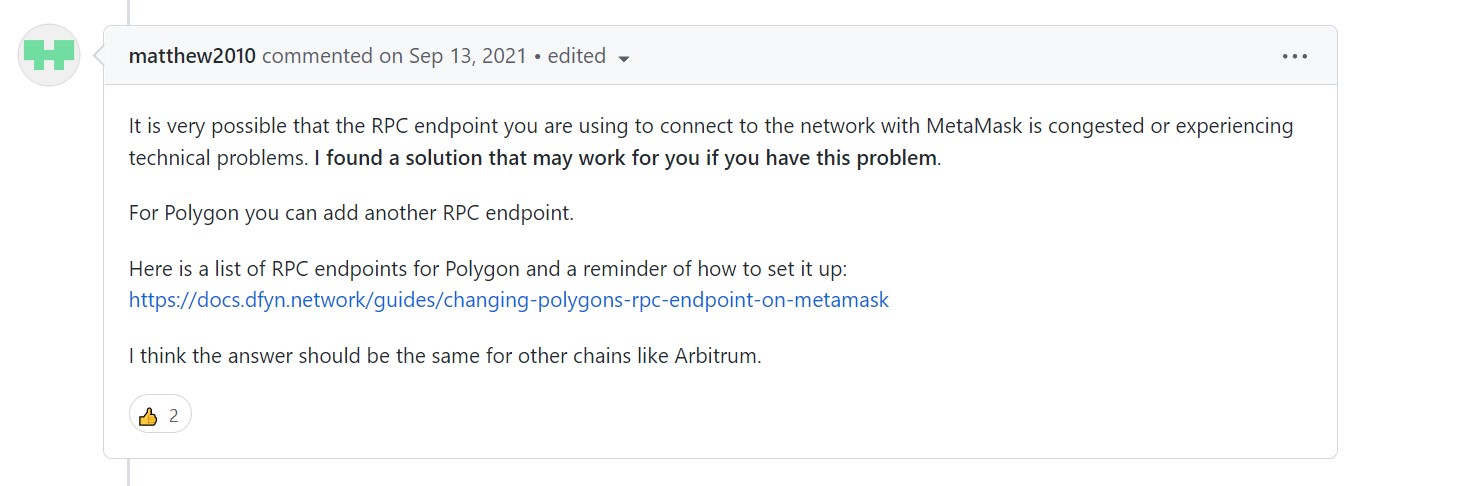
3. Скриншот ниже взят из Github
.

4. Скриншот ниже взят из Reddit
.

5. Скриншот ниже взят из MetaMask.
6. Скриншот ниже взят из Gitter
.

7. Скриншот ниже взят из Ethereum.

8. Скриншот ниже взят из Ethereum.

Заключительные мысли —
Ошибка JSON RPC сопровождается многочисленными ошибками, но внутренняя ошибка 32603 является одной из серьезных ошибок и может быть устранена с помощью 5 лучших практик и этих 8 возможных решений.
Также опубликовано здесь. < /p>
Оригинал
Are you getting an ‘Internal JSON-RPC’ error while connecting the Ledger hardware wallet to MetaMask on PC or Mobile?
If your answer is YES then look no further as we have got you covered. Before I teach you the easiest way to fix the ‘Internal JSON RPC’ Metamask error, let me tell you that you are not alone in who is having this issue right now.
There are tons of users across the world who use Metamask are having the Internal JSON RPC error while connecting the Ledger hardware wallet.
There are multiple ways that can be used to fix the Metamask Internal JSON RPC error on Mobile or PC but what worked for us is downloading the Chrome Browser and using the new Ledger Live Bridge.
Also Read > How to Add Arbitrum to Metamask
Apart from updating apps, make sure you have Contract data allowed in the Ethereum app.
Without any further ado, let’s get started:
As mentioned above, you can fix the Metamask Internal JSON RPC error by simply downloading Chrome and Metamask.
Once you have successfully installed and set up Metamask, you have to enable Ledger Live Support by heading to Settings > Advanced > Use Ledger Live.
Once done, follow the steps written below to fix the JSON RPC error:
- Once you have successfully added Metamask to your browser, click on its icon.
- After that, click on the profile icon located in the upper right corner
- Now, go to Settings > Advanced > Use Ledger Live
- Turn in On.
- When you do so, you will have the Ledger Live bridge enabled.
- Once enabled, head back to your MetaMask wallet and click the profile icon again but this time, you have to select ‘connect a hardware wallet’
- After that, select Ledger and click on the Connect option
- Doing this will open up a new window where you have to select ‘Open Ledger Live’.
- In the Open Device Bridge window, click on Open.
- When you do so, you will have the bridge between Ledger Live and MetaMask activated.
- That’s it.
That’s all you need to know about how to fix the Metamask Internal JSON RPC error on Mobile and PC.

I am a valuable team member at arceusx.net and an avid gamer who finds joy in exploring the virtual realms of games like Roblox. With a passion for staying at the forefront of technological advancements, I stay updated on artificial intelligence and technology news.
Welcome to this guide, where we will see how to fix the internal json-rpc error that you may have encountered sometime using Metamask and you can’t fix the problem.
Let’s take a look at the solution we have found, and you can use to bypass this problem.
To do this:
If you see the error “Internal JSON-RPC error” when trying to interact with another network, I recommend you try the following:
- Make sure that the network you are using has been added correctly. You can use Chainlist to add custom networks/tokens.
- Make sure you have enough tokens native to that network (e.g. Etheruem on the Ethereum network, BNB on the BSC, etc.) to pay the gas transaction fee.
- Make sure you have the Metamask extension or mobile app updated.
The problem usually comes from the network configuration. To do this, I recommend you check that you have the correct information, and try to add the network again with other information. Because many times, there are different RPC points, or what we indicate in the second box of new rpc url. Sometimes, the network is congested and some RPC points work worse than others, and adding the network with a different url in new RPC URL can solve this problem. To find out about the different RPCs, search for the network and RPC in Google or you can search this list to find the documentation listing all the urls you can use for that network. For example, in the case of polygon, we have: https://polygon-rpc.com/, https://rpc-mainnet.matic.network, https://rpc-mainnet.maticvigil.com and many more.
In the list, simply enter the network name with control+f and you will see the RPCs for each network that are listed in Chainlist and can be used in your metamask.
Another solution that sometimes works is to restart the app or uninstall the app or extension and reinstall it. But always do this if you have the recovery phrase and can import your Metamask account again.
I hope this has helped you to find out how you can fix this annoying metamask problem. Remember, if you don’t have an account with Binance, you can create one just below.
Platform: Binance
Min. deposit: $10
License: Cysec
Very low commissions
Exchange with more cryptocurrencies
I am getting this error when i trying to use metamask on my local for a simple transaction from one account(say A) to another (say B).
code: -32603
data: {originalError: {…}}
message: «Internal JSON-RPC error.»
stack: «Error: WalletMiddleware — Invalid «from» address.↵ at h (chrome-extension://nkbihfbeogaeaoehlefnkodbefgpgknn/background.js:1:1226252)↵ at async chrome-extension://nkbihfbeogaeaoehlefnkodbefgpgknn/background.js:1:1224243″
proto: Object

Solutions I tried on my own(which didn’t work ofc):
1. Downgrading my web3.js to beta 33,35 and 37 release. Currently, I am using 1.2.0 version.
2. Changing my metamask to mainnet and then back to local test net, which I am running on port:9545
Below is my smart contract:
contract ApprovalContract {
    address payable public sender;
    address payable public receiver;
    address public constant approver = <some account address>;

    function deposit (address payable _receiver) external payable {
        require(msg.value > 0);
        sender = msg.sender;
        receiver = _receiver;
    }

}
And below is my custom js (using web3.js)
var web3 = new Web3(Web3.givenProvider || "ws://localhost:9545");

var contractAddress = <contractAddress>;

var ApprovalContract = new web3.eth.Contract(ABI, contractAddress);

$('#contract-form').submit(function() {
  event.preventDefault();
  var fromAddress = $('#fromAddress').val();
  var toAddress = $('#toAddress').val();
  var amount = $('#amount').val();

  ApprovalContract.methods.deposit(toAddress).send({"from": fromAddress, "value": web3.utils.toWei(amount,'ether')},
    function(error, result) {
      if (error) {
        console.log('error: ' + error);
          $('#deposit-result').html('Error: ' + error);
      } else {
        $('#deposit-result').html('Success TX: <b>' + result + '</b>');
      }
    });
});
The flow is going into the last function and displaying the error as below:
error: Error: Internal JSON-RPC error.
{
  "originalError": {}
}
Expectation: Since my account A, is the account[0] of Metamask where is logging in to, I am expecting the Metamask pop up to show to confirm the transaction but instead I am getting this «Internal JSON RPC errror.»
Any ideas ???
Thanks in advance!!!