
-
8/10/2019 IntraOs 70 V4.0 ENG — Service Installation
1/52
IntraOs 70X-ray EquipmentService & Installation Manual
Blue X Imaging Srl Via Idiomi 1/8-33 20090 Assago ITALY e-mail
[email protected] -
8/10/2019 IntraOs 70 V4.0 ENG — Service Installation
2/52
IntraOs 70 Service & In
2/52 69 500 00210
1 Medical device for emission of ionizing radiation on re2
System turned ON and ready3 Irradiation
4 Alarm
5 Exposure time in s6 Manual decrease of exposure time
7 Manual increase of exposure time
8 Patient size large
9 Patient size small
10 Maxillary incisor11 Maxillary canine or premolar
12 Maxillary molar
13 Mandibular incisor
14 Mandibular canine or premolar
15 Mandibular molar
16 Bite-wing premolar
17 Use of digital detector
18 Radiation exposure pushbutton
Control panel and exposure pushb
1 2 3
56
8
9
10 11 12
13 14 15
18
1
stallation Manual
Version 4.0
uest
utton
4
7
16
17
-
8/10/2019 IntraOs 70 V4.0 ENG — Service Installation
3/52
IntraOs 70 Service & Installation Manual
Version 4.0 69 500 00210
SET-UPMICROSWITCHES
KEYBOARDCONNECTOR
BACK UP TIMTEST POINT &
MICROPROCESSORWATCH DOG LED
FUSE 4T 200 mA
5 x 20
PS24
FUST 200
5 x
OUTPUTLINE TO
TUBEHEAD
INPUTMAINS LINENEUTRAL
& LIVE
JUMPERFUSE 2
MAINSSWITCH
FUSE 1
& FUSE 2T8A 6.3×3
Layout Power Board Timer Aut
3/52
POWERSUPPLY5 V LED
RED
WERPPLYV LED
E 3mA
20
HANDSWITCHSOCKETS
HANDSWITCHJUMPERS
Set
-
8/10/2019 IntraOs 70 V4.0 ENG — Service Installation
4/52
IntraOs 70 Service & In
4/52 69 500 00210
Blue X Imaging S.r.l.
Via Mario Idiomi 1/8-3320090 Assago ITALY
tel.+39.0245712171fax +39.0245703385
e-mail [email protected]
IntraOs 70 Dental X-ray EquipmentService & Installation
Manual English EditiVersion 4.0 March 2008
Printed 30/05/2008 12:11:00Code 69 500 00210
Blue X Imaging is committed to Total Qualit
Thank you for notifying us any error found in the do
stallation Manual
Version 4.0
n
.
cument.
-
8/10/2019 IntraOs 70 V4.0 ENG — Service Installation
5/52
IntraOs 70 Service & Installation Manual
Version 4.0 69 500 00210
Table of Contents
1. INTRODUCTION
……………………………………………….1.1 Purpose
……………………………………………………….1.2Equipment Classification ………………………………1.3
Applicable Standards ……………………………………1.4
Environmental Data ……………………………………..1.5
Obligations of the Installer …………………………….1.6
Warning………………………………………………………1.7
Demonstration
……………………………………………..2. TECHNICAL
DATA……………………………………………2.1 System
Supply …………………………………………….2.2 Tube
Housing Assembly ……………………………….2.3
Beam Limiting Device ………………………………….2.4
AutoSet Timer
……………………………………………..2.5 Mechanical
Suspension System ……………………..2.6 Weights
………………………………………………………3. ASSEMBLY AND INSTALLATION ……………………3.1 Wall
Mounted Systems …………………………………3.2 Mobile
Systems ……………………………………………4. MAINTENANCE
………………………………………………..4.1
Maintenance of the Wall Support …………………..4.2
Maintenance of the Extension Arm ………………..4.3
Maintenance of the Folding Arm ……………………4.4
Maintenance of the Tube-Head ………………………4.5
Maintenance of the Beam Limiting Device ……..4.6 Maintenance of
the Timer ……………………………..4.7 Checking Filament
Pre-Heating Time …………….4.8 Special Service Functions
……………………………..5. MEASUREMENTS
……………………………………………..5.1 Line
Voltage
………………………………………………..5.2
Anode Voltage KVp…………………………………..5.3
Anode Current mA …………………………………….5.4
Exposure Time
…………………………………………….5.5 Leakage
Radiation ……………………………………….5.6 Earth
Resistance …………………………………………..5.7
Earth Leakage
……………………………………………..6. Spare Parts
………………………………………………………….6.1
Tube-Head
…………………………………………………..6.2
Folding Arm
………………………………………………..6.3
Extension Arm
…………………………………………….6.4Wall Support
……………………………………………….6.5 Mobile
Base ………………………………………………..6.6
AutoSet Timer
……………………………………………..5/52
……………………… 7
…………………….. 7
…………………….. 7
…………………….. 7
…………………….. 7
…………………….. 8
…………………….. 8
…………………….. 8
……………………… 9
…………………….. 9
…………………….. 9
…………………… 10
…………………… 10
…………………… 11
…………………… 11
……………………. 12
…………………… 12
…………………… 25
……………………. 28
…………………… 29
…………………… 29…………………… 30
…………………… 34
…………………… 34
…………………… 34
…………………… 35
…………………… 35
……………………. 36
…………………… 36
…………………… 36…………………… 36
…………………… 37
…………………… 38
…………………… 38
…………………… 39
……………………. 40
…………………… 40
…………………… 41
…………………… 42
…………………… 43
…………………… 44
…………………… 45
-
8/10/2019 IntraOs 70 V4.0 ENG — Service Installation
6/52
IntraOs 70 Service & In
6/52 69 500 00210
Appendix A System Components
…………………………………….Appendix B Icons
………………………………………………………….Appendix
C Exposure Table
……………………………………………Appendix D Alarm
Conditions ………………………………………..Appendix
E Identification Labels
…………………………………….Appendix F Cooling
Curves ……………………………………………Electrical requirements: see section 3.1.3 at page 13.
To connect the timer see section 3.1.10 at page 19.
INPUTPOWERLINE
SWITCH
ELECTRONICTIMER
WALLSUPPORT
X-RAYHEAD
IN OUT
IN
GROUND
HAC
HAND-SWITCHSOCKET TST1
FUSE F1
FUSE F2
OUT
ZERO OHMRESISTOR
FUSE
HAND-SWITSOCKET TS
NEUTRAL
LIVE
stallation Manual
Version 4.0
…………………. 46
…………………. 47
…………………. 48
…………………. 49
…………………. 50
…………………. 51
D-SWITCHNNECTIONUMPERS
4
H2
-
8/10/2019 IntraOs 70 V4.0 ENG — Service Installation
7/52
IntraOs 70 Service & Installation Manual
Version 4.0 69 500 00210
1. INTRODUCTION
1.1 PurposeThe IntraOs 70 X-ray Equipment is design to fulfil
the neeradiography in the general dental practice.The system can be
configured for wall, unit or mobile soluttypes of timers and
tube-heads.The features of the system make it easy to use, and grant lowith
minimum maintenance.1.2 Equipment Classification IEC: IntraOs 70 is a Class I, type
B equipmentFDA: IntraOs 70 is a Class II equipment (21 CFR 872-
1.3 Applicable StandardsThe IntraOs 70 system configurations,
all equipped with thcomply with the following standards.IEC 601-1 General requirements for safetyIEC 601-1-2
Electromagnetic compatibilityIEC 601-1-3 General requirements for
radiation prdiagnostic X-ray equipment
IEC 601-2-7 Particular requirements for the safetygenerators of
diagnostic X-ray generaIEC 601-2-28 Particular requirements for the safetyassemblies
and X-ray tube assembliediagnosis21 CFR 1020.30 Diagnostic x-ray systems and their m21 CFR
1020.31 Radiographic equipment1.4 Environmental Data
Applicable ranges of temperature, humidity, and atmosphereported
here below both for operation and transport conditAmbient TranTemperature from 10 to 40 C froRelative Humidity
from 30 to 75%Pressure from700 to 1060 hPa from7/52
s for intra-oral
ions and different
g useful life
1800).
AutoSet timer,
tection in
f high voltageorsf X-ray sourcefor medical
jor components
ic pressure areions.
sport & Storage20 to +50 C10 to 90%500 to 1060 hPa
-
8/10/2019 IntraOs 70 V4.0 ENG — Service Installation
8/52
IntraOs 70 Service & In
8/52 69 500 00210
1.5 Obligations of the InstallerObligations of the Installer
are:A To make sure that the line voltage specified by the
Manufacturer of the equipment is available and within
thspecified range.B For safety reasons verify that a proper switch
is availablfrom line voltage supply when needed during installatioC Install
and test the equipment with due diligence accordiinstallation instructions from the Manufacturer.D To provide the
Operators Manual to the User.1.6 Warning
X-ray equipment produce ionising radiation that may be
harproperly controlled. It is therefore recommended that the
equoperated by trained personnel only in accordance with existiEven if compliant to specifications of electromagnetic
comprecommended not to use the equipment in presence of
externelectromagnetic fields, such as those generated by cellular
pmight interfere with the electronic circuits of the system.1.7 DemonstrationIn order to use of the system for demonstration
purposes radihas to be inhibited by disconnecting the supply cables
to thethe wall support or into the timer.Cables to be disconnected are those leaving the connection
btube-head and not those coming in from the timer.Make sure that the disconnected cables are properly
insulateundesired contacts with live points.This task has to be done by trained personnel only to avoid
telectrical shock.DISCONNECTHERE
INPUTPOWERLINE
SWITCH
ELECTRONICTIMER
WALLSUPPORT
X-RAYHEAD
IN OUT
stallation Manual
Version 4.0
e
to disconnect.g to the
ful if notipment beg law.
tibility, it isalones, which
ation emissionube-head into
ock towards the
to prevent
e risk of
-
8/10/2019 IntraOs 70 V4.0 ENG — Service Installation
9/52
IntraOs 70 Service & Installation Manual
Version 4.0 69 500 00210
2. TECHNICAL DATA
2.1 System SupplyLine Voltage 115 V (from 99 V to 137 V in
depending on tube housing a230 V (from 198 V to 275 V idepending
on tube housing aLine VoltageWorking Range
Limited to the working rangefrom108 V to 132 V for typefrom 207
V to 253 V for typeMaximumLine Current
8 A at 115 V5 A at 230 V
Fuse 8A slow blow at 115 V,
5 A slow blow at 230 Vfor two-phase supply or on mthe second
fuse to be activatLine Frequency 50/60 Hz 2 HzLine resistance 0.4 Ohm at 115
V,0.8 Ohm at 230 V
2.2 Tube Housing AssemblyNominalLine Voltage
120 V for type 93 200 01300,230 V for type 93 200 01700
Line VoltageWorking Range
120 V 10% for type 93 200230 V 10% for type 93 200
Anode voltage70 kVp 8% at nominal line66 kVp 8% at nominal
line74 kVp 8% at nominal lineAnode current7.0 mA 15% at at nominal li5.3 mA 15% at nominal
line8.3 mA 15% at nominal lineMaximum load 70 kVp, 7 mA, 3.2 sX-ray insert 3 electrodes, grid
control actimodels: OCX/70-G, RFG070Focal Spot 0.8 (EN
60336:1995-04)Inherent filtration > 2.5 mm AlDuty Cycle
1/30Radiation Leakage < 0.1 mGy/h a 1 m (< 11.5 m9/52
sub-ranges
ssembly)sub-ranges
ssembly)f the THA:
3 200 01300,3 200 01700
obile system,d by jumper cut
01300,01700oltageoltage 10%oltage+ 10%ne voltagevoltage
10%voltage + 10%n
/h a 1 m)
-
8/10/2019 IntraOs 70 V4.0 ENG — Service Installation
10/52
IntraOs 70 Service & In
10/52 69 500 00210
2.3 Beam Limiting Device
Round BLDMetal cone with near-focus seFocus skin distance (FSD)
8.2Circular radiation fieldsize 2.35 diameter (6 cm)
Rectangular BLDMetal body with near-focus seFocus skin distance
(FSD) 8.2Rectangular radiation fieldsize 1.38×1.81 (3.5×4.6 cm)2.4 AutoSet TimerLine VoltageWorking Range
115 V 15% for type 93 300230 V 15% for type 93 300
Exposure factor Exposure time in s,18 steps from 0.06 s to 3.2
s0.06 0.060.08 0.080.10 0.10Time in seconds is convertedmains pulses with 1 pulse preat 50 Hz, 16.6 ms at 60
Hz.Precision 0.02 s or 5% (whichever thExposure factor setting
Automatic setting through tooselection and patient size, fortraditional film or digital
sensosetting moving up or down thplus or minus keys.Irradiation signal Yellow light on hand-switch a
panel plus acoustic buzzerPreheating time Set at installation
(typical valuHand-switch Hand-switch with 3 m coiled cremote mounting possibilityOverall size 6 (15 cm) width, 9 (24
cm)cm) depthOther features Microprocessor controlled fun
Film speed setting3 s minimum waiting time
Energy management for coolOptional kit with 33 ft (10 m)remote
hand-switch mountingstallation Manual
Version 4.0
tion(21 cm)
tion(21 cm)
02000100
R10 scale)0.060.080.10
to number of
cision (20 ms
greater)h typeuse withr, or manualscale with
d on control
e 180 ms)ord,
height, 3 (9
ctionality
down timeable for
-
8/10/2019 IntraOs 70 V4.0 ENG — Service Installation
11/52
IntraOs 70 Service & Installation Manual
Version 4.0 69 500 00210
2.5 Mechanical Suspension SysteWall Support 4.72 (12 cm)
width,9.45 (24cm) height,3.54 (9 cm depth)
Extension arm, length Short: 17 (45 cm),medium:27 (70 cm),long
35 (90 cm),extra long 43 (110 cm)Folding arm;useful reach
55 (140 cm) with short exten65 (165 cm) with medium ex72 (185
cm) with long exte80 (205 cm) with extra longMobile Stand 29 (74 cm) width,
42 (107 cm) height,24 (62 cm) depth65 (165 cm) total heath
with2.6 WeightsTimer 3.7 lb (1.7 kg)Tube-head: 14.1 lb (6.4 kg)Round
BLD 0.22 lb (0.1 kg)Rectangular BLD 0.44 lb (0.2 kg)Folding Arm: 15.4 lb (7 kg)Short
Ext. Arm 7.7 lb (3.5 kg)Medium Ext. Arm 9.3 lb (4.2 kg)Long Ext.
Arm 11 lb (5 kg)Extra long Ext. Arm 12.7 lb (5.8 kg)Wall Support:
2.9 lb (1.3 kg)Mobile Stand 55.1 lb (25 kg)11/52
sion armension arm
nsion armxt. arm
folding arm
-
8/10/2019 IntraOs 70 V4.0 ENG — Service Installation
12/52
IntraOs 70 Service & In
12/52 69 500 00210
T1
B1
3. ASSEMBLY AND INSTALLATION
3.1 Wall Mounted Systems
3.1.1 Unpacking
Unpack the components of the system and checkthe following:
A Each item is in good conditions and was notdamaged during
transportation.B All the items for the desired systemconfiguration are
available.C The line voltage on the labels of timer andtube-head are
corresponding to the existinglocal line voltage.3.1.2 Structural Requirements
The wall support has to be mounted in a convenient positionside
of the chair or on back wall (head of the patient).The maximum useful reach is of 80 (205 cm) from the
wallcombining a 43 (110 cm) extension arm with a folding arThe wall support can be mounted with 2, 4, or 6 bolts,
depenquality.A Two bolts only (top and bottom centralholes T2, B2) are used
when there is asolid slim column (e.g. iron mounting) withweak
sides (e.g. wooden wall). Consideringthe requested safety factor,
each one of thetwo bolts has to withstand a load of 5470
N,comprehensive of a safety factor, i.e. about1240 lbs or 560 kg.
Proper screw to beselected for a solid connection to the wall.Classes ISO 8.8 (M 8, M 8×1, M 8×1.25) orSAE Grade 5 (5/16
18UNC, 5/16 24UNF) are recommended.B Four bolts, two on top sides (T1, T3) andtwo on bottom sides
(B1, B3) is the regularmounting for solid (concrete) wall, but
alsoon large metal plate. Considering therequested safety factor,
each bolt has towithstand a load of 2735 N, comprehensiveof a safety factor, i.e. about 620 lbs or 280
stallation Manual
Version 4.0
T2 T3
B2 B3
on left or right
when.
ing on wall
-
8/10/2019 IntraOs 70 V4.0 ENG — Service Installation
13/52
IntraOs 70 Service & Installation Manual
Version 4.0 69 500 00210
kg. Proper expansion screw to be selected for a solid cconcrete
wall; the permissible load of each screw has t308 lbs (about 140
kg). On solid concrete use heavy duty metal anchors.On hollow bricks use injection chemical fixing.C Six bolts,
three on top (T1, T2, T3) and three at bottomrequired when the wall is not solid enough and the
loaddistributed on more points. Considering the requested sbolt has
to withstand a load of 911 N, comprehensive oi.e. about 210 lbs or
95 kg.In case the wall is not in condition to withstand the
indicateactions can be evaluated by adoption of reinforcing
plates:D Large plate to fit vertical supports at 16 distance, withand
one cable opening for the wall mount in the middleE In case of a thin (wooden) wall not solid enough, the uplate
(counter plate) made of iron (2 mm thick) can beMake sure that the
wall is solid enough to carry the loaF The use of two reinforcing iron plates of about 4 timeswall
support, one by each side of the wall, can help whplate looks not
adequate; additional bolts have to be ustogether the two
plates.Make sure that the wall is solid enough to carry the loaRecommended bolts are listed belowRecommended Bolts
Diameter Class CorM 8X1.25 ISO 8.8
M 8X1 ISO 8.85/16 18 UNC SAE- Grade 55/16 24 UNF SAE- Grade
5INSUFFICIENT WALL OR HARDWARE STRENGHMAY CAUSE THE WALL MOUNT TO
PULL OUT FTHE WALL AND THE FULL SYSTEM TO FALL OTHE PATIENT OR THE
OPERATOR CAUSINGINJURIES.3.1.3 Electrical Requirements
The power line cable must be connected to the input termintimer
to supply the timer itself and to make available powehead at the
output terminals (OUT), upon request by the ophand switch).Power to the X-ray head is thus controlled by the timer (S
13/52
nnection to thebe greater than
(B1, B2, B3) arehas to be
afety factor, eachf a safety factor,
d load, corrective
4 mounting holes
.e of a reinforcinghe solution..he surface of there one singled
to keep.
Section mm36.639.233.8
37.41
TROMTO
als (IN) of thefor the X-ray
erator (via the
ITCH).
-
8/10/2019 IntraOs 70 V4.0 ENG — Service Installation
14/52
IntraOs 70 Service & In
14/52 69 500 00210
The X-ray head is connected to the output terminals of the
tithrough the connecting block in the wall support.Cabling (2 poles plus ground) to connect the power line to
thtimer to the wall support is not provided and has to be
procurlarge section conductors keeps to minimum the wire
resistanrelevant voltage drop.Wire Type Square Section mm ResisAWG 16 1.35AWG 14 2.11
The hand-switch too can be mounted far from the timer, prois in
view and the sound of the buzzer can be heard.3.1.4 Mounting and Connecting Sequence
A Mount the Wall SupportB Mount the TimerC Mount the Extension
ArmD Mount the Folding/Simple ArmE Connect the Wall SupportF
Connect the TimerG Connect the hand-SwitchH Optional Remote
hand-SwitchI Mount and connect the Tube-headJ Mount the Beam
Limiting DeviceK Final Tuning and Set-UpINPUTPOWERLINE
SWITCH
ELECTRONICTIMER
WALLSUPPORT
X-RAHEA
IN OUT
stallation Manual
Version 4.0
er (OUT)
e timer and theed. Cable withe and the
ance Ohm/m2x0.015×0.0094
ided the patient
-
8/10/2019 IntraOs 70 V4.0 ENG — Service Installation
15/52
IntraOs 70 Service & Installation Manual
Version 4.0 69 500 00210
T1
B1
3.1.5 Mounting the Wall Support
A Remove the plastic coverunscrewing the screws under thelogo
label.B Use the Wall Support plate or atemplate to mark the holes on
thewall. Please note that the timercan be mounted close to the
WallSupport on the right side or in aremote position. Cabling
shouldhave been laid out accordingly.C Make the holes in the wall according tothe applicable type of
mounting:a Two bolts,b Four bolts,c Six bolts,d With or without
reinforcing plate.D Slide the logo-strip out from the plasticcover to access the
screws and remove itfrom the metal frame.E Mount the metal frame on the wall usingproper heavy-duty metal
anchors andmake sure that the power cable entersfrom behind.F Secure it to the wall ensuring it is level.Improper levelling
might cause the armto move and swing out ofposition.G Perform wire connection andfinal set-up complying
withrecommended sequence of actionsreported in the following.15/52
T2 T3
B2 B3
-
8/10/2019 IntraOs 70 V4.0 ENG — Service Installation
16/52
IntraOs 70 Service & In
16/52 69 500 00210
3.1.6 Mounting the Timer
A Use the mounting plate or thetemplate to mark the holes onthe
wall.B Slide the logo-strip out fromthe plastic cover to access
thescrews and remove the plasticcover from the plastic frame.C Drill the four holes in the walland secure the timer
makingsure it is level. Cabling shouldhave been laid out
inaccordance to mountingrequirements.D Perform wire connection and
final set-up complying withrecommended sequence ofactions
reported in thefollowing.3.1.7 Mounting the Extension Arm
A Unpack the extension arm and check for completeness oB Cut,
but do not remove, the string to be used later on tofrom the Folding/Simple Arm through the Extension ArSupport.
C Lightly grease the support tube at base of the extension atop
of wall mount.D Insert, but without tightening, the locking and the
frictiostallation Manual
Version 4.0
parts.ull the cable
to the Wall
rm and insert at
screws.
-
8/10/2019 IntraOs 70 V4.0 ENG — Service Installation
17/52
IntraOs 70 Service & Installation Manual
Version 4.0 69 500 00210
SAFETYSTRIP
3.1.8 Mounting the Folding Arm
WARNING.THE SPRINGS IN THE FOLDING ARM
MAY CAUSE INJURY TO THEINSTALLER AS WELL AS DAMAGETO THE ARM
ITSELF IF NOTHANDLED PROPERLY.DO NOT REMOVE BINDING UNTILWHEN
NECESSARY AS INDICATED INTHE INSTRUCTIONS BELOW.A Slide the blocking ring onto the support
tube at base of the arm.B Light grease the mounting pin at base
ofFolding Arm.C Secure the driving string to the end of the
electrical cable of the Folding Arm.D Pull the other end of the
string to drivethe electrical cable of the Folding Armthrough Extension Arm out
into WallMount.E Hold Folding Arm sections together andcarefully remove binding
allowing thearm sections to open slowly, away frompeople.F Perform wire connection (into the wallSupport) and final
set-up complying withrecommended sequence of actionsreported in the
following.WARNING.NEVERCONNECTTHE CABLEOF THEFOLDINGARMDIRECTLYTO
MAINSLINE.
17/52
-
8/10/2019 IntraOs 70 V4.0 ENG — Service Installation
18/52
IntraOs 70 Service & In
18/52 69 500 00210
TOFOLDINGARM
EXTENSIONARM
FROMTIMER
WALL SUPPORT CONNECTIONS
GROUNDCONNECTIONSON WALLPLATE
3.1.9 Connecting the Wall Support
A Connect the three wires from the Timer (additional cableblock
and to the Folding/Simple Arm (Tube-head) as repfigure.B Connect the ground cable on the Wall Support to the blothe
extension armstallation Manual
Version 4.0
) to the terminalorted in the next
king bolt on
-
8/10/2019 IntraOs 70 V4.0 ENG — Service Installation
19/52
IntraOs 70 Service & Installation Manual
Version 4.0 69 500 00210
3.1.10 Connecting the Timer
A Turn-off the line voltage supply line.
B Connect the three wires from the line voltage supply
toterminal block (IN on the left) but do not connect anyoutgoing
wire (OUT on the right) to Wall Support.C Make sure that the live connector is the hot one:
a Connect an AC voltmeter or a test light between thlive in and
ground.b Turn line voltage supply ON. If full line voltagelamp lights) the wiring is correct. If not turn line vOFF,
reverse live in and neutral in wires anmeasurement; eventually the
full line voltage shoulbetween line and ground (test lamp
lights).c Make sure no voltage is read between neutral innot check line
voltage distribution.D Test the timer for full functionality keeping the
outputdisconnected so that power is not provided to the load.IN
GROUND
HAND-SWITCSOCKET TST
FUSE F1
FUSE F2
OUT
ZERO OHMRESITOR
FUS
HAND-SWSOCKET
NEUTRAL
LIVE
19/52
the
block terminal
s measured (testltage supplyrepeat the
d be read
nd ground; if
ables
AND-SWITCHCONNECTION
JUMPERS
E F4
TCHST2
-
8/10/2019 IntraOs 70 V4.0 ENG — Service Installation
20/52
IntraOs 70 Service & In
20/52 69 500 00210
E Connect the load. Turn OFF the line
voltage supply line,
Connect the three
wires of additionalcable outgoing to theFolding Arm
(WallSupport).Live and neutral wiresthe folding arm (tube-head) can
be interchanged.Table of Fuses for Timer AutoSet
Fuse 115 V 2F1 T8 A 6.3×32 T5F2 T8 A 6.3×32 T5
F3, F4 T200 mA 5×20 T200
3.1.11 Connect the Hand-Switch
The hand-switch is provided with a 3 m coiled cord the
termiplugged in the lower left corner of the board, either
externallTST1) or internally to the timer (connector TST2).Jumpers are
available to activate properly the hand-switch cPosition TST1 for
TST1, TST2 for TST2, TST1/2 for both.3.1.12 Optional Remote Hand-Switch
The hand-switch can be remotely mounted using the optionaremote
box (wall holder) and connection cable.The wall holder (remote box) has a hook to hold the hanplug
below where to connect the coiled cable.A cable 10 m long is provided with a plug on one side, tsocket
on the timer, and free wires on the other side, to bconveniently
around the room, and eventually to connectinto the wall holder
(remote box).The connection of the wiresis here indicated.
The wires of the switch arenumber 3 and 4 (those in the
middle of the connector).
GROUND
TIMER CONNECTIO
NEUTRAL IN
LIVE IN
INPUT
FROMLINEVOLTAGE
SUPPLY
stallation Manual
Version 4.0
to
0 V5x205x20A 5×20
nations can be(connector
nnection:
kit made of a
-switch and a
connect to thee able to place itit to the block
S
NEUTRAL OUT
LIVE OUT
OUTPUT
TOFOLDINGARM
-
8/10/2019 IntraOs 70 V4.0 ENG — Service Installation
21/52
IntraOs 70 Service & Installation Manual
Version 4.0 69 500 00210
3.1.13 Mounting and Connecting the Tube-Head
A Remove retaining screws and cover plate on inner
side(handgrip) of Folding/Simple Arm at tube-head side.B Unscrew and slide out the U shaped retaining clip .
C Slightly lubricate the outer pin of the connecting sockeD
Slide the connecting socket into the terminal pole of thArm.E Put back the U shaped retaining clip making sure it
hasspecific slot on the outer pin of the connecting socket alocking
screw.F Put back the cover plate and block it with the four retai
3.1.14 Mounting the Beam Limiting Device
A Mount the beam limiting device on the tube-head and
lclock-wise rotation.21/52
of terminal pole
of the tube-head.Folding/Simple
entered thed tighten the
ing screws.
ck it close with a
-
8/10/2019 IntraOs 70 V4.0 ENG — Service Installation
22/52
IntraOs 70 Service & In
22/52 69 500 00210
3.1.15 Final Tuning and Set-Up
A Remove the line voltage fuse(s) from the timer
B Put back the cover plate on the folding/simple arm (tubeC
Tighten locking screw and tune friction screw in ExtensiD Tune
friction screw on the folding arm for rotation arounaxis.E Make sure the Timer switch is in the off position.F Set
the dip switches SW2 as indicated in the following ta Enable/disable correction of exposure time to
compefluctuations of line voltage.b Indicate the nominal line voltage of the tube-head (s
c Set the pre-heating time according to type of X-ray itube-head
assembly; the measured value is marked itube-head;G Put back the line voltagefuse(s).
H Put back all plastic coversand logo strips.
I Connect the system to theline voltage by switching the
general line voltage switchon and/or plug the powercord into the
wall socket.J Switch the timer on.K The system is now ready for
Functional Check asdescribed in the Operators Manual.
PRE-HEATING TIME SETTING — TYPICAL V
Type of insert OCX/70-G RPre-Heating
Time180 ms 1
stallation Manual
Version 4.0
head side)n Arm.d the vertical
define:nsate
e label).
sert used in thefront of the
LUES
8G070
60 ms
-
8/10/2019 IntraOs 70 V4.0 ENG — Service Installation
23/52
IntraOs 70 Service & Installation Manual
Version 4.0 69 500 00210
Enable/disable exposure timecorrection to compensatefluctuations
of mains voltage.dip 1
Setting Dose Compensation
Disabled
Enabled
Indicate the nominal voltage ofthe tube-head (see label).
dip 2 dip 3Setting Tube-Head Type
110 or 220VAC
115 or 230VAC
120 or 240VAC
125 or 250
VAC
Set pre-heatinindicated on ltube-head
dip 5 dip 6
Setting Filament Pr
100 ms
120 ms
140 ms
160 ms
180 ms
200 ms
220 ms
240 ms
DIP 4NOT USED
DIP 8NOT USE
PRDIP 2-3
TUBE-HEAD TYPEDIP 1
DOSE COMPENSATION
23/52
time asbel in front of the
dip 7
-Heating Time
DIP 5-6-7-HEATING TIMES
-
8/10/2019 IntraOs 70 V4.0 ENG — Service Installation
24/52
IntraOs 70 Service & In
24/52 69 500 00210
3.1.16 Layout Power Board Timer AutoSet
SET-UPMICROSWITCHES
KEYBOARDCONNECTOR
BACK UP TIMETEST POINT & LE
MICROPROCESSORWATCH DOG LED
FUSE 4T 200 mA
5 x 20
POSUP24 V
FUSET 2005 x 2
OUTPUTLINE TO
TUBEHEAD
INPUTMAINS LINENEUTRAL
& LIVE
JUMPERFUSE 2
MAINSSWITCH
FUSE 1& FUSE 2
T8A 6.3×32
stallation Manual
Version 4.0
POWERSUPPLY5 V LED
D
ERPLYLED
3A
HANDSWITCHSOCKETS
ANDSWITCHJUMPERS
-
8/10/2019 IntraOs 70 V4.0 ENG — Service Installation
25/52
IntraOs 70 Service & Installation Manual
Version 4.0 69 500 00210
3.2 Mobile Systems
3.2.1 Unpacking
Unpack the components of the system andcheck the following:
A Each item is in good conditions and wasnot damaged during
transportation.B All the items for the desired systemconfiguration are
available.C The line voltage on the labels of timerand tube-head are
corresponding to theexisting local line voltage.3.2.2 Room Preparation
Make sure that a wall socket is availableclose to the dental
chair in reach of themobile X-ray equipment to be connected.Such a socket has to be provided with aground connector to the
protective earthpoint of the room. For the line voltagesupply to the wall socket it is recommendedthe use of a cable
with large sectionconductors to keep to minimum the cableresistance
and the relevant voltage drop.Wire Type Square Section mm ResiAWG 16 1.35AWG 14 2.11
25/52
tance Ohm/m2x0.015×0.0094
-
8/10/2019 IntraOs 70 V4.0 ENG — Service Installation
26/52
IntraOs 70 Service & In
26/52 69 500 00210
3.2.3 Mounting and Connecting Sequence
The recommended sequence to mount andconnect system modules is
listed here below.A Assembly the Mobile Stand.B Mount the Timer.C Mount the
Suspension Arm.D Connect the Line voltage Cable.E Connect the
Timer.F Mount and connect the Tube-head.G Mount the Beam Limiting
Device.H Final Tuning and Set-Up.3.2.4 Assembling the Mobile StandThe following sequence to be
followed.A Put together the base elements and tightenscrew and
washer.B Mount the column (timer plate externally tothe long legs see
picture) and tighten itwith the screw and washer from below.C Mount the front wheels and rear wheels
with brake.D Mount the manoeuvring handles.E Connect the plug on
the line voltage cable.3.2.5 Mounting the Timer
A Refer to section 0 at page 18.
B The zero Ohm resistor R51
close to fuse F2 has to be cutfor systems cord connected tothe
mains.3.2.6 Mounting the Suspension Arm
Refer to section 3.1.8 at page 17.
stallation Manual
Version 4.0
-
8/10/2019 IntraOs 70 V4.0 ENG — Service Installation
27/52
IntraOs 70 Service & Installation Manual
Version 4.0 69 500 00210
LN
INPUTFROMLINEVOLTAGESUPPLY
GROUPOINT
GR
GROUNDWIRE INPUT
NEUTRAL IN
TIMER CONNECT
LIVE IN
3.2.7 Connecting the Line voltage Cable
A The line voltage cable for the mobile unit is providedB The
grounding wire of the main cable has to be blockegrounding provision (common bolt for bonding and gr
nut and lock-washer.C The grounding wire for the timer is the
placed on the cbonding and grounding and blocked (second) with nutD Connect the
grounding cable for the timer tothe ground provision on the terminal block ofthe timer and the
two linewires from the mains cable tothe input point for live
andneutral connections.3.2.8 Connecting the Timer
For the connection of the outputcable to the timer please refer
tosection 0 at page 18.3.2.9 Activation ofFuse 2
Units provided with supply cordand plug must be equipped with
fuses onboth line phases. The activation on thesecond fuse is done
by cutting the JumperFuse 2 (zero Ohm resistor) close to FuseF2.
See position on layout in section3.1.16 at page 24.3.2.10 Connecting the Tube-HeadRefer to section 3.1.11 at page
20.3.2.11 Mounting the Beam Limiting Device
Refer to section 3.1.14 at page 21.
3.2.12 Final Tuning and Set-Up
Refer to section 3.1.15 at page 22.
27/52
LN
OUTPUTTO
FOLDINGARM
DS
OUND PROVISIONN MOBILE FRAME
IONS MOBILE
ith plug.(first) to the
unding) using
mmon bolt fornd lock-washer.
-
8/10/2019 IntraOs 70 V4.0 ENG — Service Installation
28/52
-
8/10/2019 IntraOs 70 V4.0 ENG — Service Installation
29/52
IntraOs 70 Service & Installation Manual
Version 4.0 69 500 00210
FRICTIOSCRE
4.1 Maintenance of the WallSupport
A Remove the cover and verify that the mountingis closely
connected to the wall and stays firmand steady during various
movements of thesystem.B Verify that the ground cable of the wall supportis properly
connected to the wall plate and tothe blocking bolt on the
extension arm.C Check friction during rotation of ExtensionArm and adjust
relevant screw if needed.D Verify that the technical label withidentification data
outside the plastic cover atbottom is in place and is readable.4.2 Maintenance of the Extension
A Slide partially out
the extension armfrom wall mount,inspect for wear ofthe joint
andlubricate for smoothrotation.B Check frictionduring rotation ofFolding Arm andadjust relevant
screwif needed.C Verify that thetechnical label withidentification data isin
place and isreadable.29/52
N
rm
FRICTIONSCREW
-
8/10/2019 IntraOs 70 V4.0 ENG — Service Installation
30/52
IntraOs 70 Service & In
30/52 69 500 00210
ARM FIRSTSECTION
MINIMUMCLEARANCE
ARM SECONDSECTION
a) BASIC
b) BRAS
c) SAFE
d) SIDE
PARTS OF ARTICULATED JOI
a
b
cd
4.3 Maintenance of the Folding ArmSpecifically for the folding
arm inspect for wear of pins andevery 24 months, in case of normal use (about 6000 cycles).
worn out parts or the arm itself if it appears damaged.
Maintenance can be performed with the arm mounted on theor on
the mobile stand.A Disconnect the tube housing assembly keeping the arm favoid
the risk of injuries (fig.1) .B Remove the snap-out caps of the first arm section, the blof
the pins, then the metal cover by pushing the pins outattention to
supporting the arm (fig. 2 and fig. 3).stallation Manual
Version 4.0
PIN
BUSHING
Y CLAMP
OLDER
T
evers at least
eplace the
extension arm
lly open to
cking screwsaying
-
8/10/2019 IntraOs 70 V4.0 ENG — Service Installation
31/52
IntraOs 70 Service & Installation Manual
Version 4.0 69 500 00210
Fig. 4
Fig. 1 Fig. 2
Fig. 5
Fig. 8
BENT ARM
(IN SHADE)INDICATESWEARING OUTOF BASIC PIN
31/52
Fig. 9
Fig. 6
Fig. 7
Fig. 3
-
8/10/2019 IntraOs 70 V4.0 ENG — Service Installation
32/52
IntraOs 70 Service & In
32/52 69 500 00210
Fig. 10
Fig. 13
Fig. 15
Fig. 17
Fig. 11
stallation Manual
Version 4.0
Fig. 12
Fig. 14
Fig. 16
Fig. 18
-
8/10/2019 IntraOs 70 V4.0 ENG — Service Installation
33/52
IntraOs 70 Service & Installation Manual
Version 4.0 69 500 00210
C Be careful not to pinch fingers between the two sectionwhile
manoeuvring (fig. 4).D In the second section of the arm remove the two
snap-otube-head side and the pin in order to raise the metal cfriction (fig. 10) and spring (fig. 11). In case of removathe
metal cover of the second section is different.E Inspect the main
joint at the base of the arm (fig.for
pin and levers. A clearance lower than 3 mm of the blotwo levers
from the body of the firstarm (fig. 7) indicates that the basicpin
of the articulated joint iswearing out, and must be replaced.Also a
parking position with the firstsection of the arm not
standingvertical (fig. 4) but bent to some 5degrees or more reveals
that the basicpin is wearing out. To replace the pinof the
articulated joint (fig. 8)proceed as follows:a Loosen the friction
screw (fig. 10) and release the srotating the spring cap (fig. 11) with a round tool o(the base
of a drill is fine) until zero pressure on th12, about 1 cm free
thread left);b Keeping the first arm vertical, push the brass bushiand
extract the supporting parts (round tool size 10c Disassemble the parts of the joint and replace the bd Tension
the spring as needed by screwing the sprindesired distance (fig. 11, about 5 cm free thread lefF Lubricate
moving parts (fig. 17 and fig. 18) and the thrthe metal covers before their insertion.G Mount the metal covers
provisionally, with friction scrH Mount the tube-head and secure it with the holding forI Verify
proper balancing and in case tune tension of sprJ Tune the friction
screws of the two arms.K Block tight the screws of metal covers and
place the snL Slide partially out the Arm from the Extension Arm,
inthe vertical joint and lubricate for smooth rotation.M Verify
that the label with identification data is in placeCLEC
33/52
s of the arm
ut caps on thever and tune
l, beware that
wearing out ofk holding the
pring by4 mm diameterbasic pin (fig.
g out (fig. 13)mm diameter);asic pin;g cap to the);e pins to
blockws loosen
(fig. 1)ngs.
p-out caps.pect for wear of
and is readable.
3 mmMINIMUM
RANCEECK
-
8/10/2019 IntraOs 70 V4.0 ENG — Service Installation
34/52
IntraOs 70 Service & In
34/52 69 500 00210
FRICTIONSCREW
FRICTIONSCREW
4.4 Maintenance of the Tube-HeadA Inspect for damage/wear to the
X-ray tube-head and supB Inspect for oil leakage. Replace tube-head
if necessary.C Check for positionstability. Adjustfriction for rotationaround the horizontalaxis
if necessary.D Check that electricalcables are correctlytwisted and
notdamaged or wear out.E Verify that thetechnical label withidentification data isin
place and isreadable.F Dismount the tube-head from the arm and lubricate the pin
forsmooth rotation. Warning: remove the tube-head with the arm
completely open to avoidthe risk of injuries.G Check the U shaped retaining clip and replaceif wear. Do not
mount the tube-head until allchecks of the suspension system
arecompleted.4.5 Maintenance of the Beam LimitiA Verify that the collimator
is properly mounted and, in cafirmly closed.
BVerify that the internal cone is not damaged. Replace
thenecessary.C Verify that the technical label with identification data
isreadable.4.6 Maintenance of the TimerA Inspect the panel for damages on
the surface.B Inspect the cable of the exposure switch for wear.C
Check that all lights (except the yellow one) are workingsystem is switched on.D Perform a Functional Check as described
in the OperatorThis check includes verification of: a) yellow light, b) bu
stallation Manual
Version 4.0
FRICTIONSCREW
ort system.
g Devicee, lock it
collimator if
n place and is
when the
s Manual.zzer, c) alarm
-
8/10/2019 IntraOs 70 V4.0 ENG — Service Installation
35/52
IntraOs 70 Service & Installation Manual
Version 4.0 69 500 00210
for Exposure push button pressed at power on, d) alaExposure
stopped by the operator.E Verify that the fuses mounted comply with what
specifbelow.F Verify that the technical label with identification data
ireadable.Table of Fuses for Timer AutoSetFuse 115 V 2
F1 T8 A 6.3×32 T5F2 T8 A 6.3×32 T5
F3, F4 T200 mA 5×20 T200
4.7 Checking Filament Pre-HeatingDuring the life of the system
thewearing out of the filament may resultin a different pre-heating
time (PHT).The value set at installation needstherefore to be
verified and in casecorrected.A At a fixed distance measure the
X-ray dose for exposure of 2.0 s
(nominal irradiation of 100 pulsesat 50 Hz, 120 at 60 Hz).
B At same distance measure the dose for exposure of 0.2(nominal
irradiation of 10 pulses at 50 Hz, 12 at 60 HzC If dose at 0.2 s is 1/10 of dose at 2 s, the value set for PD
If dose at 0.2 s is lower than 1/10 of the dose at 2 s, PHincreased. Proceed at steps of 20 ms until fine.E If dose at 0.2
s is higher than 1/10 of the dose at 2 s, Preduced. Proceed at steps of 20 ms until fine.
4.8 Special ServiceFunctions
A Digital Volt Meter. This function allows theuser to display
the line voltage level (forexample 224 V in the side picture).a
Enter this function by switching the systemon while pressing at the same time the
, the , and the keys.b Exit by switching the system off.
35/52
m for
ed in the table
in place and is
30 V5x205x20
mA 5×20
Time
s.
T is fine.T has to be
T has to be
-
8/10/2019 IntraOs 70 V4.0 ENG — Service Installation
36/52
IntraOs 70 Service & In
36/52 69 500 00210
B Test of Control Panel. This function is intended to test liand
segments of numerical display on the control panel.a Enter this
function by switching the system ON wthe same time the , the , and the adult keys.
b By pressing the or keys all segments of the ndisplay are
scanned.c By pressing the X-ray pushbutton the rAY mesdisplayed.d By pressing each button on the panel, the
corresponturned ON; a second pressure would turn it OFFe At the last
button pressed the system automatically efunction.WARNING: Do not press the X-ray pushbutton as l
button twice; the second time the timer becomes actiand
radiation is emitted.5. MEASUREMENTS
All measurements to be done with the equipment supplied
atvoltage with specified line resistance (see section 2.2 at
pagetolerances on the measured values have to take into account
tthe each measurement instrument. Measurements have to betrained personnel only to avoid the risk of electrical
shock.5.1 Line VoltageThe Line voltage can be measured using a Volt
Meter for Altwithin the proper range. A service function can be
activatedtimer to display the current line voltage (see section 4.8
of th5.2 Anode Voltage KVpThe kVp level is the actual peak value of
the Anode voltagestabilizes once the preheating time of the filament has
elapse0.2 s) and the high voltage transformer is actually loaded.
Thcan be measured with a non-invasive kVp meter placed in
frfollowing the instructions in the user manual of the
instrumemeasure can be done with an exposure time of 500 ms or
mointroduced a delay of the reading instrument of about 300
msvoltage level to stabilize after the pre-heating time has
elapse5.3 Anode Current mA
WARNING. To prevent high voltage shock make sure the syis
disconnected from the power supply when connections to tmeasurement
points are performed. Electric discharge mightstallation Manual
Version 4.0
hts, buttons,
ile pressing at
merical
sage is
ing lamp is.xit this
st
e
nominal line9). Thehe precision ofdone by
ernate Currentn the AutoSet
is Manual).
hich
(in aboute kVp levelnt of the BLDt. A correcte havingto allow
thed.stemhe
-
8/10/2019 IntraOs 70 V4.0 ENG — Service Installation
37/52
IntraOs 70 Service & Installation Manual
Version 4.0 69 500 00210
A1
A2
occur in case of improper operation
The Anode current in mA is the actualaverage value of the tube
current whichraises when the filament has warmed-up, after the preheating time haselapsed.
Remove the back cover of the tube-head, disconnect the jumper
A1-A2 andreplace it with a precision resistor of1000 Ohm.The anode current can be read with aDC voltmeter connected to
points A1 and A2, with the 1 Vto 1 mA.After the measurement disconnect the 1000 Ohm resistor
ajumper.5.4 Exposure TimeThe actual exposure (loading) time is
determined as the tibetween the instant when the tube current first
rises above tmaximum value and the instant when it finally falls
belowIn order to assure the requested exposure time
(irradiation),time of the used insert, set-up at installation, is
automaticalconsideration by the microprocessor.The actual switch-on time (SOT) of the tube-head assemblsum of
the filament pre-heating time (PHT) and of the requtime (RET).SOT = PHT + RET
During filament pre-heating radiation is not emitted.
The measure of the exposure time can be correctly measureTime
meters with the ability to trigger when the kV level rmaximum.Exposure time can also be measured after having connecteresistor
of 1000 Ohm between points A1 and A2 on the smon the back of the
tube-head, by monitoring the voltage acrcurrent) with an
oscilloscope, and counting the number ofinterval, as per above
definition.When the compensation function to correct the effects of lion
the emitted X-ray dose is activated, the requested exposcorrected in order to assure dose consistency.When the actual
line voltage is lower than the nominal lineactual exposure time is
increased.37/52
corresponding
d put back the
e intervalhe 25% of itshe same value.
the pre-heating
y taken into
is therefore theested exposure
d with kVp &aches 75% of its
a precisionll circuit board
oss it (tubeulses in the time
e fluctuationsre time is
voltage, the
-
8/10/2019 IntraOs 70 V4.0 ENG — Service Installation
38/52
IntraOs 70 Service & In
38/52 69 500 00210
When the actual line voltage is higher than the nominal
lineactual exposure time is decreased.Do disable the compensation function (dip switch number 1to OFF
position) to verify exposure time accuracy.This is not necessary in case a meter with the ability to
triggthe kVp level and the value read should be compared with
thgiven by the timer for 3 seconds after the exposure (refer to
tManual to activate the function to display the actual
exposurcompensation).5.5 Leakage RadiationThe value of leakage radiation of the X-ray
tube assembly is1 m distance taking into account the energy
provided in 1 homeasurement is performed at a distance different from 1 m, tbe
properly corrected.The applicable technique factors are of 70 kV and 7 mA.
Thmaximum leakage has to be considered, excluding the
directiprimary beam. The duty cycle factor as reported in
sectionsbe taken into account for the computation of the actual
doseIn case for example a measure is done at 50 cm distance frowith
an exposure of 1 s, the following computations have toA duty cycle of 1/30 means maximum of 1 s exposure e120 s per
hour.Dose at 100 cm is computed taking into account the invei.e. at
twice the distance the dose intensity is reduced toD1h100cm =
D1s50cm * 120 * (50/100)2 = D1s50cm *where: D1s50cm is the dose
measured at 50 cm with 1 sand D1h100cm is the dose computed at 1 m
distance forhour.5.6 Earth ResistanceThe measurement of the earth resistance to
be done after havdisconnected the system for the power supply
line.Using a voltage generator of not more than 6 V, 50/60 Hz, ais
applied from 5 s to 10 s through the earth terminal to anywhich can
be in touch to the patient/operator.The voltage drop is then measured and the earth resistance c
The system complies for values lower than 0,1 (extended t
the supply cable cannot be disconnected like in the cases
ofinstallations).stallation Manual
Version 4.0
oltage, the
f SW2 moved
r on 75% ofindication
he Operatorstime after
measured atr. In case the
e value has to
point ofon of the.2 has also toate.
the sourcee performed:
ery 30 s, i.e.
se square law,ne quarter.0
exposurethe energy of 1
ing
urrent of 25 Aetal part
mputed.
o 0,2 in case
ermanent
-
8/10/2019 IntraOs 70 V4.0 ENG — Service Installation
39/52
IntraOs 70 Service & Installation Manual
Version 4.0 69 500 00210
5.7 Earth LeakageConnect the Timer to themeasuring circuit
asshown in the figure(R1=10 k5%, R2=1k1%,C1=0,015 F 5%)A Set the input supplyvoltage (Vp) equalto 110% of thenominal
supplyvoltage.B Connect a voltmeter(Vx with 1 MOhminput impedance) tothe
indicated pointsC Switch the Timer OND Make two measures in Normal Conditions
(NC with S1S5 ON: live and neutral conductors in normal co
S5 OFF: swap of live and neutral conductors.
E Make two measures in Single Fault Condition (SFC wi S5 ON:
live and neutral conductors in normal coS5 OFF: swap of live and neutral conductors.
Please note that 1V equals to 1mA.
Make sure values of leakage currents fall within the limitstable
below.LIMIT OF EARTH LEAKAGE CURREN
Type Of Device
Normal
Condition(S1 ON)X-ray Equipment permanentlyconnected to line
voltage 5 mAMobile X-ray Equipment 2,5 mA39/52
ON)dition.
h S1 OFF).dition.
hown in the
Tingle Fault
ConditionS1 OFF).
10 mA5 mA
-
8/10/2019 IntraOs 70 V4.0 ENG — Service Installation
40/52
IntraOs 70 Service & In
40/52 69 500 00210
6. Spare Parts
6.1 Tube-Head
93 200 01700: G 230 V without BLD93 200 01300: G 120 V without
BLDList of Spare Parts Figure THItem Description
A Rear and Front Cover
BRound Beam Limiting Device, FFD 21 cmOutput Field 6 cm
diameterC rectangular Beam Limiting Device, FFD 21 cmOutput Field
3.5×4.6 cmD Side cap tube-head holder
ECoupling with Concentric Pin
for SN lower than TK0501F Friction Ring for tube-head with
screwsG Wave SuppressorFigure TH
A
B
D
F
C
stallation Manual
Version 4.0
Code76 190 25110
91 300 00020
91 300 00040
76 190 25120
76 190 2524176 190 2524076 190 2545076 190 25600
E
-
8/10/2019 IntraOs 70 V4.0 ENG — Service Installation
41/52
IntraOs 70 Service & Installation Manual
Version 4.0 69 500 00210
6.2 Folding Arm
93 100 12010: for Wall Mount
List of Spare Parts — Figure FAItem Description
ATube head support for folding arm
for SN lower than FA0501B Cover Plate Tube-Head HolderC Arm
Cover Extension SideD Arm Cover Tube-Head SideE Retaining Clip With
ScrewFCable 2.8 m With Concentric Connector
for SN lower than FA0501G Ring Spacer D 25 With HoleH Snap Out
Cap (set of 8)I Friction Screw M6x10 For Arm (set of 2)L Basic pin
and seeger ringsFigure FA
AD
C
H
F
G
I
L
41/52
Code76 190 2525176 190 2525076 190 2513076 190 2514076 190
2515076 190 2527076 190 2543176 190 2543076 190 2546076 190 2516076
190 2534076 500 30010B
E
-
8/10/2019 IntraOs 70 V4.0 ENG — Service Installation
42/52
IntraOs 70 Service & In
42/52 69 500 00210
6.3 Extension Arm93 100 17100 45 cm93 100 17200 70 cm93 100
17300 90 cm93 100 17400 110 cm
List of Spare Parts Figure EAItem Description
A Large Ring Spacer D35B Snap out Cap D25 (set of
CFriction Screw Brass Cap M6x10 (set of 3)
Friction Screw Brass Cap M8x10 (set of 3)
Figure EA
A B
stallation Manual
Version 4.0
Code76 190 2547076 190 2518076 190 2533176 190 25332
-
8/10/2019 IntraOs 70 V4.0 ENG — Service Installation
43/52
IntraOs 70 Service & Installation Manual
Version 4.0 69 500 00210
6.4 Wall Support93 100 11000
List of Spare Parts — Figure WSItem Description
A Plastic Cover Wall MountB Logo Strip Blue X
Figure WS
A
B
43/52
Code76 190 2519076 190 25200
-
8/10/2019 IntraOs 70 V4.0 ENG — Service Installation
44/52
IntraOs 70 Service & In
44/52 69 500 00210
6.5 Mobile Base93 100 2008093 100 20090
List of Spare Parts Figure MBItem Description
A Transport Handle (set of 2)B Cable Holder With Strain ReliefC
Hook For CableD Wheel (set of 2)E Wheel With Brake (set of 2)Figure MB
A
B
C
DE
stallation Manual
Version 4.0
Code76 190 2528076 190 2530076 190 2529076 190 2541076 190
25420 -
8/10/2019 IntraOs 70 V4.0 ENG — Service Installation
45/52
IntraOs 70 Service & Installation Manual
Version 4.0 69 500 00210
6.6 AutoSet Timer93 300 60100: 230 V93 300 60200: 115 V
List of Spare Parts Figure AUItem Description
A Front CoverB Mounting PlateC Mounting Columns
D230V Power Control Board With Triac115V Power Control Board
With TriacE Keyboard Control PanelF AutoSet Membrane
G Hand Switch Without CableH Coiled CableI Logo Strip IntraOs
70J1230V Fuse F1/F2 T5A 250V 5×20 (set of 10)115V Fuse F1/F2 T8A
250V 6.3×32 (set of 10)J2 Fuse F3/F4 T200mA 250 V 5×20 (set of 10)
Figure AU
A
BE
C
HG
I
45/52
Code76 190 2522076 190 2523076 190 2531076 190 2551076 190
2551176 190 2553076 190 2555076 190 2559076 190 2558076 190 2521076 190 2564076 190 2564176
190 25630D
F
-
8/10/2019 IntraOs 70 V4.0 ENG — Service Installation
46/52
IntraOs 70 Service & In
46/52 69 500 00210
Appendix ASystem Components
ArticleSystem Component
Type CodeCatalogue Number
Wall Support 93 100 11000
Extension Arm 45 cm 93 100 17100Extension Arm 70 cm 93 100
17200Extension Arm 90 cm 93 100 17300Extension Arm 110 cm 93 100 17400
Folding Arm 93 100 12010
Tube Head G 120 V 93 200 01300Tube Head G 230 V 93 200 01700
20 cm Round BLD 91 300 0002020 cm Rectangular BLD 91 300
00040AutoSet Timer 115 VAC 93 300 60200AutoSet Timer 230 VAC 93 300
60100Mobile Base 93 100 20080Mobile Base UL/CSA 93 100 20090
Wall Plate 86 100 11500
stallation Manual
Version 4.0
-
8/10/2019 IntraOs 70 V4.0 ENG — Service Installation
47/52
IntraOs 70 Service & Installation Manual
Version 4.0 69 500 00210
Appendix BIcons
IEC Type BEquipment
ComplComm
X-ray OnComplUS St
Examine AnnexedDocumentation
Line vSyste
Increase Exposure Time(one step)
Off (Divoltag
Decrease Exposure Time(one step) On (Cvoltag
Child Small Patient ~ Altern
Adult Large Patient Fuse
Upper Incisor Protec
Upper Canine/Premolar N Neutraperma
Upper Molar LLive Pperma
Lower Incisor Inhere
Lower Canine/Premolar gggg Focal
Lower Molar FragileHandl
Bite Wing — Interproximal Fear o
Digital ReceptorUpDo No
Radiography Push Button Stacki
4
Ionizing Radiation SeparDo No
47/52
iance to Europeanunity Requirements
iance to Canadian andndards
ltage supply On -Ready
sconnected from LineSupply)
nnected to LineSupply)
te Current
ive Earth
l Point (for equipmentent connected to line)
int (for equipmentent connected to line)
t Filtration
pot
,With Care
Humidity
Overturn
g Limit
te Collection,Dispose
-
8/10/2019 IntraOs 70 V4.0 ENG — Service Installation
48/52
IntraOs 70 Service & In
48/52 69 500 00210
Appendix CExposure Table
IntraOs 70 — 70 kVp, 7 mA — Exposure Times in s
Focus-F
ilmD
istance23cm
DFilm
EFilm
DFilm
EFilm
Digital
DFilm
EFilm
Digital
3,20 2,50 2,00 2,60 1,25 1,00 0,80 0,64 0,50 0,40
2,50 2,00 2,60 1,25 1,00 0,80 0,64 0,50 0,40 0,32
2,00 2,60 1,25 1,00 0,80 0,64 0,50 0,40 0,32 0,25
1,60 1,25 1,00 0,80 0,64 0,50 0,40 0,32 0,25 0,20
LowerMolar
1,25 1,00 0,80 0,64 0,50 0,40 0,32 0,25 0,20 0,16
LowerPremolar
1,00 0,80 0,64 0,50 0,40 0,32 0,25 0,20 0,16 0,12
LowerIncisor
0,80 0,64 0,50 0,40 0,32 0,25 0,20 0,16 0,12 0,10
0,64 0,50 0,40 0,32 0,25 0,20 0,16 0,12 0,10 0,08
F
ocus-FilmD
istance33cm
DFilm
EFilm
Digital
DFilm
EFilm
Digital
D
Film
E
Film
Digital
stallation Manual
Version 4.0
Digital
SmallPatient
LargePatient
0,32
0,25
0,20UpperMolar
0,16 UpperPremolar
0,12 Bite Wing
0,10UpperIncisor
0,08
0,06
SmallPatient
LargePatient
-
8/10/2019 IntraOs 70 V4.0 ENG — Service Installation
49/52
IntraOs 70 Service & Installation Manual
Version 4.0 69 500 00210
Appendix DAlarm Conditions
AutoSet Timer Alarm Conditions
Code Fault /Error Signal Action Re
A 01X-ray requestedduring cool-downperiod
Green lamp(System Ready)flashing
Systeminhibited
Byaconsy
A 02Line voltagebelow lower limit
Green lamp (SystemReady) and red lamp(Alarm) flashing
Systeminhibited
Aulinra
A 03 Line voltageabove upper limit
Green lamp (SystemReady) and red lamp(Alarm) flashing
Systeminhibited
Aulinra
A 04Correctedexposure timelower than 60 ms
Green lamp (SystemReady) and red lamp(Alarm) flashing
0.06 sforced.
Byacon
A 05Correctedexposure timegreater than 3.2 s
Green lamp (SystemReady) and red lamp(Alarm) flashing
3.2 sforced.
Byacon
A 06Line Frequency
Detection Failure
System Ready(green) lamp and
Alarm (red) lampflashing
System
inhibited
By
off
A 07Exposure pushbutton pressed atpower on
Red lamp(Alarm) flashing
Exposureinhibited.
Byacon
A 08Exposurestopped by theoperator
Red lamp(Alarm) flashing
Systeminhibited
Byacon1
A 09Exposurestopped by the
back-up timer
Red lamp (Alarm)switched on
Systeminhibited
Byoff
A 10Back-up relayfailure
Red lamp (Alarm)switched on
Systeminhibited
Byoff
A 11Power switchingdevice failure
Red lamp (Alarm)switched on
Systeminhibited
Byoff
A12Line dips duringexposure
Red lamp (Alarm)switched on
Exposureinhibited
Byacon
49/52
set
nowledgementthe panel or whentem cooled down
tomatically whenvoltage back in
ge
tomatically whenvoltage back inge
nowledgementthe panel
nowledgementthe panel
switching system
and on again
nowledgementthe panel
nowledgementthe panel or after
switching systemand on again
switching systemand on againswitching systemand on again
nowledgementthe panel
-
8/10/2019 IntraOs 70 V4.0 ENG — Service Installation
50/52
IntraOs 70 Service & In
50/52 69 500 00210
Appendix EIdentification Labels
stallation Manual
Version 4.0
-
8/10/2019 IntraOs 70 V4.0 ENG — Service Installation
51/52
IntraOs 70 Service & Installation Manual
Version 4.0 69 500 00210
Appendix FCooling Curves
51/52
-
8/10/2019 IntraOs 70 V4.0 ENG — Service Installation
52/52
IntraOs 70Dental X-ray Equipment
Service & Installation ManualEnglish Edition
Version 4.0
Code Fault /Error
A 01
X-ray requested
during cool-down
period
A 02
Line voltage
below lower limit
A 03
Line voltage
above upper limit
A 04
Corrected
exposure time
lower than 60 ms
A 05
Corrected
exposure time
greater than 3.2 s
A 06
Line Frequency
Detection Failure
A 07
Exposure push
button pressed at
power on
A 08
Exposure stopped
by the operator
A 09
Exposure stopped
by the back-up
timer
A 10
Back-up relay
failure
A 11
Power switching
device failure
A12
Line dips during
exposure
Appendix D
Alarm Conditions
AutoSet Timer Alarm Conditions
Signal
Green lamp
(System Ready)
flashing
Green lamp (System
Ready) and red lamp
(Alarm) flashing
Green lamp (System
Ready) and red lamp
(Alarm) flashing
Green lamp (System
Ready) and red lamp
(Alarm) flashing
Green lamp (System
Ready) and red lamp
(Alarm) flashing
System Ready (green)
lamp and Alarm (red)
lamp flashing
Red lamp
(Alarm) flashing
Red lamp
(Alarm) flashing
Red lamp (Alarm)
switched on
Red lamp (Alarm)
switched on
Red lamp (Alarm)
switched on
Red lamp (Alarm)
switched on
IntraOs 70 – Operator’s Manual
Action
System
inhibited
System
inhibited
System
inhibited
0.06 s
forced.
3.2 s
forced.
System
inhibited
Exposure
inhibited.
System
inhibited
System
inhibited
System
inhibited
System
inhibited
Exposure
inhibited
Reset
By acknowledgement
on the panel or when
system cooled down
Automatically when
line voltage back in
range
Automatically when
line voltage back in
range
By acknowledgement
on the panel
By acknowledgement
on the panel
By switching system
off and on again
By acknowledgement
on the panel
By acknowledgement
on the panel or after
1 m
By switching system
off and on again
By switching system
off and on again
By switching system
off and on again
By acknowledgement
on the panel
|
Ошибка А02 в рентгене FONA XDG |
||||||
|
||||||
|
||||||
|
||||||
|
||||||
|
||||||
|
||||||
|
||||||
|
||||||
|
||||||
|
||||||
|
||||||
|
||||||
|
||||||
|
||||||
|















|
Ошибка А02 в рентгене FONA XDG |
||||||
|
||||||
|
||||||
|
||||||
|
||||||
|
||||||
|
||||||
|
||||||
|
||||||
|
||||||
|
||||||
|
||||||
|
||||||
|
||||||
|


Specifications:
|
Accompanying Data:
Blue X IntraOs 70 Medical Equipment PDF Operator’s Manual (Updated: Friday 20th of January 2023 01:20:24 PM)
Rating: 4.1 (rated by 59 users)
Compatible devices: Oxford In-Situ, 930 160, TruTrak+ 3900, ArjoHuntleigh Akron BoBath 5 4632, Pneupac babyPAC 100, AUDIOSTAR PRO, Halo One Series, C-Series.
Recommended Documentation:
Blue X IntraOs 70: Text Version of Document
(Ocr-Read Summary of Contents, UPD: 20 January 2023)
-
19, IntraOs 70 – Operator’s Manual Appendix C Exposure Table IntraOs 70 — 70 kVp, 7 mA — Exposure Times in s D Film E Film Digital Small Patient D Film E Film Digital Focus-Film Distance 23 cm D Film E Film Digital Large Pa…
-
14, IntraOs 70 – Operator’s Manual 1 2 3 4 5 6 7 LINE — SWITCH ON/OFF EXPOSURE HAND-SWITCH CONNECTION EXPOSURE PUSHBUTTON YELLOW LIGHT EXPOSURE HAND-SWITCH CABLE 3.4 Operation Turn on the line voltage supply switch on (below the timer) to bring the system ready Position the image rec…
-
22, IntraOs 70 – Operator’s Manual Appendix F Cooling Curves COOLING CURVE OF X-RAY TUBE kJ T (min) COOLING CURVE OF TUBE-HEAD kJ T (min)
… -
8, IntraOs 70 – Operator’s Manual • Folding arm; useful reach of 55” (140 cm) with 17”¾ (45 cm) extension arm 65” (165 cm) with 27”½ (70 cm) extension arm 72”¾ (185 cm) with 35”½ (90 cm) extension arm 80” (205 cm) with 43”¼ (110 cm) extension arm • The mobile version is composed of: Mobile base: 29” (74 cm) wi…
-
10, IntraOs 70 – Operator’s Manual 3. OPERATING INSTRUCTIONS 3.1 Demonstration In order to use of the system for demonstration purposes radiation emission has to be inhibited by disconnecting the supply cables to the tube-head into the wall support or into the timer. Cables to be disconnected are those leaving the connection block towards the tube-h…
-
9, IntraOs 70 – Operator’s Manual 2.5 AutoSet Timer The timer is working at line voltage of 115 V ± 15%, 50/60 Hz. Mains features are: • Microprocessor controlled functionality • Zero-crossing power switching. • Film speed setting. • Automatic setting of exposure time from 60 ms to 3.2 s through object selection. • Functionality…
-
18, IntraOs 70 – Operator’s Manual Appendix B Icons IEC Type B Equipment Compliance to European Community Requirements X-ray On Compliance to Canadian and US Standards Examine Annexed Documentation Line voltage supply On — System Ready Increase Exposure Time (one step)…
-
24, IntraOs 70 Dental X-ray Equipment Operator’s Manual English Edition USA Version 3.2
… -
5, IntraOs 70 – Operator’s Manual 1.5 Obligation of the Installer Obligation of the Installer is: • To make sure that the line voltage specified be the Manufacturer of the equipment is available and within the specified range. • For safety reasons verify that a proper switch is available to disconnect from line voltage supply when needed during installa…
-
7, IntraOs 70 – Operator’s Manual 2.2 Beam Limiting Device • Circular Output Section Focus Skin Distance: 8.27”(21 cm) Output Radiation Field: 2.35” diameter (6 cm) • Rectangular Output Section Focus Skin Distance: 8.27”(21 cm) Output Radiation Field: 1.8”x 1.81” (3.5 x 4.6 cm) 2.3 Mechan…
-
13, IntraOs 70 – Operator’s Manual During the exposure the yellow lamp of X-ray On , on the timer and on the hand-switch, lights and the internal buzzer sounds to indicate radiation emission. As additional safety feature the timer is provided of an independent back-up device (back-up timer and back-up relay) which is going to cut-off radiation i…
Blue X IntraOs 70: Recommended Instructions
DHG397, Bravo Pro, KX-F3100, 2008 Optra


-
HEWI | 1 Rückenstütze Serie 802 LifeSystemBackrest rail Range 802 LifeSystemMontage- und GebrauchsanleitungInstallation and Operating InstructionsNotice de montage et mode d‘emploiInstallatie-en gebruikshandleidingIstruzioni di montaggio e per l’usoInstrucciones de instalación y funcionamientoInstrukcja montażu i obsługi …
LifeSystem 802 Series 20
-
1 PEN USER MANUAL Forsteo® FORSTEO 20 micrograms (µg)/ 80 microlitres solution for injection, in pre-filled pen Instructions for use Before you use your new pen, please read the section Instructions for use completely. Follow the directions carefully when using the pen. Also read the package leaflet provided. Do not share your pen or your needles as this may risk transmissi …
Forsteo 20 5
-
Document Information for:TypeNameRevisionStateDescriptionOriginatorFile ListApproval InformationPerson Action Date and TimeThis page is generated automatically by the GEMS ePDM SystemPrinted documents are for Reference Only and may be out-of-date.Check the database to ensure you have the correct revision.State: RELEASE — Document is released and under formal Change Control. Changes are …
LOGIQ A3 252
Additional Information:
Operating Impressions, Questions and Answers:
Поставщики и цены:
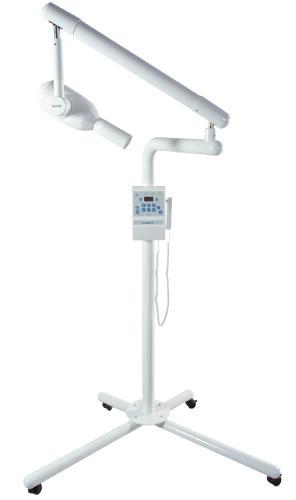
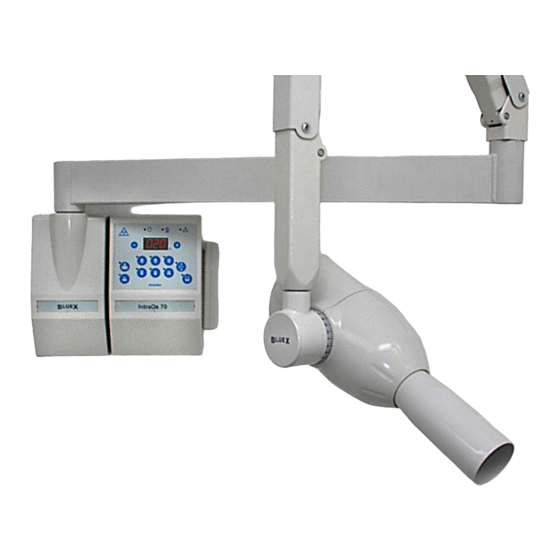
Дентальный рентген IntraOS 70 является стоматологическим РТГ аппаратом нового поколения. У рентгена совмещены преимущества высокочасточного и импульсного рентгеновского оборудования:
— фильтрование мягкого излучения — «GRID» улучшенное качество съемки — классической и цифровой
— Высокая надежность — низкие расходы в эксплуатации и сервиса
— Увеличенный срок эксплуатации РТГ головки — пониженная прогреваемость лампы
— Стабилизатор электрического напряжения – регулировка времени проявки снимков
— Простое обслуживание и лёгкая манипуляция
— фотосъёмки на классические РТГ плёнки или через цифровые сенсоры.
Модели прибора:
Передвижной — максимальная длина рукава 1,1 м
Настенный — максимальная длина 1,9 м.
Дентальный рентген IntraOS 70 Технические характеристики
— Потребляемая мощность 70 кВт;
— Сила тока 7 мА;
— Мощность 1,4 кВт;
— Максимальный рабочий цикл 1/60;
— Фокусное расстояние 20 см.;
— Облучаемое поле на конце коллиматора (диаметр) 6 см.
Назначение оборудования — Дентальный рентген Intra OS 70
Похожее оборудование
Отзывы и комментарии:
-
Contents
-
Table of Contents
-
Bookmarks
Quick Links
IntraOs 70
X-ray Equipment
Operator’s Manual
Blue X Imaging Srl Via Idiomi 1/8-33 20090 Assago ITALY e-mail bluex@bluex.it
Related Manuals for Blue X IntraOs 70

Summary of Contents for Blue X IntraOs 70
-
Page 1
IntraOs 70 X-ray Equipment Operator’s Manual Blue X Imaging Srl Via Idiomi 1/8-33 20090 Assago ITALY e-mail bluex@bluex.it… -
Page 2
IntraOs 70 X-ray Equipment Operator’s Manual – English Edition USA Version 3.2 December2006 Printed 04/12/2006 11:20 AM Code 69 500 01110 Blue X Imaging is committed to Total Quality. Thank you for notifying us any error found in this document. -
Page 3: Table Of Contents
IntraOs 70 – Operator’s Manual Table of Contents Introduction ……………….4 Congratulations…………..4 Purpose ………………4 Equipment Classification…………4 Applicable Standards………….4 Obligation of the Installer…………5 Obligation of the User …………5 Warning ……………..5 Technical Data…………….6 Tube-Head G ……………..6 Beam Limiting Device …………7 Mechanical System…………..7 Weights………………8 AutoSet Timer ……………9…
-
Page 4: Introduction
The unit is manufactured under a Quality Control System which grants full compliance to specifications. 1.2 Purpose The IntraOs 70 X-ray Equipment is design to fulfil the needs for intra- oral radiography in the general dental practice. The system can be configured for wall, unit or mobile solutions and different types of timers and tube-heads.
-
Page 5: Obligation Of The Installer
IntraOs 70 – Operator’s Manual 1.5 Obligation of the Installer Obligation of the Installer is: • To make sure that the line voltage specified be the Manufacturer of the equipment is available and within the specified range. • For safety reasons verify that a proper switch is…
-
Page 6: Technical Data
IntraOs 70 – Operator’s Manual Make sure to carefully manoeuvre the suspension arms to position the tube-head in order prevent harm to the fingers in areas where they may be pinched. Even if compliant to specifications of electromagnetic compatibility, it…
-
Page 7: Beam Limiting Device
IntraOs 70 – Operator’s Manual 2.2 Beam Limiting Device • Circular Output Section • Rectangular Output Section Focus Skin Distance: Focus Skin Distance: 8.27”(21 cm) 8.27”(21 cm) Output Radiation Field: Output Radiation Field: 2.35” diameter (6 cm) 1.8”x 1.81” (3.5 x 4.6 cm) 2.3 Mechanical System…
-
Page 8: Weights
IntraOs 70 – Operator’s Manual • Folding arm; useful reach of 55” (140 cm) with 17”¾ (45 cm) extension arm 65” (165 cm) with 27”½ (70 cm) extension arm 72”¾ (185 cm) with 35”½ (90 cm) extension arm 80” (205 cm) with 43”¼…
-
Page 9: Autoset Timer
IntraOs 70 – Operator’s Manual 2.5 AutoSet Timer The timer is working at line voltage of 115 V ± 15%, 50/60 Hz. Mains features are: • Microprocessor controlled functionality • Zero-crossing power switching. • Film speed setting. • Automatic setting of exposure time from 60 ms to 3.2 s through object selection.
-
Page 10: Operating Instructions
IntraOs 70 – Operator’s Manual 3. OPERATING INSTRUCTIONS 3.1 Demonstration In order to use of the system for demonstration purposes radiation emission has to be inhibited by disconnecting the supply cables to the tube-head into the wall support or into the timer.
-
Page 11
IntraOs 70 – Operator’s Manual Index 0.32 0.40 0.50 0.64 0.80 1.00 1.25 1.60 2.00 Speed E type D type D type: Kodak Ultraspeed, Agfa Dentus M2 — E type: Kodak Ektaspeed Plus The timer offers the possibility to correct the exposure time to compensate radiation dose changes due to fluctuations of the line voltage supply, thus granting consistent film blackening. -
Page 12
IntraOs 70 – Operator’s Manual To operate the systems switch the timer “on” with the button below the unit. During start-up all the lamps in the panel and the segments of the display, but the yellow light of X-ray On , are blinking for 3 s, to let the operator check that lights in the panel are properly working. -
Page 13
IntraOs 70 – Operator’s Manual During the exposure the yellow lamp of X-ray On , on the timer and on the hand-switch, lights and the internal buzzer sounds to indicate radiation emission. As additional safety feature the timer is provided of an independent back-up device (back-up timer and back-up relay) which is going to cut-off radiation in case of failure of the main timer. -
Page 14: Operation
IntraOs 70 – Operator’s Manual 3.4 Operation Turn on the line voltage supply switch on (below the timer) to bring the system ready EXPOSURE HAND-SWITCH CONNECTION Position the image receptor LINE-SWITCH where needed and orientate the ON/OFF BLD accordingly. Select the desired exposure time (using the keys or the knob depending on the type of timer connected).
-
Page 15: Safety
IntraOs 70 – Operator’s Manual 3.5 Safety • Electrical. Trained and qualified technicians only are authorized to remove covers and have access to power circuits. Power supply lines must comply with safety legislation and have ground terminals for protective earth connection.
-
Page 16: Disinfecting
Refer to Service & Installation Manual for instructions. 4. DISPOSING OF OBSOLETE EQUIPMENT The IntraOs 70 system is made of different materials which include may kinds of metals, iron, aluminium, lead, copper and others, plastic materials, electronic components and dielectric oil in the tube-head.
-
Page 17: Appendix A System Components
IntraOs 70 – Operator’s Manual Appendix A System Components Article Type Code System Component Catalogue Number Wall Support 93 100 11000 Extension Arm 45 cm 93 100 17100 Extension Arm 70 cm 93 100 17200 Extension Arm 90 cm 93 100 17300…
-
Page 18: Appendix B Icons
IntraOs 70 – Operator’s Manual Appendix B Icons Compliance to IEC Type B European Community Equipment Requirements Compliance to Canadian and US X-ray On Standards Examine Annexed Line voltage supply Documentation On — System Ready Increase Exposure Off (Disconnected Time (one step)
-
Page 19: Appendix C Exposure Table
IntraOs 70 – Operator’s Manual Appendix C Exposure Table IntraOs 70 — 70 kVp, 7 mA — Exposure Times in s Small Patient Large Patient 3,20 2,50 2,00 2,60 1,25 1,00 0,80 0,64 0,50 0,40 0,32 2,50 2,00 2,60 1,25 1,00 0,80 0,64 0,50 0,40 0,32 0,25…
-
Page 20: Appendix D Alarm Conditions
IntraOs 70 – Operator’s Manual Appendix D Alarm Conditions AutoSet Timer Alarm Conditions Code Fault /Error Signal Action Reset A 01 X-ray requested Green lamp System By acknowledgement during cool-down (System Ready) inhibited on the panel or when period flashing…
-
Page 21: Appendix E Identification Labels
IntraOs 70 – Operator’s Manual Appendix E Identification Labels…
-
Page 22: Appendix F Cooling Curves
IntraOs 70 – Operator’s Manual Appendix F Cooling Curves COOLING CURVE OF X-RAY TUBE T (min) COOLING CURVE OF TUBE-HEAD T (min)
-
Page 23
Page intentionally left blank… -
Page 24
IntraOs 70 Dental X-ray Equipment Operator’s Manual English Edition USA Version 3.2…