


 Добрый день друзья!
Принтер выдавал ошибку E000000 при включении даже не крутил барабан! Оказалось, что порвана термопленка.
Заменили, все сделали аккуратно, поставили, включили аппарат, но он снова выдает эту же ошибку.
Пытались сбросить через сервис-меню: CLEAR > ENGIN > ERRCLR, затем выкл-вкл принтер, он стал немного крутить барабан, но потом снова выдает эту же ошибку.
Печь прозвонили, все в порядке.
Можете подсказать, может нужно что-то ещё сбросить?
С уважением.
Добавлено спустя 53 минуты 22 секунды:
Вроде бы нашли проблему! Термодатчик нужно менять.
Подскажите его номерок или какие есть совместимые?
С уважением.
 Thanks: 0
 Likes: 0
 Dislikes: 0
-
09-17-2015
#1

Junior Member
- Rep Power
- 0
error code e000000 in ir 2520
Hi everybody!
Thank you for accepting me here.
I am Godlove from Tanzania, East Africa.I have may Canon ir 2520 that when i tray to shoot on it gives a error message above (error code e000000 in ir 2520) if any one can help me to find solution. I have triad to replace a new HVT it still does the same
-
09-17-2015
#2
Service Manager
100+ Posts
- Rep Power
- 33
Re: error code e000000 in ir 2520
Originally Posted by GODLOVE
Hi everybody!
Thank you for accepting me here.
I am Godlove from Tanzania, East Africa.I have may Canon ir 2520 that when i tray to shoot on it gives a error message above (error code e000000 in ir 2520) if any one can help me to find solution. I have triad to replace a new HVT it still does the same
It is fixing error just reset it from the service mode.
Cheers
Senior Technician Specialist
A+; Network+
Copier Brand handled: Canon, Lanier, Konica Minolta, Sharp, Ricoh, Kyocera Mita, Nashuatech, Ollivetti, Toshiba
Printer Handled: Canon, HP, Epson, Brother, Samsung
Duplicators: Risograph, Duplo
-
09-17-2015
#3
Junior Member
- Rep Power
- 0
Re: error code e000000 in ir 2520
Originally Posted by _SuabE_
It is fixing error just reset it from the service mode.
Cheers
Thank you for your respond. Well i did try to clear it bay entering Service Mode >CLEAR>ENGIN>ERRCLR enter Service Mode >CLEAR>ENGIN>ERRCLR and finally power cycle the machine. It Cycle for a while then stop and turn again to the previously state of error e000000. If i may ask if is something to do with the blue n red cables on the Engine control er Circuits? Because i changed all to a new Control circuits or is something else ?
-
09-17-2015
#4
Junior Member
- Rep Power
- 0
Re: error code e000000 in ir 2520
Originally Posted by GODLOVE
Thank you for your respond. Well i did try to clear it bay entering Service Mode >CLEAR>ENGIN>ERRCLR enter Service Mode >CLEAR>ENGIN>ERRCLR and finally power cycle the machine. It Cycle for a while then stop and turn again to the previously state of error e000000. If i may ask if is something to do with the blue n red cables on the Engine control er Circuits? Because i changed all to a new Control circuits or is something else ?
Hello pleas help me with this problem. and if possible someone send an electrical wiring manual of this machinery
-
09-17-2015
#5
Junior Member
- Rep Power
- 0
Re: error code e000000 in ir 2520
Originally Posted by GODLOVE
Hello pleas help me with this problem. and if possible someone send an electrical wiring manual of this machinery
Helow! I hope someone is goner help me with a solution to my Machinery
I m still waitingThank you Technical Friends
-
09-17-2015
#6
Senior Tech
100+ Posts
- Rep Power
- 29
Re: error code e000000 in ir 2520
Replace fixing unit end reset than try with old unit.
-
09-18-2015
#7
Re: error code e000000 in ir 2520
If you got the E0000 error AFTER you replaced any boards & you can’t reset it in service mode I would suggest that you have a loose connection somewhere, go back & check the work you did.
If all looks good then may just be a coincidence & you’ll need to replace the fixing film ass’y
-
09-18-2015
#8
Junior Member
- Rep Power
- 0
Re: error code e000000 in ir 2520
Originally Posted by copier tech
If you got the E0000 error AFTER you replaced any boards & you can’t reset it in service mode I would suggest that you have a loose connection somewhere, go back & check the work you did.
If all looks good then may just be a coincidence & you’ll need to replace the fixing film ass’y
Thank you friends! I have removed older fixing and replace another one. Then shoot On the machinery started and engine rotate on its normal way. There after it change onto e000246. What do i do?
-
09-20-2015
#9
Trusted Tech
50+ Posts
- Rep Power
- 29
Re: error code e000000 in ir 2520
Originally Posted by GODLOVE
Thank you friends! I have removed older fixing and replace another one. Then shoot On the machinery started and engine rotate on its normal way. There after it change onto e000246. What do i do?
E246 means that AC power supply is not normal or bad power supply pcb.


 error code e000000 in ir 2520

 Originally Posted by GODLOVE

Bookmarks
Bookmarks
Posting Permissions

- You may not post new threads
- You may not post replies
- You may not post attachments
- You may not edit your posts
- BB code is On
- Smilies are On
- [IMG] code is On
- [VIDEO] code is On
- HTML code is Off
Forum Rules
Ошибка E000 в лазерных принтерах и МФУ Canon означает неисправность узла термозакрепления. Эта ошибка появляется, когда при подаче напряжения на термоэлемент, датчик температуры не догревается до нужной температуры. Обычно это означает выход из строя термоэлемента. Но иногда встречаются нюансы. О них мы и поговорим.
И так, перед нами Canon MF4410

с ошибкой E000

Дело в том, что, в последнее время, довольно часто мне в ремонт попадают устройства с ошибкой E000 в которых термоэлемент вполне исправен, а проблема оказывается с блоком питания Canon. При том, это касается не только относительно новых устройств, но и устройств постарше, к примеру, LBP2900. На термоэлемент с блока питания подается 220 вольт переменного напряжения. Что бы выяснить, рабочий ли блок питания, необходимо мультиметром проверить, подается ли на разъем подключения термоэлемента напряжение. Но сначала необходимо добраться до этого разъема.
И так, приступим. Откручиваем болт сзади устройства, со стороны разъема USB.

Сзади и снизу местонахождение защелок боковой крышки показано треугольниками,


а сверху черточками.

После снятия боковой крышки, отсоединяем все шлейфы и кабели от платы управления

Откручиваем сзади болт, который находится над разъемом USB.

Откручиваем все болты крепящие плату управления и снимаем ее.

Для того, что бы снять пластмассовое крепление шлейфов, необходимо поднять вверх защелку и сдвинуть крепление вправо.

Снимаем металлический каркас, на котором крепилась плата управления. Для этого откручиваем все болты, крепящие каркас.


Вот мы и добрались до разъема питания термоэлемента. Подключаем плату управления в подвешенном состоянии, следя за тем, что бы ничего не замкнуть.Включаем устройство и замеряем напряжение на разъеме подключения термоэлемента. Хочу заметить, что у меня был случай, когда с отключенным термоэлементом напряжение присутствовало, а с подключенным, под нагрузкой, напряжения не было. Так что рекомендую замерять напряжение с подключенным термоэлементом.

Схема управления подачи питания на термоэлемент во всех устройствах Canon практически идентична. Неисправны могут быть несколько элементов вместе или по отдельности:
1. Подгорели контакты реле 1. Проверить просто — необходимо подать около 20 вольт с любого блока питания и прозвонить контакты, которые должны замкнуться.
2. Вышел из строя транзистор 2.
3. Проблема в оптроне 3. Проверить довольно сложно, лучше заменить.
4. Пробитый диод 4. Для проверки выпаять и прозвонить.

При данном дефекте выхода из строя других элементов я не встречал. Надеюсь статья вам поможет. Удачи.
точно (100%) — если бы «не контакт» с платой термистора, то ошибка вылетает E000. А тут уже другой случай.
Пленка в этих аппаратах металлизированная, от НР1010/1200 я ни когда не ставил, ставим (оем Термопленка LJ P1505, LJ M1522, M1120). Термоэлемент только подходит от M1536, CP1525, MF4410/4430/4450/4550/4570 возможно отличается (не проверял) от HP1010. Идеально проверить заведомо исправными блоками.
Для себя вижу несколько действий (чтобы сделал,в сервисе каждую недельку такие аппараты, поэтому проблем нет с перекидкой блоков):
— неисправна плата, заведомо исправной проверил
— термоэлемент не совместим от HP 1010, (самому интересно, будет в ремонте аппарат — проверю так ли это)
— пленка должна быть металлизированной, но большинство инженеров ставят от 1010/1200, немножко подрезая край — больше на 1-1,5 мм — предположение думаю ошибочно
— дефектный термистор
других неисправностей при ошибке E001 не может быть.
Думаю все же, при первом включении после замены термопленки и термоэлемента … Печка сильно нагрелась(термоэлемент оригинальный? от какого аппарата???), и досталось заодно и термистору… а теперь печка нагревается до критического уровня и аппарат блокируется
Второй вариант событий: при дефектной плате было подано завышенное напряжение на термоэлемент, что и вызвало его повреждение / прогар о чем и символизировала ошибка на экранчике «Е000» .
подкинь плату, потом блок термоузла (как будет аппарат в ремонте).
_________________
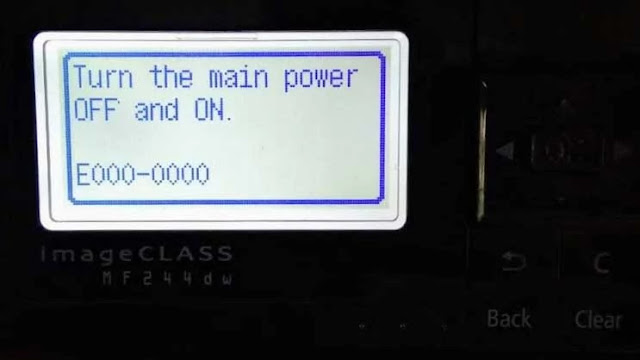
Canon imageCLASS MF 244dw How to fix turn the main power on E000-0000. We are sharing a few methods to fix the error E000-0000 on Canon image CLASS MF 244dw, MF 232dw, MF 264dw, MF 217dw series monochrome printer so checks them one by one until it gets solved.
Canon ImageCLASS MF 244DW error code E000-0000
 |
| canon imageclass mf232dw error e000-0000 |
Here in this post, I explain Canon imageCLASS MF 244dw How to fix turn the main power on E000-0000. We are sharing a few methods to fix the error E000-0000 on Canon image CLASS MF 244dw, MF 232dw, MF 264dw, MF 217dw series monochrome printer so checks them one by one until it gets solved.
Meaning of the E000-0000 error code:
The E000 error code is for the Fuser unit does not start up within a specified time. Check the fuser lamp, thermistor, and thermostat, and try to reset the trouble code if these parts are correct.
How to fix the E000-0000 error code
Follow these steps to fix your problem:
- Press the “Menu” button.
- Then Scroll down to “Initialize Menu” then press «OK«.
- Scroll to “Initialize All” then press «OK«.
- Search for “Initialize settings” press “OK” and select “YES” then Press “OK” wait a moment.
- Then switch off the machine and turn the power back ON and the code should reset.
I hope this was helpful, don’t forget to share it via any of the share buttons on this page are highly welcomed as well.
-
Catalog
-
Sign In
-
Contacts
-
Forum
-
Eng
- Error Codes
- Canon
- iR2520
- All codes
Error Codes List page 6
- Code: E354-0000
- Description: Mismatched serial number for the SOFT-ID PCB
- Remedy:
- Code: E355-0000
- Description: Mismatched serial number between the SOFT-ID, the Flash Rom and the FRAM
- Remedy:
- Code: E355-0004
- Description: System information error
- Remedy:
- Code: E355-0005
- Description: System information error
- Remedy:
- Code: E500-0000
- Description: Communication error
The communication with the host machine is interrupted. - Remedy: 1.Check the cable. 2.Replace the Finisher Controller PCB (PCB1). 3.Replace the DC Controller PCB.
- Code: E505-0001
- Description: EEPROM error
The checksum for the EEPROM data has an error. - Remedy: 1.Replace the Finisher Controller PCB (PCB1).