
[2636] 09-18 21:23:59:448: PROTOCOL_MSG_Start recvd, d=, hPort=15,flags=4,mask=180128a,IfType=2
[2252] 09-18 21:23:59:448: Line up event occurred on port 15
[2252] 09-18 21:23:59:448: Local identification = MSRAS-0-QWERTY1
[2252] 09-18 21:23:59:448: PortName: VPN3-10
[2252] 09-18 21:23:59:448: Starting PPP on link with IfType=0x2,IPIf=0xffffffff,IPv6If=0x8
[2252] 09-18 21:23:59:448: RasGetBuffer returned 771cb40 for SendBuf
[2252] 09-18 21:23:59:448: FsmInit called for protocol = c021, port = 15
[2252] 09-18 21:23:59:448: FsmInit for protocol = c021 Configuration 0x180128a
[2252] 09-18 21:23:59:448: PPP ConfigMask 0x180128a
[2252] 09-18 21:23:59:448: PPP ConfigMask = 180128a
[2252] 09-18 21:23:59:448: PPP ConfigMask = 180128a
[2252] 09-18 21:23:59:448: APs available = 2
[2252] 09-18 21:23:59:448: FsmReset called for protocol = c021, port = 15
[2252] 09-18 21:23:59:448: Inserting port in bucket # 15
[2252] 09-18 21:23:59:448: Inserting bundle in bucket # 17
[2252] 09-18 21:23:59:448: FsmOpen event received for protocol c021 on port 15
[2252] 09-18 21:23:59:448: FsmThisLayerStarted called for protocol = c021, port = 15
[2252] 09-18 21:23:59:448: FsmUp event received for protocol c021 on port 15
[2252] 09-18 21:23:59:448: <PPP packet sent at 09/18/2010 17:23:59:448
[2252] 09-18 21:23:59:448: <Protocol = LCP, Type = Configure-Req, Length = 0x17, Id = 0x0, Port = 15
[2252] 21:23:59:448: <C0 21 01 00 00 15 01 04 05 78 05 06 58 F8 15 7E |.!.......x..X..~|
[2252] 21:23:59:448: <07 02 08 02 0D 03 06 00 00 00 00 00 00 00 00 00 |................|
[2252] 09-18 21:23:59:448:
[2252] 09-18 21:23:59:448: InsertInTimerQ called portid=14,Id=0,Protocol=c021,EventType=0,fAuth=0,Timeout=1
[2252] 09-18 21:23:59:448: InsertInTimerQ called portid=14,Id=0,Protocol=0,EventType=3,fAuth=0,Timeout=150
[2252] 09-18 21:23:59:448: Line up event occurred on port 16
[2252] 09-18 21:23:59:448: PortName: VPN3-9
[2252] 09-18 21:23:59:448: CorrelationGuidStr: {EA6D9348-FAC7-47A1-8F8C-E7EDDC6329CB} from ddm
[2252] 09-18 21:23:59:448: correlation guid = {EA6D9348-FAC7-47A1-8F8C-E7EDDC6329CB} length 39-41
[2252] 09-18 21:23:59:448: Starting PPP on link with IfType=0x0,IPIf=0x0,IPv6If=0x0
[2252] 09-18 21:23:59:448: RasGetBuffer returned 902ad30 for SendBuf
[2252] 09-18 21:23:59:448: FsmInit called for protocol = c021, port = 16
[2252] 09-18 21:23:59:448: FsmInit for protocol = c021 Configuration 0x80870a
[2252] 09-18 21:23:59:448: PPP ConfigMask 0x80870a
[2252] 09-18 21:23:59:448: PPP ConfigMask = 80870a
[2252] 09-18 21:23:59:448: PPP ConfigMask = 80870a
[2252] 09-18 21:23:59:448: APs available = 3
[2252] 09-18 21:23:59:448: FsmReset called for protocol = c021, port = 16
[2252] 09-18 21:23:59:448: Inserting port in bucket # 16
[2252] 09-18 21:23:59:448: Inserting bundle in bucket # 16
[2252] 09-18 21:23:59:448: FsmOpen event received for protocol c021 on port 16
[2252] 09-18 21:23:59:448: FsmThisLayerStarted called for protocol = c021, port = 16
[2252] 09-18 21:23:59:448: FsmUp event received for protocol c021 on port 16
[2252] 09-18 21:23:59:448: <PPP packet sent at 09/18/2010 17:23:59:448
[2252] 09-18 21:23:59:448: <Protocol = LCP, Type = Configure-Req, Length = 0x36, Id = 0x0, Port = 16
[2252] 21:23:59:448: <C0 21 01 00 00 34 01 04 05 78 03 04 C2 27 05 06 |.!...4...x...'..|
[2252] 21:23:59:448: <58 F8 15 7E 07 02 08 02 0D 03 06 11 04 06 4E 13 |X..~..........N.|
[2252] 21:23:59:448: <17 01 B0 D4 31 07 75 51 49 28 82 96 3A A4 13 E0 |....1.uQI(..:...|
[2252] 21:23:59:448: <42 65 00 00 00 00 00 00 00 00 00 00 00 00 00 00 |Be..............|
[2252] 09-18 21:23:59:448:
[2252] 09-18 21:23:59:448: InsertInTimerQ called portid=16,Id=0,Protocol=c021,EventType=0,fAuth=0,Timeout=1
[2252] 09-18 21:23:59:448: InsertInTimerQ called portid=16,Id=0,Protocol=0,EventType=3,fAuth=0,Timeout=150
[2180] 09-18 21:23:59:448: Packet received (54 bytes) for hPort 15
[2252] 09-18 21:23:59:448: >PPP packet received at 09/18/2010 17:23:59:448
[2252] 09-18 21:23:59:448: >Protocol = LCP, Type = Configure-Req, Length = 0x17, Id = 0x0, Port = 16
[2252] 21:23:59:448: >C0 21 01 00 00 15 01 04 05 78 05 06 58 F8 15 7E |.!.......x..X..~|
[2252] 21:23:59:448: >07 02 08 02 0D 03 06 00 00 00 00 00 00 00 00 00 |................|
[2252] 09-18 21:23:59:448:
[2252] 09-18 21:23:59:448: CheckOption: Negotiated Options 2
[2252] 09-18 21:23:59:448: CheckOption: Negotiated Options 2
[2252] 09-18 21:23:59:448: CheckOption: Negotiated Options 82
[2252] 09-18 21:23:59:448: CheckOption: Negotiated Options 182
[2252] 09-18 21:23:59:448: CheckOption: Negotiated Options 2182
[2252] 09-18 21:23:59:448: <PPP packet sent at 09/18/2010 17:23:59:448
[2252] 09-18 21:23:59:448: <Protocol = LCP, Type = Configure-Nak, Length = 0xc, Id = 0x0, Port = 16
[2252] 21:23:59:448: <C0 21 03 00 00 0A 05 06 41 50 34 1E 00 00 00 00 |.!......AP4.....|
[2252] 09-18 21:23:59:448:
[2252] 09-18 21:23:59:448: >PPP packet received at 09/18/2010 17:23:59:448
[2252] 09-18 21:23:59:448: >Protocol = LCP, Type = Configure-Req, Length = 0x36, Id = 0x0, Port = 15
[2180] 09-18 21:23:59:448: Packet received (12 bytes) for hPort 15
[2252] 21:23:59:448: >C0 21 01 00 00 34 01 04 05 78 03 04 C2 27 05 06 |.!...4...x...'..|
[2252] 21:23:59:448: >58 F8 15 7E 07 02 08 02 0D 03 06 11 04 06 4E 13 |X..~..........N.|
[2252] 21:23:59:448: >17 01 B0 D4 31 07 75 51 49 28 82 96 3A A4 13 E0 |....1.uQI(..:...|
[2252] 21:23:59:448: >42 65 00 00 00 00 00 00 00 00 00 00 00 00 00 00 |Be..............|
[2252] 09-18 21:23:59:448:
[2252] 09-18 21:23:59:448: CheckOption: Negotiated Options 2
[2252] 09-18 21:23:59:448: CheckOption: Negotiated Options 2
[2252] 09-18 21:23:59:448: CheckOption: Negotiated Options 2
[2252] 09-18 21:23:59:448: CheckOption: Negotiated Options 82
[2252] 09-18 21:23:59:448: CheckOption: Negotiated Options 182
[2252] 09-18 21:23:59:448: CheckOption: Negotiated Options 2182
[2252] 09-18 21:23:59:448: <PPP packet sent at 09/18/2010 17:23:59:448
[2252] 09-18 21:23:59:448: <Protocol = LCP, Type = Configure-Reject, Length = 0x21, Id = 0x0, Port = 15
[2252] 21:23:59:448: <C0 21 04 00 00 1F 11 04 06 4E 13 17 01 B0 D4 31 |.!.......N.....1|
[2252] 21:23:59:448: <07 75 51 49 28 82 96 3A A4 13 E0 42 65 00 00 00 |.uQI(..:...Be...|
[2252] 21:23:59:448: <00 00 00 00 00 00 00 00 00 00 00 00 00 00 00 00 |................|
[2252] 09-18 21:23:59:448:
[2252] 09-18 21:23:59:448: >PPP packet received at 09/18/2010 17:23:59:448
[2252] 09-18 21:23:59:448: >Protocol = LCP, Type = Configure-Nak, Length = 0xc, Id = 0x0, Port = 15
[2180] 09-18 21:23:59:448: Packet received (33 bytes) for hPort 16
[2252] 21:23:59:448: >C0 21 03 00 00 0A 05 06 41 50 34 1E 00 00 00 00 |.!......AP4.....|
[2252] 09-18 21:23:59:448:
[2252] 09-18 21:23:59:448: CheckOption: Negotiated Options 20
[2252] 09-18 21:23:59:448: RemoveFromTimerQ called portid=14,Id=0,Protocol=c021,EventType=0,fAuth=0
[2252] 09-18 21:23:59:448: <PPP packet sent at 09/18/2010 17:23:59:448
[2252] 09-18 21:23:59:448: <Protocol = LCP, Type = Configure-Req, Length = 0x17, Id = 0x1, Port = 15
[2252] 21:23:59:448: <C0 21 01 01 00 15 01 04 05 78 05 06 41 50 34 1E |.!.......x..AP4.|
[2252] 21:23:59:448: <07 02 08 02 0D 03 06 00 00 00 00 00 00 00 00 00 |................|
[2252] 09-18 21:23:59:448:
[2252] 09-18 21:23:59:448: InsertInTimerQ called portid=14,Id=1,Protocol=c021,EventType=0,fAuth=0,Timeout=1
[2180] 09-18 21:23:59:448: Packet received (23 bytes) for hPort 16
[2252] 09-18 21:23:59:448: >PPP packet received at 09/18/2010 17:23:59:448
[2252] 09-18 21:23:59:448: >Protocol = LCP, Type = Configure-Reject, Length = 0x21, Id = 0x0, Port = 16
[2252] 21:23:59:448: >C0 21 04 00 00 1F 11 04 06 4E 13 17 01 B0 D4 31 |.!.......N.....1|
[2252] 21:23:59:448: >07 75 51 49 28 82 96 3A A4 13 E0 42 65 00 00 00 |.uQI(..:...Be...|
[2252] 21:23:59:448: >00 00 00 00 00 00 00 00 00 00 00 00 00 00 00 00 |................|
[2252] 09-18 21:23:59:448:
[2252] 09-18 21:23:59:448: RemoveFromTimerQ called portid=16,Id=0,Protocol=c021,EventType=0,fAuth=0
[2252] 09-18 21:23:59:448: <PPP packet sent at 09/18/2010 17:23:59:448
[2252] 09-18 21:23:59:448: <Protocol = LCP, Type = Configure-Req, Length = 0x1b, Id = 0x1, Port = 16
[2252] 21:23:59:448: <C0 21 01 01 00 19 01 04 05 78 03 04 C2 27 05 06 |.!.......x...'..|
[2252] 21:23:59:448: <58 F8 15 7E 07 02 08 02 0D 03 06 00 00 00 00 00 |X..~............|
[2252] 09-18 21:23:59:448:
[2252] 09-18 21:23:59:448: InsertInTimerQ called portid=16,Id=1,Protocol=c021,EventType=0,fAuth=0,Timeout=1
[2180] 09-18 21:23:59:448: Packet received (27 bytes) for hPort 15
[2252] 09-18 21:23:59:448: >PPP packet received at 09/18/2010 17:23:59:448
[2252] 09-18 21:23:59:448: >Protocol = LCP, Type = Configure-Req, Length = 0x17, Id = 0x1, Port = 16
[2252] 21:23:59:448: >C0 21 01 01 00 15 01 04 05 78 05 06 41 50 34 1E |.!.......x..AP4.|
[2252] 21:23:59:448: >07 02 08 02 0D 03 06 00 00 00 00 00 00 00 00 00 |................|
[2252] 09-18 21:23:59:448:
[2252] 09-18 21:23:59:448: CheckOption: Negotiated Options 2182
[2252] 09-18 21:23:59:448: CheckOption: Negotiated Options 21a2
[2252] 09-18 21:23:59:448: CheckOption: Negotiated Options 21a2
[2252] 09-18 21:23:59:448: CheckOption: Negotiated Options 21a2
[2252] 09-18 21:23:59:448: CheckOption: Negotiated Options 21a2
[2252] 09-18 21:23:59:448: <PPP packet sent at 09/18/2010 17:23:59:448
[2252] 09-18 21:23:59:448: <Protocol = LCP, Type = Configure-Ack, Length = 0x17, Id = 0x1, Port = 16
[2252] 21:23:59:448: <C0 21 02 01 00 15 01 04 05 78 05 06 41 50 34 1E |.!.......x..AP4.|
[2252] 21:23:59:448: <07 02 08 02 0D 03 06 00 00 00 00 00 00 00 00 00 |................|
[2252] 09-18 21:23:59:448:
[2252] 09-18 21:23:59:448: >PPP packet received at 09/18/2010 17:23:59:448
[2252] 09-18 21:23:59:448: >Protocol = LCP, Type = Configure-Req, Length = 0x1b, Id = 0x1, Port = 15
[2180] 09-18 21:23:59:448: Packet received (23 bytes) for hPort 15
[2252] 21:23:59:448: >C0 21 01 01 00 19 01 04 05 78 03 04 C2 27 05 06 |.!.......x...'..|
[2252] 21:23:59:448: >58 F8 15 7E 07 02 08 02 0D 03 06 00 00 00 00 00 |X..~............|
[2252] 09-18 21:23:59:448:
[2252] 09-18 21:23:59:448: CheckOption: Negotiated Options 2182
[2252] 09-18 21:23:59:448: CheckOption: Negotiated Options 2182
[2252] 09-18 21:23:59:448: CheckOption: Negotiated Options 21a2
[2252] 09-18 21:23:59:448: CheckOption: Negotiated Options 21a2
[2252] 09-18 21:23:59:448: CheckOption: Negotiated Options 21a2
[2252] 09-18 21:23:59:448: CheckOption: Negotiated Options 21a2
[2252] 09-18 21:23:59:448: <PPP packet sent at 09/18/2010 17:23:59:448
[2252] 09-18 21:23:59:448: <Protocol = LCP, Type = Configure-Nak, Length = 0xb, Id = 0x1, Port = 15
[2252] 21:23:59:448: <C0 21 03 01 00 09 03 05 C2 23 81 00 00 00 00 00 |.!.......#......|
[2252] 09-18 21:23:59:448:
[2252] 09-18 21:23:59:448: >PPP packet received at 09/18/2010 17:23:59:448
[2180] 09-18 21:23:59:448: Packet received (11 bytes) for hPort 16
[2252] 09-18 21:23:59:448: >Protocol = LCP, Type = Configure-Ack, Length = 0x17, Id = 0x1, Port = 15
[2252] 21:23:59:448: >C0 21 02 01 00 15 01 04 05 78 05 06 41 50 34 1E |.!.......x..AP4.|
[2252] 21:23:59:448: >07 02 08 02 0D 03 06 00 00 00 00 00 00 00 00 00 |................|
[2252] 09-18 21:23:59:448:
[2252] 09-18 21:23:59:448: RemoveFromTimerQ called portid=14,Id=1,Protocol=c021,EventType=0,fAuth=0
[2252] 09-18 21:23:59:448: >PPP packet received at 09/18/2010 17:23:59:448
[2252] 09-18 21:23:59:448: >Protocol = LCP, Type = Configure-Nak, Length = 0xb, Id = 0x1, Port = 16
[2252] 21:23:59:448: >C0 21 03 01 00 09 03 05 C2 23 81 00 00 00 00 00 |.!.......#......|
[2252] 09-18 21:23:59:448:
[2252] 09-18 21:23:59:448: CheckOption: Negotiated Options 8
[2252] 09-18 21:23:59:448: RemoveFromTimerQ called portid=16,Id=1,Protocol=c021,EventType=0,fAuth=0
[2252] 09-18 21:23:59:448: <PPP packet sent at 09/18/2010 17:23:59:448
[2252] 09-18 21:23:59:448: <Protocol = LCP, Type = Configure-Req, Length = 0x1c, Id = 0x2, Port = 16
[2252] 21:23:59:448: <C0 21 01 02 00 1A 01 04 05 78 03 05 C2 23 81 05 |.!.......x...#..|
[2252] 21:23:59:448: <06 58 F8 15 7E 07 02 08 02 0D 03 06 00 00 00 00 |.X..~...........|
[2252] 09-18 21:23:59:448:
[2252] 09-18 21:23:59:448: InsertInTimerQ called portid=16,Id=2,Protocol=c021,EventType=0,fAuth=0,Timeout=1
[2180] 09-18 21:23:59:448: Packet received (28 bytes) for hPort 15
[2252] 09-18 21:23:59:448: >PPP packet received at 09/18/2010 17:23:59:448
[2252] 09-18 21:23:59:448: >Protocol = LCP, Type = Configure-Req, Length = 0x1c, Id = 0x2, Port = 15
[2252] 21:23:59:448: >C0 21 01 02 00 1A 01 04 05 78 03 05 C2 23 81 05 |.!.......x...#..|
[2252] 21:23:59:448: >06 58 F8 15 7E 07 02 08 02 0D 03 06 00 00 00 00 |.X..~...........|
[2252] 09-18 21:23:59:448:
[2252] 09-18 21:23:59:448: CheckOption: Negotiated Options 21a2
[2252] 09-18 21:23:59:448: CheckOption: Negotiated Options 21aa
[2252] 09-18 21:23:59:448: CheckOption: Negotiated Options 21aa
[2252] 09-18 21:23:59:448: CheckOption: Negotiated Options 21aa
[2252] 09-18 21:23:59:448: CheckOption: Negotiated Options 21aa
[2252] 09-18 21:23:59:448: CheckOption: Negotiated Options 21aa
[2252] 09-18 21:23:59:448: <PPP packet sent at 09/18/2010 17:23:59:448
[2252] 09-18 21:23:59:448: <Protocol = LCP, Type = Configure-Ack, Length = 0x1c, Id = 0x2, Port = 15
[2252] 21:23:59:448: <C0 21 02 02 00 1A 01 04 05 78 03 05 C2 23 81 05 |.!.......x...#..|
[2252] 21:23:59:448: <06 58 F8 15 7E 07 02 08 02 0D 03 06 00 00 00 00 |.X..~...........|
[2252] 09-18 21:23:59:448:
[2252] 09-18 21:23:59:448: FsmThisLayerUp called for protocol = c021, port = 15
[2252] 09-18 21:23:59:448: LCP Local Options-------------
[2180] 09-18 21:23:59:448: Packet received (28 bytes) for hPort 16
[2252] 09-18 21:23:59:448: 	MRU=1400,ACCM=-1,Auth=0,MagicNumber=1095775262,PFC=ON,ACFC=ON
[2252] 09-18 21:23:59:448: 	Recv Framing = PPP,SSHF=OFF,MRRU=1500,LinkDiscrim=0
[2252] 09-18 21:23:59:448: LCP Remote Options-------------
[2252] 09-18 21:23:59:448: 	MRU=1400,ACCM=-1,Auth=c223,MagicNumber=1492653438,PFC=ON,ACFC=ON
[2252] 09-18 21:23:59:448: 	Send Framing = PPP,SSHF=OFF,MRRU=1500,LinkDiscrim=0
[2252] 09-18 21:23:59:448: LCP Configured successfully
[2252] 09-18 21:23:59:448: Sending Version Identification MSRASV5.20
[2252] 09-18 21:23:59:448: <PPP packet sent at 09/18/2010 17:23:59:448
[2252] 09-18 21:23:59:448: <Protocol = LCP, Type = Identification, Length = 0x14, Id = 0x2, Port = 15
[2252] 21:23:59:448: <C0 21 0C 02 00 12 41 50 34 1E 4D 53 52 41 53 56 |.!....AP4.MSRASV|
[2252] 21:23:59:448: <35 2E 32 30 00 00 00 00 00 00 00 00 00 00 00 00 |5.20............|
[2252] 09-18 21:23:59:448:
[2252] 09-18 21:23:59:448: Sending ComputerName Identification MSRAS-0-QWERTY1
[2252] 09-18 21:23:59:448: <PPP packet sent at 09/18/2010 17:23:59:448
[2180] 09-18 21:23:59:448: Packet received (20 bytes) for hPort 16
[2252] 09-18 21:23:59:448: <Protocol = LCP, Type = Identification, Length = 0x19, Id = 0x3, Port = 15
[2252] 21:23:59:448: <C0 21 0C 03 00 17 41 50 34 1E 4D 53 52 41 53 2D |.!....AP4.MSRAS-|
[2252] 21:23:59:448: <30 2D 51 57 45 52 54 59 31 00 00 00 00 00 00 00 |0-QWERTY1.......|
[2252] 09-18 21:23:59:448:
[2252] 09-18 21:23:59:448: Client: LCP Configured successfully for Guid {EA6D9348-FAC7-47A1-8F8C-E7EDDC6329CB}
[2252] 09-18 21:23:59:448: Sending Correlation Guid {EA6D9348-FAC7-47A1-8F8C-E7EDDC6329CB}
[2180] 09-18 21:23:59:448: Packet received (25 bytes) for hPort 16
[2252] 09-18 21:23:59:448: <PPP packet sent at 09/18/2010 17:23:59:448
[2252] 09-18 21:23:59:448: <Protocol = LCP, Type = Identification, Length = 0x1a, Id = 0x4, Port = 15
[2252] 21:23:59:448: <C0 21 0C 04 00 18 41 50 34 1E 48 93 6D EA C7 FA |.!....AP4.H.m...|
[2252] 21:23:59:448: <A1 47 8F 8C E7 ED DC 63 29 CB 00 00 00 00 00 00 |.G.....c).......|
[2252] 09-18 21:23:59:448:
[2252] 09-18 21:23:59:448: Authenticating phase started
[2180] 09-18 21:23:59:448: Packet received (26 bytes) for hPort 16
[2252] 09-18 21:23:59:448: Calling APWork in APStart
[2252] 09-18 21:23:59:448: >PPP packet received at 09/18/2010 17:23:59:448
[2252] 09-18 21:23:59:448: >Protocol = LCP, Type = Configure-Ack, Length = 0x1c, Id = 0x2, Port = 16
[2252] 21:23:59:448: >C0 21 02 02 00 1A 01 04 05 78 03 05 C2 23 81 05 |.!.......x...#..|
[2252] 21:23:59:448: >06 58 F8 15 7E 07 02 08 02 0D 03 06 00 00 00 00 |.X..~...........|
[2252] 09-18 21:23:59:448:
[2252] 09-18 21:23:59:448: RemoveFromTimerQ called portid=16,Id=2,Protocol=c021,EventType=0,fAuth=0
[2252] 09-18 21:23:59:448: FsmThisLayerUp called for protocol = c021, port = 16
[2252] 09-18 21:23:59:448: LCP Local Options-------------
[2252] 09-18 21:23:59:448: 	MRU=1400,ACCM=-1,Auth=c223,MagicNumber=1492653438,PFC=ON,ACFC=ON
[2252] 09-18 21:23:59:448: 	Recv Framing = PPP,SSHF=OFF,MRRU=1500,LinkDiscrim=0
[2252] 09-18 21:23:59:448: LCP Remote Options-------------
[2252] 09-18 21:23:59:448: 	MRU=1400,ACCM=-1,Auth=0,MagicNumber=1095775262,PFC=ON,ACFC=ON
[2252] 09-18 21:23:59:448: 	Send Framing = PPP,SSHF=OFF,MRRU=1500,LinkDiscrim=0
[2252] 09-18 21:23:59:448: LCP Configured successfully
[2252] 09-18 21:23:59:448: Authenticating phase started
[2252] 09-18 21:23:59:448: Calling APWork in APStart
[2252] 09-18 21:23:59:448: <PPP packet sent at 09/18/2010 17:23:59:448
[2252] 09-18 21:23:59:448: <Protocol = CHAP, Type = Protocol specific, Length = 0x1e, Id = 0x0, Port = 16
[2252] 21:23:59:448: <C2 23 01 00 00 1C 10 63 6C 85 55 89 0D 77 99 D1 |.#.....cl.U..w..|
[2252] 21:23:59:448: <1D 48 FD 34 B9 17 C5 51 57 45 52 54 59 31 00 00 |.H.4...QWERTY1..|
[2252] 09-18 21:23:59:448:
[2252] 09-18 21:23:59:448: InsertInTimerQ called portid=16,Id=0,Protocol=c223,EventType=0,fAuth=1,Timeout=1
[2252] 09-18 21:23:59:448: >PPP packet received at 09/18/2010 17:23:59:448
[2180] 09-18 21:23:59:448: Packet received (30 bytes) for hPort 15
[2252] 09-18 21:23:59:448: >Protocol = LCP, Type = Identification, Length = 0x14, Id = 0x2, Port = 16
[2252] 21:23:59:448: >C0 21 0C 02 00 12 41 50 34 1E 4D 53 52 41 53 56 |.!....AP4.MSRASV|
[2252] 21:23:59:448: >35 2E 32 30 00 00 00 00 00 00 00 00 00 00 00 00 |5.20............|
[2252] 09-18 21:23:59:448:
[2252] 09-18 21:23:59:448: Identification packet received
[2252] 09-18 21:23:59:448: Remote identification = MSRASV5.20 length 11-13
[2252] 09-18 21:23:59:448: >PPP packet received at 09/18/2010 17:23:59:448
[2252] 09-18 21:23:59:448: >Protocol = LCP, Type = Identification, Length = 0x19, Id = 0x3, Port = 16
[2252] 21:23:59:448: >C0 21 0C 03 00 17 41 50 34 1E 4D 53 52 41 53 2D |.!....AP4.MSRAS-|
[2252] 21:23:59:448: >30 2D 51 57 45 52 54 59 31 00 00 00 00 00 00 00 |0-QWERTY1.......|
[2252] 09-18 21:23:59:448:
[2252] 09-18 21:23:59:448: Identification packet received
[2252] 09-18 21:23:59:448: Remote identification = MSRAS-0-QWERTY1 length 16-18
[2252] 09-18 21:23:59:448: >PPP packet received at 09/18/2010 17:23:59:448
[2252] 09-18 21:23:59:448: >Protocol = LCP, Type = Identification, Length = 0x1a, Id = 0x4, Port = 16
[2252] 21:23:59:448: >C0 21 0C 04 00 18 41 50 34 1E 48 93 6D EA C7 FA |.!....AP4.H.m...|
[2252] 21:23:59:448: >A1 47 8F 8C E7 ED DC 63 29 CB 00 00 00 00 00 00 |.G.....c).......|
[2252] 09-18 21:23:59:448:
[2252] 09-18 21:23:59:448: Identification packet received
[2252] 09-18 21:23:59:448: ReceiveIndication: ClientVersion already present for port 16
[2252] 09-18 21:23:59:448: >PPP packet received at 09/18/2010 17:23:59:448
[2252] 09-18 21:23:59:448: >Protocol = CHAP, Type = Protocol specific, Length = 0x1e, Id = 0x0, Port = 15
[2252] 21:23:59:448: >C2 23 01 00 00 1C 10 63 6C 85 55 89 0D 77 99 D1 |.#.....cl.U..w..|
[2252] 21:23:59:448: >1D 48 FD 34 B9 17 C5 51 57 45 52 54 59 31 00 00 |.H.4...QWERTY1..|
[2252] 09-18 21:23:59:448:
[2252] 09-18 21:23:59:448: <PPP packet sent at 09/18/2010 17:23:59:448
[2252] 09-18 21:23:59:448: <Protocol = CHAP, Type = Protocol specific, Length = 0x3b, Id = 0x0, Port = 15
[2252] 21:23:59:448: <C2 23 02 00 00 39 31 E2 36 CF D4 0A A2 C2 CE C7 |.#...91.6.......|
[2252] 21:23:59:448: <AA E0 75 C7 E3 0B 58 00 00 00 00 00 00 00 00 32 |..u...X........2|
[2252] 21:23:59:448: <45 6B A4 88 DD 00 35 4A 7C 13 75 BC BA 13 73 F5 |Ek....5J|.u...s.|
[2252] 21:23:59:448: <16 35 0B 30 86 B7 FD 00 76 70 6E 00 00 00 00 00 |.5.0....vpn.....|
[2252] 09-18 21:23:59:448:
[2252] 09-18 21:23:59:448: InsertInTimerQ called portid=14,Id=0,Protocol=c223,EventType=0,fAuth=0,Timeout=1
[2180] 09-18 21:23:59:448: Packet received (59 bytes) for hPort 16
[2252] 09-18 21:23:59:448: >PPP packet received at 09/18/2010 17:23:59:448
[2252] 09-18 21:23:59:448: >Protocol = CHAP, Type = Protocol specific, Length = 0x3b, Id = 0x0, Port = 16
[2252] 21:23:59:448: >C2 23 02 00 00 39 31 E2 36 CF D4 0A A2 C2 CE C7 |.#...91.6.......|
[2252] 21:23:59:448: >AA E0 75 C7 E3 0B 58 00 00 00 00 00 00 00 00 32 |..u...X........2|
[2252] 21:23:59:448: >45 6B A4 88 DD 00 35 4A 7C 13 75 BC BA 13 73 F5 |Ek....5J|.u...s.|
[2252] 21:23:59:448: >16 35 0B 30 86 B7 FD 00 76 70 6E 00 00 00 00 00 |.5.0....vpn.....|
[2252] 09-18 21:23:59:448:
[2252] 09-18 21:23:59:448: RemoveFromTimerQ called portid=16,Id=0,Protocol=c223,EventType=0,fAuth=1
[2252] 09-18 21:23:59:448: <PPP packet sent at 09/18/2010 17:23:59:448
[2252] 09-18 21:23:59:448: <Protocol = CHAP, Type = Protocol specific, Length = 0x30, Id = 0x0, Port = 16
[2252] 21:23:59:448: <C2 23 03 00 00 2E 53 3D 42 41 41 34 42 41 46 36 |.#....S=BAA4BAF6|
[2252] 21:23:59:448: <44 42 34 45 38 31 33 33 42 38 43 39 44 38 42 42 |DB4E8133B8C9D8BB|
[2252] 21:23:59:448: <35 36 43 45 43 31 38 42 38 42 32 31 35 41 37 43 |56CEC18B8B215A7C|
[2252] 09-18 21:23:59:448:
[2180] 09-18 21:23:59:448: Packet received (48 bytes) for hPort 15
[2252] 09-18 21:23:59:448: Strong encryption
[2252] 09-18 21:23:59:448: MPPE-Send/Recv-Keys set
[2252] 09-18 21:23:59:448: Auth Attribute Domain = QWERTY1
[2252] 09-18 21:23:59:448: Auth Attribute Idle Timeout Seconds = 0
[2252] 09-18 21:23:59:448: AuthAttribute MaxChannelsAllowed = -1
[2252] 09-18 21:23:59:448: FsmThisLayerUp called for protocol = c223, port = 16
[2252] 09-18 21:23:59:448: NotifyCaller(hPort=16, dwMsgId=20)
[2252] 09-18 21:23:59:448: Server: Authentication successful for Guid {EA6D9348-FAC7-47A1-8F8C-E7EDDC6329CB}
[2252] 09-18 21:23:59:448: Callback phase started
[2252] 09-18 21:23:59:448: CallbackPriv in CB = 1
[2252] 09-18 21:23:59:448: <PPP packet sent at 09/18/2010 17:23:59:448
[2252] 09-18 21:23:59:448: <Protocol = CBCP, Type = Protocol specific, Length = 0x8, Id = 0x1, Port = 16
[2252] 21:23:59:448: <C0 29 01 01 00 06 01 02 00 00 00 00 00 00 00 00 |.)..............|
[2252] 09-18 21:23:59:448:
[2252] 09-18 21:23:59:448: InsertInTimerQ called portid=16,Id=1,Protocol=c029,EventType=0,fAuth=0,Timeout=1
[2252] 09-18 21:23:59:448: >PPP packet received at 09/18/2010 17:23:59:448
[2252] 09-18 21:23:59:448: >Protocol = CHAP, Type = Protocol specific, Length = 0x30, Id = 0x0, Port = 15
[2252] 21:23:59:448: >C2 23 03 00 00 2E 53 3D 42 41 41 34 42 41 46 36 |.#....S=BAA4BAF6|
[2180] 09-18 21:23:59:448: Packet received (8 bytes) for hPort 15
[2252] 21:23:59:448: >44 42 34 45 38 31 33 33 42 38 43 39 44 38 42 42 |DB4E8133B8C9D8BB|
[2252] 21:23:59:448: >35 36 43 45 43 31 38 42 38 42 32 31 35 41 37 43 |56CEC18B8B215A7C|
[2252] 09-18 21:23:59:448:
[2252] 09-18 21:23:59:448: RemoveFromTimerQ called portid=14,Id=0,Protocol=c223,EventType=0,fAuth=0
[2252] 09-18 21:23:59:448: MS-CHAP-MPPE-Keys set
[2252] 09-18 21:23:59:448: FsmThisLayerUp called for protocol = c223, port = 15
[2252] 09-18 21:23:59:448: NotifyCaller(hPort=15, dwMsgId=20)
[2252] 09-18 21:23:59:448: Callback phase started
[2252] 09-18 21:23:59:448: CallbackPriv in CB = 0
[2252] 09-18 21:23:59:448: >PPP packet received at 09/18/2010 17:23:59:448
[2252] 09-18 21:23:59:448: >Protocol = CBCP, Type = Protocol specific, Length = 0x8, Id = 0x1, Port = 15
[2252] 21:23:59:448: >C0 29 01 01 00 06 01 02 00 00 00 00 00 00 00 00 |.)..............|
[2252] 09-18 21:23:59:448:
[2252] 09-18 21:23:59:448: <PPP packet sent at 09/18/2010 17:23:59:448
[2252] 09-18 21:23:59:448: <Protocol = CBCP, Type = Protocol specific, Length = 0x8, Id = 0x1, Port = 15
[2252] 21:23:59:448: <C0 29 02 01 00 06 01 02 00 00 00 00 00 00 00 00 |.)..............|
[2252] 09-18 21:23:59:448:
[2252] 09-18 21:23:59:448: InsertInTimerQ called portid=14,Id=1,Protocol=c029,EventType=0,fAuth=0,Timeout=1
[2180] 09-18 21:23:59:448: Packet received (8 bytes) for hPort 16
[2252] 09-18 21:23:59:464: >PPP packet received at 09/18/2010 17:23:59:464
[2252] 09-18 21:23:59:464: >Protocol = CBCP, Type = Protocol specific, Length = 0x8, Id = 0x1, Port = 16
[2252] 21:23:59:464: >C0 29 02 01 00 06 01 02 00 00 00 00 00 00 00 00 |.)..............|
[2252] 09-18 21:23:59:464:
[2252] 09-18 21:23:59:464: RemoveFromTimerQ called portid=16,Id=1,Protocol=c029,EventType=0,fAuth=0
[2252] 09-18 21:23:59:464: <PPP packet sent at 09/18/2010 17:23:59:464
[2252] 09-18 21:23:59:464: <Protocol = CBCP, Type = Protocol specific, Length = 0x8, Id = 0x1, Port = 16
[2252] 21:23:59:464: <C0 29 03 01 00 06 01 02 00 00 00 00 00 00 00 00 |.)..............|
[2252] 09-18 21:23:59:464:
[2252] 09-18 21:23:59:464: FsmThisLayerUp called for protocol = c029, port = 16
[2252] 09-18 21:23:59:464: NotifyCaller(hPort=16, dwMsgId=23)
[2252] 09-18 21:23:59:464: GetClientInterfaceInfo: Using Normal-filter
[2180] 09-18 21:23:59:464: Packet received (8 bytes) for hPort 15
[2252] 09-18 21:23:59:464: GetClientInterfaceInfo: Using Normal-Ipv6filter
[2252] 09-18 21:23:59:464: ProcessNPSAuthAttributes(hPort=16): MS_VSA_Not_Quarantine_Capable received with value [0x1]
[2252] 09-18 21:23:59:464: ProcessNPSAuthAttributes(hPort=16): Received Normal v4 filters
[2252] 09-18 21:23:59:464: ProcessNPSAuthAttributes(hPort=46989316): RQS-RQC case
[2252] 09-18 21:23:59:464: ProcessNPSAuthAttributes(hPort=16): RQS-RQC: Using V4 Normal Filter as DdmNewBundle.pFilter
[2252] 09-18 21:23:59:464: >PPP packet received at 09/18/2010 17:23:59:464
[2252] 09-18 21:23:59:464: >Protocol = CBCP, Type = Protocol specific, Length = 0x8, Id = 0x1, Port = 15
[2252] 21:23:59:464: >C0 29 03 01 00 06 01 02 00 00 00 00 00 00 00 00 |.)..............|
[2252] 09-18 21:23:59:464:
[2252] 09-18 21:23:59:464: RemoveFromTimerQ called portid=14,Id=1,Protocol=c029,EventType=0,fAuth=0
[2252] 09-18 21:23:59:464: FsmThisLayerUp called for protocol = c029, port = 15
[2252] 09-18 21:23:59:464: NotifyCaller(hPort=15, dwMsgId=3)
[2252] 09-18 21:23:59:464: FsmInit called for protocol = 80fd, port = 15
[2252] 09-18 21:23:59:464: FsmInit for protocol = 80fd Configuration 0x180128a
[2252] 09-18 21:23:59:464: FsmReset called for protocol = 80fd, port = 15
[2252] 09-18 21:23:59:464: NotifyCaller(hPort=15, dwMsgId=1)
[2420] 09-18 21:23:59:464: PROTOCOL_MSG_DdmInterfaceInfo recvd,IPif=11,IPv6=12,Type=0
[2252] 09-18 21:23:59:464: FsmInit called for protocol = 80fd, port = 16
[2252] 09-18 21:23:59:464: FsmInit for protocol = 80fd Configuration 0x80970a
[2252] 09-18 21:23:59:464: FsmReset called for protocol = 80fd, port = 16
[2252] 09-18 21:23:59:464: FsmInit called for protocol = 8021, port = 16
[2252] 09-18 21:23:59:464: FsmInit for protocol = 8021 Configuration 0x80970a
[2636] 09-18 21:23:59:464: PROTOCOL_MSG_Stop recvd
[2252] 09-18 21:23:59:464: FsmReset called for protocol = 8021, port = 16
[2252] 09-18 21:23:59:464: FsmOpen event received for protocol 80fd on port 16
[2252] 09-18 21:23:59:464: FsmThisLayerStarted called for protocol = 80fd, port = 16
[2252] 09-18 21:23:59:464: FsmUp event received for protocol 80fd on port 16
[2252] 09-18 21:23:59:464: <PPP packet sent at 09/18/2010 17:23:59:464
[2252] 09-18 21:23:59:464: <Protocol = CCP, Type = Configure-Req, Length = 0xc, Id = 0x4, Port = 16
[2252] 21:23:59:464: <80 FD 01 04 00 0A 12 06 01 00 00 41 00 00 00 00 |...........A....|
[2252] 09-18 21:23:59:464:
[2252] 09-18 21:23:59:464: InsertInTimerQ called portid=16,Id=4,Protocol=80fd,EventType=0,fAuth=0,Timeout=1
[2252] 09-18 21:23:59:464: FsmOpen event received for protocol 8021 on port 16
[2252] 09-18 21:23:59:464: FsmThisLayerStarted called for protocol = 8021, port = 16
[2252] 09-18 21:23:59:464: FsmUp event received for protocol 8021 on port 16
[2252] 09-18 21:23:59:464: <PPP packet sent at 09/18/2010 17:23:59:464
[2252] 09-18 21:23:59:464: <Protocol = IPCP, Type = Configure-Req, Length = 0xc, Id = 0x5, Port = 16
[2252] 21:23:59:464: <80 21 01 05 00 0A 03 06 0A 0A 00 02 00 00 00 00 |.!..............|
[2252] 09-18 21:23:59:464:
[2252] 09-18 21:23:59:464: InsertInTimerQ called portid=16,Id=5,Protocol=8021,EventType=0,fAuth=0,Timeout=1
[2252] 09-18 21:23:59:464: FsmClose event received for protocol c021 on port 15
[2252] 09-18 21:23:59:464: RemoveFromTimerQ called portid=14,Id=1,Protocol=c021,EventType=0,fAuth=0
[2252] 09-18 21:23:59:464: FsmThisLayerDown called for protocol = c021, port = 15
[2180] 09-18 21:23:59:464: Packet received (12 bytes) for hPort 15
[2252] 09-18 21:23:59:464: RemoveFromTimerQ called portid=14,Id=0,Protocol=c223,EventType=0,fAuth=0
[2180] 09-18 21:23:59:464: Packet received (12 bytes) for hPort 15
[2252] 09-18 21:23:59:464: RemoveFromTimerQ called portid=14,Id=1,Protocol=c029,EventType=0,fAuth=0
[2252] 09-18 21:23:59:464: <PPP packet sent at 09/18/2010 17:23:59:464
[2252] 09-18 21:23:59:464: <Protocol = LCP, Type = Terminate-Req, Length = 0x12, Id = 0x5, Port = 15
[2252] 21:23:59:464: <C0 21 05 05 00 10 41 50 34 1E 00 3C CD 74 00 00 |.!....AP4..<.t..|
[2252] 21:23:59:464: <02 D0 00 00 00 00 00 00 00 00 00 00 00 00 00 00 |................|
[2252] 09-18 21:23:59:464:
[2252] 09-18 21:23:59:464: InsertInTimerQ called portid=14,Id=5,Protocol=c021,EventType=0,fAuth=0,Timeout=1
[2180] 09-18 21:23:59:464: Packet received (18 bytes) for hPort 16
[2252] 09-18 21:23:59:464: >PPP packet received at 09/18/2010 17:23:59:464
[2252] 09-18 21:23:59:464: >Protocol = CCP, Type = Configure-Req, Length = 0xc, Id = 0x4, Port = 15
[2252] 21:23:59:464: >80 FD 01 04 00 0A 12 06 01 00 00 41 00 00 00 00 |...........A....|
[2252] 09-18 21:23:59:464:
[2252] 09-18 21:23:59:464: Non-LCP packet received when LCP is not opened
[2252] 09-18 21:23:59:464: Packet being silently discarded
[2252] 09-18 21:23:59:464: >PPP packet received at 09/18/2010 17:23:59:464
[2252] 09-18 21:23:59:464: >Protocol = IPCP, Type = Configure-Req, Length = 0xc, Id = 0x5, Port = 15
[2252] 21:23:59:464: >80 21 01 05 00 0A 03 06 0A 0A 00 02 00 00 00 00 |.!..............|
[2252] 09-18 21:23:59:464:
[2252] 09-18 21:23:59:464: Non-LCP packet received when LCP is not opened
[2252] 09-18 21:23:59:464: Packet being silently discarded
[2252] 09-18 21:23:59:464: >PPP packet received at 09/18/2010 17:23:59:464
[2252] 09-18 21:23:59:464: >Protocol = LCP, Type = Terminate-Req, Length = 0x12, Id = 0x5, Port = 16
[2252] 21:23:59:464: >C0 21 05 05 00 10 41 50 34 1E 00 3C CD 74 00 00 |.!....AP4..<.t..|
[2252] 21:23:59:464: >02 D0 00 00 00 00 00 00 00 00 00 00 00 00 00 00 |................|
[2252] 09-18 21:23:59:464:
[2252] 09-18 21:23:59:464: RemoveFromTimerQ called portid=16,Id=2,Protocol=c021,EventType=0,fAuth=0
[2252] 09-18 21:23:59:464: RemoveFromTimerQ called portid=16,Id=0,Protocol=0,EventType=2,fAuth=0
[2252] 09-18 21:23:59:464: FsmThisLayerDown called for protocol = c021, port = 16
[2252] 09-18 21:23:59:464: FsmDown event received for protocol 80fd on port 16
[2252] 09-18 21:23:59:464: RemoveFromTimerQ called portid=16,Id=4,Protocol=80fd,EventType=0,fAuth=0
[2252] 09-18 21:23:59:464: FsmReset called for protocol = 80fd, port = 16
[2252] 09-18 21:23:59:464: FsmDown event received for protocol 8021 on port 16
[2252] 09-18 21:23:59:464: RemoveFromTimerQ called portid=16,Id=5,Protocol=8021,EventType=0,fAuth=0
[2252] 09-18 21:23:59:464: FsmReset called for protocol = 8021, port = 16
[2252] 09-18 21:23:59:464: <PPP packet sent at 09/18/2010 17:23:59:464
[2252] 09-18 21:23:59:464: <Protocol = LCP, Type = Terminate-Ack, Length = 0x12, Id = 0x5, Port = 16
[2252] 21:23:59:464: <C0 21 06 05 00 10 41 50 34 1E 00 3C CD 74 00 00 |.!....AP4..<.t..|
[2252] 21:23:59:464: <02 D0 00 00 00 00 00 00 00 00 00 00 00 00 00 00 |................|
[2252] 09-18 21:23:59:464:
[2252] 09-18 21:23:59:464: LCP Phase: Received Terminate Request
[2252] 09-18 21:23:59:464: InsertInTimerQ called portid=16,Id=0,Protocol=0,EventType=2,fAuth=0,Timeout=1
[2180] 09-18 21:23:59:464: Packet received (18 bytes) for hPort 15
[2252] 09-18 21:23:59:464: >PPP packet received at 09/18/2010 17:23:59:464
[2252] 09-18 21:23:59:464: >Protocol = LCP, Type = Terminate-Ack, Length = 0x12, Id = 0x5, Port = 15
[2252] 21:23:59:464: >C0 21 06 05 00 10 41 50 34 1E 00 3C CD 74 00 00 |.!....AP4..<.t..|
[2252] 21:23:59:464: >02 D0 00 00 00 00 00 00 00 00 00 00 00 00 00 00 |................|
[2252] 09-18 21:23:59:464:
[2252] 09-18 21:23:59:464: RemoveFromTimerQ called portid=14,Id=5,Protocol=c021,EventType=0,fAuth=0
[2252] 09-18 21:23:59:464: FsmThisLayerFinished called for protocol = c021, port = 15
[2252] 09-18 21:23:59:464: NotifyCaller(hPort=15, dwMsgId=10)
[2180] 09-18 21:23:59:464: PROTOCOL_MSG_LineDown recvd, hPort=16
[2180] 09-18 21:23:59:464: PROTOCOL_MSG_LineDown recvd, hPort=15
[2252] 09-18 21:23:59:464: Line down event occurred on port 16
[2252] 09-18 21:23:59:573: FsmDown event received for protocol c021 on port 16
[2252] 09-18 21:23:59:573: RemoveFromTimerQ called portid=16,Id=2,Protocol=c021,EventType=0,fAuth=0
[2252] 09-18 21:23:59:573: FsmReset called for protocol = c021, port = 16
[2252] 09-18 21:23:59:573: RemoveFromTimerQ called portid=16,Id=0,Protocol=0,EventType=3,fAuth=0
[2252] 09-18 21:23:59:573: RemoveFromTimerQ called portid=16,Id=0,Protocol=0,EventType=7,fAuth=0
[2252] 09-18 21:23:59:573: RemoveFromTimerQ called portid=16,Id=0,Protocol=0,EventType=2,fAuth=0
[2252] 09-18 21:23:59:573: RemoveFromTimerQ called portid=16,Id=0,Protocol=0,EventType=1,fAuth=0
[2252] 09-18 21:23:59:573: RemoveFromTimerQ called portid=16,Id=0,Protocol=0,EventType=4,fAuth=0
[2252] 09-18 21:23:59:573: RemoveFromTimerQ called portid=16,Id=0,Protocol=0,EventType=6,fAuth=0
[2252] 09-18 21:23:59:573: LcpEnd
[2252] 09-18 21:23:59:573: Line down event occurred on port 15
[2252] 09-18 21:23:59:573: FsmDown event received for protocol c021 on port 15
[2252] 09-18 21:23:59:573: RemoveFromTimerQ called portid=14,Id=5,Protocol=c021,EventType=0,fAuth=0
[2252] 09-18 21:23:59:573: FsmReset called for protocol = c021, port = 15
[2252] 09-18 21:23:59:573: RemoveFromTimerQ called portid=14,Id=0,Protocol=0,EventType=3,fAuth=0
[2252] 09-18 21:23:59:573: RemoveFromTimerQ called portid=14,Id=0,Protocol=0,EventType=7,fAuth=0
[2252] 09-18 21:23:59:573: RemoveFromTimerQ called portid=14,Id=0,Protocol=0,EventType=2,fAuth=0
[2252] 09-18 21:23:59:573: RemoveFromTimerQ called portid=14,Id=0,Protocol=0,EventType=1,fAuth=0
[2252] 09-18 21:23:59:573: RemoveFromTimerQ called portid=14,Id=1,Protocol=c029,EventType=0,fAuth=0
[2252] 09-18 21:23:59:573: LcpEnd
[2252] 09-18 21:23:59:573: Post line down event occurred on port 15
[2252] 09-18 21:23:59:573: NotifyCaller(hPort=15, dwMsgId=25)
[980] 09-18 21:23:59:573: Stopping Accounting for port 16
[2252] 09-18 21:24:01:586: Post line down event occurred on port 16
[2252] 09-18 21:24:01:586: NotifyCaller(hPort=16, dwMsgId=25)
Такого подключения нет. Запустите автоматическое создания подключения

При удаленном подключении к корпоративной сети ras.urfu.ru с логином возникает сообщение: «Не удается найти сертификат. Требуется установка на компьютер сертификата.”
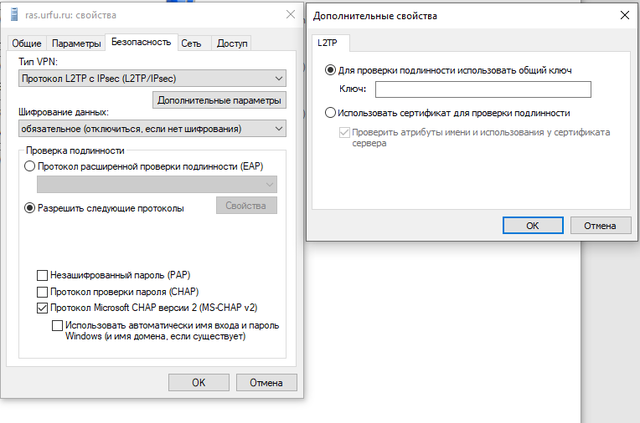
Проверить правильность настроек во вкладке безопасность:
Выполнить команду при подключенном VPN
nslookup my.urfu.ru (любой другой внутренний ресурс)

Если все успешно распознается, но при этом все равно браузер выдает 403 ошибку – то необходимо проверить ПК на вирусы. Проблема в используемом браузере.
619 ошибка
Вводите неверный пароль
628 ошибка
Попробовать подключение по другому протоколу PPTP или L2TP.
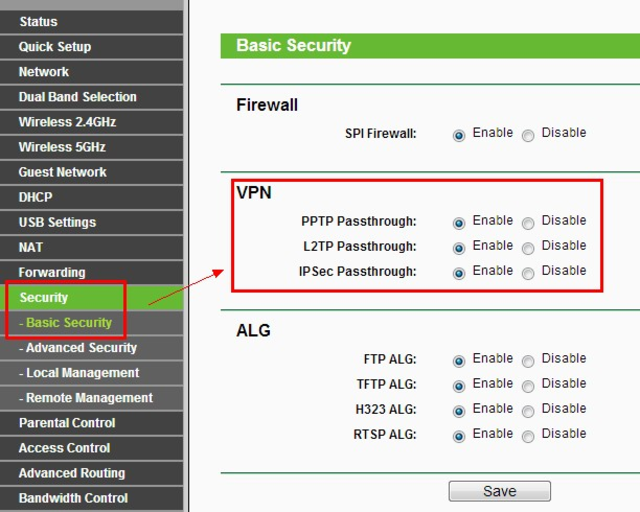
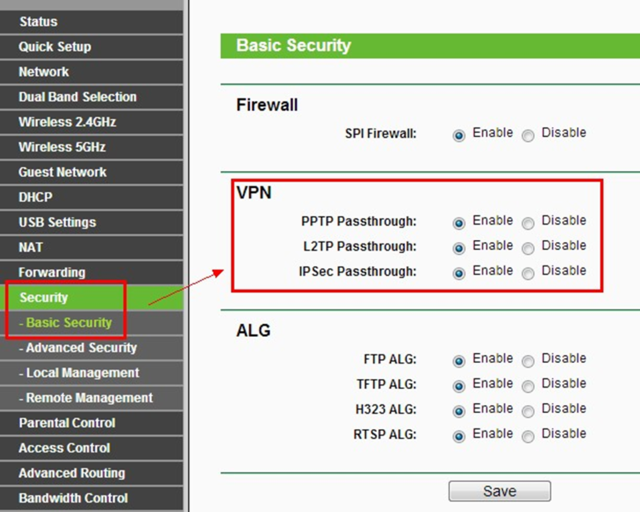
Если подключаетесь через маршрутизатор, то проверить разрешения для протоколов:
720 ошибка
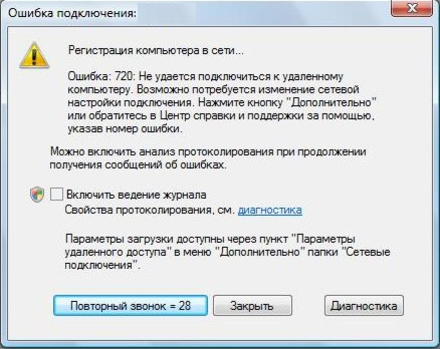
Данная ошибка возникает при некорректной работе WAN Miniport (это системные адаптеры). Или неправильно настроенного Kaspersky Secure Connection (если установлен).
Данная неисправность исправляется самой OS:


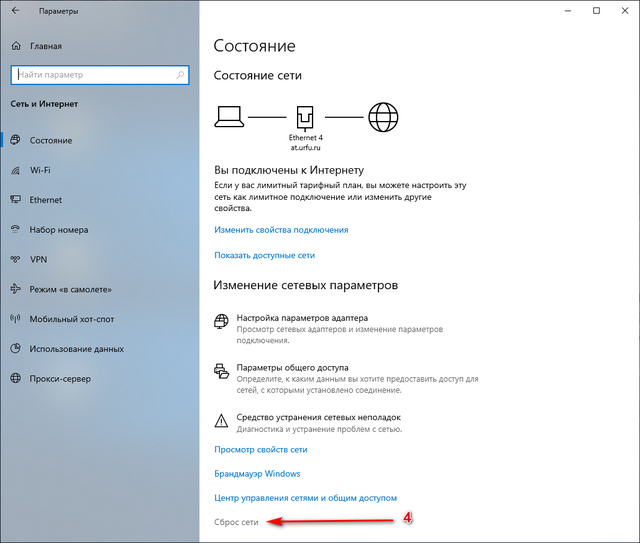
Далее соглашаемся на сброс параметров сети.
Через 5 минут ПК будет перезагружен и все сетевые параметры будут восстановлены.
Данный метод подходит для большинства ошибок связанных с сетевыми подключениями.
768 ошибка

Проверить правильность выбора метода шифрования данных (при PPTP- необязательное, L2TP – обязательное)
Если все настройки верные — перезагрузить ПК.
868 ошибка при подключении из сети Университета
Обновить или переустановить драйвера на сетевой карте.
Неправильно подключенный маршрутизатор.
Проблема с локальной сетью (отключен коммутатор доступа или закончились адреса в пуле)
807 ошибка
Проверить на маршрутизаторе разрешения для протоколов:
by Elena Constantinescu
Elena started writing professionally in 2010 and hasn’t stopped exploring the tech world since. With a firm grasp of software reviewing and content editing, she is always trying… read more
Updated on
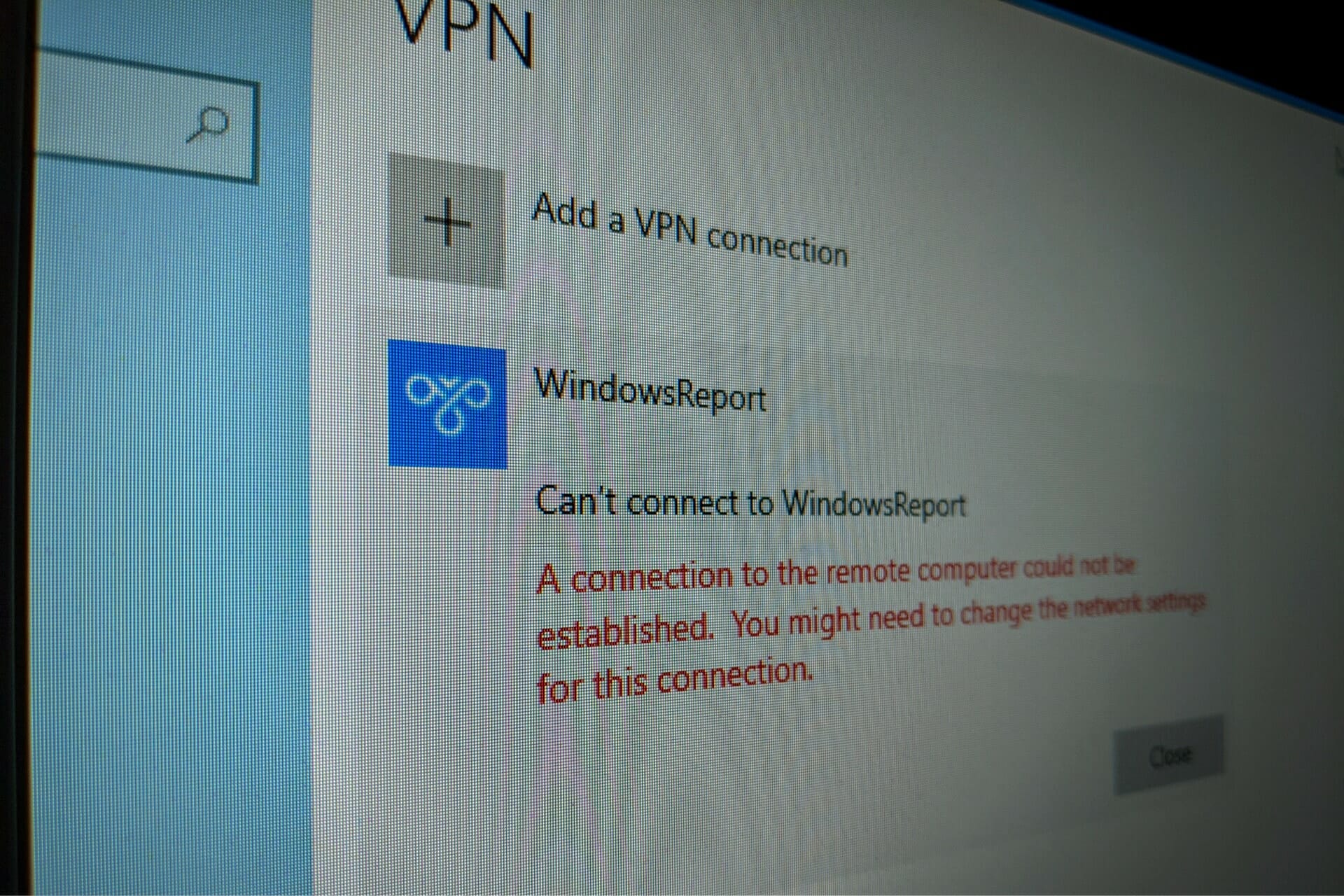
- VPN error code 720 says that A connection to the remote computer could not be established. You might need to change the network settings for this connection.
- You can fix this issue on your Windows 10 PC and establish a successful VPN connection using the 7 safe solutions we described in this article.
- Check out the most common VPN error codes and their solutions.
- Join our VPN Troubleshooting Hub to fix more VPN-related problems.
Using a virtual private network is a great way to gain remote access to another machine through the Internet, become parts of its LAN, and use shared resources.
But you can also use a reliable VPN tool to protect your privacy and security online. Unfortunately, it’s impossible to do this when getting a VPN error code.
If you received the VPN error 720 on Windows 10, it says A connection to the remote computer could not be established. You might need to change the network settings for this connection.
Try the following solutions to get rid of the error code and establish the VPN connection without any issues.
How do I fix VPN error 720 on Windows 10?
Check if your username and password are correct
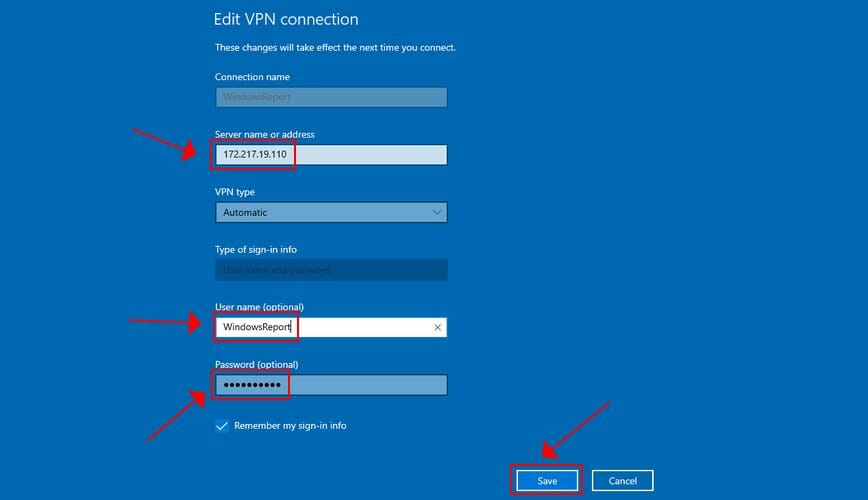
- Right-click the Start button and go to Network Connections.
- Select VPN.
- Pick your VPN connection and click Advanced Options.
- Click Edit.
- Also check the Server address.
- Click Save when you’re done.
Find out how to correctly use the Windows 10 VPN provider.
Check the Windows 10 firewall for opened ports
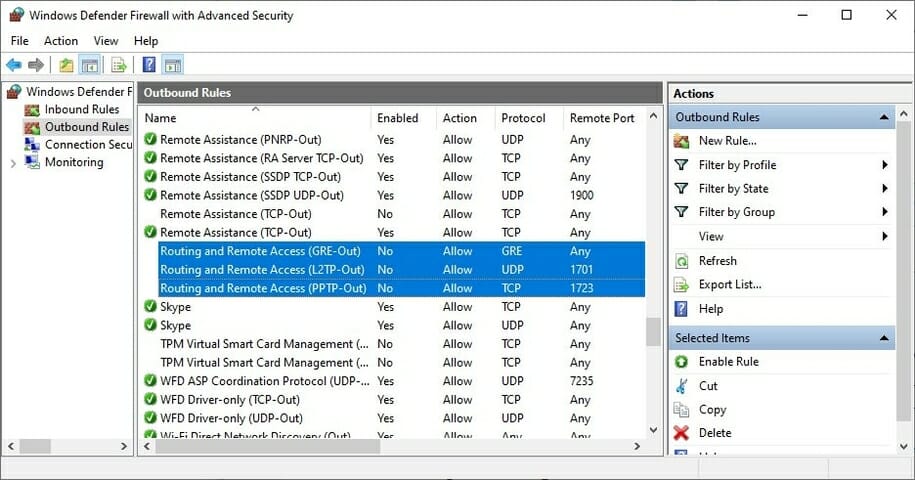
- Press the Start button, type firewall, select Firewall & network protection.
- Click Advanced settings and Yes if prompted by UAC (User Account Control).
- Go to Outbound Rules* and check the Remote Port status (depending on your preferred VPN protocol):
- PPTP – port 1723 over TCP and port 47 over GRE**.
- L2TP/IPsec – port 1701 over UDP (L2TP***) and ports 500 and 4500 over UDP (IPsec).
- SSTP – port 443 over TCP.
- IKEv2 – ports 500 and 4500 over UDP.
*The Outbound Rules must be configured on the client PC (the one that’s trying to connect to the VPN server). If you’re trying to remotely access another PC using a VPN, you should also check the Inbound Rules > Local Port status on the server PC (the one you’re trying to connect to).
**The default rules are called Routing and Remote Access (PPTP-Out) and Routing and Remote Access (GRE-Out), respectively.
***The default rule is called Routing and Remote Access (L2TP-Out).
If the ports associated with your preferred VPN protocol are closed, then you need to open the firewall ports associated wit your VPN protocol.
Reinstall the WAN Miniport network adapters
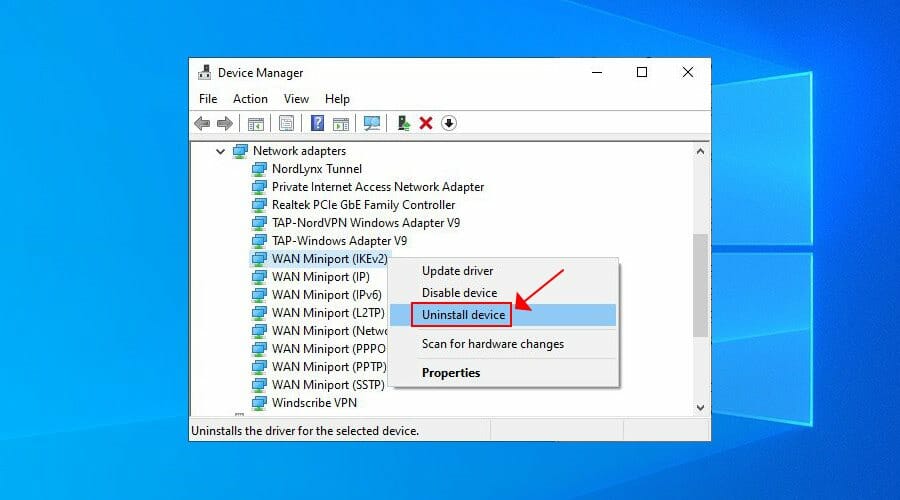
- Right-click the Windows 10 Start button and go to Device Manager.
- Expand the Network adapters menu.
- Right-click any entry that contains WAN Miniport.
- Press Uninstall device.
- Click Uninstall to confirm.
- Do this for all WAN Miniport entries.
The WAN Miniport network adapters will be automatically reinstalled by the operating system, as you can notice by right-clicking an entry in Device Manager and selecting Scan for hardware changes. Hopefully, this should fix VPN error 720 on Windows 10.
Reset Winsock and flush DNS
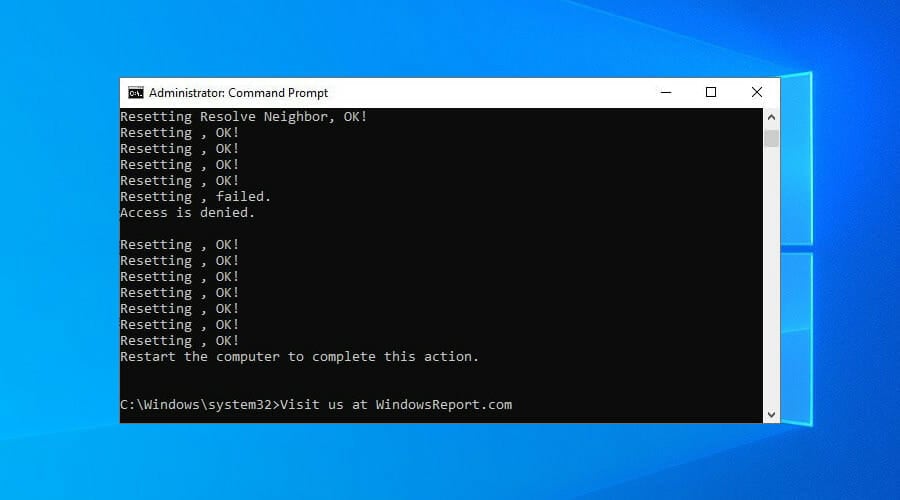
- Launch Command Prompt as admin.
- Paste the lines (press Enter between each line)
ipconfig /flushdns

ipconfig /registerdns

ipconfig /release

ipconfig /renew

NETSH winsock reset catalog

NETSH int ipv4 reset reset.log

NETSH int ipv6 reset reset.log

exit
- Restart your computer.
This is a great method for quickly repairing networking issues that might interfere with your VPN connection. It might be enough to resolve error 720 on Windows 10 PC.
Find out more about fixing DNS issues in Windows 10.
Set your router’s IP address
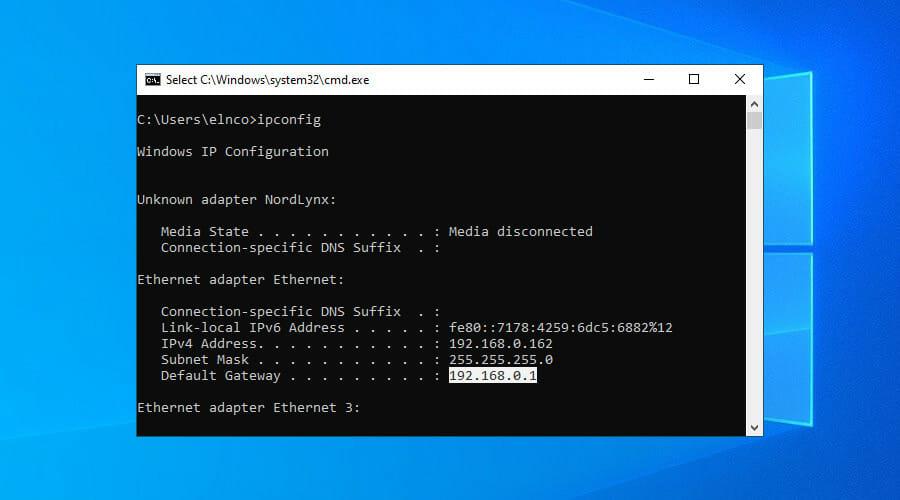
- Use the PC configured to accept incoming VPN connections.
- Press Win + R, type cmd, press Enter.
- Type ipconfig and Enter.
- Select the IP address next to Default Gateway.
- Press Enter to copy it.
- Right-click the Start button and go to Network Connections.
- Click Change adapter options.
- Right-click Incoming Connections and go to Properties.
- Switch to the Networking tab.
- Double-click Internet Protocol Version 4 (TCP/IPv4).
- Select Use the following IP address and paste the gateway.
This solution forces the VPN server to use your router’s IP address, which should help fix VPN error 720 on Windows 10.
Use a premium VPN client

- Sign up for a PIA subscription plan.
- Download and install PIA.
- Launch the app and click its icon in the systray.
- Press the big power button to connect to the nearest VPN server.
If you buy a trustworthy VPN application like Private Internet Access, you don’t have to worry about VPN error codes on Windows PC anymore since the client auto-resolves those issues.
We used PIA in our example because it’s the best VPN for Windows 10 PC. It’s a product owned by Kape Technologies, which can be installed on a wide range of devices, including Mac, Linux, Android, and iOS.
PIA supports OpenVPN and WireGuard protocols with strong encryption. You can set it up on 10 devices at once as well as contact the 24/7 live chat support if you encounter any problems.
More about PIA:
- +3,300 VPN servers in 48 countries
- Exclusive DNS servers
- Port forwarding, split tunneling, kill switch
- No logs or leaks
- 30-days money-back guarantee (no free trial)

Private Internet Access
Connect to PIA’s fast and safe servers to avoid any VPN error codes and enjoy a smooth browsing experience.
In conclusion, you can try the solutions above to fix VPN error 720 on Windows 10. However, if everything else fails, consider upgrading to a premium subscription plan.
We can’t think of a better VPN service than PIA. It’s also the best VPN for the Yandex browser.
Your connection is not secure — websites you visit can find out your details:

- Your IP Address:
loading

Companies can sell this information, alongside your location and internet provider name, and profit from it by serving targeted ads or monitoring your data usage.
We recommend Private Internet Access, a VPN with a no-log policy, open source code, ad blocking and much more; now 79% off.

Эта ошибка выскакивает довольно редко, но если выскакивает, вот небольшая инструкция по ее устранению:
Устранение ошибки 720
1. Быстрый вариант решения
Откройте командную строку (Пуск — Выполнить — cmd)
Последовательно выполните следующие команды:
* netsh int ip reset resetlog.txt
* netsh winsock reset
После этого перезагружаем компьютер и настраиваем подключение по локальной сети, так как выполнение этой команды приводит к перезаписи параметров реестра, которые используются стеком протоколов TCP/IP, что равнозначно его удалению и повторной установке.
P.S. При надобности пересоздайте VPN подключение.
Предупреждение! Выполнение команды netsh winsock reset может отрицательно повлиять на работу программ, осуществляющих доступ в Интернет или отслеживающих данные в Интернете: антивирусных программ, брандмауэров и прокси-клиентов. В случае неправильной работы одной из этих программ после использования рассматриваемого метода переустановите программу, чтобы восстановить ее работоспособность.
2. Долгий вариант решения: рекомендуется переустановить операционную систему.
3. Вариант решения с диагностикой
Ошибка свидетельствует о повреждении разделов реестра, в которых хранится конфигурация Winsock.
Решение:
Этап 1: Проверка целостности раздела Winsock2
1. Нажмите кнопку Пуск, выберите пункт Выполнить, введите команду Command и нажмите кнопку ОК.
2. Введите команду netdiag /test:winsock и нажмите клавишу ВВОД.
Средство Netdiag отобразит результаты проверки ряда сетевых компонентов, в том числе Winsock.
Для получения дополнительных сведений о данной проверке наберите команду netdiag в следующем виде:
/v: netdiag /test:winsock /v
Примечание: средство netdiag находится в папке Support\Tools установочного диска ОС
Если средство Netdiag сообщает об ошибке необходимо восстановить раздел реестра Winsock2. Для этого следуйте инструкциям, изложенным далее.
Этап 2: Восстановление поврежденной конфигурации Winsock
Введите в командной строке
netsh winsock reset
Примечание: После выполнения команды перезагрузите компьютер.
Предупреждение:
Выполнение команды netsh winsock reset может плохо отразиться на программах, которые используют или контролируют доступ к Интернету, например на антивирусных программах, брандмауэрах или клиентах прокси. В случае неправильной работы одной из этих программ после использования рассматриваемого метода переустановите программу, чтобы восстановить ее работоспособность.
Если эти операции не решают проблемы, следуйте инструкциям, изложенным далее.
Удалите поврежденные разделы реестра и переустановите протокол TCP/IP.
Удаление поврежденных разделов реестра
1. В редакторе реестра найдите следующие разделы, щелкните каждый из них правой кнопкой мыши и выберите пункт Удалить:
HKEY_LOCAL_MACHINE\System\CurrentControlSet\Services\Winsock
HKEY_LOCAL_MACHINE\System\CurrentControlSet\Services\Winsock2
2. После удаления разделов реестра перезагрузите компьютер. После перезагрузки Windows XP создаст эти разделы заново.
Установка TCP/IP
1. Щелкните правой кнопкой мыши сетевое подключение и выберите команду Свойства.
2. Нажмите кнопку Установить.
3. Выберите пункт Протокол и нажмите кнопку Добавить.
4. Нажмите кнопку Установить с диска.
5. Введите C:\Windows\inf и нажмите кнопку ОК.
6. В списке протоколов выберите Протокол Интернета (TCP/IP) и нажмите кнопку ОК.
4. Интересный вариант решения (повторяет мысль изложенную в п.3, но цель достигается другими способами): любителям тонкой настройки должна помочь информация с форума локальной сети студентов ИАТЭ от MusicMan
Цитата
«Вообще говоря эта ошибка возникает из-за рассогласования протоколов. Самый простой случай это отсутствие протокола PPTP или его корявые настройки. В общем вот какое то решение из инета.
Ошибка 720 Попытка подключения не удалась поскольку удаленному и локальному компьютерам не удалось согласовать управляющие протоколы РРР. Пляски с бубном, вроде удаления стека TCP\IP протоколов, пересоздания VPN соединения и изменения параметров шифрования, ничего не дали. Возникло предположение, что что-то не то с PPTP протоколом, это подтвердил лог попытки подключения.
Отступление
Включается он, кстати, так:
netsh ras set tracing ppp enabled
а выключается так:
netsh ras set tracing ppp disabled
После этого в папке %systemroot%\tracing создаётся файл PPP.log, в который и записывается подробная информация о PPP соединениях.
Конец отступления.
Поиск в интернете ничего не дал, кроме того, что для переустановки PPTP протокола следует переустановить Windows, но это уже не наш путь, поэтому два дня было потрачено на выяснение того, как этот протокол можно «поправить» не идя на столь радикальную меру, как переустановка. К сожалению интернет в этом помочь не может никак. То есть вообще информация об этом отсутствует.
Итак, как я уже говорил, вынесение TCP\IP протокола ничего не даёт, удаление сетевых устройств также на дало положительного эффекта, если же включить отображение скрытых устройств, то можно обнаружить «Минипорт WAN (PPTP)», но удалить его обычным способом нельзя, так как Windows ругается «Не удалось удалить устройство. Возможно это устройство необходимо для загрузки Windows «. Но, как известно, на всякую … найдётся болт с хитрой резьбой, поэтому для данного устройства был «обновлен» драйвер на драйвер какой-то сетевой карты, после чего Минипорт WAN (PPTP) был с лёгкостью удалён.
Вот тут-то и начались проблемы.
Попытка установить драйвер для Минипорт WAN (PPTP) окончилась неудачей, так как в списке сетевых «устройств» производства Microsoft этот драйвер отсутствует, но, если обновлять драйвер для любого из оставшихся «минипортов», то совершенно волшебным образом драйвер Минипорт WAN (PPTP), в списке возможных для установки, появляется. С помощью filemon удалось выяснить, что при обновлении драйвера Windows обращается к файлу netrasa.inf, при открытии которого можно увидеть «волшебную строку» MS_PptpMiniport. Казалось бы, подсунь этот файл при установке драйвера и проблема решена, но когда я так сделал, окно со списком драйверов было девственно чистым. То есть в файле явно есть информация о драйвере, но она не отображается.
И тогда я открыл для себя страшную тайну фирмы Microsoft, эта тайна называется
ExcludeFromSelect =\
все устройства, названия которых в inf файле заканчиваются на символ идущий после знака равенства (в данном случае \) в окне установки драйверов не отображаются.
Дальше вроде просто, заремил точкой с запятой перечисление неотображаемых устройств, подсунул инф netrasa.inf, установил драйвер и всё заработало… Но не такая эта ОС, Windows… Драйвер установился, но ошибка осталась.
Блин.
Утомил, наверное? Тогда не буду рассказывать, как я лопатил реестр в поисках записи о Минипорт WAN (PPTP) и дам, наконец, решение.
1. Удаляем TCP\IP протокол, перезагружаемся.
2. Заменяем драйвер для Минипорт WAN (PPTP) на любой другой, какой под руку попадётся.
3. Удаляем Минипорт WAN (PPTP)
4. В реестре, по адресу HKEY_LOCAL_MACHINE\SYSTEM\CurrentControlSet\Control\Class\{4D36E972-E325-11CE-BFC1-08002bE10318} находим запись о Минипорт WAN (PPTP) и удаляем соответствующую ветку.
5. Открываем netrasa.inf и меняем:
[ControlFlags]
ExcludeFromSelect =\
SW\{eeab7790-c514-11d1-b42b-00805fc1270e},\
MS_IrdaMiniport,\
MS_IrModemMiniport, \
MS_L2tpMiniport,MS_PptpMiniport,MS_PtiMiniport,\
MS_NdisWanAtalk,\
MS_NdisWanBh,\
MS_NdisWanIp,\
MS_NdisWanIpx,\
MS_NdisWanNbfIn,MS_NdisWanNbfOut
на
[ControlFlags]
;ExcludeFromSelect =\
; SW\{eeab7790-c514-11d1-b42b-00805fc1270e},\
; MS_IrdaMiniport,\
; MS_IrModemMiniport, \
; MS_L2tpMiniport,MS_PptpMiniport,MS_PtiMiniport,\
; MS_NdisWanAtalk,\
; MS_NdisWanBh,\
; MS_NdisWanIp,\
; MS_NdisWanIpx,\
; MS_NdisWanNbfIn,MS_NdisWanNbfOut
6. Устанавливаем Минипорт WAN (PPTP)
7. Устанавливаем TCP\IP протокол»
P.S Самому помог пункт 1, но если он не поможет, пробуйте другие, особенно пункт 2, очень иногда очень помогает=))
Источник
Содержание
- В чём суть и причины появления ошибки 720?
- Как «вылечить» ошибку 720?
- Устраните вирусы
- Настройте или переустановите антивирус
- Проверьте и настройте брандмауэр
- Проверьте параметры адаптера
- Сбросьте настройки IP
- Переустановите стек TCP/IP
- Переустановите драйверы
- «Всё равно не работает! Что делать?»
Компьютер — сложная техника, состоящая из аппаратного и программного обеспечения. А как известно, тому и другому свойственно сбоить по самым разным причинам, среди которых действия пользователя, баги, конфликты оборудования или ПО.
В этой статье мы поговорим об ошибке, возникающей при подключении к высокоскоростному интернету. И это ошибка с кодом 720.
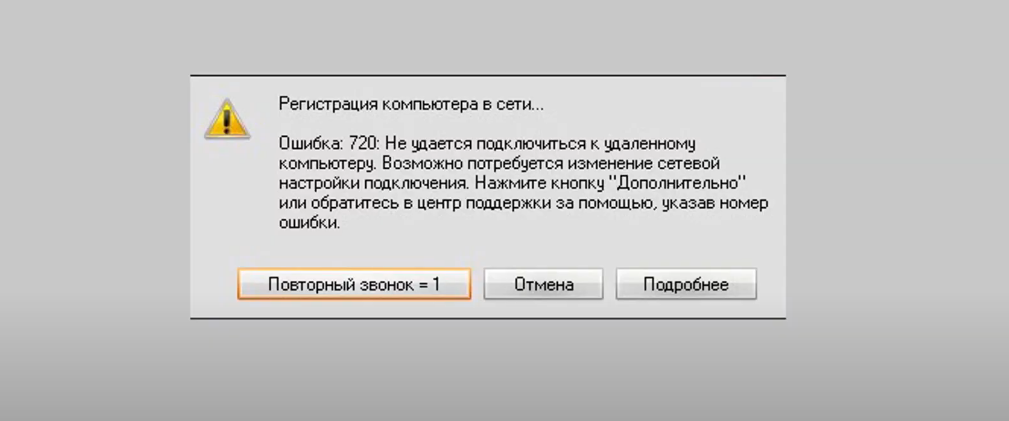
В чём суть и причины появления ошибки 720?
Этот сбой сигнализирует о том, что компьютеру не удаётся установить связь с удалённым сервером.
Появиться неполадка может на любой версии «майкрософтовской» операционной системы: от неё не застрахованы пользователи ни Windows 7, ни Win 10 или даже 11.
Чаще всего ошибка 720 возникает при использовании ADSL-модема или прямом подключении ПК к Ethernet-кабелю линии провайдера, применяющего протоколы PPPoE или любой VPN. К слову, в билайне — L2TP. А это протокол туннелирования, предназначенный именно для построения VPN.
Но не стоит ругать провайдера. Это проблема на стороне пользователя. Она может быть связана с:
- проделками вирусов;
- сбоем антивируса;
- повреждением системных файлов Windows;
- сбоем в драйверах сетевой карты;
- ошибками в параметрах протоколов TCP/IP и/или PPP;
- одновременной работой несовместимых протоколов;
- неактуальной версией прошивки маршрутизатора или сбоем в параметрах;
- проблемами с аппаратным обеспечением — сетевой картой или «железом» модема.
Как «вылечить» ошибку 720?
Устраните вирусы
Проведите глубокое сканирование компьютера на наличие вредоносного ПО. Используйте антивирусную программу со свежей базой вирусов, иначе способ может не сработать.
Настройте или переустановите антивирус
Попробуйте внести браузер и интернет-соединение в список исключений антивируса и брандмауэра Windows. Если не сработало, то удалите антивирус с помощью специальной утилиты, например Revo Uninstaller. Не будет лишним избавиться от файлового мусора — для этого воспользуйтесь программой CCleaner. Затем перезагрузите ПК, установите антивирус и снова перезагрузитесь.
Проверьте и настройте брандмауэр
Если манипуляции с антивирусом не помогли, то отключите брандмауэр.
- Зайдите в «Панель управления».

- Перейдите в раздел «Система и безопасность».
- Кликните по строке «Брандмауэр Защитника Windows».
- Выберите в меню слева «Включение и отключение брандмауэра Защитника Windows».
- Поставьте маркеры напротив строк, отключающих функции брандмауэра.
- Попытайтесь подключиться к интернету.
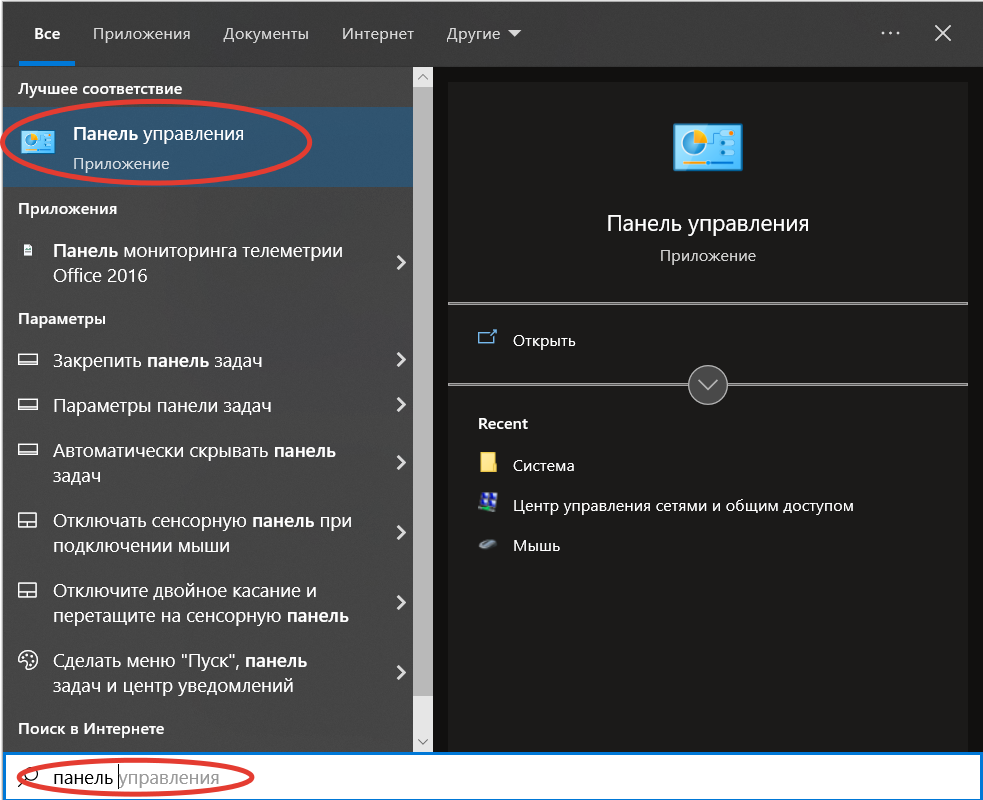
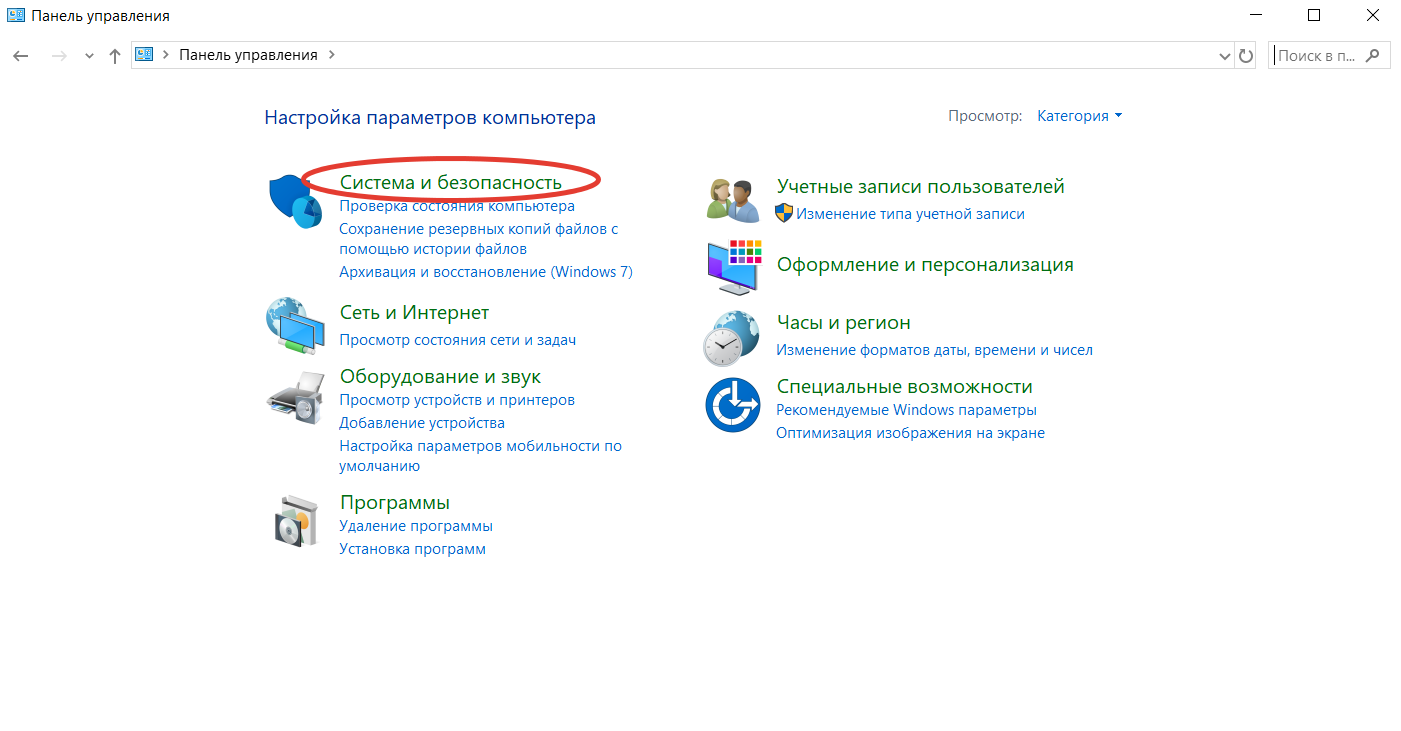
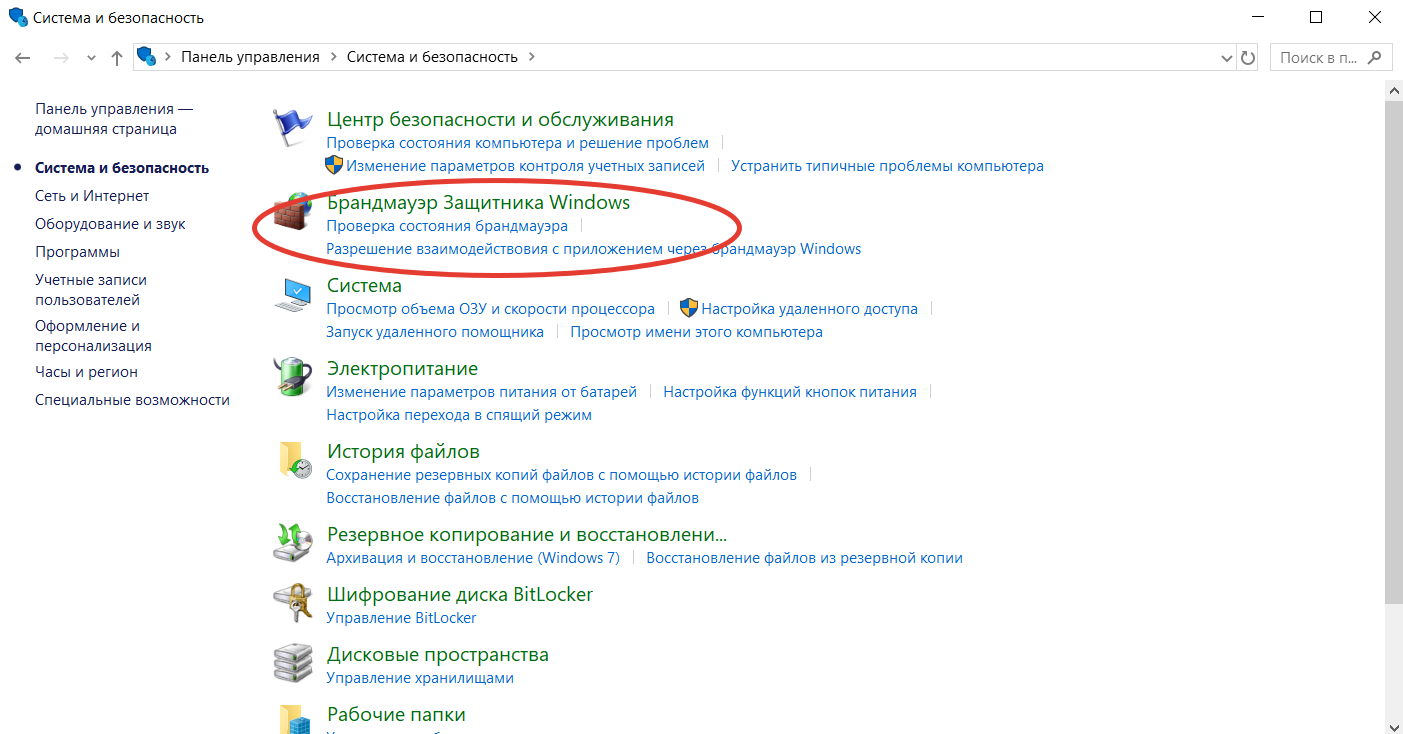
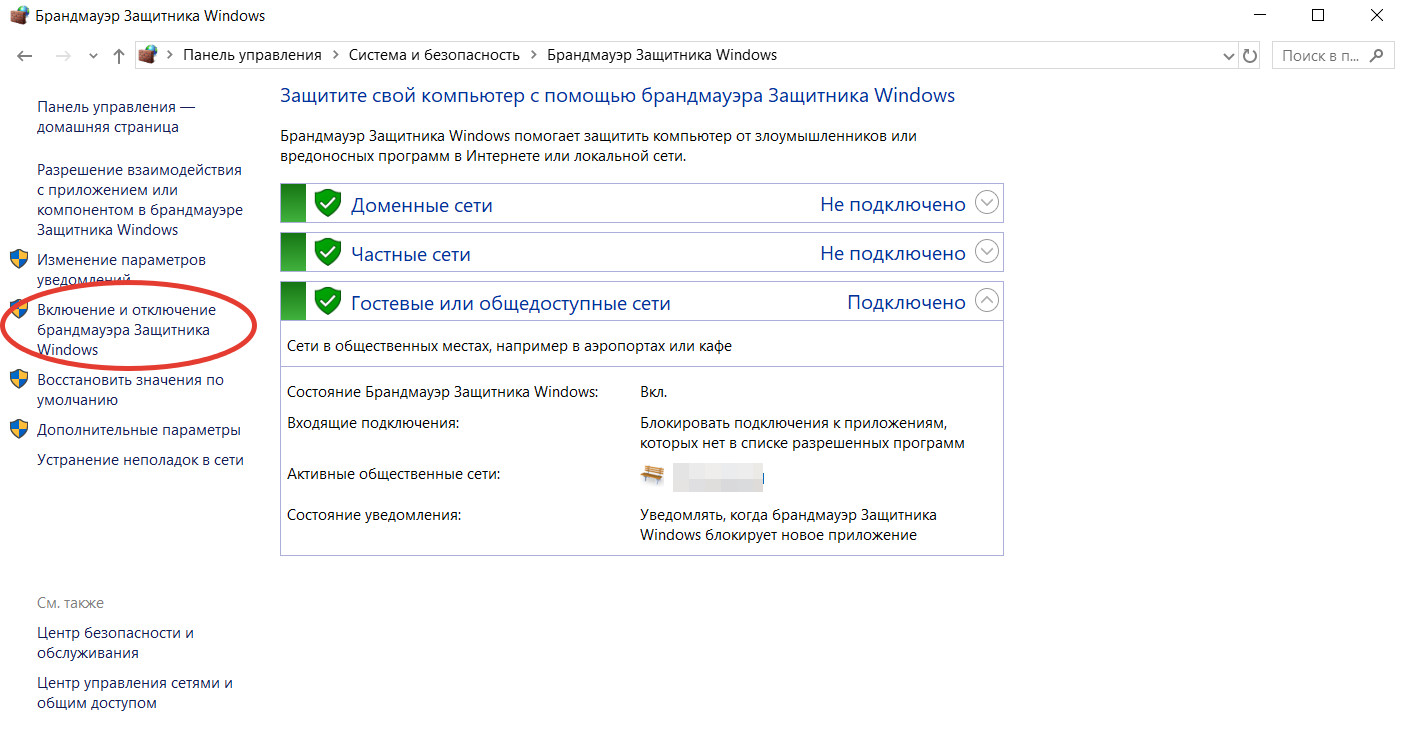
Если подключение заработало, то добавьте браузер в исключения брандмауэра:
- Повторите действия 1–3 из предыдущей инструкции.
- Кликните по строке «Разрешение взаимодействия с приложением…»
- Выберите в списке браузер и поставьте напротив него галочку.
Если не удалось, то установите прежние параметры приложения — проблема точно не в нём.
Проверьте параметры адаптера
- Откройте раздел «Сетевые подключения». Чтобы не блуждать по «Панели управления», просто нажмите
сочетание Win + R, после чего введите в строке ncpa.cpl и нажмите на кнопку ввода. - Нажмите правой кнопкой мыши на нужное соединение и кликните по строке «Свойства».
- Убедитесь, что протокол IP версии 4 активирован — он должен быть отмечен галочкой.
Сбросьте настройки IP
- Вызовите командную строку. Для этого нажмите сочетание Win + R, после чего введите в строке cmd и нажмите Enter.
- Введите команду netsh int ip reset resetlog.txt.
- Введите следующую команду — netsh winsock reset.
- Введите ещё одну команду — ipconfig /flushdns.
- Если используете Windows 7, то поочерёдно введите команды net stop dnscache и net start dnscache.
- Перезагрузите ПК.
Переустановите стек TCP/IP
- Нажмите Win + R.
- Вызовите редактор реестра, для этого введите в строке regedit.
- Вставьте в поисковую строку путь HKEY_LOCAL_MACHINE\System\CurrentControlSet\Services\.
- Найдите папки Winsock и Winsock2, выделите их и удалите кнопкой Delete.
- Перезагрузите компьютер.
- Откройте «Проводник» и перейдите в раздел «Этот компьютер».
- Откройте системный локальный диск. Как правило, это диск C.
- Зайдите в папку Windows, затем перейдите в INF.
- Найдите файл nettcpip.
- На всякий случай скопируйте его куда-нибудь.
- Откройте оригинальный файл (в папке INF).
- Найдите блок из 4 строк, который начинается с [MS_TCPIP.PrimaryInstall] и заканчивается
AddReg = Registry.TCPIP.PrimaryInstall. - В третьей строке блока замените 0XA0 на 0X80.
- Сохраните изменения в файле.
- Повторите шаги 1 и 2 из инструкции по проверке параметров адаптера.
- В окне «Свойства» нажмите кнопку «Установить».
- Последовательно выберите опции «Протокол» и «Установить с диска».
- Нажмите «Обзор» и укажите путь к файлу nettcpip в папке INF на системном диске.
- Вернитесь в окно «Свойства», кликните по строке «IP версии 4».
- Нажмите «Удалить».
- Кликните по кнопке «Установить».
- Повторите шаги 18 и 19.
- Перезагрузите компьютер.
Переустановите драйверы
- Откройте «Проводник» (комбинация клавиш Win + E).
- Зайдите в раздел «Этот компьютер».
- Кликните правой кнопкой мыши в этом окне и в контекстном меню выберите «Свойства».
- В меню слева нажмите на строку «Диспетчер устройств».
- Разверните список устройств блока «Сетевые адаптеры», нажав на стрелочку возле него.
- Выберите нужный сетевой адаптер. В его названии будет указан бренд, например Realtek или Intel.
- Нажмите правой кнопкой мыши на адаптер.
- В контекстном меню выберите опцию «Удалить устройство».
- Перезагрузите компьютер.
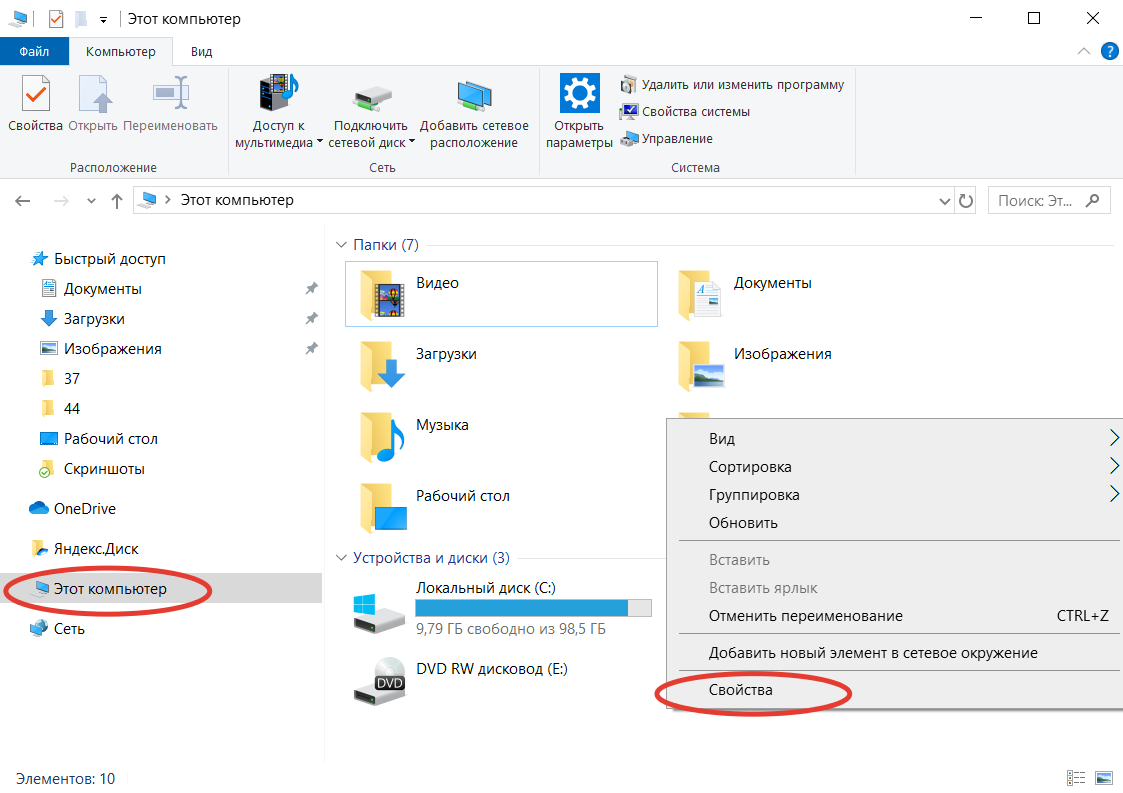
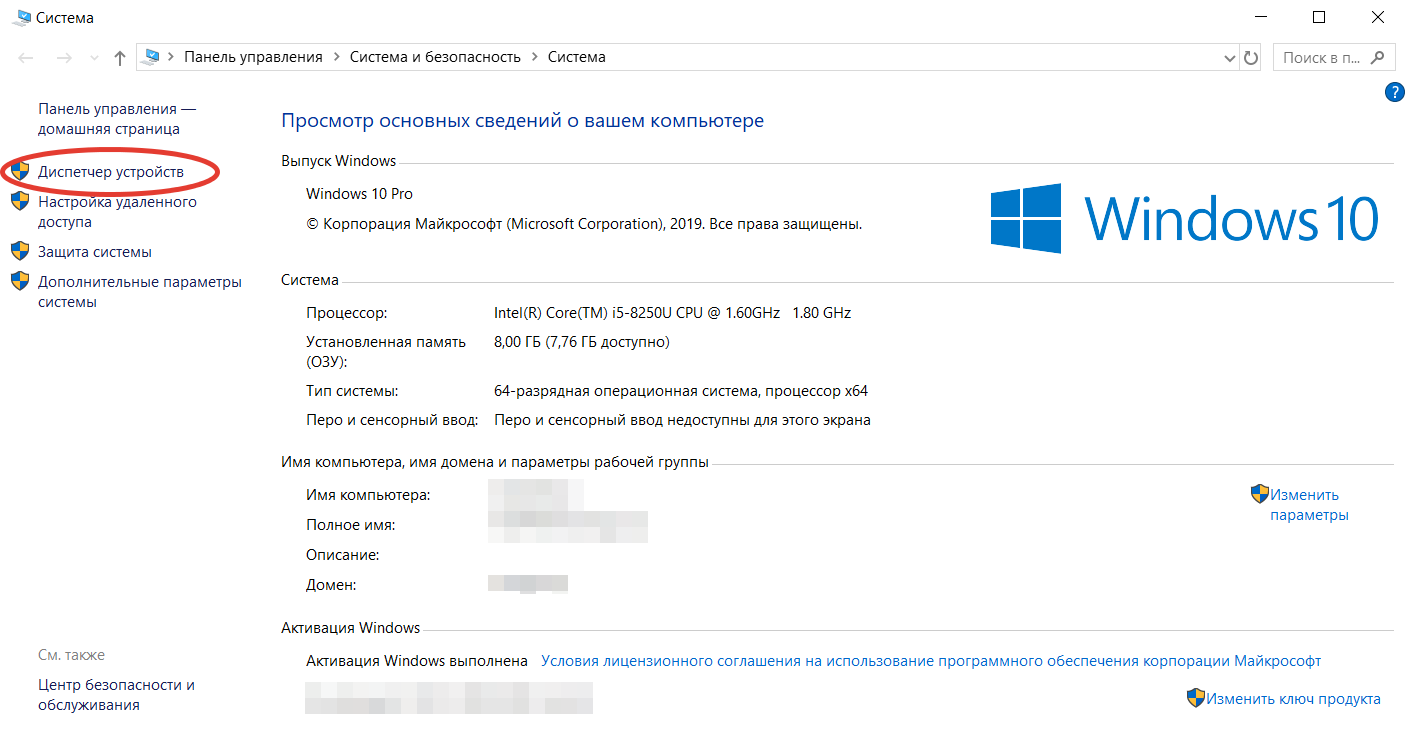
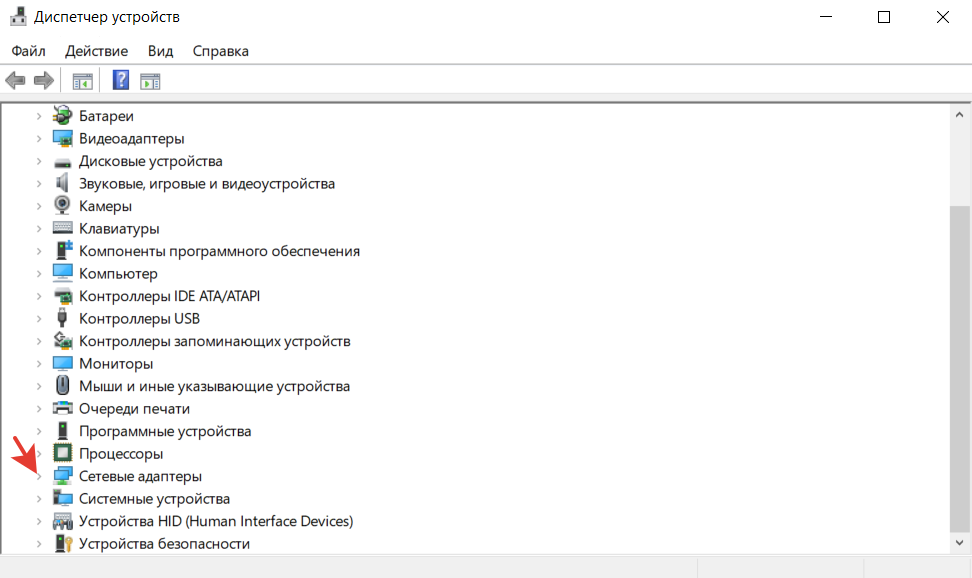
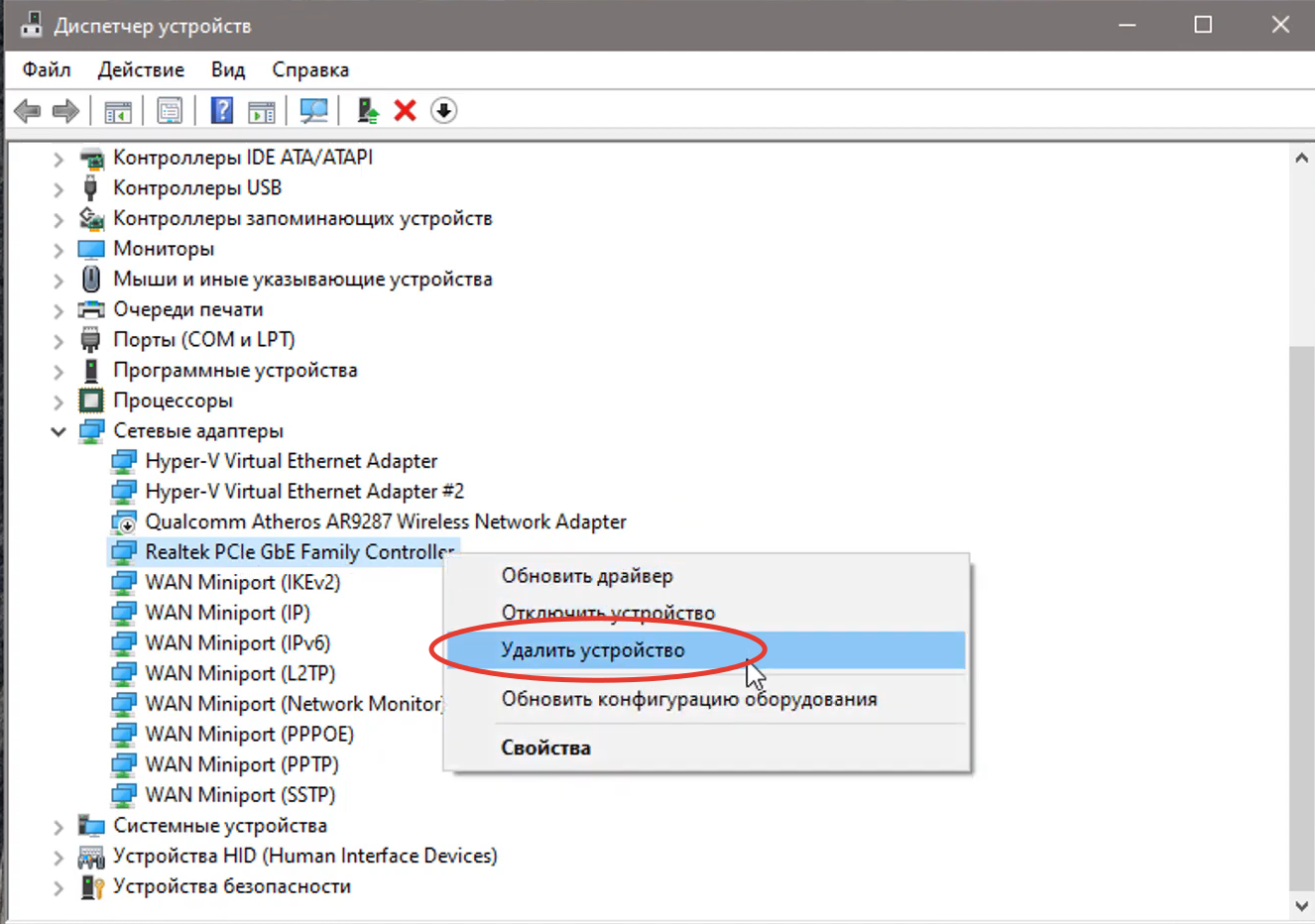
После перезагрузки драйвер установится самостоятельно из вшитой в операционную систему базы.
«Всё равно не работает! Что делать?»
Если вы перепробовали все варианты, значит, причина появления ошибки 720 в настройках или прошивке роутера. О том, как работать в веб-конфигураторах маршрутизаторов разных производителей, можно узнать в разделе «Обзоры» билайна.
Не помогло и это — необходимо тестировать оборудование на других устройствах. Вероятнее всего, вы имеете дело с аппаратной неполадкой.