
|
kiff20072008 61 / 61 / 24 Регистрация: 28.09.2012 Сообщений: 378 |
||||
|
1 |
||||
|
19.04.2014, 00:14. Показов 22337. Ответов 18 Метки нет (Все метки)
Есть программа калькулятор Кликните здесь для просмотра всего текста
Добавлено через 5 часов 29 минут
0 |

|
153 / 148 / 66 Регистрация: 20.02.2014 Сообщений: 556 |
|
|
19.04.2014, 13:55 |
2 |
|
Это вроде не утечка памяти Ну да, не утечка, это обычный SEGFAULT. Пройдись по калькулятору дебаггером, он тебе эту строчку прям подсветит.
1 |


|
61 / 61 / 24 Регистрация: 28.09.2012 Сообщений: 378 |
|
|
20.04.2014, 12:27 [ТС] |
3 |
|
Вованя, не совсем понял как пройтись ? Добавлено через 20 часов 49 минут
0 |
|
153 / 148 / 66 Регистрация: 20.02.2014 Сообщений: 556 |
|
|
20.04.2014, 12:39 |
4 |
|
не совсем понял как пройтись ? В какой IDE работаете?
0 |
|
61 / 61 / 24 Регистрация: 28.09.2012 Сообщений: 378 |
|
|
20.04.2014, 12:40 [ТС] |
5 |
|
Вованя, visual studio 2013
0 |
|
153 / 148 / 66 Регистрация: 20.02.2014 Сообщений: 556 |
|
|
20.04.2014, 12:46 |
6 |
|
visual studio 2013 Честно говоря, я с VS не очень дружу, но если не изменяет память, то просто жмите F5 и исполняйте программу, по идее ошибка должна перехватиться и указать на строку в коде.
0 |
|
61 / 61 / 24 Регистрация: 28.09.2012 Сообщений: 378 |
|
|
20.04.2014, 12:47 [ТС] |
7 |
|
Вованя, так в том то и дело что все нормально работает
0 |
|
153 / 148 / 66 Регистрация: 20.02.2014 Сообщений: 556 |
|
|
20.04.2014, 13:00 |
8 |
|
все нормально работает А что в вашем хедере?
0 |
|
61 / 61 / 24 Регистрация: 28.09.2012 Сообщений: 378 |
|
|
20.04.2014, 13:03 [ТС] |
9 |
|
Вованя, где ? Проверяю не я поэтому то и не могу понять где ошибка
0 |
|
153 / 148 / 66 Регистрация: 20.02.2014 Сообщений: 556 |
|
|
20.04.2014, 13:15 |
10 |
|
где ? В calculator.h чего там лежит?
Калькулятор все высчитывает нормально пока не возникает нехватка памяти Так на каком этапе то это происходит? В какой строчке то? Добавьте отладочной печати хотя бы уж, посмотрите, чего да как.
0 |
|
61 / 61 / 24 Регистрация: 28.09.2012 Сообщений: 378 |
|
|
20.04.2014, 13:20 [ТС] |
11 |
|
Вованя, возникает все в функции getstring так как выделение памяти происходит только там
0 |

|
153 / 148 / 66 Регистрация: 20.02.2014 Сообщений: 556 |
|
|
20.04.2014, 13:32 |
12 |
|
так как выделение памяти происходит только там Ну вы бы могли перед каждым выделением памяти поместить функцию printf с текстом о строке и перед какой функцией этот printf вызывается и после каждого вызова malloc тоже поместить такой же printf с текстом, чтобы убедиться, где ошибок нет.
0 |
|
61 / 61 / 24 Регистрация: 28.09.2012 Сообщений: 378 |
|
|
20.04.2014, 13:44 [ТС] |
13 |
|
Вованя, так а смысл этого Без нехватки памяти все работает нормально о чем робот и говорит
0 |
|
153 / 148 / 66 Регистрация: 20.02.2014 Сообщений: 556 |
|
|
20.04.2014, 13:57 |
14 |
|
Только при нехватке памяти Честно говоря, сразу так и не понятно было, что именно вас беспокоит
0 |

|
61 / 61 / 24 Регистрация: 28.09.2012 Сообщений: 378 |
|
|
21.04.2014, 10:37 [ТС] |
15 |
|
Вованя, робот при проверке возвращает ошибку Добавлено через 5 часов 30 минут Добавлено через 14 часов 34 минуты
0 |
|
5496 / 4891 / 831 Регистрация: 04.06.2011 Сообщений: 13,587 |
|
|
21.04.2014, 11:57 |
16 |
|
Я смоделировать нехватку памяти не могу Кто мешает вместо сравнения на NULL сделать присвоение?
1 |
|
kiff20072008 61 / 61 / 24 Регистрация: 28.09.2012 Сообщений: 378 |
||||
|
21.04.2014, 17:50 [ТС] |
17 |
|||
|
alsav22, Кликните здесь для просмотра всего текста
все проверки какие могу представить проходит
0 |
|
5496 / 4891 / 831 Регистрация: 04.06.2011 Сообщений: 13,587 |
|
|
22.04.2014, 04:13 |
18 |
|
Полный код дайте, чтобы проверить можно было в работе. Добавлено через 1 час 46 минут
Кто мешает вместо сравнения на NULL сделать присвоение? Код (из первого поста), если там, где выделяется память, заменить сравнение с NULL на присваивание NULL, нормально отрабатывает?
0 |
|
kiff20072008 61 / 61 / 24 Регистрация: 28.09.2012 Сообщений: 378 |
||||
|
22.04.2014, 09:15 [ТС] |
19 |
|||
|
alsav22,
0 |
Почему программа завершается на S_object.findShortestWord(S_object.get(), str_value2); с Process returned -1073741819 (0xC0000005) execution time : 3.804 s?
#include <iostream>
#include <stdio.h>
#include <cstring>

using namespace std;

class FirstClass {
    public:
        char* str_value;
    public:
        FirstClass(const char* value = ""):str_value(0) {
            set(value);
        }

        FirstClass(const FirstClass &obj):str_value(0) {
            set(obj.str_value);
        };

        ~FirstClass() {delete[] str_value;}

    void set(const char* value) {
        delete[] str_value;
        str_value = new char[strlen(value)+1];
        strcpy(str_value, value);
    }

    const char* get() const {
        return str_value;
    }
};

class SecondClass : public FirstClass {
    public:
        SecondClass(const char* str_value = "") : FirstClass (str_value) {}
    void findShortestWord(const char* in, char* out) {
        int len = strlen(in);

        int beginWord = 0;
        int lengthWord = 0;

        for (int i = 0; i < len; i++) {
            while ( (in[i] == ' ') && ( in[i] != '\0')  ) i++;
            int begin = i;
            while ( (in[i] != ' ') && (in[i] != '\0') ) i++;
            int end = i;
            char tmp[256];
            for(int j = begin, k=0; j < end; j++, k++)
                tmp[k] = in[j];
            tmp[end - begin] = '\0';

            int currentLen = end - begin;
            if (currentLen < lengthWord) {
                lengthWord = currentLen;
                beginWord = begin;
            }
}

        for (int i = beginWord, k = 0; i < beginWord + lengthWord; i++, k++)
            out[k] = in[i];

        out[lengthWord] = '\0';
    }
};

int main() {
    char* str_value2;
    FirstClass F_object("Hello my world 1");

    printf("\nFirstClass init: %s", F_object.get());

    F_object.set("Hello my world 2");

    printf("\nFirstClass set: %s", F_object.get());

    FirstClass F_object2 = F_object;

    SecondClass S_object(F_object.get());

    printf("\nSecondClass init: %s", S_object.get());

    S_object.findShortestWord(S_object.get(), str_value2);

    //F_object = S_object;

    printf("\nSearch and delete: %s", str_value2);

    return 0;
}
The process finished with exit code -1073741819 (0xc0000005) error indicates a synchronization issue, an attempt to access restricted memory space, etc.
You can say that the compiler will throw the same access violation error when it can’t compile your code due to any restrictions or unclarity. But don’t worry because this post will let you know what might have happened and provide you with multiple solutions to kick away the process finished with exit code -1073741819 (0xc0000005) c++ error.
So, wait no more and continue reading to stop seeing the scary process finished error.
Contents
- Process Finished With Exit Code: What Are the Causes?
- – The Thread Termination Isn’t Synchronized
- – You Are Accessing a Restricted Memory/Heap/Stack Space
- – Incorrect Conversion from C to Python
- How To Fix the Process Finished With Exit Code Error?
- – Synchronize the Thread Termination
- – Debug Your Code To Find the Problematic Line
- – Install a Custom Signal Handler
- – Alter Your C Code To Make It Work in Python
- Conclusion
Process Finished With Exit Code: What Are the Causes?
The causes behind the process finished with exit code -1073741819 (0xc0000005) pycharm error include trying to access some data from a restricted memory space or an unloaded file. Also, improperly converting the code written in C language into Python can invite the data execution error code to your system.
– The Thread Termination Isn’t Synchronized
If the thread termination isn’t synchronized, you’ll receive the above error on your screen. It means that if a thread is created in your program, but it gets terminated through a function call. Now, if your program tries to access the same thread, the error will show up.
Look at this example for more clarity. You have loaded a DLL file and executed a function that makes the DLL code create a thread. The given thread’s task is to access some DLL-specific data. Next, you have made a call to the FreeLibrary() function to terminate DLL.
Consequently, the destructors will run and send an implicit signal to the thread created earlier to terminate. After this, they’ll perform a cleanup process. Now, you have unloaded the DLL. At this point, if your program is scheduled to switch back to the given thread, the pycharm process finished with exit code “-1073741819 (0xc0000005)” error.
The above situation comes under access violation, which stops the program’s execution.
– You Are Accessing a Restricted Memory/Heap/Stack Space
If you try to access a restricted memory/heap/stack space in your hard drive, the operating system kernel will send a signal to the current process. A process can either install a custom signal handler or use the operating system’s default signal handler. In the latter case, the installation error will occur.
You must know that a custom signal handler allows a process to recover itself from the signal sent to it from the operating system kernel. However, in the absence of the custom signal handler, the default signal handler provided by the operating system is used. The default handler usually results in the abnormal termination of the process, which is identified through a crashed program, the given error, or a core dump.
– Incorrect Conversion from C to Python
Using libdll.so or libdll.dll functions in your Python program would be no harm if you alter the code accordingly. Although the CTypes foreign function library will help you out, if you don’t specify the function arguments and return type correctly, the process finished with exit code “-1073741819” (0xc0000005) python error will occur.
Imagine a situation where you have imported a function from libdll.so. The function’s definition looks like float new_func(uint32_t ui, void *pv, char *pc). Now, if you don’t modify the function’s definition as expected by Python, you’ll see the stated error.
Please look at the following incorrect code block for reference.
func1.argtypes = (ctypes.c_uint32, ctypes.c_void_p, ctypes.c_char_p)
func1.restype = ctypes.c_float
How To Fix the Process Finished With Exit Code Error?
You can fix the process finished with exit code -1073741819 (0xc0000005) by synchronizing the thread termination or debugging your code to find the erroneous line. Moreover, you must execute the correct Python equivalent of your C code to get rid of the mentioned error.
– Synchronize the Thread Termination
Synchronizing the thread termination can help you eliminate the given error. The process refers to cleaning up all the resources related to the terminated thread, including its helper threads. In short, your program shouldn’t contain any threads and resources connected to the terminated thread.
After completing the cleanup process, nothing in your program will take you back to the terminated thread. Eventually, you won’t run into the access violation issue leading to the permanent removal of the stated error.
– Debug Your Code To Find the Problematic Line
It would be best to debug your code to get the number of the problematic line and fix the same to remove the error. You’ll be happy to note that Visual Studio allows you to open your program and debug it to find the erroneous line instantly.
For example, your program was running just fine a few minutes ago. Then, you added some more lines of code, but this time, it ended with the exit code – 1073741819. In this case, you’ll have to open your program in Visual Studio, find the problematic line and check if it does something illegal. On checking the line, you find out that it contains a pointer for a deleted variable.
It means that you are trying to access a memory address that isn’t assigned to any of your program variables. Thus, you’ll need to stop using the given pointer or assign a different memory address to it. In both of these situations, you won’t see the same error again.
– Install a Custom Signal Handler
You should install a custom signal handler as a tool to recover from the signal sent from the operating system kernel and avoid the sudden process finished error. However, there are a few points that you must consider while installing a signal handler and never ignore them.
The important have been listed below.
- Create a function that’ll be used as a signal handler and ensure that it accepts an integer.
- You can install a particular handler for each desired signal or an overall signal handler for multiple types of signals.
- Call the signal() function by passing the signal name and the function or the signal handler designed earlier as the first and second arguments, respectively.
- The signal handler will be called with the recently occurred signal’s name when the signal you want to handle occurs.
– Alter Your C Code To Make It Work in Python
Having the correct Python equivalent of your C code will help you stay away from the mentioned error. In the case of using libdll.dll or libdll.so functions, you’ll need to specify the pointers and variables separately while passing the arguments to eliminate the error.
Continuing with the example shared earlier, you can see that the “new_func” function accepts one unsigned integer and two pointers targeting the addresses of a void and a character. As the first pointer targets a void, it isn’t necessary to specify it as a ctypes.POINTER. However, for the character pointer, you’ll have to pass the argument like ctypes.POINTER(ctypes.c_char).
Here you go with the correct Python equivalent of the “new_func” function imported from the libdll.so.
func1.argtypes = (ctypes.c_uint32, ctypes.c_void_p, ctypes.POINTER(ctypes.c_char))
func1.restype = ctypes.c_float
Conclusion
The process finished with exit code -1073741819 (0xc0000005) clion error, and its other variations can result from an mistakes like accessing an unallocated or restricted space on your system or an incorrect code conversion from C to Python. But you can always correct your mistakes and stop making wrong choices to make everything work again. Please reread this article’s main points in the list below to conclude the main idea:
- It will be beneficial to clean up all the resources and helper threads associated with the terminated thread to fix the given error.
- You should never try to access a restricted memory/heap/stack space to avoid the same error.
- The Visual Studio debugger can assist you in finding the coding statement causing the given error.
- Using a custom signal handler can save you from the stated error.
- Correctly specifying the libdll.so function definitions in Python can help resolve the error.
Thus, it’s all about being careful about your actions, performing the necessary cleanups, and giving a bit more attention to detail to push away the above error.
- Author
- Recent Posts

Your Go-To Resource for Learn & Build: CSS,JavaScript,HTML,PHP,C++ and MYSQL. Meet The Team
I’m getting a strange error «Process finished with exit code -1073741819 (0xC0000005)» running python 3.7 on a windows machine. The process just crashes. The error comes in random time. It seems to appear inside a thread.
Is there someway to get more information where exactly the error comes from? Right now my only solution is to add logging, but that is really time consuming.
Thanks a lot for any hint.
asked Sep 6, 2020 at 9:36

4
I had the same issue, not long time ago and I have solved this with the following solution:
reinstall python – you don’t have python33.dll in c:\WINDOWS\system32\
Maybe you have different python versions – look at folders in root of c:
If yes, then point to your version of python.exe in pyCharm > Settings > Project Interpreter
answered Jan 20, 2021 at 20:37

I’ve seen this error occur when a Python script has infinite (or very deep) recursion and the following code is used to increase the recursion limit:
import sys
sys.setrecursionlimit(4000)
I would guess that the error means we are running out of memory.
answered Oct 22, 2022 at 7:36

Paul WintzPaul Wintz
2,5521 gold badge20 silver badges33 bronze badges
1
В операционной системе Windows, вне зависимости от версии, всегда имеются баги и ошибки, которые проявляются с разной частотой и интенсивностью. Одной из них является ошибка с кодом 1073741819, особенность которой заключается в невозможности инсталляции и запуска программ с правами администратора. Обычно она возникает после миграции с «семёрки» на более старшие версии, то есть пользователи Windows 10 встречаются с проблемой намного чаще. Но и в 7, и 8 Windows она тоже изредка встречается. Сегодня вы узнаете, что означает эта ошибка и как с ней бороться, не прибегая к посторонней помощи.
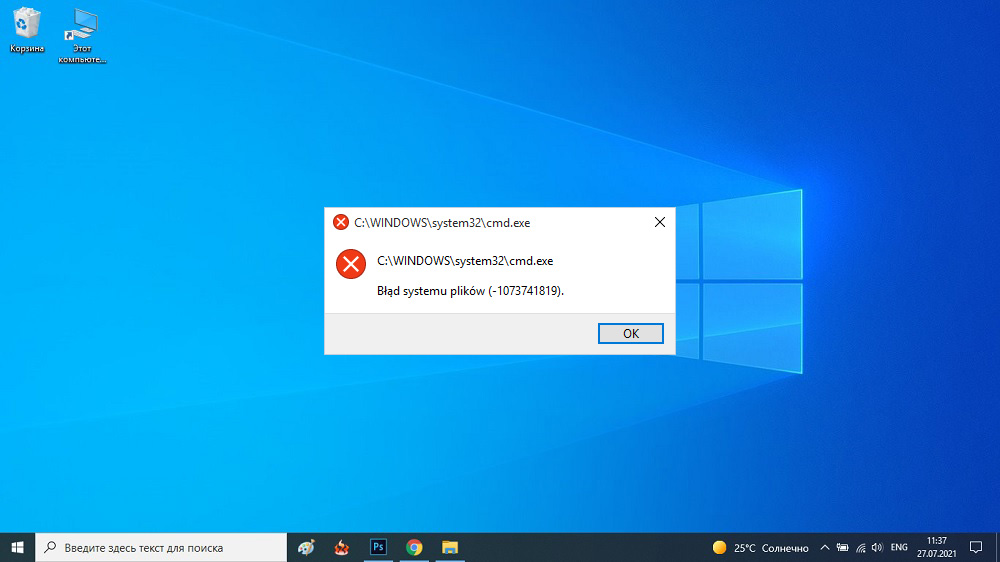
Причины возникновения ошибки файловой системы 1073741819
Сущность проблемы заключается в невозможности запуска исполняемых файлов с правами администратора. Из этого же следует, что вы не сможете установить на компьютер новый софт. При каждой попытке запуска программ с административными правами система контроля и администрирования учётных записей пользователей Windows (сокращённо – UAC) будет блокировать открытие этого файла с выдачей сообщения об ошибке 1073741819. По существу, будет также подавлена любая прочая административная активность с вашей стороны.
Основная причина выглядит довольно странно – это миграция с одной версии Windows на другую. В Microsoft допустили неточность, которая имеет столь тяжёлые последствия. Дело в том, что многие параметры пользователя из предыдущей версии ОС переносятся в новую операционку, в том числе и пользовательская звуковая схема. Но при этом некоторые системные звуки в «восьмерке» и «десятке» отсутствуют, что и приводит к блокировке административного доступа к различным системным сервисам и функциям со стороны UAC. Другими словами, ошибка в большинстве случаев проявляется после миграции, хотя известны и более экзотические причины.
Мы попытаемся рассмотреть все известные на сегодня способы решения данной проблемы.
Как устранить ошибку файловой системы 1073741819 в Windows 10/8/7
Исходя из того, что данный баг появляется из-за несоответствия звуковых схем и проявляется в основном при переходе с младшей версии Windows на старшую, а также что ошибка связана с блокировкой UAC прав администратора, мы и будем описывать способы решения проблемы.
Изменение звуковой схемы системы на значение «по умолчанию»
Самый очевидный способ устранения ошибки 1073741819 заключается в исправлении «неправильной» звуковой схемы. При этом у вас есть два варианта – использовать дефолтную схему, то есть схему для данной версии Windows «по умолчанию». Второй вариант не столь хорош – использование схемы «без звуков», но как временное решение его тоже можно использовать – хотя бы для того, чтобы убедиться, что дело именно в схеме. И если не в ней, то выполнить возврат к своим предпочтениям.
Итак, приводим последовательность действий:
Как правило, в результате подобных манипуляций вы сможете без проблем запускать любые программы на исполнение, в том числе и те, которые нуждаются в запуске от имени администратора.
Данный способ самый простой и эффективный, но он вряд ли устроит всех. Если вы привыкли к собственной звуковой схеме и не хотите её потерять, или если работа операционной системы без звуковых оповещений вас абсолютно не устраивает, следует отказаться от этого способа и использовать другие из перечисленных ниже.
Изменение рабочей темы Windows
Вы спросите, какое отношение имеет выбор темы в «десятке» к появлению ошибки 1073741819, связанной с файловой системой? Нельзя сказать, что самое непосредственное, но опосредованное – точно. Дело в том, что рабочая тема – это не только обои, но и заставка, цветовая и звуковая схема.
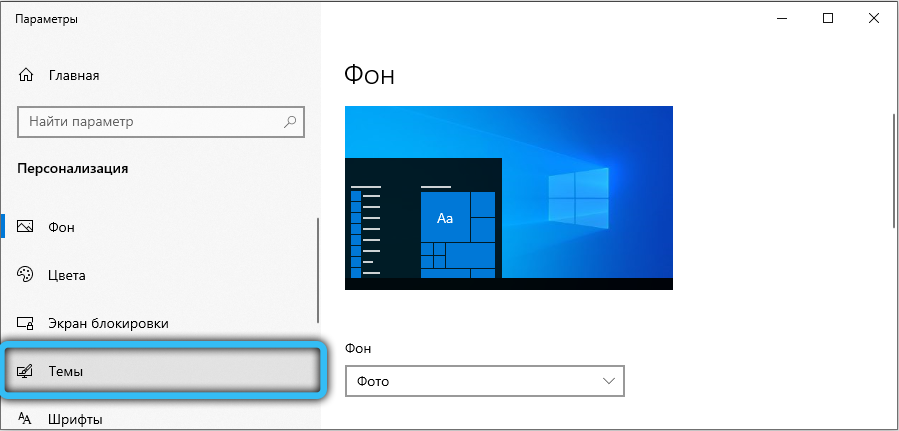
Принцип решения проблемы предельно прост: вы выбираете любую тему из раздела «Темы по умолчанию», что автоматически приведёт к использованию дефолтной звуковой схемы.
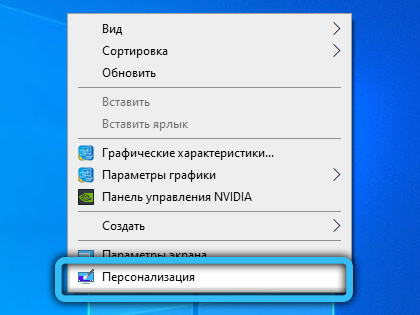
Для выполнения этой операции нужно щёлкнуть ПКМ по пустому пространству на рабочем столе, а в появившемся контекстном меню выбрать пункт «Персонализировать». Откроется новое окно, где и следует выбрать тему по умолчанию, не обязательно называющуюся Windows 10.
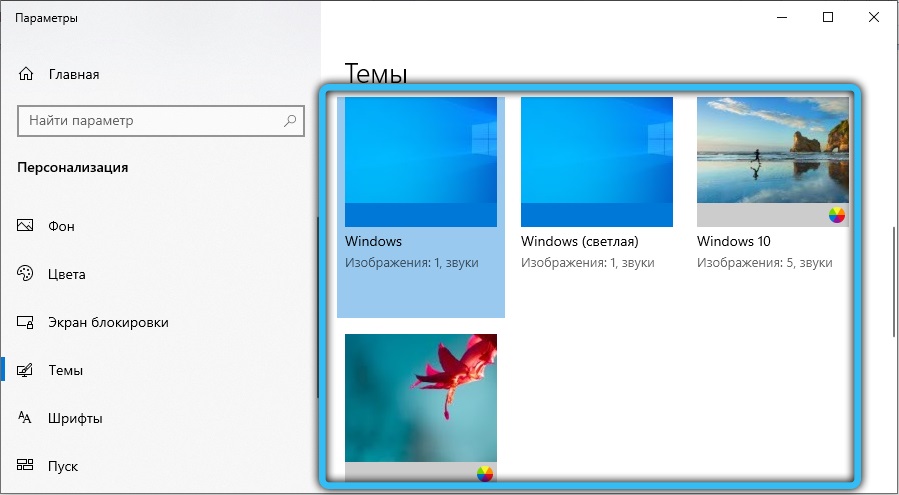
Но, опять же, это вариант не для тех, кому дорога собственная звуковая схема, и таких пользователей, судя по всему, немало. Для них будет интересным решением следующий вариант.
Отключение UAC
Как мы уже знаем, служба UAC отвечает за работу системы контроля пользовательских учётных записей. Её отключение поможет вам устранить ошибку с кодом 1073741819 (аварийное завершение работы программы), но вы должны понимать, какими последствиями чревато такое решение. Если встроенный Защитник определит, что программа, которую вы намереваетесь инсталлировать, может вносить изменения в ваш компьютер, вы не получите соответствующего предупреждения. Если вы готовы смириться с подобными рисками, то это отличный способ сохранить свою звуковую схему без последствий в виде блокировки запуска программ.
Сам алгоритм следующий:
В принципе никто не мешает вам создать свою звуковую схему заново, чтобы не подвергать риску свой компьютер. Но если вы полагаетесь на то, что с любыми угрозами справится установленный антивирус, то такой вариант вполне достоин внимания.
Создание нового пользовательского аккаунта
Этот способ из той же серии – создавая учётную запись нового пользователя, вы автоматически делаете её беспроблемной, поскольку она не перенеслась из предыдущей версии Windows, а была создана в соответствии с текущими правилами.
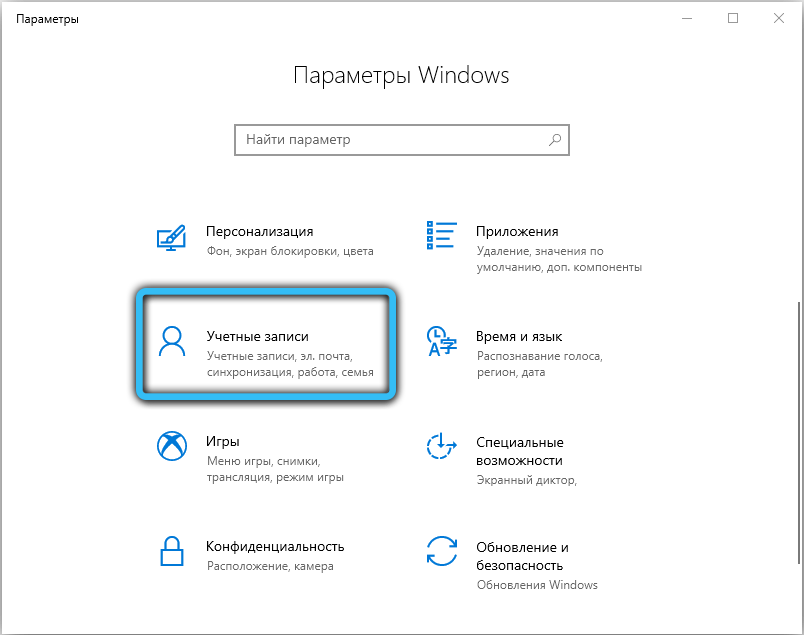
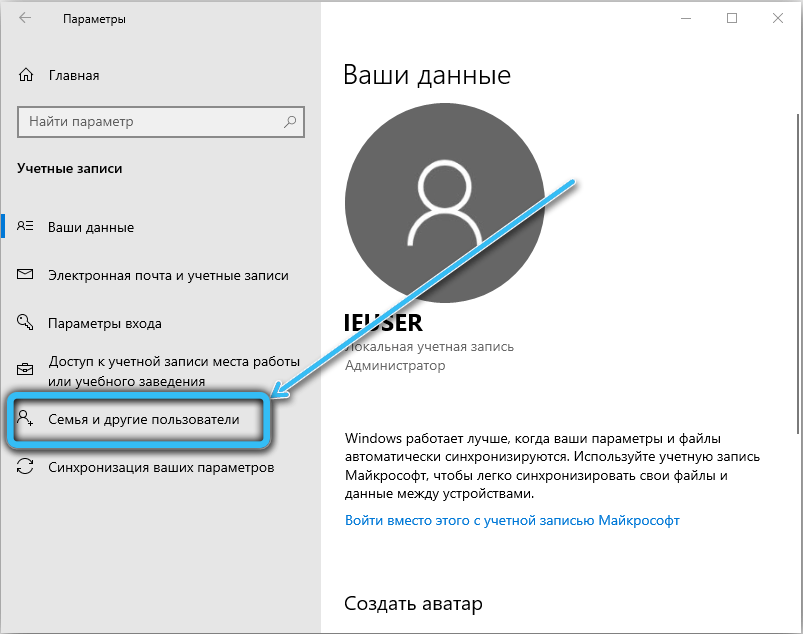
Старую учётную запись можно не удалять. Но нужно понимать, что если вы зайдёте в старый пользовательский аккаунт, ошибка 1073741819 снова будет вас сопровождать повсюду, где требуются действия с правами администратора.
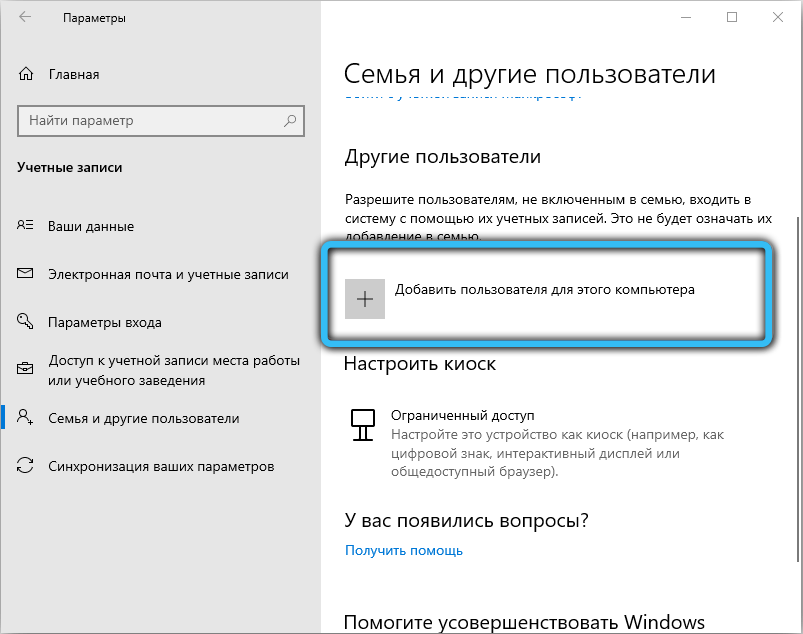
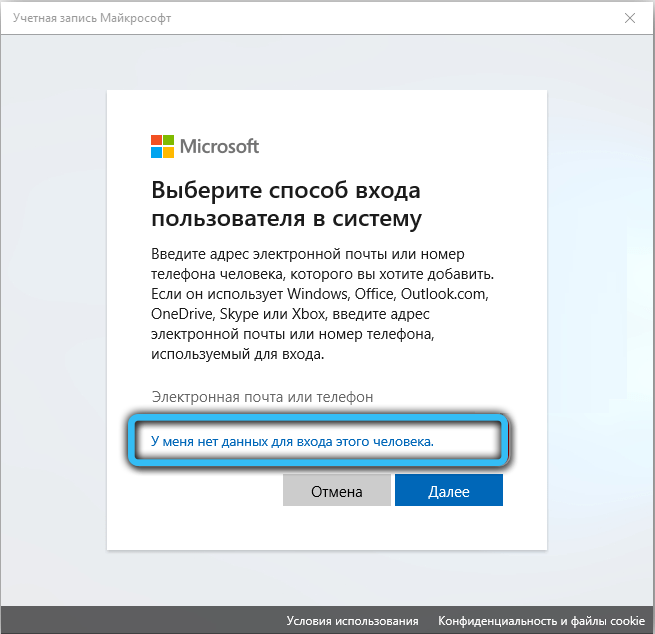
Метод не слишком удобен и рационален, но если все вышеперечисленные варианты не сработали или являются для вас неприемлемыми – отчего ж не попробовать? При этом вы и решаете проблему, и не теряете свои предпочтения. Правда, пользоваться ими можно будет с определёнными ограничениями.
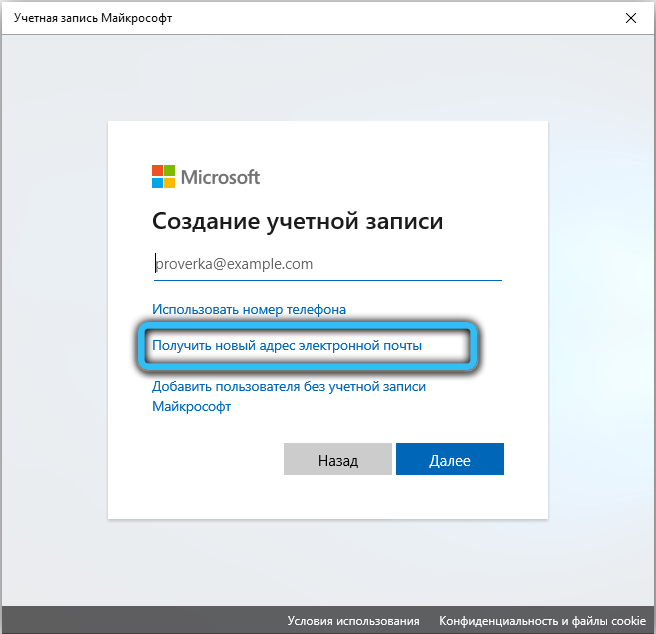
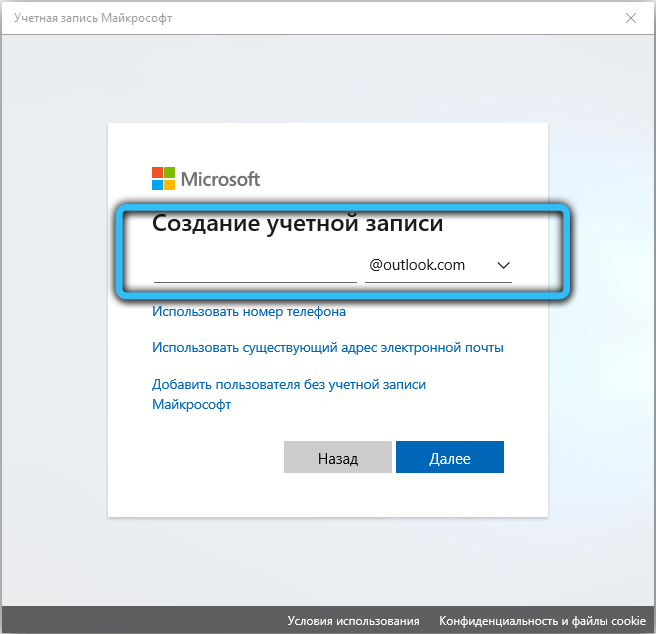
Удаление подозрительного софта
Нельзя исключить и того, что ответственным за блокировку запуска файлов является отнюдь не UAC, особенно если вы убедились, что звуковая схема здесь ни при чём. Вполне может оказаться, что установленный ранее софт каким-то образом блокирует добавление новых файлов, тем самым препятствуя установке новых программ. Проверить, так ли это, можно с помощью антивируса. Не помешает и изучить особенности используемых приложений в поисковике. Возможно, от какой-то программы придётся отказаться.
Изменение параметров питания
А вот это уже действительно экзотика. Но, говорят, способ помогает, если другие не срабатывают.
Алгоритм действий следующий:
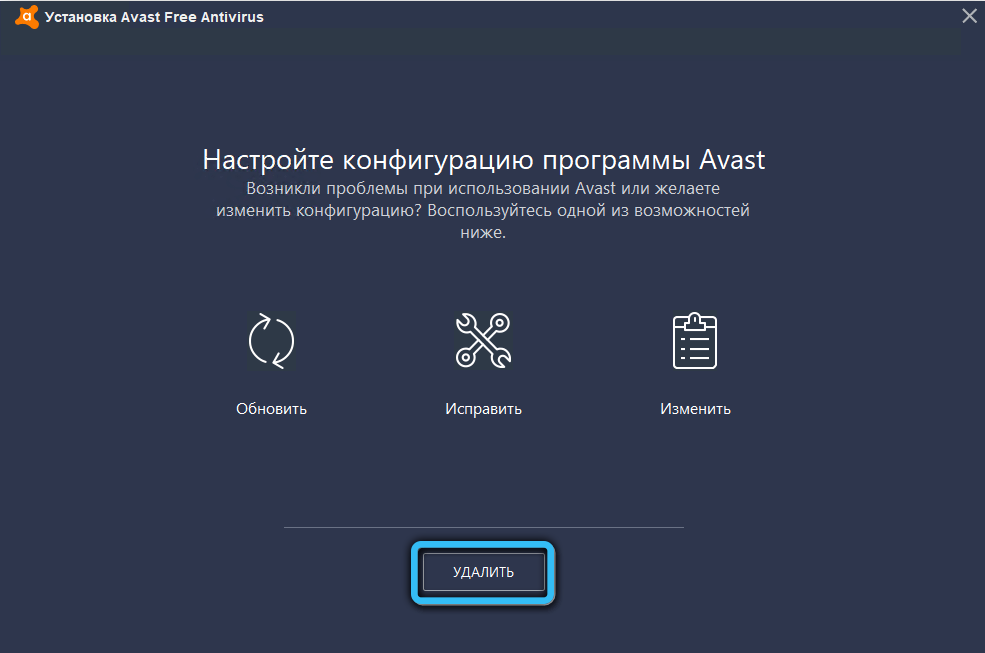
Удаление антивируса Avast
Иногда за блокировку запуска исполняемых файлов с правами администратора ответственен антивирус Avast, но вы не знаете, по какой причине он это делает. Лучший способ удостовериться, что виноват именно антивирус – отключить его. И если окажется, что ошибка 1073741819 – это его вина, лучше удалить Avast и заменить его другим антивирусным пакетом, благо выбор достаточно велик.
Восстановление системы
Ничто из перечисленного не помогло? Что ж, если исключить переустановку операционной системы, то в вашем распоряжении имеется более щадящий и очень действенный рецепт – это откат системы до состояния, когда ошибка с кодом 1073741819 вам не досаждала.
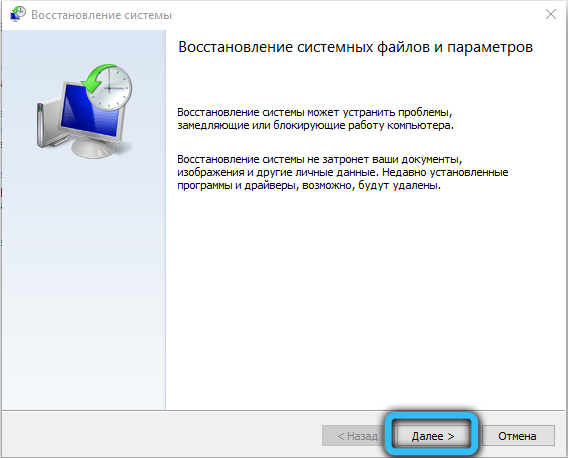
Как это сделать, мы рассказывали не единожды, важно только понимать, каковы возможные последствия этого шага.
Заключение
В большинстве случаев решить проблему с ошибкой 1073741819 удаётся использованием дефолтной звуковой схемы или теми способами, которые косвенно приводят к такому же результату. Если ошибка начала проявляться неожиданно и не после перехода на старшую версию Windows, придётся основательно поработать, чтобы диагностировать «болезнь» и вылечить компьютер. Надеемся, что наша статья поможет вам в этом благородном деле.