
Поясните, пожалуйста, в чем суть ошибки С3863?
Проект компилируется и работает в g++. Однако при сборке проекта в Visual Studio 2017 компилятор выдает ошибку С3863 (тип массива является неназначаемым). Это массив указателей на объекты класса SensorData.
Серьезность Код Описание    Проект  Файл    Строка  Состояние подавления
Ошибка  C3863   тип массива "SensorData *[quantity]" является неназначаемым data    c:\users\chas\clang\generation.cpp  42
Имеется 3 файла: generation.cpp, source.cpp, source.hpp. Код программ:
    // ***** generation.cpp *****
#include <ctime> // time_t
#include <cstdio> // sprintf
#include <iostream> //cin cout
#include <cstdlib> // exit success
#include "source.hpp"

using namespace std;

int main (int argc, char* argv[])
{
    cout <<"Программа записи показаний датчиков температуры и влажности в" <<
    " базу данных. Для этого потребуется указать модель, координаты " <<
    "установки и дату установки датчиков.\n";
    cout << "Укажите количество датчиков для внесения в базу данных, " <<
    "либо 0 для выхода.\n";
    int quantity = 0;
    while(true)
    {
        cin >> quantity;
        if(quantity > 0)
            break;
        else if(quantity == 0)
            return EXIT_SUCCESS;
        else
            cout <<"Ошибка! Ввведите положительное число, либо 0.\n";
    }

    SensorData *ptr[quantity];
    int complete = 0; // автозаполнение данных датчиков
    cout << "Требуется автозаполнение данных датчиков (модель, " <<
    "координаты, дата установки)?\n" << "0-да, 1(и др.числа)-нет: ";
    cin >> complete;
    if(!complete)
    {
        for(int i=0; i<quantity; ++i)
        {
            char buffer [6];
            sprintf (buffer, "DHT%d", 11*(i%2+1));
            ptr[i]=new SensorData(buffer, time(NULL)-300000*(i%50+1),
            201600+3152*(i%5), 216000+3517*(i%8));
            ptr[i]->generateMesuares();
        }
    }
    else
    {
        for(int i=0; i<quantity; ++i)
        {
            ptr[i]=new SensorData;
            ptr[i]->setModel();
            ptr[i]->setCoordinates();
            ptr[i]->setDate();
            ptr[i]->generateMesuares();
        }
    }

    while(true)
    {
        cout << "\nСписок датчиков в базе данных: \n";
        int i;
        for(i=0; i<quantity; ++i)
        {
            cout << "№" << i+1 << endl;
            ptr[i]->getInfo();
        }
        int selection;
        while(true)
        {
        cout << "Выберите номер датчика (0-для выхода): ";
        cin >> selection;
        if(selection < 0 || selection > i+1)
            cout << "Выберите снова. \n";
        else
            break;
        }
        if(!selection)
            return EXIT_SUCCESS;
        time_t begin, end;
        while(true)
        {
            cout << "Выберите период измерений: \n";
            cout << "Выбор даты начала периода \n";
            begin = ptr[selection-1]->choiceTime();
            cout << "Выбор даты конца периода \n";
            end = ptr[selection-1]->choiceTime();
            if(begin > end)
                cout <<"Дата начала периода позже даты окончания.\n";
            else
                break;
        }
        while(true)
        {
            int choice = 0;
            while(true)
            {
                cout << "Выберите результат обработки данных: \n";
                cout << "1 - минимальное значение;\n";
                cout << "2 - среднее значение;\n";
                cout << "3 - максимальное значение;\n";
                cout << "4 - три предыдущих параметра;\n";
                cout << "0 - вернуться к списку датчиков.\n";
                cin >> choice;
                if(choice < 0 || choice > 4)
                    cout << "Выберите снова. \n";
                else
                    break;
            }
            if(!choice)
                break;
            else
                switch(choice)
                {
                    case 1:
                        ptr[selection-1]->getMinMeasure(begin, end);
                        break;
                    case 2:
                        ptr[selection-1]->getMiddleMeasure(begin, end);
                        break;
                    case 3:
                        ptr[selection-1]->getMaxMeasure(begin, end);
                        break;
                    case 4:
                        ptr[selection-1]->getMinMeasure(begin, end);
                        ptr[selection-1]->getMiddleMeasure(begin, end);
                        ptr[selection-1]->getMaxMeasure(begin, end);
                        break;
                }
        }
    }
    return EXIT_SUCCESS;
}

// *****source.hpp

#ifndef SOURCE_HPP
#define SOURCE_HPP
#include <ctime> // time_t
#include <vector> // vector
#include <string> // string
using namespace std;

class Measures
{
public:
    Measures();
    Measures(time_t timeAndDate, float temperatureMeasure,
    float humidityMeasure);
    void getMeasures();
    time_t dateAndTime;
    float temperature;
    float humidity;
};

class Sensor
{
public:
    Sensor();
    Sensor(const char *str, time_t timeAndDate, int latLocation,
    int longLocation);
    void setModel();
    void setCoordinates();
    time_t conversionTime();
    void setDate();
    void getInfo();
    time_t getInstallDate();
private:
    string model; // модель
    int latitude; // место установки широта, секунды
    int longitude; // место установки долгота, секунды
    time_t installationDate; // дата установки
};

class SensorData : public Sensor
{
public:
    SensorData(){};
    SensorData(const char *str, time_t timeAndDate, int latLocation,
    int longLocation) : Sensor(str, timeAndDate, latLocation, longLocation){};
    vector<Measures> measures_;
    void generateMesuares();
    vector<Measures>::iterator searchIterator(Measures *startPtr,
    time_t timeLimit);
    //выбор времени из диапазона времени измерений
    time_t choiceTime();
    vector<Measures>::iterator searchIterator(vector<Measures>::iterator p,
    time_t timeLimit);
    //печатаем максимальное T и H за указанный период
    void getMaxMeasure(time_t timeBegin, time_t timeEnd);
    //печатаем минимальное T и H за указанный период
    void getMinMeasure(time_t timeBegin, time_t timeEnd);
    //печатаем среднее T и H за указанный период
    void getMiddleMeasure(time_t timeBegin, time_t timeEnd);
};
#endif // SOURCE_HPP

далее реализации методов в source.cpp
Вопрос: как же сделать так, чтобы при скомпиляции не появлялась ошибка С3863, и не избавляться от массива? На мой взгляд в нем весь смысл автоматизации программы. И пожалуйста поясните, почему и зачем VS так критически относится к подобным массивам?
Segmentation faults in C or C++ is an error that occurs when a program attempts to access a memory location it does not have permission to access. Generally, this error occurs when memory access is violated and is a type of general protection fault. Segfaults are the abbreviation for segmentation faults.
The core dump refers to the recording of the state of the program, i.e. its resources in memory and processor. Trying to access non-existent memory or memory which is being used by other processes also causes the Segmentation Fault which leads to a core dump.
A program has access to specific regions of memory while it is running. First, the stack is used to hold the local variables for each function. Moreover, it might have memory allocated at runtime and saved on the heap (new in C++ and you may also hear it called the “free store“). The only memory that the program is permitted to access is it’s own (the memory previously mentioned). A segmentation fault will result from any access outside of that region.
Segmentation fault is a specific kind of error caused by accessing memory that “does not belong to you“:
- When a piece of code tries to do a read-and-write operation in a read-only location in memory or freed block of memory, it is known as a segmentation fault.
- It is an error indicating memory corruption.
Common Segmentation Fault Scenarios
In a Segmentation fault, a program tries to access memory that is not authorized to access, or that does not exist. Some common scenarios that can cause segmentation faults are:
- Modifying a string literal
- Accessing an address that is freed
- Accessing out-of-array index bounds
- Improper use of scanf()
- Stack Overflow
- Dereferencing uninitialized pointer
1. Modifying a String Literal
The string literals are stored in the read-only section of the memory. That is why the below program may crash (gives segmentation fault error) because the line *(str+1) = ‘n’ tries to write a read-only memory.
Example:
C
#include <stdio.h>
int main()
{
char* str;
str = "GfG";
*(str + 1) = 'n';
return 0;
}
C++
#include <iostream>
using namespace std;
int main()
{
char* str;
str = "GfG";
*(str + 1) = 'n';
return 0;
}
Output
timeout: the monitored command dumped core
/bin/bash: line 1: 32 Segmentation fault timeout 15s ./83b16132-8565-4cb1-aedb-4eb593442235 < 83b16132-8565-4cb1-aedb-4eb593442235.in
Refer, to Storage for Strings in C for more details.
2. Accessing an Address That is Freed
Here in the below code, the pointer p is dereferenced after freeing the memory block, which is not allowed by the compiler. Such pointers are called dangling pointers and they produce segment faults or abnormal program termination at runtime.
Example:
C
#include <stdio.h>
#include <stdlib.h>
int main(void)
{
int* p = (int*)malloc(8);
*p = 100;
free(p);
*p = 110;
printf("%d", *p);
return 0;
}
C++
#include <iostream>
using namespace std;
int main(void)
{
int* p = (int*)malloc(sizeof(int));
*p = 100;
free(p);
*p = 110;
return 0;
}
Output
Segmentation Fault
3. Accessing out-of-bounds Array Index
In C and C++, accessing an out-of-bounds array index may cause a segmentation fault or other undefined behavior. There is no boundary checking for arrays in C and C++. Although in C++, the use of containers such as with the std::vector::at() method or with an if() statement, can prevent out-of-bound errors.
Example:
C
#include <stdio.h>
int main(void)
{
int arr[2];
arr[3] = 10;
return (0);
}
C++
#include <iostream>
using namespace std;
int main()
{
int arr[2];
arr[3] = 10;
return 0;
}
Output
Segmentation Faults
4. Improper use of scanf()
The scanf() function expects the address of a variable as an input. Here in this program n takes a value of 2 and assumes its address as 1000. If we pass n to scanf(), input fetched from STDIN is placed in invalid memory 2 which should be 1000 instead. This causes memory corruption leading to a Segmentation fault.
Example:
C
#include <stdio.h>
int main()
{
int n = 2;
scanf("%d", n);
return 0;
}
C++
#include <iostream>
using namespace std;
int main()
{
int n = 2;
cin >> n;
return 0;
}
Output
Segementation Fault
5. Stack Overflow
It’s not a pointer-related problem even code may not have a single pointer. It’s because of running out of memory on the stack. It is also a type of memory corruption that may happen due to large array size, a large number of recursive calls, lots of local variables, etc.
Example:
C
#include <stdio.h>
int main()
{
int arr[2000000000];
return 0;
}
C++
#include <iostream>
using namespace std;
int main()
{
int array[2000000000];
return 0;
}
Output
Segmentation Fault
6. Buffer Overflow
If the data being stored in the buffer is larger than the allocated size of the buffer, a buffer overflow occurs which leads to the segmentation fault. Most of the methods in the C language do not perform bound checking, so buffer overflow happens frequently when we forget to allot the required size to the buffer.
Example:
C
#include <stdio.h>
int main()
{
char ref[20] = "This is a long string";
char buf[10];
sscanf(ref, "%s", buf);
return 0;
}
C++
#include <iostream>
using namespace std;
int main()
{
char ref[20] = "This is a long string";
char buf[10];
sscanf(ref, "%s", buf);
return 0;
}
Output
Segmentation Fault
7. Dereferencing an Uninitialized or NULL Pointer
It is a common programming error to dereference an uninitialized pointer (wild pointer), which can result in undefined behavior. When a pointer is used in a context that treats it as a valid pointer and accesses its underlying value, even though it has not been initialized to point to a valid memory location, this error occurs. Data corruption, program errors, or segmentation faults can result from this. Depending on their environment and state when dereferencing, uninitialized pointers may yield different results.
As we know the NULL pointer does not points to any memory location, so dereferencing it will result in a segmentation fault.
Example:
C
#include <stdio.h>
int main()
{
int* ptr;
int* nptr = NULL;
printf("%d %d", *ptr, *nptr);
return 0;
}
C++
#include <iostream>
using namespace std;
int main()
{
int* ptr;
int* nptr = NULL;
cout << *ptr << " " << *nptr;
return 0;
}
Output
Segmentation Fault
How to Fix Segmentation Faults?
We can fix segmentation faults by being careful about the causes mentioned:
- Avoid modifying string literals.
- Being careful when using pointers as they are one of the most common causes.
- Considering the buffer and stack size before storing the data to avoid buffer or stack overflow.
- Checking for bounds before accessing array elements.
- Use scanf() and printf() carefully to avoid incorrect format specifiers or buffer overflow.
Overall, the cause of the segmentation fault is accessing the memory that does not belong to you in that space. As long as we avoid doing that, we can avoid the segmentation fault. If you cannot find the source of the error even after doing it, it is recommended to use a debugger as it directly leads to the point of error in the program.
Last Updated :
07 May, 2023
Like Article
Save Article
I get to help a lot of people learn C# programming every year. As I watch new developers grow and get used to working in C# and Visual Studio, it has become fairly clear to me that reading C# compiler errors and even their documentation is an acquired skill. I’ve made a request for Microsoft to improve the error message feedback in Visual Studio, but until that’s resolved developers still have a tough time working through early obstacles.
Because of this, I’m creating this unusual post to serve as beginner-friendly documentation to what I personally view as the most likely compiler errors a new developer is likely to encounter. Microsoft has wonderful documentation on compiler errors, and this is something that will help you out significantly as you grow, but early on a paragraph or two aimed at a beginner can be exactly what you need.
I also snuck in a few of the more interesting compiler errors I noticed about the maximum limits of the C# compiler, so even if you’re very familiar with C# at this point you’ll likely still learn a few things skimming this list.
Take a look at my list and my recommendations on these issues and let me know if you find this helpful or encounter something I missed.
CS0003 – Out of Memory
This occurs when a computer runs out of memory compiling your code. Close any unnecessary programs and reboot the machine if the problem persists.
CS0004 – Warning Treated as Error
Developers may configure projects to treat certain warnings as errors. These warnings may be specified in the build section of the project’s properties. Typically it is best to resolve the specific warning listed in the build errors since someone wanted that to be treated severely.
CS0015 – Type Name too Long
.NET requires the names of types and namespaces to be less than 1024 characters. If you find yourself getting this error, you may want to reconsider your team’s naming choices.
CS0017 – More than one entry point defined
This occurs when your program has more than one class defined with a static void main method. Remove one of them or manually set the project’s startup object in the project properties.
CS0019 – Operator ‘operator’ cannot be applied to operands of type ‘type’ and ‘type’
This occurs when you try to compare two different types in ways that cannot be compared. For example, checking to see if integer values are equal to Boolean values, subtracting a string from a number, etc. This error often occurs when developers forget what type of data is stored by a particular variable.
CS0020 – Division by Constant Zero
This occurs if you try to force a division by zero in your code. You cannot force a division by zero through a numeric literal or by using a constant for the denominator, but you can declare a variable holding 0 and use that as a denominator.
CS0021 – Cannot apply indexing to type
This occurs when you try to use an array or list-style indexer on a type that doesn’t support it. This often occurs when developers assume they’re working with an array, string, or list and are not.
CS0023 – Operator ‘operator’ cannot be applied to operand of type ‘type’
This occurs when you try to use a mathematical operator with a type that doesn’t support it. For example, trying to generate a negative value of a string. Double check that your variables are of the type you think they are and re-evaluate what you are trying to do.
CS0026 – Keyword this cannot be used in a static method
This error occurs when you are working inside of a static method and try to use the this keyword. Static methods are methods associated with the class itself and not with an instance of the class. As a result, static methods do not have access to any properties, methods, or fields on the class that are not static.
CS0029 – Cannot implicitly convert type ‘type’ to ‘type’
This occurs when you have a variable of one type and are trying to store it into a variable of another type. Some types allow you to automatically convert from one type to another (an implicit conversion), but the types you are using do not support that. You may need to use an explicit cast using (type) syntax.
CS0030 – Cannot convert type ‘type’ to ‘type’
This occurs when there is no implicit or explicit conversion between two different types. If you’re sure you need to do what you’re doing, you could create a method to convert from one type to the other.
CS0031 – Constant value ‘value’ cannot be converted to a ‘type’.
This occurs when you try to store a value into a variable type that cannot store that particular value. For example, if you try to store 5 billion into an integer (which can store values up to around 2.1 billion) you will get this compiler error. You can resolve this error by storing the value into a type that can hold larger values, such as a long.
CS0050 – Inconsistent accessibility: return type ‘type’ is less accessible than method ‘method’
This occurs when a method returns a type that has a visibility or access modifier that is more restrictive than the method and class the method is currently in. For example this error will occur if a public method in a public class returns a type that is defined as internal.
This error usually occurs when developers forget to mark a class as public. Remember that classes have a default access modifier of internal when no access modifier is specified. Typically the fix for this is to explicitly declare that class as public.
CS0051 – Inconsistent accessibility: parameter type ‘type’ is less accessible than method ‘method’
This occurs when a method takes in a parameter that is of a type that has a visibility or access modifier that is more restrictive than the method and class the method is currently in. For example this error will occur if a public method in a public class requires a parameter of a type that is defined as internal.
This error usually occurs when developers forget to mark a class as public. Remember that classes have a default access modifier of internal when no access modifier is specified. Typically the fix for this is to explicitly declare that class as public.
CS0052 – Inconsistent accessibility: field type ‘type’ is less accessible than field ‘field’
This occurs when a class has a public field that is of a type that has a visibility or access modifier that is more restrictive than the class the method is currently in. For example this error will occur if a class has a public field of a type that is defined as internal.
This error usually occurs when developers forget to mark a class as public. Remember that classes have a default access modifier of internal when no access modifier is specified. Typically the fix for this is to explicitly declare that class as public.
CS0053 – Inconsistent accessibility: property type ‘type’ is less accessible than property ‘property’
This occurs when a class has a property of a type that has a visibility or access modifier that is more restrictive than the property’s visibility. For example this error will occur if a public property is of a type that is defined as internal.
This error usually occurs when developers forget to mark a class as public. Remember that classes have a default access modifier of internal when no access modifier is specified. Typically the fix for this is to explicitly declare that class as public.
CS0060 – Inconsistent accessibility: base class ‘class1’ is less accessible than class ‘class2’
This occurs when a class inherits from another class but the subclass’s access modifier is less restrictive than the base class’s access modifier. For example this error will occur if a public class inherits from an internal class.
This error usually occurs when developers forget to mark a class as public. Remember that classes have a default access modifier of internal when no access modifier is specified. Typically the fix for this is to explicitly declare that class as public.
CS0061 – Inconsistent accessibility: base interface ‘interface 1’ is less accessible than interface ‘interface 2’
This occurs when an interface inherits from another interface but the child interface’s access modifier is less restrictive than the base interface’s access modifier. For example this error will occur if a public interface inherits from an internal interface.
This error usually occurs when developers forget to mark an interface as public. Remember that interfaces have a default access modifier of internal when no access modifier is specified, although every member of an interface is public. Typically the fix for this is to explicitly declare that interface as public.
CS0100 – The parameter name ‘parameter name’ is a duplicate
This occurs when a developer declares a method but uses the same parameter name twice in the method’s parameter list. The fix for this is generally to remove an unneeded parameter or to rename parameters so that all parameters have a different name.
CS0101 – The namespace ‘namespace’ already contains a definition for ‘type’
This occurs when a class is defined twice in the same namespace. This can occur when a class is renamed but the old file still exists, when a developer forgot to mark a class as part of a different namespace, or when a developer intended to use the partial keyword but forgot to specify it. The fix for this will vary based on which files you want and what namespaces they should live in.
CS0102 – The type ‘type name’ already contains a definition for ‘identifier’
This occurs when you declare a member such as a field twice in the same class. Often this is a symptom of using an existing variable name instead of choosing a new name.
CS0103 – The name ‘identifier’ does not exist in the current context
This error often occurs when trying to use a variable defined in another scope. This commonly occurs when you try to define a variable inside of a try block and refer to it in a catch block, when there was no guarantee that the runtime was able to create that variable and therefore the variable is not available.
The fix for this is typically to declare the variable before the try / catch block and update its value from the try block. In this way the catch block will get either the initial value of the variable or its updated value and will be able to reference it.
CS0111 – Type ‘class’ already defines a member called ‘member’ with the same parameter types
This occurs when a developer creates a duplicate method or property with an identical signature consisting of a return type and parameter types. The compiler detects that there will not be a way for code outside of the class to distinguish between one member and the other and so this error is raised. Typically when this occurs you need to either rename one of the two members, change the parameters of one of the methods, or merge the two methods together into one method.
CS0117 – ‘type’ does not contain a definition for ‘identifier’
This occurs when you are trying to call a method or use a property on an instance of an object, but there is no method or property with that name. This can be an issue with capitalization, spelling, or forgetting the name of the member you’re referring to. Code completion can help you find the correct name to use.
CS0120 – An object reference is required for the non-static field, method, or property ‘member’
This often occurs in static methods when you attempt to work with non-static members of the same class. Remember that static methods are associated with the class itself and not with a specific instance of that class. As a result, static methods cannot access properties, fields, and methods that are not marked as static.
The fix for this is often to remove the static keyword from the method that needs to access instance variables. This is counter-intuitive since the compiler pushes you towards adding static in other places, but if you follow that path to its logical conclusion all of your data becomes static eventually, so you’re better off removing the static keyword when confronted by this.
CS0122 – ‘member’ is inaccessible due to its protection level
This occurs when you are trying to call a method or use a property on an instance of an object, but that member is defined as private or protected and you are outside of the class or something that inherits from it. You may not be intended to work with the method or property you are using and you should probably look for public members that might meet your needs without compromising the class’s encapsulation.
CS0127 – Since ‘function’ returns void, a return keyword must not be followed by an object expression
This is a rarer error that occurs when you are in a method defined as void but are trying to return a specific object. Remember that void methods do not return any value so a return statement should just be listed as return;. If you find that you do need to return a value, you should change the return type of the method from void to some specific type.
CS0128 – A local variable named ‘variable’ is already defined in this scope
This occurs when you re-declare a variable that already exists. The solution for this is to either use a different variable name or to remove the type name from your statement and change it from a variable declaration to an assignment statement and re-use the existing variable.
This error often comes from copying and pasting code that declares a new variable.
CS0133 – The expression being assigned to ‘variable’ must be constant
This occurs when you are declaring a const and declaring it to another variable. Constants are evaluated at the time your code is compiled and the compiler will not know the value of your variables. As a result, constants must be set to a literal number or string value.
CS0134 – ‘variable’ is of type ‘type’. A const field of a reference type other than string can only be initialized with null.
This occurs when you are trying to declare a const of a type other than a numeric or string value. Typically, if you have a const that needs to store a reference type you should instead use readonly which is less optimized than a const but works with reference types and ensures that the value will never change.
CS0136 – A local variable named ‘var’ cannot be declared in this scope because it would give a different meaning to ‘var’, which is already used in a ‘parent or current/child’ scope
This occurs when you declare a new variable with the same name as another variable in a visible scope. The solution for this is to either use a different variable name or to remove the type name from your statement and change it from a variable declaration to an assignment statement and re-use the existing variable.
CS0145 – A const field requires a value to be provided
This occurs when you declare a const but do not provide a value. You should set a const equal to some string or numeric variable when declaring it.
CS0150 – A constant value is expected
This occurs when the compiler requires a constant value such as a numeric or string literal but a variable is defined. This can occur when you use a variable in a switch statement or when you are using an array initializer for an array with a variable size.
Switch statements cannot use cases for specific variables, though switch expressions are more flexible.
When working with arrays of varying size, you may want to avoid the use of array initializers and instead manually set the elements of the array after creation.
CS0152 – The label ‘label’ already occurs in this switch statement
This occurs when you duplicate a case statement inside of a switch statement. Typically this occurs when you didn’t notice the case already existed and you can delete your repeated case statement.
CS0160 – A previous catch clause already catches all exceptions of this or of a super type (‘type’)
The ordering of catch statements in a try / catch matters since the runtime will try to match the first catch that applies to the exception it encountered. Because of this, the compiler generates this error if it sees a more specific exception type after a less specific exception type since this results in a case where the more specific catch statement could never be reached.
Move your more specific catch statement above the less specific one to fix this error.
CS0161 – Not all code paths return a value
This occurs because the C# compiler believes that it is possible to get to the end of your method without encountering a return statement. Keep in mind that the C# compiler does very little inferences based on your if statements and even if it may not actually be possible to reach the end of the method without returning, the compiler still thinks it is.
The fix for this is almost always to add a final return statement.
CS0165 – Use of unassigned local variable
This occurs when the compiler sees a variable that is defined but not set to an initial value and determines that the value of that variable needs to be read from later on in the method before the variable is guaranteed to have its value set.
The fix for this is generally to set the variable to be equal to an initial value.
CS0176 – Static member ‘member’ cannot be accessed with an instance reference; qualify it with a type name instead
This occurs when you have a static property or field on a class but are trying to refer to it on a specific instance of that class.
Use the class name instead of the instance variable to access the static member.
CS0201 – Only assignment, call, increment, decrement, and new object expressions can be used as a statement
This typically occurs when you are performing some sort of mathematical operation but not storing the result into a variable. The compiler understands the operation but sees it has no value, so it raises the error.
The fix for this is to store the result of the mathematical operation into a variable or to remove the unnecessary line.
CS0204 – Only 65534 locals are allowed
Apparently you have a method that has over 65 thousand local variables inside of it. The compiler doesn’t like this very much and, frankly, I’m a little concerned why you’d need that many.
Reconsider your life choices.
CS0230 – Type and identifier are both required in a foreach statement
This occurs when you are writing a foreach statement without specifying all parts of the statement.
foreach statements require a variable type, a variable name, the word in, and some variable that can be enumerated over. For example: foreach (string person in people)
CS0234 – The type or namespace name ‘name’ does not exist in the namespace ‘namespace’ (are you missing an assembly reference?)
This occurs when you are trying to refer to a type via its fully-qualified name, including the namespace, but no known type exists with that namespace and type name. This can be a spelling error, a mistake as to which namespace the type lives in, or a correct namespace and type, but your project does not yet have a reference to the project the type is defined in.
If your spelling and namespaces are correct you may need to add a project reference to your project or install a package via nuget.
CS0236 – A field initializer cannot reference the non-static field, method, or property ‘name’.
This occurs when you try to define a field by referencing another field. This error exists to prevent unpredictable behavior based on which field initializers run first.
The fix for this is to set the value of the field in the constructor instead of in a field initializer.
CS0246 – The type or namespace name ‘type/namespace’ could not be found (are you missing a using directive or an assembly reference?)
This occurs when you are trying to refer to a type no known type exists with that type name in the using statements currently in your file.
This is usually a spelling error or a missing using statement at the top of your file.
If your spelling and using statements are correct you may need to add a project reference to your project or install a package via nuget.
CS0266 – Cannot implicitly convert type ‘type1’ to ‘type2’. An explicit conversion exists (are you missing a cast?)
This occurs when you are trying to store a variable of one type into a variable of another type without casting. For example, if you are trying to set a double value into an int variable you will see this error.
The statement “an explicit conversion exists (are you missing a cast)” is telling you that these types are compatible, but the compiler wants to make sure you intend to convert from one to another so it requires you to cast your variable from one type to another.
You cast variables in C# by using parentheses around a type name like this: int num = (int)myDouble;
CS0500 – ‘class member’ cannot declare a body because it is marked abstract
This occurs when you declare an abstract member inside of an abstract class, but you tried to give it a method body (using {}). Abstract members do not have method bodies.
Remove the {}’s from your abstract method. Alternatively, if you want to provide a default implementation and allow inheriting classes to optionally override yours, use virtual instead of abstract.
CS0501 – ‘member function’ must declare a body because it is not marked abstract, extern, or partial
This occurs when you try to declare a method but forget to give it a method body with {}’s.
This can also occur when you mean to define an abstract method but forgot to use the abstract keyword.
CS0506 – ‘function1’ : cannot override inherited member ‘function2’ because it is not marked “virtual”, “abstract”, or “override”
In C# you have to mark a method as virtual or abstract to be able to override it.
The fix for this is usually to add the virtual keyword to the method in the base class.
CS0507 – ‘function1’ : cannot change access modifiers when overriding ‘access’ inherited member ‘function2’
When overriding a method you must keep the same access modifier as the base method. If the access modifier needs to change, change it in all classes that have the method.
CS0508 – ‘Type 1’: return type must be ‘Type 2’ to match overridden member ‘Member Name’
When overriding a method you cannot change the return type of the method. If you think you need to return something radically different, you may need to introduce a new method instead of overriding an existing one. Alternatively, creative uses of interfaces or inheritance can allow you to return a more specific version of something from a method through polymorphism.
CS0513 – ‘function’ is abstract but it is contained in nonabstract class ‘class’
When you need a method to be abstract, the entire class needs to be abstract as well.
CS0525 – Interfaces cannot contain fields
This one is self-explanatory. An interface is a contract that defines what members need to be present. Fields in classes should be private and are implementation details that do not belong in an interface.
CS0526 – Interfaces cannot contain constructors
This one is self-explanatory. An interface is a contract that defines what members need to be present on an already-constructed class. Interfaces do not care about how an instance is created and cannot denote constructors required for a given class.
CS0531 – ‘member’ : interface members cannot have a definition
This occurs when you try to give an interface member a method body. Interfaces denote capabilities that must be in place, not how those capabilities should work.
If you think you really need a default implementation of a method, you might want to use an abstract class instead of an interface.
CS0534 – ‘function1’ does not implement inherited abstract member ‘function2’
This occurs when you inherit from an abstract class that has abstract members but do not override those members. Because of this, the compiler has no implementation for those abstract members and does not know how to handle them if they are called.
Override the inherited member or mark the inheriting class as abstract as well.
CS0535 – ‘class’ does not implement interface member ‘member’
This occurs when you implement an interface but have not provided members that match those defined in the interface. Members must match the exact type signatures of those defined in the interface and should have names that match those in the interface as well.
CS0645 – Identifier too long
This occurs when you try to name a variable or other identifier something longer than 512 letters long.
What exactly are you trying to do over there that has you naming variables this long?
CS0844 – Cannot use local variable ‘name’ before it is declared.
This occurs when you try to use a variable in a method above when that variable is declared. C# does not have hoisting like some other languages do and variables are only available after they are declared.
Reorder your statements to match your needs.
CS1001 – Identifier expected
This usually occurs when you forget the name of a variable, class, or parameter but have defined other aspects of that line of code. Check some reference materials for what you are trying to do because you’re missing something important.
CS1002 – Semicolon expected
C# requires you to end most statements with a semicolon, including this one. Add a semicolon to the end of the line and all should be well.
CS1026 – ) expected
You have too many opening parentheses and not enough closing parentheses. Check to make sure that all open-parentheses have a matching closing parentheses.
Clicking on a parentheses in Visual Studio will highlight the matching parentheses making it easier to spot the one you’re missing.
CS1033 – Source file has exceeded the limit of 16,707,565 lines representable in the PDB; debug information will be incorrect
What on earth are you even doing over there? Why would you have a source file that requires more than 16 million lines?
Don’t do that. Just no. It’s time to hire a consultant.
CS1034 – Compiler limit exceeded: Line cannot exceed ‘number’ characters
Some people like tabs. Some people like spaces. You, apparently solve this debate by removing line breaks entirely.
You should never need to have a line of code longer than 16 million characters.
CS1035 – End-of-file found, ‘*/’ expected
Your code has a block comment start (/*) but no matching end comment. Add an end comment (*/) and the compiler will be happier.
CS1039 – Unterminated string literal
It looks like you started a string somewhere but forgot to put the other quotation mark. Add it in where it needs to be.
CS1501 – No overload for method ‘method’ takes ‘number’ arguments
This occurs when you are trying to call a method with an incorrect number of arguments or parameters to that method. Check the code or documentation for the method you’re trying to call and ensure you have the correct number of arguments specified.
CS1513 – } expected (missing closing scope)
You have too many opening curly braces and not enough closing curly braces. Check to make sure that all open curly braces have a matching closing curly brace.
Clicking on a { in Visual Studio will highlight the matching } making it easier to spot the one you’re missing.
CS1514 – { expected
Your code requires a { but you didn’t provide one. This often happens after declaring a namespace or class. Check your syntax and add curly braces where they need to go.
CS1525 – Invalid expression term ‘character’
This error seems ambiguous, but most of the time when I see this error it comes from someone trying to use == to assign a value to a variable instead of using the = operator. If this is not your error, you may need to consult some documentation or reference material for valid syntax for what you’re trying to do.
CS1552 – Array type specifier, [], must appear before parameter name
This error occurs when you put [] syntax around the variable name and not around the type name when declaring an array.
Write your arrays as int[] myArray; instead of int myArray[];.
CS1604 – Cannot assign to ‘variable’ because it is read-only
This occurs when you’ve declared a readonly or const variable and are trying to set its value. You can’t do that. If you need to change its value, it can’t be readonly or const.
CS7036 – No argument given that corresponds to the required formal parameter (incorrect method call)
This error occurs when trying to call a base constructor but not specifying a parameter that is required by that constructor.
Double check your base() call and make sure the number and types of parameters lines up with a specific constructor present on your base class.
The segmentation fault, also known as segfault, is a type of computer error that occurs whenever an unexpected condition causes the processor to attempt to access a memory location that’s outside its own program storage area. The term “segmentation” refers to a memory protection mechanism used in virtual memory operating systems.
This specific error arises because data is typically shared on a system using different memory sections, and the program storage space is shared among applications.
Segmentation faults are usually triggered by an access violation, which occurs when the CPU attempts to execute instructions outside its memory area or tries to read or write into some reserved address that does not exist. This action results in halting the current application and generates an output known as Segmentation Fault.
#1. What are the Symptoms of Segmentation Fault?
The symptoms of segmentation faults may vary depending on how and where they’re generated. Typically, this error is generated due to one of the following conditions:
#a. Dereferencing a null pointer
Programming languages offer references, which are pointers that identify where in memory an item is located. A null pointer is a special pointer that doesn’t point to any valid memory location. Dereferencing (accessing) null pointer results in segmentation faults or null pointer exceptions.
/**
 * @file main.c
 * @author freecoder
 * @brief this program allow to handle a segmentation fault error
 *
 * @version 1.0
 * @date 8 Jan. 2022
 *
 * @copyright Copyright (c) 2022
 *
 */
#include <stdio.h>

/* main program entry */
int main(int argc, char **argv)
{
	/* local variables */
	unsigned int *puiPointer = NULL;
	/* body program */
	*puiPointer = 20;
	return 0;
}
after compiling and running the program with the gdb command, the segmentation fault error appears:
➜  Article-XX gcc -g main.c -o main
➜  Article-XX ./main
[1]    7825 segmentation fault  ./main
➜  Article-XX gdb ./main
GNU gdb (Debian 10.1-1.7) 10.1.90.20210103-git
Copyright (C) 2021 Free Software Foundation, Inc.
License GPLv3+: GNU GPL version 3 or later <http://gnu.org/licenses/gpl.html>
This is free software: you are free to change and redistribute it.
There is NO WARRANTY, to the extent permitted by law.
Type "show copying" and "show warranty" for details.
This GDB was configured as "x86_64-linux-gnu".
Type "show configuration" for configuration details.
For bug reporting instructions, please see:
<https://www.gnu.org/software/gdb/bugs/>.
Find the GDB manual and other documentation resources online at:
    <http://www.gnu.org/software/gdb/documentation/>.
For help, type "help".
Type "apropos word" to search for commands related to "word"...
Reading symbols from ./main...
(gdb) start
Temporary breakpoint 1 at 0x401111: file main.c, line 20.
Starting program: /home/others/Article-XX/main
warning: Error disabling address space randomization: Operation not permitted
Temporary breakpoint 1, main (argc=1, argv=0x7ffc9c096258) at main.c:20
20              unsigned int *puiPointer = NULL;
(gdb) list
15
16      /* main program entry */
17      int main(int argc, char **argv)
18      {
19              /* local variables */
20              unsigned int *puiPointer = NULL;
21
22              /* body program */
23
24              *puiPointer = 20;
(gdb) s
24              *puiPointer = 20;
(gdb) s
Program received signal SIGSEGV, Segmentation fault.
0x000000000040111d in main (argc=1, argv=0x7ffc9c096258) at main.c:24
24              *puiPointer = 20;
(gdb) 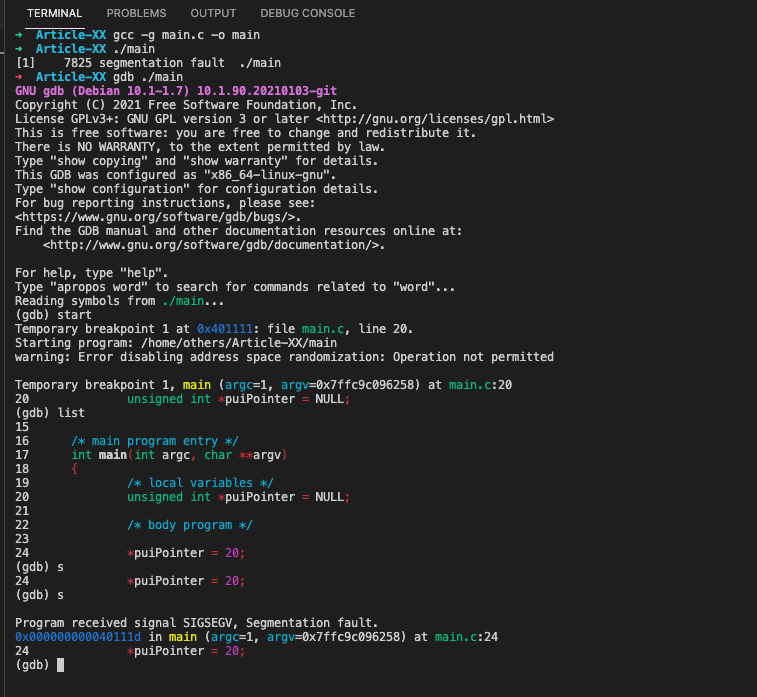
#b. Trying to access memory not initialized
Programs using uninitialized variables may crash when attempting to access uninitialized memory or may expose data stored in the uninitialized variables by writing to them. Also in the case when the program attempts to read or write to an area of memory not allocated with malloc(), calloc() or realloc().
An example of a simple segmentation fault is trying to read from a variable before it has been set:
/**
 * @file main.c
 * @author freecoder
 * @brief this program allow to handle a segmentation fault error
 *
 * @version 1.0
 * @date 8 Jan. 2022
 *
 * @copyright Copyright (c) 2022
 *
 */
#include <stdio.h>

/* main program entry */
int main(int argc, char **argv)
{
	/* local variables */
	unsigned int *puiPointer;
	/* body program */
	*puiPointer = 20;
	return 0;
}
In this case, the pointer puiPointer will be pointing to a random location in memory, so when the program attempts to read from it (by dereferencing *puiPointer), a segmentation fault will be triggered:
➜  Article-XX gcc -g main.c -o main
➜  Article-XX gdb ./main
GNU gdb (Debian 10.1-1.7) 10.1.90.20210103-git
Copyright (C) 2021 Free Software Foundation, Inc.
License GPLv3+: GNU GPL version 3 or later <http://gnu.org/licenses/gpl.html>
This is free software: you are free to change and redistribute it.
There is NO WARRANTY, to the extent permitted by law.
Type "show copying" and "show warranty" for details.
This GDB was configured as "x86_64-linux-gnu".
Type "show configuration" for configuration details.
For bug reporting instructions, please see:
<https://www.gnu.org/software/gdb/bugs/>.
Find the GDB manual and other documentation resources online at:
    <http://www.gnu.org/software/gdb/documentation/>.
For help, type "help".
Type "apropos word" to search for commands related to "word"...
Reading symbols from ./main...
(gdb) start
Temporary breakpoint 1 at 0x401111: file main.c, line 24.
Starting program: /home/others/Article-XX/main
warning: Error disabling address space randomization: Operation not permitted
Temporary breakpoint 1, main (argc=1, argv=0x7fff6df4f038) at main.c:24
24              *puiPointer = 20;
(gdb) list
19              /* local variables */
20              unsigned int *puiPointer;
21
22              /* body program */
23
24              *puiPointer = 20;
25
26              return 0;
27      }
(gdb) s
Program received signal SIGSEGV, Segmentation fault.
0x0000000000401115 in main (argc=1, argv=0x7fff6df4f038) at main.c:24
24              *puiPointer = 20;
(gdb) 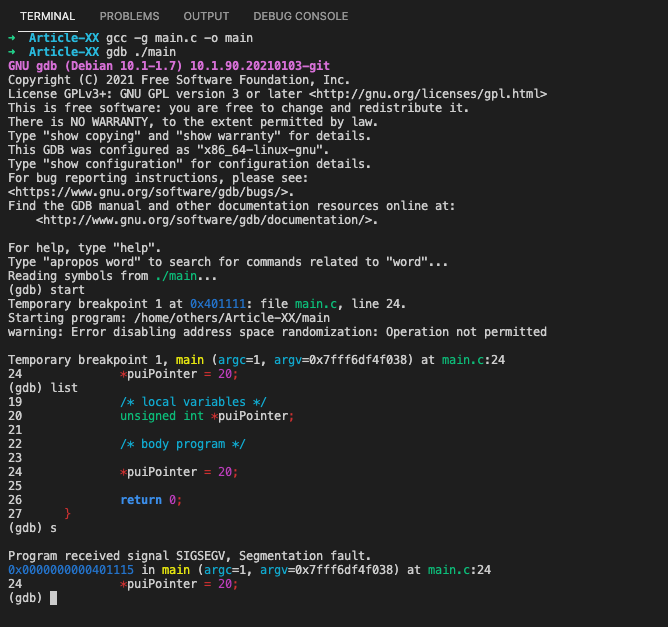
#c. Trying to access memory out of bounds for the program
In most situations, if a program attempts to access (read or write) memory outside of its boundaries, a segmentation fault error will occur. A code example of a simple segmentation fault error is below:
/**
 * @file main.c
 * @author freecoder
 * @brief this program allow to handle a segmentation fault error
 *
 * @version 1.0
 * @date 8 Jan. 2022
 *
 * @copyright Copyright (c) 2022
 *
 */
#include <stdio.h>

/* main program entry */
int main(int argc, char **argv)
{
	/* local variables */
	unsigned int uiArray[20];
	/* body program */
	uiArray[5000] = 1;
	return 0;
}
As shown bellow, the segmentation fault occurs after executing the out of bounds statement:
➜  Article-XX gcc -g main.c -o main
➜  Article-XX gdb ./main
GNU gdb (Debian 10.1-1.7) 10.1.90.20210103-git
Copyright (C) 2021 Free Software Foundation, Inc.
License GPLv3+: GNU GPL version 3 or later <http://gnu.org/licenses/gpl.html>
This is free software: you are free to change and redistribute it.
There is NO WARRANTY, to the extent permitted by law.
Type "show copying" and "show warranty" for details.
This GDB was configured as "x86_64-linux-gnu".
Type "show configuration" for configuration details.
For bug reporting instructions, please see:
<https://www.gnu.org/software/gdb/bugs/>.
Find the GDB manual and other documentation resources online at:
    <http://www.gnu.org/software/gdb/documentation/>.
For help, type "help".
Type "apropos word" to search for commands related to "word"...
Reading symbols from ./main...
(gdb) start
Temporary breakpoint 1 at 0x401111: file main.c, line 23.
Starting program: /home/others/Article-XX/main
warning: Error disabling address space randomization: Operation not permitted
Temporary breakpoint 1, main (argc=1, argv=0x7ffdb68620f8) at main.c:23
23              uiArray[5000] = 1;
(gdb) list
18      {
19              /* local variables */
20              unsigned int uiArray[20];
21
22              /* body program */
23              uiArray[5000] = 1;
24
25              return 0;
26      }
(gdb) s
Program received signal SIGSEGV, Segmentation fault.
main (argc=1, argv=0x7ffdb68620f8) at main.c:23
23              uiArray[5000] = 1;
(gdb) 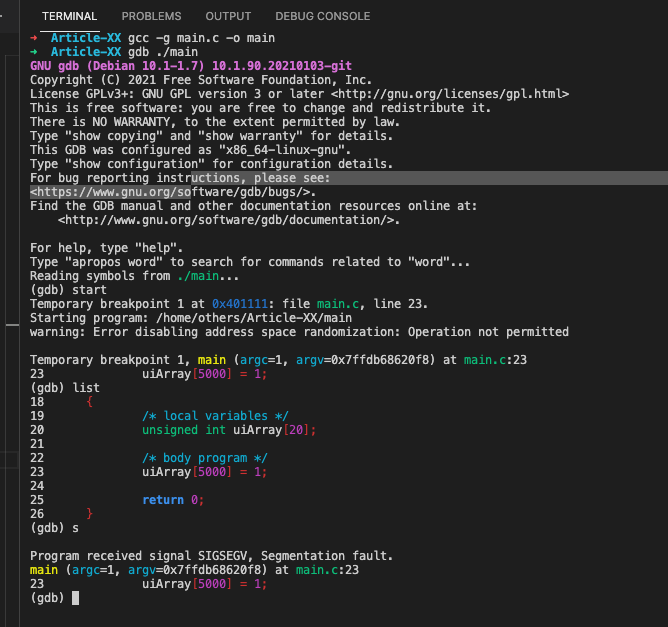
#d. Trying to modify string literals
/**
 * @file main.c
 * @author freecoder
 * @brief this program allow to handle a segmentation fault error
 *
 * @version 1.0
 * @date 8 Jan. 2022
 *
 * @copyright Copyright (c) 2022
 *
 */
#include <stdio.h>

/* main program entry */
int main(int argc, char **argv)
{
	/* local variables */
	char* pucString = "Sample String 1";
	/* body program */
	pucString[14] = '2';
	return 0;
}
As shown bellow, we got a segmentation error because the compiler put the string constant “Sample String 1” in read-only memory while trying to modify the contents of that memory which fails as a result:
➜  Article-XX gcc -g main.c -o main
➜  Article-XX gdb ./main
GNU gdb (Debian 10.1-1.7) 10.1.90.20210103-git
Copyright (C) 2021 Free Software Foundation, Inc.
License GPLv3+: GNU GPL version 3 or later <http://gnu.org/licenses/gpl.html>
This is free software: you are free to change and redistribute it.
There is NO WARRANTY, to the extent permitted by law.
Type "show copying" and "show warranty" for details.
This GDB was configured as "x86_64-linux-gnu".
Type "show configuration" for configuration details.
For bug reporting instructions, please see:
<https://www.gnu.org/software/gdb/bugs/>.
Find the GDB manual and other documentation resources online at:
    <http://www.gnu.org/software/gdb/documentation/>.
For help, type "help".
Type "apropos word" to search for commands related to "word"...
Reading symbols from ./main...
(gdb) start
Temporary breakpoint 1 at 0x401111: file main.c, line 20.
Starting program: /home/others/Article-XX/main
warning: Error disabling address space randomization: Operation not permitted
Temporary breakpoint 1, main (argc=1, argv=0x7ffc2ea212e8) at main.c:20
20              char* pucString = "Sample String 1";
(gdb) list
15
16      /* main program entry */
17      int main(int argc, char **argv)
18      {
19              /* local variables */
20              char* pucString = "Sample String 1";
21
22              /* body program */
23              pucString[14] = '2';
24
(gdb) n
23              pucString[14] = '2';
(gdb)
Program received signal SIGSEGV, Segmentation fault.
main (argc=1, argv=0x7ffc2ea212e8) at main.c:23
23              pucString[14] = '2';
(gdb) 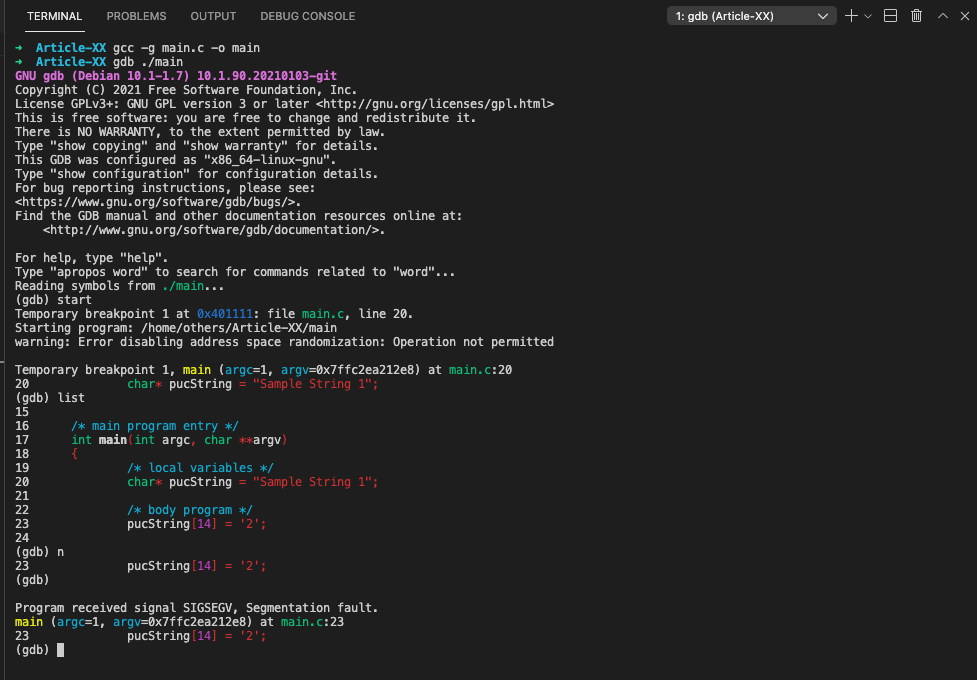
#e. Using variable’s value as an address
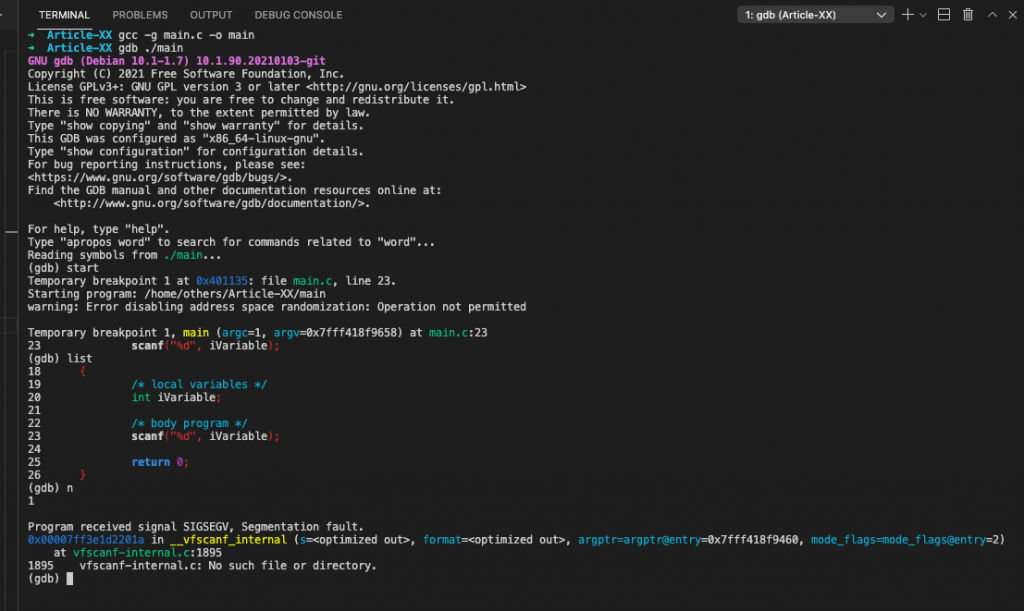
A segmentation fault occurs when accidentally you are using a variable’s value as an address as you can see through the code example bellow:
/**
 * @file main.c
 * @author freecoder
 * @brief this program allow to handle a segmentation fault error
 *
 * @version 1.0
 * @date 8 Jan. 2022
 *
 * @copyright Copyright (c) 2022
 *
 */
#include <stdio.h>

/* main program entry */
int main(int argc, char **argv)
{
	/* local variables */
	int iVariable;
	/* body program */
	scanf("%d", iVariable);
	return 0;
}
As shown in the terminal consol bellow, the segmentation occurs after the scans statement:
➜  Article-XX gcc -g main.c -o main
➜  Article-XX gdb ./main
GNU gdb (Debian 10.1-1.7) 10.1.90.20210103-git
Copyright (C) 2021 Free Software Foundation, Inc.
License GPLv3+: GNU GPL version 3 or later <http://gnu.org/licenses/gpl.html>
This is free software: you are free to change and redistribute it.
There is NO WARRANTY, to the extent permitted by law.
Type "show copying" and "show warranty" for details.
This GDB was configured as "x86_64-linux-gnu".
Type "show configuration" for configuration details.
For bug reporting instructions, please see:
<https://www.gnu.org/software/gdb/bugs/>.
Find the GDB manual and other documentation resources online at:
    <http://www.gnu.org/software/gdb/documentation/>.
For help, type "help".
Type "apropos word" to search for commands related to "word"...
Reading symbols from ./main...
(gdb) start
Temporary breakpoint 1 at 0x401135: file main.c, line 23.
Starting program: /home/others/Article-XX/main
warning: Error disabling address space randomization: Operation not permitted
Temporary breakpoint 1, main (argc=1, argv=0x7fff418f9658) at main.c:23
23              scanf("%d", iVariable);
(gdb) list
18      {
19              /* local variables */
20              int iVariable;
21
22              /* body program */
23              scanf("%d", iVariable);
24
25              return 0;
26      }
(gdb) n
1
Program received signal SIGSEGV, Segmentation fault.
0x00007ff3e1d2201a in __vfscanf_internal (s=<optimized out>, format=<optimized out>, argptr=argptr@entry=0x7fff418f9460, mode_flags=mode_flags@entry=2)
    at vfscanf-internal.c:1895
1895    vfscanf-internal.c: No such file or directory.
(gdb)
#f. Stack overflow
The segmentation fault error may occur if the call stack pointer exceeds the stack bound in case of an infinite recursive function call:
/**
 * @file main.c
 * @author freecoder
 * @brief this program allow to handle a segmentation fault error
 *
 * @version 1.0
 * @date 8 Jan. 2022
 *
 * @copyright Copyright (c) 2022
 *
 */
#include <stdio.h>

/* main program entry */
int main(void)
{
	/* local variables */
	/* body program */
	main();
	return 0;
}
As shown bellow, the segmentation fault error happened, due to a stack oveflow after calling the main function:
➜  Article-XX gcc -g main.c -o main
➜  Article-XX gdb ./main
GNU gdb (Debian 10.1-1.7) 10.1.90.20210103-git
Copyright (C) 2021 Free Software Foundation, Inc.
License GPLv3+: GNU GPL version 3 or later <http://gnu.org/licenses/gpl.html>
This is free software: you are free to change and redistribute it.
There is NO WARRANTY, to the extent permitted by law.
Type "show copying" and "show warranty" for details.
This GDB was configured as "x86_64-linux-gnu".
Type "show configuration" for configuration details.
For bug reporting instructions, please see:
<https://www.gnu.org/software/gdb/bugs/>.
Find the GDB manual and other documentation resources online at:
    <http://www.gnu.org/software/gdb/documentation/>.
For help, type "help".
Type "apropos word" to search for commands related to "word"...
Reading symbols from ./main...
(gdb) start
Temporary breakpoint 1 at 0x40110a: file main.c, line 22.
Starting program: /home/others/Article-XX/main
warning: Error disabling address space randomization: Operation not permitted
Temporary breakpoint 1, main () at main.c:22
22              main();
(gdb) list
17      int main(void)
18      {
19              /* local variables */
20
21              /* body program */
22              main();
23
24              return 0;
25      }
(gdb) n
Program received signal SIGSEGV, Segmentation fault.
main () at main.c:22
22              main();
(gdb) 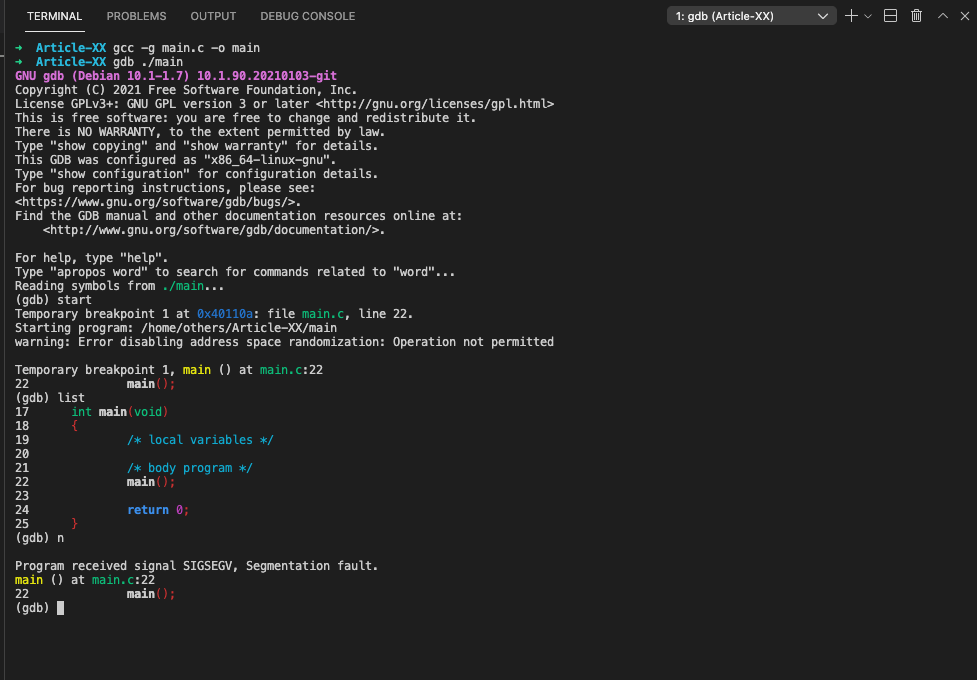
#2. How do you Fix Segmentation Faults?
Because segmentation faults are often associated with memory management issues or problematic pointer assignments, they can be fixed by making sure that the target application correctly handles these errors and does not attempt to read or write memory locations outside its own address space.
There are also certain procedures which you can follow in order to prevent and fix segmentation faults:
#a. How to Prevent Segmentation Faults?
Most segmentation faults occur due to memory access errors, so it’s important to make sure that pointers used by an application always reference valid data areas.
- Check the reference of null memory.
- Testing the code with Valgrind or Electric Fence
- Assert() before dereferencing a suspective pointer, mainly a pointer embedded in a struct that is maintained in a container in a list or an array.
- Always remember to initialize pointers properly.
- Protect shared resources against concurrent access in multithreading by using a mutex or a semaphore.
- Use of free() routine
#b. How to Fix Segmentation Faults?
There are some tools that you can use in order to fix the segmentation faults:
- Gdb and core dump file
- Gdb and backtrace.
- Debugfs and Dmesg for kernel debugging
Conclusion
A segmentation fault is generally caused by a programming bug that tries to access either non-existent or protected memory. It can also happen as a result of dividing an integer by zero (causing the program counter to be redirected to nowhere), accessing memory that is out of bounds at an address that does not contain valid data or code.
Finally, when enabled on some operating systems (and in some embedded programming environments), the processor may issue an exception if a memory address contains a non-mapped machine code instruction.
I hope this post has clarified what segmentation faults on the x86 architecture imply and how to avoid them. Do not forget to share the information on social networks if you believe it is useful for others. If you have any queries, please do not hesitate to leave a comment and subscribe to our newsletter. Best of luck with your coding and see you in the next article!
Many time during running c++ program you get comparison errors. Sometimes it will be iso c++ forbids comparison between pointer and integer or sometimes you will get iso c++ forbids comparison between pointer and integer [-fpermissive]. Here we will see when these type of c++ compiler error occurs and how to resolve these iso c++ forbids comparison between pointer and integer errors from c++ program.
#include <iostream>
using namespace std;
int main() {
    char str[2];
    cout << "Enter ab string";
    cin >> str;
    if (str == 'ab')
    {
         cout << "correct";
    } else {
        cout << "In correct";
    }
    return 0;
}
Output:
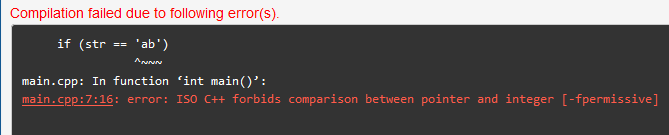
Here during string comparison you are getting compilation errors. “error: ISO C++ forbids comparison between pointer and integer [-fpermissive]”
SOLUTION FOR ERROR:
if(str==’ab’), here str is const char* type. Which is array of character.
Here ‘ab’ is consider as integer value. ideally it should be as constant string value.
Because of single quote it is considered as integer value.
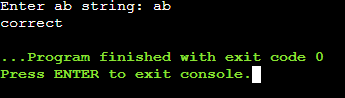
So for comparison you need to use double quote “ab”. And declare it as string variable.
Now you can compare using strcmp(str, “ab”) or using str == “ab”.
#include <iostream>
using namespace std;
int main() {
    string str;
    cout << "Enter ab string: ";
    cin >> str;
    if (str == "ab")
    {
         cout << "correct";
    } else {
        cout << "In correct";
    }
    return 0;
}
Output:
2. error: ISO C++ forbids comparison between pointer and integer [-fpermissive]
#include <iostream>
using namespace std;

int func(int i, int j) {
    int val = 1;
    if (val > func) {
      return (val+1);
    }
    return val;
}

int main() {
  int val = func(3,6);
  return 0;
}
Output:

SOLUTION FOR ERROR:
If you see if condition if(val > func), then here we have by mistake given function name which has different datatype then integer value.
So our comparison is wrong. Whenever any comparison is wrong you will get this error. Ideally here we need to compare with some integer value.
    int val = 1;
    int IntValue = 0;
    if (val > IntValue) {
      return (val+1);
    }
    return val;
Here we have removed function name and comparing it with Integer value. Now that error will be resolved.
CONCLUSION:
Whenever you are getting any error similar to ISO C++ forbids comparison between pointer and integer [-fpermissive], Then check that comparison condition. You will get to know that comparison condition is mismatch with two different data type of variables. For resolving c++ forbids comparison error you just need to compare similar kind of variables in conditions. I hope given two examples will be helpful for your to find out your code issue. If you like this article then please check other c++ related information in given website. Happy Coding !! 🙂
Reader Interactions