
Regardless of the time of year, Phasmophobia can be a blast of a game to play with friends. What isn’t a blast, however, is being forced to contend with errors and forced disconnects. If you’re bumping up against the Game Does Not Exist error in Phasmophobia, here are all of the most helpful solutions.
As with many technical hiccups, there are multiple things that can be attempted to fix this particular Phasmophobia error. If one doesn’t work, we recommend jumping to the next and seeing if that one fixes the issue for you.
Change Server Region
Some players have reported that swapping back and forth between server regions has solved the error. Here’s a step-by-step guide on how to do so:
- From the main lobby, click on the corkboard.
- Click the “Multiplayer” button.
- This will take you to a list of public servers. At the top left are two letters representing your selected region (NA for North America, EU for Europe, SA for South America, and AS for Asia).
- Now, all you have to do is switch from your preferred server region to another and then back again.
Ideally, this will have corrected the error and allow you to play multiplayer without issue. If the error persists, read on.
Check for Game Updates
The “Game Does Not Exist” error can also occur as a result of a mismatched game version. If changing your server region didn’t do the trick, this method will be even easier than that one. Simply close Phasmophobia and see if the game requires an update.
If the game begins to download a recently pushed patch, the Game Does Not Exist error should be rectified once the patch is applied, and you’re able to launch the game again. You may want to restart the Steam application itself to ensure there’s no update available.
Join and Then Leave Another Multiplayer Lobby
If all else fails, joining a public Phasmophobia match and then leaving it may allow your own games to avoid the error. To join one, navigate to the multiplayer screen on the lobby’s corkboard and click on a public lobby (any game will do, as long as you’re able to fully join it) before disconnecting and trying your own once again.
All in all, this method is one of the fastest and most straightforward solutions, so it’s very much worth an attempt if the first two haven’t yielded any success.
And now you know how to fix the Game Does Not Exist error in Phasmophobia. These are the most common solutions for correcting the issue and allowing you to play multiplayer unimpeded. If you’re looking for more Phasmophobia info, be sure to read Twinfinite’s guide on all voice commands and phrases you can use in-game. Or perhaps you’d like to learn how to use the music box or smudge stick items before embarking on your next ghost-hunting adventure.

Justin Mercer
A fan of any game that has something to say, a certified MMORPG lover following the genre for nigh on 20 years, and a staunch defender of (almost) every single game on the original PlayStation.
More Stories by Justin Mercer
Phasmophobia is a horror game that allows players to group up in teams of four and hunt down ghosts. The game has managed to amass a lot of popularity in a short period, which has led to some frequent errors in the game, most likely due to the server load.
One of the errors players have been experiencing is the ‘game does not exist’ or ‘server version mismatch’ error. This error not only appears for new players who have recently installed the game but for some old players as well. If you are facing the issue, here are some of the solutions you can try to fix it.
Check if you are on the Beta version and update your game
One of the main reasons for the ‘game does not exist,’ or ‘server version mismatch’ error is that players in the lobby use different game versions. The easiest fix for that is to make sure that your game is updated to the latest version.
Additionally, if either you or your friend are on the Beta version, you will not be able to play together. Opting out of the Beta version is quite simple, and you can do so by following the given steps.
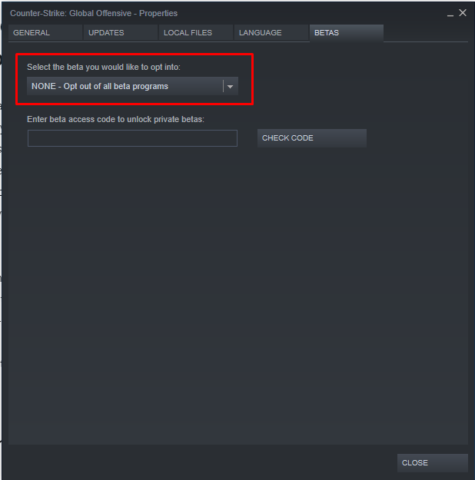
- Open Steam
- Right-click on Phasmophobia and select Properties
- Under the Betas tab, select the active Beta version.
- Click on ‘NONE – opt-out of all beta programs’
Your game will most likely download again, partially, if you opt-out of the beta branch.
Check your server region
The server in the game depends on the region you are located in. Playing with a friend from a different region can cause several issues, including the ones mentioned above. For instance, if your friend is from the UK and you live in the US, the two of you will connect to your respective servers, causing an issue in the lobby. You can change your server region in the top right of the Server Lobby in the game.
Verify Integrity of Game Files
Sometimes corrupt game files can cause several issues, including the ‘game does not exist’ or ‘server version mismatch’ error. Instead of downloading the game repeatedly, you can just check if the game files are all in place. It can be done by following the given steps.
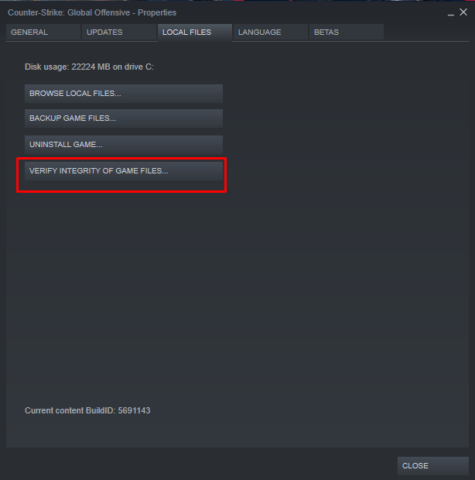
- Open Steam
- Right-click on Phasmophobia and select Properties
- Under the Local files tab, click on Verify Integrity of game files.
This should take a bit of time, but once done, you should try starting the game again and check whether the issue has been resolved or not.
If none of the above solutions work, we recommend reinstalling the game completely to fix the issue.
The burgeoning success of indie game developer Kinetic Games’ breakout title Phasmophobia has not come without its problems. Following the game’s ever-rising popularity, some players have begun to experience major server issues. Now, however, a solution to the Phasmophobia “game does not exist” server version mismatch error has been discovered.
While attempting to play with others in private lobbies, players have been unable to launch co-op multiplayer games with friends because of the “game does not exist,” or “server version mismatch,” error.
As the game is still only in Early Access, bugs and glitches come with the territory. That being said, the increasing prevalence of this particular error has caused many to search for answers.
Though Kinetic Games is aware of the error, there are a few things you can do to fix the issue until there’s a permanent fix.
1. Identify your server region
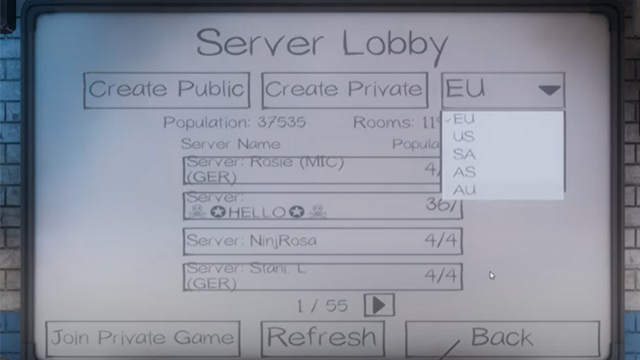
First, you will need to ensure that you and your friends are all on the same server.
Every player’s server is chosen based on their region. Consequently, you will likely end up on the “EU” server if you live in Europe or “US” server if you live within the United States. That being said, you can switch your server if need be.
This is important because you will receive the “game does not exist,” or “server version mismatch,” error if your entire co-op team is not on the same server.
To change your server, simply visit the server region tab in the top right of the “Server Lobby” screen as shown above. From there, you can adjust your server region as necessary.
If you and your friends still receive an error message after adjusting your server regions, then it is time to move on to the next step.
2. Check if you are using the beta version of Phasmophobia
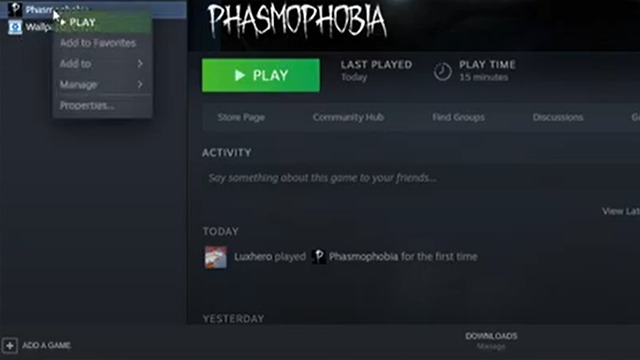
Now that you have ensured your server region is correct, the next step is to double-check if you are still opted in for the game’s beta.
If only some of your team is out of the beta server, then you will also receive the “game does not exist” server version mismatch error.
As seen above, the steps are:
- Open up your Steam page
- Right-click on Phasmophobia
- Select “Properties”
- Go to the “Betas” tab
- The “Beta Build” will either be selected or deselected
- Deselect the beta build listed within if it is currently active
You’ll be able to quickly determine if you are opted into the game’s beta version. The beta version of the game can be quite buggy, so it is suggested that your entire team choose to deselect the beta build at this point.
3. Update your game
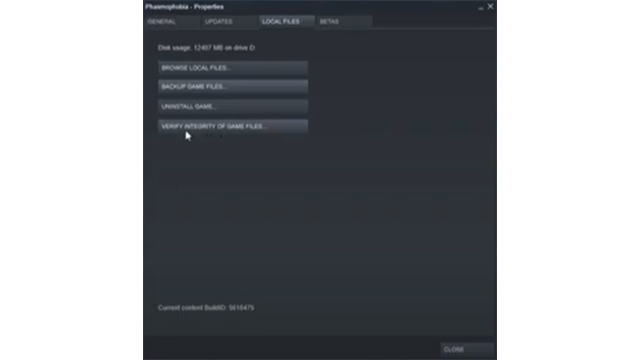
If you are still having issues playing with your friends, there is one final fix. This time around, you will need to update Phasmophobia.
Without the most-recently updated version of the game, you will not be able to play in private servers. As a result, you may have to manually jumpstart the updating process from time to time.
The steps here are similar to checking it you’re in the beta branch, with one important difference:
- Open up your Steam page
- Right-click on the Phasmophobia game
- Select “Properties”
- Go to the “Local Files” tab
From here, select “Verify Integrity of Game Files.” This will re-download any missing or corrupted game files that may be causing the error issue.
After following all of these steps, you should now be able to get around the “game does not exist” error and play Phasmophobia on private servers with your friends. That being said, as an Early Access release, Phasmophobia is still susceptible to new bugs and glitches. So check back in to make sure you are up to date on the latest glitch fixes for Phasmophobia.
About the author

Hunter Boyce
Hunter Boyce has been writing professionally for a solid half-decade. During that time, he has written about everything from mixed martial arts to TV/film. Whenever he’s not watching UFC PPVs or playing games in his free time, he’s usually fantasizing about finding a Dungeons and Dragons group that won’t flake on him. His favorite games are The Last of Us, Fallout 3, BioShock and Red Dead Redemption.
The “Game Does Not Exist” error is unfortunately a common occurrence for Phasmophobia players. After doing some digging, it is apparent that this error message appears due to server outages or internet issues. Luckily, there are a few steps Phasmophobia players can take to try and fix this annoying issue. Continue reading to learn how to fix the “Game Does Not Exist” error in Phasmophobia
As stated above, players have reported a few fixes to the “Game Does Not Exist” error. However, let it be clear that these fixes are not guaranteed to fix the issue. If none of these fixes work, one can assume that this is an error with Phasmophobia servers, and you may have to wait it out. Let’s get into it!
Related: Is Phasmophobia on Xbox? – Answered
Fix #1: Update Phasmophobia
This is quite the easy fix, and many players have reported this working for them. If you have run into the “Game Does Not Exist” error, try restarting Phasmophobia. If this does not work, try restarting Steam as a whole. This may trigger and update for Phasmophobia, and an outdated client is almost sure to bring this issue.
Fix #2: Join Random Lobbies
One crafty Redditor has found a potential fix for the “Game Does Not Exist” error in Phasmophobia. All they did was as follows:
- Join random Public Lobby
- Leave random Public Lobby
- Join Private Lobby
Some people have stated that this technique worked for them, so definitely give it a shot!
Fix #3: Set the Correct Region
Often times Phasmophobia players will accidentally click the wrong Region in the server list. Simply set your region to the correct area, and test to see if it works.
Fix #4: Verify Game Cache
While verifying Phasmophobia’s game cache is more of a last-resort fix, many players have fixed their errors by performing this. Here’s how to verify your game cache for Phasmophobia:
- Open Steam Library
- Right Click Phasmophobia
- Click Properties
- Click Local Files
- Click “Verify Integrity of Game Files”
If your game files are the reason you are getting the “Game Does Not Exist” error in Phasmophobia, this fix should clear it right up. Keep in mind it may take a few minutes to perform this process.
Related: What is Custom Difficulty in Phasmophobia? – Answered
Now that you know how to fix the “Game Does Not Exist” error in Phasmophobia, try these techniques out and see if they work.

Joe Greene
Joe Greene is currently the SEO Manager for the prestigious Prima Games. With a background in writing, music and coding, Joe can really do it all!
More Stories by Joe Greene
Do you want to know how to fix the “Phasmophobia Game Does Not Exist” error? The Phasmophobia game is a first-person horror game developed by Kinetic Games. Unfortunately, some players have reported various Errors with the game, including the “Phasmophobia Game Does Not Exist” error. It has become a standard error for many players and real trouble. This guide will tell you how to fix the “Phasmophobia Game Does Not Exist” error.
What is The Game Not Exist Mean?
If you’re a big fan of horror games, chances are you’ve tried the ever-popular Phasmophobia. But if you’ve been met with the dreaded “game does not exist” error, fear not! This error typically indicates an issue either with your internet connection or due to outages with the game itself. Thankfully, these outages and disruptions are usually fixed quite quickly, so you should be able to get back to solving mysteries and scaring yourself silly in no time.

You can fix the “Phasmophobia Game Does Not Exist” error by updating the game, joining Random lobbies, setting the correct region, or verifying the game cache.
- Updating the game: You can restart the game or restart Steam. Restart Steam will update the game to the latest version and fix the issue.
- Joining Random Lobbies: One Redditor has claimed that he has solved the “Phasmophobia Game Does Not Exist” by entering a random public Lobby, leaving it, and entering again into a private lobby.
- Setting the Correct Region: You can select the correct region by visiting the Steam settings. Go to “Steam > Settings > Downloads” and then click on “Download Region.” Set the right part for your country and restart the game to see if it fixes the issue.
- Verifying the Game Cache: Finally, you can try verifying the game cache. To do this, open your Steam client and navigate to the “Phasmophobia” game. Once you’ve selected the game, click on the Verify Integrity of Game Files button in the bottom right corner. This will check for missing or corrupted files and automatically download them if necessary.
We hope this guide has helped you fix the “Phasmophobia Game Does Not Exist” error. If you have any other questions or need more help, feel free to ask us in the comments section below. Good luck, and happy hunting!
Phasmophobia is available on PC.
Source: Prime Games