
|
ommo |
|
|
1 |
|
|
19.01.2015, 09:58. Показов 17878. Ответов 50
Добрый день! Есть база, критичная и большая. В ней документы с большим количеством респонсов, информация о которых подсобирается при открытии в RTF поля, формируя текст и ссылки. И некоторые документы в процессе существования лишаются возможности быть измененными и сохраненными, о чем я уже узнаю из уведомлялок по факту, что в документ агент должен был прописать информацию, но неуспешно. То есть плохой док — обычно известен (но уже тогда, когда проблема есть и я должна все бросать и срочно ликвидировать). При попытке вручную изменить и сохранить документ выпадает ошибка Field is too large (32K) or View’s column & selection formulas are too large, все пишут, что это ошибка дизайна. Но ни смена дизайна, ни компакт в таких случаях не помогают. Помогает удаление полей, либо очистка содержимого. Написан специальный агентик, который проверяет, не вышло ли какое поле за ограничения лотус. Но часто бывает так, что поле за ограничение не выходит, но именно в нем проблема и поиск такого поля — дело творческое и иногда непредсказуемое. То есть, проблема бывает связана с разными полями, разными по типу — RTF или текстовыми. |

|
0 / 0 / 0 Регистрация: 04.11.2007 Сообщений: 3,019 |
|
|
19.01.2015, 10:21 |
2 |
|
нда ну а по правильному вам нужно всё менять, особенно ссылки в RT
0 |
|
ommo |
|
|
19.01.2015, 16:09 |
3 |
|
Пасиба, проверю Summary, хорошая идея, только так сразу и не определишь, участвует ли поле в представлениях или нет, разве что поиском поискать…. А что, собственно, плохого в том, чтобы в richtext собирать какую-то системную информацию — можно ее и не хранить никак, чисто для отображения. |
|
0 / 0 / 0 Регистрация: 15.01.2009 Сообщений: 57 |
|
|
19.01.2015, 16:16 |
4 |
|
А что, собственно, плохого в том, чтобы в richtext собирать какую-то системную информацию — можно ее и не хранить никак, чисто для отображения. Плохо именно то, что вы грузите в поля документа ненужную информацию, что и приводит к ошибкам.
0 |
|
ommo |
|
|
19.01.2015, 16:26 |
5 |
|
> Цитата: (Constantin A Chervonenko @ 15:05:2012, 09:51 ) * 1) Так что, не для всех полей пойдет, уже плохо. А вы как проверяете-проставляете isSummary? агентом? в синопсисе не отображается это свойство… |
|
0 / 0 / 0 Регистрация: 27.10.2011 Сообщений: 2,124 |
|
|
19.01.2015, 16:50 |
6 |
|
у RichText Field isSummary = False, поэтому их нельзя вывести в представление, их очень сложно переполнить. Добавлено: 3) Я работаю с чужой системой и порой не в курсе, почему разработчик сделал так, а не иначе. К тому же у меня есть основания полагать, что разработчик не мир, раз это реализовано серийно. Так что мы не будем отображать в видах. 1. Сочувствую
0 |
|
ommo |
|
|
19.01.2015, 17:18 |
7 |
|
у RichText Field isSummary = False, поэтому их нельзя вывести в представление, их очень сложно переполнить. Добавлено: Не будем отклоняться от темы. Может, вы и правы, попробуем, посмотрим. Что там в RTF-ном поле лежит — дело десятое, раз ограничений с его стороны нет. Тем не менее я вижу, что иногда (иногда!) очистка такого поля помогает восстановить документ. (да, я протоколирую все действия при этом и могу видеть, что было в прошлый раз, итд). |

|
Shomdryk 0 / 0 / 0 Регистрация: 25.12.2010 Сообщений: 246 |
||||
|
20.01.2015, 11:48 |
8 |
|||
|
Натравите в самом конце querysave этот код на документ, при сохранении которого получаете ошибку про 32К.
0 |
|
ommo |
||||
|
20.01.2015, 13:47 |
9 |
|||
|
Натравите в самом конце querysave этот код на документ, при сохранении которого получаете ошибку про 32К.
уже что-то подобное написала. Откуда цифра 2000? |
|
0 / 0 / 0 Регистрация: 25.12.2010 Сообщений: 246 |
|
|
20.01.2015, 14:08 |
10 |
|
Напишите именно это и покажите, что отобразил мессаджбокс.
0 |
|
0 / 0 / 0 Регистрация: 27.02.2012 Сообщений: 143 |
|
|
23.06.2015, 05:07 |
11 |
|
Коллеги. Если в документе у поля IsSummary сделать False, то этот флаг у данного поля останется навсегда? Вышло у меня в документе, вроде нигде в представлениях не используется. Теперь вот думаю, если я программно выставлю issummary=false в дальнейшем при пересохранении документа этот флаг не вернется в True? А если тип поля поменять на Rich Text, есть ли риск что инфа пропадет что было в поле?
0 |
|
0 / 0 / 0 Регистрация: 27.10.2011 Сообщений: 2,124 |
|
|
23.06.2015, 08:46 |
12 |
|
Этот лотус такой тамагочи — чуть что: «Я помер». Тихо так, без слов. Вот и приходится постоянно все проверять — ты жив? агент выполнил? документ проверил? родителя не потерял? документ сумел сохранить? Это учит дисциплине, как указатели в С, не так это и плохо. Много знать не стыдно, то что не используешь — все равно забудешь.
Если в документе у поля IsSummary сделать False, то этот флаг у данного поля останется навсегда? Проверить же легко) Нет, не остается он на всегда, перезаписывается после сохранения.
А если тип поля поменять на Rich Text, есть ли риск что инфа пропадет что было в поле? Не встречал, вот обратно есть риск. Шрифт меняется, может текст поедет.
0 |
|
0 / 0 / 0 Регистрация: 23.08.2008 Сообщений: 6,252 |
|
|
23.06.2015, 13:32 |
13 |
|
anna сказал(а): ? Этот лотус такой тамагочи — чуть что: «Я помер». Тихо так, без слов. Вот и приходится постоянно все проверять — ты жив? агент выполнил? документ проверил? родителя не потерял? документ сумел сохранить? Это учит дисциплине, как указатели в С, не так это и плохо. Много знать не стыдно, то что не используешь — все равно забудешь. ну здесь всегда может следовать встречный вопрос — что ведет себя не по-другому, при прочих равных условиях?
0 |

|
0 / 0 / 0 Регистрация: 07.02.2106 Сообщений: 812 |
|
|
25.06.2015, 15:06 |
14 |
|
Всегда был уверен, что RTF полей эта проблема не касается, но сегодня потребовалось выводить большую таблицу в форме. Естественно это RichTextTable в RichTextItem. Когда строк в таблице 200-300 — всё OK. А тут попалась таблица в 800 строк и вдруг при сохранении документа: Код Notes error: Field is too large (32K) or Views column & selection formulas are too large :red:
0 |
|
0 / 0 / 0 Регистрация: 07.04.2014 Сообщений: 633 |
|
|
25.06.2015, 15:16 |
15 |
|
Всегда был уверен, что RTF полей эта проблема не касается, но сегодня потребовалось выводить большую таблицу в форме. Естественно это RichTextTable в RichTextItem. Когда строк в таблице 200-300 — всё OK. А тут попалась таблица в 800 строк и вдруг при сохранении документа: Код Notes error: Field is too large (32K) or Views column & selection formulas are too large :red: В таблице не должно быть более 256 строк. Разбивай на куски и будет всё ОК.
0 |
|
0 / 0 / 0 Регистрация: 07.02.2106 Сообщений: 812 |
|
|
25.06.2015, 15:33 |
16 |
|
Со строками всё в порядке, про строки я знаю и не 256, а 254 кажется. Про строки оно иначе ругается. Это другое.
0 |
|
0 / 0 / 0 Регистрация: 27.10.2011 Сообщений: 2,124 |
|
|
25.06.2015, 16:03 |
17 |
|
Ну да, при программном создании таблиц, количество строк не должно быть более 254, я всегда делал по 250 + шапка.
0 |
|
0 / 0 / 0 Регистрация: 07.04.2014 Сообщений: 633 |
|
|
25.06.2015, 16:34 |
18 |
|
и не 256, а 254 кажется. 255 (как в камасутре написано), а счёт от 0. Такшта — 256. — Добавлено 26 июн 2015. Первое сообщение размещено 26 июн 2015 —
при программном создании таблиц При обычном копи\пасте тоже самое.
0 |
|
0 / 0 / 0 Регистрация: 27.10.2011 Сообщений: 2,124 |
|
|
28.06.2015, 08:28 |
19 |
|
При обычном копи\пасте тоже самое. При обычном — все более интереснее.
0 |
|
0 / 0 / 0 Регистрация: 07.02.2106 Сообщений: 812 |
|
|
28.06.2015, 10:21 |
20 |
|
Итак, заполняю программно RichText поле (на форме вычисляемое, что бы Read Only) RTF таблицами по сто строк каждая. Почему-то две таблицы по сто строк заполняются гораздо быстрее, чем одна в двести. После ста начинаются дикие тормоза при добавлении новой строки. Всё нормально до определённого объёма — где-то под 800-900 строк (зависит от содержания строк, как я полагаю от размера в байтах) при сохранении документа вылетает ошибка. Т.е. документы с меньшими по размеру таблицами сохраняются нормально, а с большими не могут. Не ожидал от RTF поля такого подвоха. Сделал поле Editable — всё равно не работает. Очевидно, у таблиц кроме 255 строк есть ещё какие-то ограничения.
0 |
There are some problems in life—and in Lotus Notes—that defy easy solutions. And one such problem is the “Field is too large (32K)” error, which affects documents whenever the size of the Summary data for a field grows beyond the limit set in Notes.
*The Lotus Notes Summary data limit is 32K for a single field or 64k for an entire document.
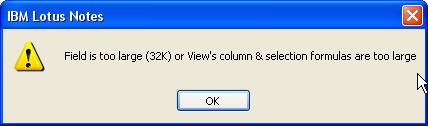
The dreaded 32K error in Lotus Notes
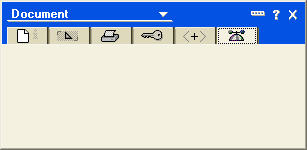
Uh oh! The Notes property box is blank
First the bad news…
Let’s get one thing out of the way: when you see the 32K error, the affected document is in deep trouble. The document may be listed in views but you cannot open it by double-clicking nor can you access its data through code. And in our personal experience, Compact and Fixup tasks weren’t able to resolve the issue either (that said, we’ve read about other people reporting success using compact commands) and neither were stamp commands. If you create a new replica, the errors may go away but the documents affected with the 32K error won’t be copied, so that might be considered a heavy-handed approach in some instances.
While the data contained inside these documents are now difficult to retrieve, you’ll have to contend with the fact that the broken docs are still hanging around in your database. They still take up disk space and they can still cause you major headaches by crashing agents and breaking any code that attempts to open them. And then there’s the small matter of the frustration that end-users feel when they attempt to open a doc and get a 32K error. And they get to feel that frustration all over again when you tell them that the affected documents likely can’t be fixed.
Views to the rescue?
One bit of good news when you’re faced with 32k error documents: they’re still readable in views* as long as the field that exceeded the 32K limit is not being displayed in any of the columns.
This means that you can create a new view with columns to list any summarized items that you’d like to look at. From there you can export the data from the view. Going through this process will also help you discover which item exceeded the 32K limit. (In our case, we had to do some trial-and-error, but we finally figured out that including one particular Text List field would cause the document to appear blank in the view–thus it was the culprit). Of course, you’re still out of luck when it comes to non-summarized fields (like Rich Text) which can’t be displayed in views but at least you can recover something.
*At least they’re readable in views in our testing—your mileage may vary. Please note that we were only able to test documents where a single field exceeded the 32K limit–so the behavior of documents where aggregate summary data exceed 64k may or may not be different (please comment if you have any information regarding this).
Some background on Summary data
This Summary information at the heart of the32K error problem is used for showing field values in views, folders or search results. Summary information is created whenever a field has the Summary flag enabled. By default, whenever Text, Text List, Number, Number List, Date, Date List, Names, Authors or Readers field is created in a document by a Form, or by LotusScript or Java, the new item will have the Summary flag enabled. (Note that Rich Text fields should never have the Summary flag enabled).
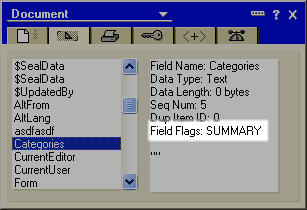
The Summary flag as shown in the Notes property box>
If you don’t need to display a given field’s content in a view or in search results, you may want to disable the Summary flag either through LotusScript (see your Lotus Notes Help for more on this) or by using Ytria’s scanEZ tool (which will let you toggle field flags for one or many documents). This can help you avoid the Field is too large (32K) error from occurring in the future because Summary data will no longer be generated by the fields in question.
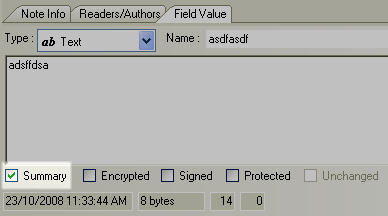
The Summary flag in scanEZ. You can uncheck the box to disable it for the field
So how can I find all the documents with this 32K affliction?
UPDATE: Please check out the comments at the bottom of this article for an alternate (and likely faster) way to find docs with the 32k error -PW
Another frustrating aspect of this “Field is too large (32K)” error issue, is that it can be quite tricky to track down all the documents in the database that have the problem. You could go and try double-clicking every document in every view to find out which ones trigger the 32K error. But if you’re in any sort of a hurry, Ytria’s scanEZ tool offers a much faster way to find these docs through its Search by Note ID Range feature.
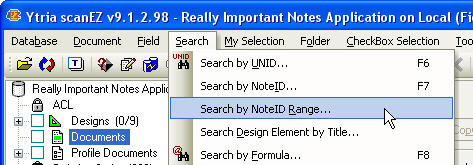
Searching by NoteID range in scanEZ
Search by Note ID Range lets you enter a numeric range of Note IDs in either hexadecimal or decimal units, then attempt to retrieve all the notes that match IDs inside the range. The larger the range that you choose, the longer the scanning process will take—the largest search you can perform (h1 to hFFFFFFFF) will attempt to search through 4,294,967,295 Note IDs. That might take a while. (The last time we tried a full-range scan, it took us a full weekend, and that was on a local NSF file). But we have some good news for scanEZ users: We’re currently developing a much faster alternative method for Note ID range searches—stay tuned!
Since we usually don’t have time for a full scan, we’ve found that the following method usually does this trick:
Just create a new document in the database and copy its NoteID to the clipboard. You can then enter a Note ID range search with a lower limit of one (h1) and an upper limit value of the NoteID that you just copied copied to the clipboard. Since Note IDs are created sequentially, this new Note ID should theoretically represent the upper limit for your database.
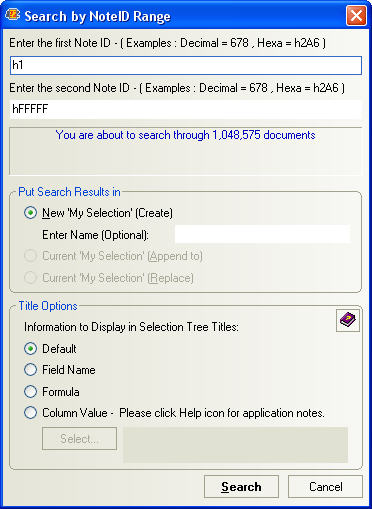
This is the ‘Search by Note ID Range’ dialog–enter your lower and upper limit NoteIDs here (in either hexadecimal or decimal form)
Once the Search by Note ID Range is complete, any 32K error document should be categorized under ‘Errors’ and marked with a ‘bomb’ icon in your search results collection (search results in scanEZ are placed in virtual folders labeled ‘My Selection’). By clicking on the individual documents with 32K errors you’re still not going to see their data, but you do at least get their NoteID, UNID and date information (and you may copy this information to the clipboard in scanEZ).
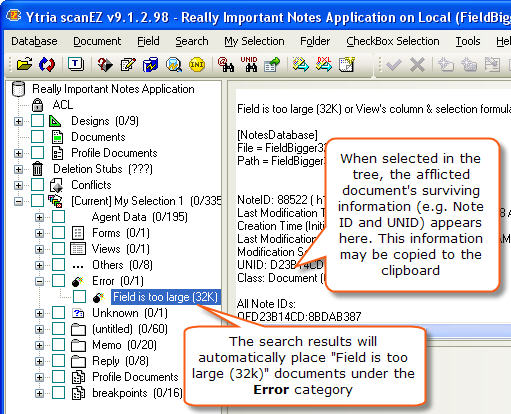
Once you’ve tracked all the documents with 32K errors, you may want to delete them. To do this in scanEZ, you just need to right-click the document in question and choose Delete. If you want to get rid of them in one fell swoop just highlight the Error category then right-click> Delete all documents in category.
If the documents in question are only afflicted with this 32K error on one database replica but are still OK on others, you may want to use the ‘Do not create deletion stub‘ option when deleting the docs in scanEZ. By doing this, the next time you replicate, these documents will be regenerated from replicas. (Just to clarify, if a deletion stub is created, the deleted 32K error document will be removed from all the other replicas upon replication).
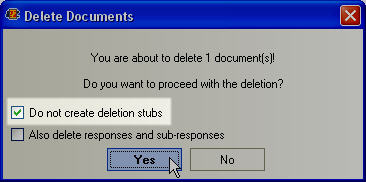
scanEZ lets you delete a document without creating a deletion stub
Is Notes Error Field Is Too Large (32k) Rules appearing? Would you like to safely and quickly eliminate Field Is Too which additionally can lead to a blue screen of death?
When you manually edit your Windows Registry trying to take away the invalid notes error field is too large 32k signature keys you’re taking a authentic chance. Unless you’ve got been adequately trained and experienced you’re in danger of disabling your computer system from working at all. You could bring about irreversible injury to your whole operating system. As very little as just 1 misplaced comma can preserve your Pc from even booting every one of the way by!
Troubleshooting field is too large 32k lotus notes Windows XP, Vista, 7, 8 & 10
Simply because this chance is so higher, we hugely suggest that you make use of a trusted registry cleaner plan like CCleaner (Microsoft Gold Partner Licensed). This system will scan and then fix any Notes Error Field Is Too Large (32k) Rules complications.
Registry cleaners automate the entire procedure of finding invalid registry entries and missing file references (including the Is error) likewise as any broken hyperlinks inside of your registry.
Issue with field is too large 32k lotus notes calendar
Backups are made immediately prior to each and every scan providing you with the choice of undoing any changes with just one click. This protects you against doable damaging your pc. Another advantage to these registry cleaners is that repaired registry errors will strengthen the speed and performance of one’s procedure drastically.
- http://www-10.lotus.com/ldd/nd8forum.nsf/DateAllFlatWeb/218c719a8660e01d85257424006d7d93?OpenDocument
- http://ypastov.blogspot.com/2013/01/field-is-too-large-32k-or-views-column_13.html
- http://recover-email.blogspot.com/2014/06/how-to-solve-lotus-notes-error-field-is.html
- http://techlab.ytria.com/855/uncategorized/lotus-notes-32k-error-help/
Cautionary Note: Yet again, for those who are not an state-of-the-art consumer it’s very encouraged that you simply refrain from editing your Windows Registry manually. If you make even the smallest error within the Registry Editor it can result in you some serious issues that may even call for a brand new set up of Windows. Not all difficulties attributable to incorrect Registry Editor use are solvable.
Fixed: lotus notes field is too large 32k or view
Symptoms of Notes Error Field Is Too Large (32k) Rules
“Notes Error Field Is Too Large (32k) Rules” appears and crashes the energetic method window.
Your Personal computer routinely crashes with Notes Error Field Is Too Large (32k) Rules when running the exact same system.
“Notes Error Field Is Too Large (32k) Rules” is shown.
Windows operates sluggishly and responds little by little to mouse or keyboard input.
Your computer periodically “freezes” for the number of seconds in a time.
Will cause of Notes Error Field Is Too Large (32k) Rules
Corrupt obtain or incomplete set up of Windows Operating System software program.
Corruption in Windows registry from a new Windows Operating System-related application adjust (install or uninstall).
Virus or malware infection which has corrupted Windows method documents or Windows Operating System-related application data files.
Another method maliciously or mistakenly deleted Windows Operating System-related files.
Mistakes this sort of as “Notes Error Field Is Too Large (32k) Rules” can be brought about by several different elements, so it really is important that you troubleshoot every of the achievable brings about to forestall it from recurring.
Simply click the beginning button.
Variety “command” inside the lookup box… Will not hit ENTER nonetheless!
Although keeping CTRL-Shift in your keyboard, hit ENTER.
You’re going to be prompted that has a authorization dialog box.
Click on Of course.
A black box will open having a blinking cursor.
Variety “regedit” and hit ENTER.
Within the Registry Editor, choose the notes error field is too large 32k signature connected key (eg. Windows Operating System) you wish to back again up.
Within the File menu, choose Export.
Inside the Preserve In list, pick out the folder in which you wish to save the Windows Operating System backup key.
Inside the File Title box, sort a reputation for the backup file, these types of as “Windows Operating System Backup”.
From the Export Vary box, ensure that “Selected branch” is selected.
Click on Help you save.
The file is then saved by using a .reg file extension.
You now use a backup within your field is too large 32k lotus notes related registry entry.
Solution to your field is too large 32k or view’s column problem
There are actually some manual registry editing measures that can not be talked about in this article due to the high chance involved for your laptop or computer method. If you want to understand more then check out the links below.
Additional Measures:
One. Conduct a Thorough Malware Scan
There’s a probability the Notes Error Rules Field (32k) Large Is Too error is relevant to some variety of walware infection. These infections are malicious and ready to corrupt or damage and possibly even delete your ActiveX Control Error files. Also, it’s attainable that your Notes Error Field Is Too Large (32k) Rules is actually connected to some element of that malicious plan itself.
2. Clean field is too large 32k or view’s column & selection formulas Disk Cleanup
The a lot more you employ your computer the extra it accumulates junk files. This comes from surfing, downloading packages, and any sort of usual computer system use. When you don’t clean the junk out occasionally and keep your program clean, it could turn into clogged and respond slowly. That is when you can encounter an Rules error because of possible conflicts or from overloading your hard drive.
Once you clean up these types of files using Disk Cleanup it could not just remedy Notes Error Field Is Too Large (32k) Rules, but could also create a dramatic change in the computer’s efficiency.
Tip: While ‘Disk Cleanup’ is definitely an excellent built-in tool, it even now will not completely clean up Field Is discovered on your PC. There are numerous programs like Chrome, Firefox, Microsoft Office and more, that cannot be cleaned with ‘Disk Cleanup’.
Since the Disk Cleanup on Windows has its shortcomings it is extremely encouraged that you use a specialized sort of challenging drive cleanup and privacy safety application like CCleaner. This system can clean up your full pc. If you run this plan after each day (it could be set up to run instantly) you are able to be assured that your Pc is generally clean, often operating speedy, and always absolutely free of any Too error associated with your temporary files.
How Disk Cleanup can help
1. Click your ‘Start’ Button.
2. Style ‘Command’ into your search box. (no ‘enter’ yet)
3. When holding down in your ‘CTRL-SHIFT’ important go ahead and hit ‘Enter’.
4. You will see a ‘permission dialogue’ box.
5. Click ‘Yes’
6. You will see a black box open up plus a blinking cursor.
7. Variety in ‘cleanmgr’. Hit ‘Enter’.
8. Now Disk Cleanup will start calculating the amount of occupied disk space you will be able to reclaim.
9. Now a ‘Disk Cleanup dialogue box’ seems. There will be a series of checkboxes for you personally to pick. Generally it will likely be the ‘Temporary Files’ that consider up the vast majority of your disk area.
10. Verify the boxes that you want cleaned. Click ‘OK’.
How to repair
3. System Restore can also be a worthwhile device if you ever get stuck and just desire to get back to a time when your computer system was working ideal. It will work without affecting your pics, paperwork, or other crucial information. You can discover this option with your User interface.
Field Is
Manufacturer
Device
Operating System
Notes Error Field Is Too Large (32k) Rules
4 out of
5
based on
34 ratings.
IBM Lotus Notes offers various tools and features that help you manage the email communication. It provides document that contains fields which stores the information. Such as: Field Name stores the name of the field, Data Length stores the size of the data in the field in bytes. You can create a Notes document using any of the two methods: either by Manual method or using an agent to create a document.
Manual method includes using the user interface e.g. The Notes menu File > Save. The programming method included creation of Notes document by using Functions or the Lotus Script Save method
You can use the NotesUIDocument class or Notes Document class to programmatically save your notes document.
While creating and saving Notes documents, if the process isn’t accomplished successfully then, various error messages are shown to the user. One such error is: “Field is too large (32K)”.
NotesDocument & NotesUIDocument class:
• Notes Document class:
The Notes Document class represents a document in a database.
NotesUIDocument is a «front end» object & NotesDocument is a «back end» document that is returned by the NotesUIDocument.Document property.
Front object refers to the object that is visible in the user interface or user screen. Backend refers to the object stored on the disk.
CreateDocument method of NotesDocument class:
The CreateDocument method is used to create a new document in the database. It returns the NotesDocument object that represents the new document. You must call the Save (True, True) method , in order to save the new document to disk.
If you are using OLE then the CreateDocument method can be used to create a NotesDocument object without using New.
Set notesDocument = notesDatabase.CreateDocument
The CreateDocument method returns the NotesDocument object that is the newly-created document
• NotesUIdocument class:
Using this class you can merge up the form and document in the user interface. It handles the NotesDocument object by getting a corresponding handler.
The class contains various properties for handling the front end document updates or status of the user interface, document edit mode cursor location..
AutoReload property: This property value is set to true so that if there is any change in the back end document, it could be automatically updated to the front end document.
Current field property: This property returns the field name that is in focus when the document is in edit mode.
Document property: It represents a document corresponding to the backend document. The return value of the above property is NotesDocument object.
The NotesUIdocument class contains various methods for LotusScript programming. The common among them are: FieldGetText, FieldSetText,Close, OpenNavigator, OpenView etc.
Lotus Notes error “Field is too large (32K)”:
Whenever you enable a summary flag for any document field, corresponding summary information is created. This information is used for showing field values in views, folders or search results. If you don’t want to display any document field then simply disable the Summary flag.
In Lotus Notes the summary data size limit is 32K and the entire document size limit is 64K. Whenever the summary data or the document increases the predefined size limits errors will be has grown beyond the defined size limit then the following error will occur:
Once the above error occurs, the document will turn inaccessible. It will not be opened anyway (neither by double click nor by data code) and the property box information will also turn inaccessible. You can only see the Document Info property tab.
The error can occur in following scenarios:
• Error while creating and saving Notes document:
• While using the programmatic method for Notes creation user can have to face the below error:
«Field is too large (32k) or View’s column & selection formulas are too large»
• While using the LotusScript agent, the following error can be prompted on the screen:
«Notes error: Field is too large (32k) or View’s column & selection formulas are too large»
• While using the user interface the following error may be prompted to screen:
«Only plain text can be used in this type of field»
«Document has invalid structure»
There is predefined size limit of Summary data for the document and the fields in the document. If the document or any field in the document exceeds this predefined size limit then the above errors can occur.
• The maximum size limit for Summary field per document is:6 4k
• The maximum size limit for Summary field per document field is: 32K
The document fields are set as summary field by default. Howe ever this limit can be changed by using the NotesItem.IsSummary property
The value of IsSummary flag can be either set to false or true.
If for a notes item the value of this flag is set to true that means it contains summary data. Otherwise if it’s false then it contains non-summary data.
Syntax
To get: flag = notesItem.IsSummary
To set: notesItem.IsSummary = flag
Resolution: The affected documents are still readable in views* as long as the field that exceeded the 32K limit is not being displayed in any of the columns.
After the above error occurs you can see document in view but you can’t access it. In such situation the Compact and Fixup tasks cannot resolve the issue. Sometimes creating a new replica will help you deal with the error but the affected documents cannot be copied.
Create a new view that lists summarized items. From there you can export the data from the view but the Non-summarized fields (like Rich Text) which can’t be displayed in views.
• If the errors are occurring due to limit exceed by particular document field, then try out the following fix. The fields that are causing problems should be excluded from views. For such items which exceeded the document limit, set the NotesItem.IsSummary property to False.
• The documents items that are more than 15k in size should be flagged as non-summary items. This includes all items that are edited by a user by using the NotesDocument.ComputeWithForm method.
• The size of rich text field can be adjusted according to your needs. So, if you have large content then it’s better to put it in a Rich Text field instead of a Text field.
You can use the ComputeWithForm method or the IsSummary propertyto update old documents to correspond with the form
• It’s recommended to display smaller amount of data in the view. For unusable fields in views it’s better to either remove some of the text or put it in a separate a non summary field.
• I f you using memos then remember not to make it too large, your recipient list should be small. You can split a single memo into multiple memos then send it. Or you can create a group and send the memo to the group instead of mutiple individual addresses.
• The size of the whole document, document items and the summary data must be kept as smaller as possible. The content displayed in view must be smaller, for that you can break a large document into multiple documents then display them.
Когда я пытаюсь установить свою подпись в IBM Notes 9 на Mac (More > Preferences > Mail > Signature), я получаю следующее сообщение об ошибке:
Notes error: Field is too large (32K) or View's column & selection formulas are too large

Я попытался установить все три поля подписи (форматированный текст, простой текст, HTML-файл) пустым, но ошибка все еще происходит.
Есть ли другое поле, которое мне нужно установить пустым? Я не вижу никаких других длинных полей ни на одной из вкладок в этом диалоговом окне настроек.
Когда я устанавливаю подпись и игнорирую ошибку, подпись сохраняется до перезапуска Notes.
Ни одно из обращений Google к этой ошибке не упоминает установку подписи или запуск на Mac. Я только что перешел с Notes 9 в Windows на Notes 9 на Mac.
2014-01-07 15:10