
Время на прочтение
2 мин
Количество просмотров 15K

Во встроенном процедурном языке PL/pgSQL для СУБД PostgreSQL отсутствуют привычные операторы TRY / CATCH для для перехвата исключений возникающих в коде во время выполнения. Аналогом является оператор EXCEPTION, который используется в конструкции:
BEGIN
  -- код, в котором может возникнуть исключение
EXCEPTION WHEN OTHERS -- аналог catch
THEN
    -- код, обрабатывающий исключение
END
Если необходимо обработать только конкретную ошибку, то в условии WHEN нужно указать идентификатор или код конкретной ошибки:
BEGIN
  -- код, в котором может возникнуть исключение
EXCEPTION WHEN '<идентификатор_или_код_ошибки>'
THEN
    -- код, обрабатывающий исключение
END
Внутри секции EXCEPTION код ошибки можно получить из переменной SQLSTATE, а текст ошибки из переменной SQLERRM:
BEGIN
  -- код, в котором может возникнуть исключение
EXCEPTION WHEN OTHERS
THEN
    RAISE NOTICE 'ERROR CODE: %. MESSAGE TEXT: %', SQLSTATE, SQLERRM;
END
Более подробную информацию по исключению можно получить командой GET STACKED DIAGNOSTICS:
BEGIN
  -- код, в котором может возникнуть исключение
EXCEPTION WHEN OTHERS
THEN
		GET STACKED DIAGNOSTICS
    	err_code = RETURNED_SQLSTATE, -- код ошибки
		msg_text = MESSAGE_TEXT, -- текст ошибки
    	exc_context = PG_CONTEXT, -- контекст исключения
 		msg_detail = PG_EXCEPTION_DETAIL, -- подробный текст ошибки
 		exc_hint = PG_EXCEPTION_HINT; -- текст подсказки к исключению

    RAISE NOTICE 'ERROR CODE: % MESSAGE TEXT: % CONTEXT: % DETAIL: % HINT: %',
   	err_code, msg_text, exc_context, msg_detail, exc_hint;
END
Полный список переменных, которые можно получить командой GET STACKED DIAGNOSTICS:
|
Имя |
Тип |
Описание |
|
|
|
код исключения |
|
|
|
имя столбца, относящегося к исключению |
|
|
|
имя ограничения целостности, относящегося к исключению |
|
|
|
имя типа данных, относящегося к исключению |
|
|
|
текст основного сообщения исключения |
|
|
|
имя таблицы, относящейся к исключению |
|
|
|
имя схемы, относящейся к исключению |
|
|
|
текст детального сообщения исключения (если есть) |
|
|
|
текст подсказки к исключению (если есть) |
|
|
|
строки текста, описывающие стек вызовов в момент исключения |
Пример обработки исключения
В качестве примера будет рассмотрена обработка ошибки деления на ноль в функции catch_exception:
CREATE OR REPLACE FUNCTION catch_exception
(
	arg_1 int,
	arg_2 int,
	OUT res int
)
LANGUAGE plpgsql
AS $$
DECLARE
	err_code text;
	msg_text text;
	exc_context text;
BEGIN
	BEGIN
		res := arg_1 / arg_2;
	EXCEPTION
	WHEN OTHERS
  THEN
		res := 0;

		GET STACKED DIAGNOSTICS
    	err_code = RETURNED_SQLSTATE,
		msg_text = MESSAGE_TEXT,
    	exc_context = PG_CONTEXT;

   		RAISE NOTICE 'ERROR CODE: % MESSAGE TEXT: % CONTEXT: %',
   		err_code, msg_text, exc_context;
  END;
END;
$$;
Вызов функции catch_exception со значением 0 в качестве второго параметра вызовет ошибку деления на ноль:
DO $$
DECLARE
	res int;
BEGIN
	SELECT e.res INTO res
	FROM catch_exception(4, 0) AS e;

	RAISE NOTICE 'Result: %', res;
END;
$$;
Результаты обработки ошибки будут выведены на консоль:
ERROR CODE: 22012
MESSAGE TEXT: деление на ноль
CONTEXT: функция PL/pgSQL catch_exception(integer,integer), строка 14, оператор
GET STACKED DIAGNOSTICS
SQL-оператор: "SELECT e.res FROM catch_exception(4, 0) AS e"
функция PL/pgSQL inline_code_block, строка 5, оператор SQL-оператор
Result: 0
To catch the error message and its code:
do $$
begin

    create table yyy(a int);
    create table yyy(a int); -- this will cause an error

exception when others then

    raise notice 'The transaction is in an uncommittable state. '
                 'Transaction was rolled back';

    raise notice '% %', SQLERRM, SQLSTATE;

end; $$
language 'plpgsql';
Haven’t found the line number yet
UPDATE April, 16, 2019
As suggested by Diego Scaravaggi, for Postgres 9.2 and up, use GET STACKED DIAGNOSTICS:
do language plpgsql $$
declare
    v_state   TEXT;
    v_msg     TEXT;
    v_detail  TEXT;
    v_hint    TEXT;
    v_context TEXT;
begin

    create table yyy(a int);
    create table yyy(a int); -- this will cause an error

exception when others then

    get stacked diagnostics
        v_state   = returned_sqlstate,
        v_msg     = message_text,
        v_detail  = pg_exception_detail,
        v_hint    = pg_exception_hint,
        v_context = pg_exception_context;

    raise notice E'Got exception:
        state  : %
        message: %
        detail : %
        hint   : %
        context: %', v_state, v_msg, v_detail, v_hint, v_context;

    raise notice E'Got exception:
        SQLSTATE: %
        SQLERRM: %', SQLSTATE, SQLERRM;

    raise notice '%', message_text; -- invalid. message_text is contextual to GET STACKED DIAGNOSTICS only

end; $$;
Result:
NOTICE:  Got exception:
        state  : 42P07
        message: relation "yyy" already exists
        detail :
        hint   :
        context: SQL statement "create table yyy(a int)"
PL/pgSQL function inline_code_block line 11 at SQL statement
NOTICE:  Got exception:
        SQLSTATE: 42P07
        SQLERRM: relation "yyy" already exists

ERROR:  column "message_text" does not exist
LINE 1: SELECT message_text
               ^
QUERY:  SELECT message_text
CONTEXT:  PL/pgSQL function inline_code_block line 33 at RAISE
SQL state: 42703
Aside from GET STACKED DIAGNOSTICS is SQL standard-compliant, its diagnostics variables (e.g., message_text) are contextual to GSD only. So if you have a field named message_text in your table, there’s no chance that GSD can interfere with your field’s value.
Still no line number though.
Summary: in this tutorial, you will learn how to catch PostgreSQL exceptions in PL/pgSQL.
Introduction to the PL/pgSQL Exception clause
When an error occurs in a block, PostgreSQL will abort the execution of the block and also the surrounding transaction.
To recover from the error, you can use the exception clause in the begin...end block.
The following illustrates the syntax of the exception clause:
<<label>>
declare
begin
    statements;
exception
    when condition [or condition...] then
       handle_exception;
   [when condition [or condition...] then
       handle_exception;]
   [when others then
       handle_other_exceptions;
   ]
end;Code language: PostgreSQL SQL dialect and PL/pgSQL (pgsql)
How it works.
- First, when an error occurs between the
beginandexception, PL/pgSQL stops the execution and passes the control to the exception list. - Second, PL/pgSQL searches for the first
conditionthat matches the occurring error. - Third, if there is a match, the corresponding
handle_exceptionstatements will execute. PL/pgSQL passes the control to the statement after theendkeyword. - Finally, if no match found, the error propagates out and can be caught by the
exceptionclause of the enclosing block. In case there is no enclosing block with theexceptionclause, PL/pgSQL will abort the processing.
The condition names can be no_data_found in case of a select statement return no rows or too_many_rows if the select statement returns more than one row. For a complete list of condition names on the PostgreSQL website.
It’s also possible to specify the error condition by SQLSTATE code. For example, P0002 for no_data_found and P0003 for too_many_rows.
Typically, you will catch a specific exception and handle it accordingly. To handle other exceptions rather than the one you specify on the list, you can use the when others then clause.
Handling exception examples
We’ll use the film table from the sample database for the demonstration.
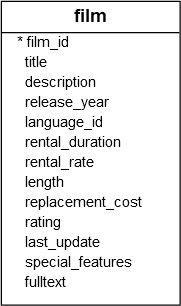
1) Handling no_data_found exception example
The following example issues an error because the film with id 2000 does not exist.
do
$$
declare
	rec record;
	v_film_id int = 2000;
begin
	-- select a film
	select film_id, title
	into strict rec
	from film
	where film_id = v_film_id;
end;
$$
language plpgsql;
Code language: PostgreSQL SQL dialect and PL/pgSQL (pgsql)
Output:
ERROR:  query returned no rows
CONTEXT:  PL/pgSQL function inline_code_block line 6 at SQL statement
SQL state: P0002Code language: Shell Session (shell)
The following example uses the exception clause to catch the no_data_found exception and report a more meaningful message:
do
$$
declare
	rec record;
	v_film_id int = 2000;
begin
	-- select a film
	select film_id, title
	into strict rec
	from film
	where film_id = v_film_id;
        -- catch exception
	exception
	   when no_data_found then
	      raise exception 'film % not found', v_film_id;
end;
$$
language plpgsql;Code language: PostgreSQL SQL dialect and PL/pgSQL (pgsql)
Output:
ERROR:  film 2000 not found
CONTEXT:  PL/pgSQL function inline_code_block line 14 at RAISE
SQL state: P0001Code language: Shell Session (shell)
2) Handling too_many_rows exception example
The following example illustrates how to handle the too_many_rows exception:
do
$$
declare
	rec record;
begin
	-- select film
	select film_id, title
	into strict rec
	from film
	where title LIKE 'A%';

	exception
	   when too_many_rows then
	      raise exception 'Search query returns too many rows';
end;
$$
language plpgsql;Code language: PostgreSQL SQL dialect and PL/pgSQL (pgsql)
Output:
ERROR:  Search query returns too many rows
CONTEXT:  PL/pgSQL function inline_code_block line 15 at RAISE
SQL state: P0001Code language: Shell Session (shell)
In this example, the too_many_rows exception occurs because the select into statement returns more than one row while it is supposed to return one row.
3) Handling multiple exceptions
The following example illustrates how to catch multiple exceptions:
do
$$
declare
	rec record;
	v_length int = 90;
begin
	-- select a film
	select film_id, title
	into strict rec
	from film
	where length = v_length;

        -- catch exception
	exception
	   when sqlstate 'P0002' then
	      raise exception 'film with length % not found', v_length;
	   when sqlstate 'P0003' then
	      raise exception 'The with length % is not unique', v_length;
end;
$$
language plpgsql;Code language: PostgreSQL SQL dialect and PL/pgSQL (pgsql)
Output:
ERROR:  The with length 90 is not unique
CONTEXT:  PL/pgSQL function inline_code_block line 17 at RAISE
SQL state: P0001Code language: Shell Session (shell)
4) Handling exceptions as SQLSTATE codes
The following example is the same as the one above except that it uses the SQLSTATE codes instead of the condition names:
do
$$
declare
	rec record;
	v_length int = 30;
begin
	-- select a film
	select film_id, title
	into strict rec
	from film
	where length = v_length;

        -- catch exception
	exception
	   when sqlstate 'P0002' then
	      raise exception 'film with length % not found', v_length;
	   when sqlstate 'P0003' then
	      raise exception 'The with length % is not unique', v_length;
end;
$$
language plpgsql;
Code language: PostgreSQL SQL dialect and PL/pgSQL (pgsql)
Output:
ERROR:  film with length 30 not found
CONTEXT:  PL/pgSQL function inline_code_block line 15 at RAISE
SQL state: P0001Code language: Shell Session (shell)
Summary
- Use the
exceptionclause in thebegin...endblock to catch and handle exceptions.
Was this tutorial helpful ?
Control structures are probably the most useful (and important) part of PL/pgSQL. With PL/pgSQL‘s control structures, you can manipulate PostgreSQL data in a very flexible and powerful way.
43.6.1. Returning from a Function #
There are two commands available that allow you to return data from a function: RETURN and RETURN NEXT.
43.6.1.1. RETURN #
RETURN expression;
RETURN with an expression terminates the function and returns the value of expression to the caller. This form is used for PL/pgSQL functions that do not return a set.
In a function that returns a scalar type, the expression’s result will automatically be cast into the function’s return type as described for assignments. But to return a composite (row) value, you must write an expression delivering exactly the requested column set. This may require use of explicit casting.
If you declared the function with output parameters, write just RETURN with no expression. The current values of the output parameter variables will be returned.
If you declared the function to return void, a RETURN statement can be used to exit the function early; but do not write an expression following RETURN.
The return value of a function cannot be left undefined. If control reaches the end of the top-level block of the function without hitting a RETURN statement, a run-time error will occur. This restriction does not apply to functions with output parameters and functions returning void, however. In those cases a RETURN statement is automatically executed if the top-level block finishes.
Some examples:
-- functions returning a scalar type
RETURN 1 + 2;
RETURN scalar_var;

-- functions returning a composite type
RETURN composite_type_var;
RETURN (1, 2, 'three'::text);  -- must cast columns to correct types
43.6.1.2. RETURN NEXT and RETURN QUERY #
RETURN NEXTexpression; RETURN QUERYquery; RETURN QUERY EXECUTEcommand-string[ USINGexpression[, ... ] ];
When a PL/pgSQL function is declared to return SETOF , the procedure to follow is slightly different. In that case, the individual items to return are specified by a sequence of sometypeRETURN NEXT or RETURN QUERY commands, and then a final RETURN command with no argument is used to indicate that the function has finished executing. RETURN NEXT can be used with both scalar and composite data types; with a composite result type, an entire “table” of results will be returned. RETURN QUERY appends the results of executing a query to the function’s result set. RETURN NEXT and RETURN QUERY can be freely intermixed in a single set-returning function, in which case their results will be concatenated.
RETURN NEXT and RETURN QUERY do not actually return from the function — they simply append zero or more rows to the function’s result set. Execution then continues with the next statement in the PL/pgSQL function. As successive RETURN NEXT or RETURN QUERY commands are executed, the result set is built up. A final RETURN, which should have no argument, causes control to exit the function (or you can just let control reach the end of the function).
RETURN QUERY has a variant RETURN QUERY EXECUTE, which specifies the query to be executed dynamically. Parameter expressions can be inserted into the computed query string via USING, in just the same way as in the EXECUTE command.
If you declared the function with output parameters, write just RETURN NEXT with no expression. On each execution, the current values of the output parameter variable(s) will be saved for eventual return as a row of the result. Note that you must declare the function as returning SETOF record when there are multiple output parameters, or SETOF when there is just one output parameter of type sometypesometype, in order to create a set-returning function with output parameters.
Here is an example of a function using RETURN NEXT:
CREATE TABLE foo (fooid INT, foosubid INT, fooname TEXT);
INSERT INTO foo VALUES (1, 2, 'three');
INSERT INTO foo VALUES (4, 5, 'six');

CREATE OR REPLACE FUNCTION get_all_foo() RETURNS SETOF foo AS
$BODY$
DECLARE
    r foo%rowtype;
BEGIN
    FOR r IN
        SELECT * FROM foo WHERE fooid > 0
    LOOP
        -- can do some processing here
        RETURN NEXT r; -- return current row of SELECT
    END LOOP;
    RETURN;
END;
$BODY$
LANGUAGE plpgsql;

SELECT * FROM get_all_foo();
Here is an example of a function using RETURN QUERY:
CREATE FUNCTION get_available_flightid(date) RETURNS SETOF integer AS
$BODY$
BEGIN
    RETURN QUERY SELECT flightid
                   FROM flight
                  WHERE flightdate >= $1
                    AND flightdate < ($1 + 1);

    -- Since execution is not finished, we can check whether rows were returned
    -- and raise exception if not.
    IF NOT FOUND THEN
        RAISE EXCEPTION 'No flight at %.', $1;
    END IF;

    RETURN;
 END;
$BODY$
LANGUAGE plpgsql;

-- Returns available flights or raises exception if there are no
-- available flights.
SELECT * FROM get_available_flightid(CURRENT_DATE);
Note
The current implementation of RETURN NEXT and RETURN QUERY stores the entire result set before returning from the function, as discussed above. That means that if a PL/pgSQL function produces a very large result set, performance might be poor: data will be written to disk to avoid memory exhaustion, but the function itself will not return until the entire result set has been generated. A future version of PL/pgSQL might allow users to define set-returning functions that do not have this limitation. Currently, the point at which data begins being written to disk is controlled by the work_mem configuration variable. Administrators who have sufficient memory to store larger result sets in memory should consider increasing this parameter.
43.6.2. Returning from a Procedure #
A procedure does not have a return value. A procedure can therefore end without a RETURN statement. If you wish to use a RETURN statement to exit the code early, write just RETURN with no expression.
If the procedure has output parameters, the final values of the output parameter variables will be returned to the caller.
43.6.3. Calling a Procedure #
A PL/pgSQL function, procedure, or DO block can call a procedure using CALL. Output parameters are handled differently from the way that CALL works in plain SQL. Each OUT or INOUT parameter of the procedure must correspond to a variable in the CALL statement, and whatever the procedure returns is assigned back to that variable after it returns. For example:
CREATE PROCEDURE triple(INOUT x int)
LANGUAGE plpgsql
AS $$
BEGIN
    x := x * 3;
END;
$$;

DO $$
DECLARE myvar int := 5;
BEGIN
  CALL triple(myvar);
  RAISE NOTICE 'myvar = %', myvar;  -- prints 15
END;
$$;
The variable corresponding to an output parameter can be a simple variable or a field of a composite-type variable. Currently, it cannot be an element of an array.
43.6.4. Conditionals #
IF and CASE statements let you execute alternative commands based on certain conditions. PL/pgSQL has three forms of IF:
-
IF ... THEN ... END IF -
IF ... THEN ... ELSE ... END IF -
IF ... THEN ... ELSIF ... THEN ... ELSE ... END IF
and two forms of CASE:
-
CASE ... WHEN ... THEN ... ELSE ... END CASE -
CASE WHEN ... THEN ... ELSE ... END CASE
43.6.4.1. IF-THEN #
IFboolean-expressionTHENstatementsEND IF;
IF-THEN statements are the simplest form of IF. The statements between THEN and END IF will be executed if the condition is true. Otherwise, they are skipped.
Example:
IF v_user_id <> 0 THEN
    UPDATE users SET email = v_email WHERE user_id = v_user_id;
END IF;
43.6.4.2. IF-THEN-ELSE #
IFboolean-expressionTHENstatementsELSEstatementsEND IF;
IF-THEN-ELSE statements add to IF-THEN by letting you specify an alternative set of statements that should be executed if the condition is not true. (Note this includes the case where the condition evaluates to NULL.)
Examples:
IF parentid IS NULL OR parentid = ''
THEN
    RETURN fullname;
ELSE
    RETURN hp_true_filename(parentid) || '/' || fullname;
END IF;
IF v_count > 0 THEN
    INSERT INTO users_count (count) VALUES (v_count);
    RETURN 't';
ELSE
    RETURN 'f';
END IF;
43.6.4.3. IF-THEN-ELSIF #
IFboolean-expressionTHENstatements[ ELSIFboolean-expressionTHENstatements[ ELSIFboolean-expressionTHENstatements... ] ] [ ELSEstatements] END IF;
Sometimes there are more than just two alternatives. IF-THEN-ELSIF provides a convenient method of checking several alternatives in turn. The IF conditions are tested successively until the first one that is true is found. Then the associated statement(s) are executed, after which control passes to the next statement after END IF. (Any subsequent IF conditions are not tested.) If none of the IF conditions is true, then the ELSE block (if any) is executed.
Here is an example:
IF number = 0 THEN
    result := 'zero';
ELSIF number > 0 THEN
    result := 'positive';
ELSIF number < 0 THEN
    result := 'negative';
ELSE
    -- hmm, the only other possibility is that number is null
    result := 'NULL';
END IF;
The key word ELSIF can also be spelled ELSEIF.
An alternative way of accomplishing the same task is to nest IF-THEN-ELSE statements, as in the following example:
IF demo_row.sex = 'm' THEN
    pretty_sex := 'man';
ELSE
    IF demo_row.sex = 'f' THEN
        pretty_sex := 'woman';
    END IF;
END IF;
However, this method requires writing a matching END IF for each IF, so it is much more cumbersome than using ELSIF when there are many alternatives.
43.6.4.4. Simple CASE #
CASEsearch-expressionWHENexpression[,expression[ ... ]] THENstatements[ WHENexpression[,expression[ ... ]] THENstatements... ] [ ELSEstatements] END CASE;
The simple form of CASE provides conditional execution based on equality of operands. The search-expression is evaluated (once) and successively compared to each expression in the WHEN clauses. If a match is found, then the corresponding statements are executed, and then control passes to the next statement after END CASE. (Subsequent WHEN expressions are not evaluated.) If no match is found, the ELSE statements are executed; but if ELSE is not present, then a CASE_NOT_FOUND exception is raised.
Here is a simple example:
CASE x
    WHEN 1, 2 THEN
        msg := 'one or two';
    ELSE
        msg := 'other value than one or two';
END CASE;
43.6.4.5. Searched CASE #
CASE
    WHEN boolean-expression THEN
      statements
  [ WHEN boolean-expression THEN
      statements
    ... ]
  [ ELSE
      statements ]
END CASE;
The searched form of CASE provides conditional execution based on truth of Boolean expressions. Each WHEN clause’s boolean-expression is evaluated in turn, until one is found that yields true. Then the corresponding statements are executed, and then control passes to the next statement after END CASE. (Subsequent WHEN expressions are not evaluated.) If no true result is found, the ELSE statements are executed; but if ELSE is not present, then a CASE_NOT_FOUND exception is raised.
Here is an example:
CASE
    WHEN x BETWEEN 0 AND 10 THEN
        msg := 'value is between zero and ten';
    WHEN x BETWEEN 11 AND 20 THEN
        msg := 'value is between eleven and twenty';
END CASE;
This form of CASE is entirely equivalent to IF-THEN-ELSIF, except for the rule that reaching an omitted ELSE clause results in an error rather than doing nothing.
43.6.5. Simple Loops #
With the LOOP, EXIT, CONTINUE, WHILE, FOR, and FOREACH statements, you can arrange for your PL/pgSQL function to repeat a series of commands.
43.6.5.1. LOOP #
[ <<label>> ] LOOPstatementsEND LOOP [label];
LOOP defines an unconditional loop that is repeated indefinitely until terminated by an EXIT or RETURN statement. The optional label can be used by EXIT and CONTINUE statements within nested loops to specify which loop those statements refer to.
43.6.5.2. EXIT #
EXIT [label] [ WHENboolean-expression];
If no label is given, the innermost loop is terminated and the statement following END LOOP is executed next. If label is given, it must be the label of the current or some outer level of nested loop or block. Then the named loop or block is terminated and control continues with the statement after the loop’s/block’s corresponding END.
If WHEN is specified, the loop exit occurs only if boolean-expression is true. Otherwise, control passes to the statement after EXIT.
EXIT can be used with all types of loops; it is not limited to use with unconditional loops.
When used with a BEGIN block, EXIT passes control to the next statement after the end of the block. Note that a label must be used for this purpose; an unlabeled EXIT is never considered to match a BEGIN block. (This is a change from pre-8.4 releases of PostgreSQL, which would allow an unlabeled EXIT to match a BEGIN block.)
Examples:
LOOP
    -- some computations
    IF count > 0 THEN
        EXIT;  -- exit loop
    END IF;
END LOOP;

LOOP
    -- some computations
    EXIT WHEN count > 0;  -- same result as previous example
END LOOP;

<<ablock>>
BEGIN
    -- some computations
    IF stocks > 100000 THEN
        EXIT ablock;  -- causes exit from the BEGIN block
    END IF;
    -- computations here will be skipped when stocks > 100000
END;
43.6.5.3. CONTINUE #
CONTINUE [label] [ WHENboolean-expression];
If no label is given, the next iteration of the innermost loop is begun. That is, all statements remaining in the loop body are skipped, and control returns to the loop control expression (if any) to determine whether another loop iteration is needed. If label is present, it specifies the label of the loop whose execution will be continued.
If WHEN is specified, the next iteration of the loop is begun only if boolean-expression is true. Otherwise, control passes to the statement after CONTINUE.
CONTINUE can be used with all types of loops; it is not limited to use with unconditional loops.
Examples:
LOOP
    -- some computations
    EXIT WHEN count > 100;
    CONTINUE WHEN count < 50;
    -- some computations for count IN [50 .. 100]
END LOOP;
43.6.5.4. WHILE #
[ <<label>> ] WHILEboolean-expressionLOOPstatementsEND LOOP [label];
The WHILE statement repeats a sequence of statements so long as the boolean-expression evaluates to true. The expression is checked just before each entry to the loop body.
For example:
WHILE amount_owed > 0 AND gift_certificate_balance > 0 LOOP
    -- some computations here
END LOOP;

WHILE NOT done LOOP
    -- some computations here
END LOOP;
43.6.5.5. FOR (Integer Variant) #
[ <<label>> ] FORnameIN [ REVERSE ]expression..expression[ BYexpression] LOOPstatementsEND LOOP [label];
This form of FOR creates a loop that iterates over a range of integer values. The variable name is automatically defined as type integer and exists only inside the loop (any existing definition of the variable name is ignored within the loop). The two expressions giving the lower and upper bound of the range are evaluated once when entering the loop. If the BY clause isn’t specified the iteration step is 1, otherwise it’s the value specified in the BY clause, which again is evaluated once on loop entry. If REVERSE is specified then the step value is subtracted, rather than added, after each iteration.
Some examples of integer FOR loops:
FOR i IN 1..10 LOOP
    -- i will take on the values 1,2,3,4,5,6,7,8,9,10 within the loop
END LOOP;

FOR i IN REVERSE 10..1 LOOP
    -- i will take on the values 10,9,8,7,6,5,4,3,2,1 within the loop
END LOOP;

FOR i IN REVERSE 10..1 BY 2 LOOP
    -- i will take on the values 10,8,6,4,2 within the loop
END LOOP;
If the lower bound is greater than the upper bound (or less than, in the REVERSE case), the loop body is not executed at all. No error is raised.
If a label is attached to the FOR loop then the integer loop variable can be referenced with a qualified name, using that label.
43.6.6. Looping through Query Results #
Using a different type of FOR loop, you can iterate through the results of a query and manipulate that data accordingly. The syntax is:
[ <<label>> ] FORtargetINqueryLOOPstatementsEND LOOP [label];
The target is a record variable, row variable, or comma-separated list of scalar variables. The target is successively assigned each row resulting from the query and the loop body is executed for each row. Here is an example:
CREATE FUNCTION refresh_mviews() RETURNS integer AS $$
DECLARE
    mviews RECORD;
BEGIN
    RAISE NOTICE 'Refreshing all materialized views...';

    FOR mviews IN
       SELECT n.nspname AS mv_schema,
              c.relname AS mv_name,
              pg_catalog.pg_get_userbyid(c.relowner) AS owner
         FROM pg_catalog.pg_class c
    LEFT JOIN pg_catalog.pg_namespace n ON (n.oid = c.relnamespace)
        WHERE c.relkind = 'm'
     ORDER BY 1
    LOOP

        -- Now "mviews" has one record with information about the materialized view

        RAISE NOTICE 'Refreshing materialized view %.% (owner: %)...',
                     quote_ident(mviews.mv_schema),
                     quote_ident(mviews.mv_name),
                     quote_ident(mviews.owner);
        EXECUTE format('REFRESH MATERIALIZED VIEW %I.%I', mviews.mv_schema, mviews.mv_name);
    END LOOP;

    RAISE NOTICE 'Done refreshing materialized views.';
    RETURN 1;
END;
$$ LANGUAGE plpgsql;
If the loop is terminated by an EXIT statement, the last assigned row value is still accessible after the loop.
The query used in this type of FOR statement can be any SQL command that returns rows to the caller: SELECT is the most common case, but you can also use INSERT, UPDATE, or DELETE with a RETURNING clause. Some utility commands such as EXPLAIN will work too.
PL/pgSQL variables are replaced by query parameters, and the query plan is cached for possible re-use, as discussed in detail in Section 43.11.1 and Section 43.11.2.
The FOR-IN-EXECUTE statement is another way to iterate over rows:
[ <<label>> ] FORtargetIN EXECUTEtext_expression[ USINGexpression[, ... ] ] LOOPstatementsEND LOOP [label];
This is like the previous form, except that the source query is specified as a string expression, which is evaluated and replanned on each entry to the FOR loop. This allows the programmer to choose the speed of a preplanned query or the flexibility of a dynamic query, just as with a plain EXECUTE statement. As with EXECUTE, parameter values can be inserted into the dynamic command via USING.
Another way to specify the query whose results should be iterated through is to declare it as a cursor. This is described in Section 43.7.4.
43.6.7. Looping through Arrays #
The FOREACH loop is much like a FOR loop, but instead of iterating through the rows returned by an SQL query, it iterates through the elements of an array value. (In general, FOREACH is meant for looping through components of a composite-valued expression; variants for looping through composites besides arrays may be added in future.) The FOREACH statement to loop over an array is:
[ <<label>> ] FOREACHtarget[ SLICEnumber] IN ARRAYexpressionLOOPstatementsEND LOOP [label];
Without SLICE, or if SLICE 0 is specified, the loop iterates through individual elements of the array produced by evaluating the expression. The target variable is assigned each element value in sequence, and the loop body is executed for each element. Here is an example of looping through the elements of an integer array:
CREATE FUNCTION sum(int[]) RETURNS int8 AS $$
DECLARE
  s int8 := 0;
  x int;
BEGIN
  FOREACH x IN ARRAY $1
  LOOP
    s := s + x;
  END LOOP;
  RETURN s;
END;
$$ LANGUAGE plpgsql;
The elements are visited in storage order, regardless of the number of array dimensions. Although the target is usually just a single variable, it can be a list of variables when looping through an array of composite values (records). In that case, for each array element, the variables are assigned from successive columns of the composite value.
With a positive SLICE value, FOREACH iterates through slices of the array rather than single elements. The SLICE value must be an integer constant not larger than the number of dimensions of the array. The target variable must be an array, and it receives successive slices of the array value, where each slice is of the number of dimensions specified by SLICE. Here is an example of iterating through one-dimensional slices:
CREATE FUNCTION scan_rows(int[]) RETURNS void AS $$
DECLARE
  x int[];
BEGIN
  FOREACH x SLICE 1 IN ARRAY $1
  LOOP
    RAISE NOTICE 'row = %', x;
  END LOOP;
END;
$$ LANGUAGE plpgsql;

SELECT scan_rows(ARRAY[[1,2,3],[4,5,6],[7,8,9],[10,11,12]]);

NOTICE:  row = {1,2,3}
NOTICE:  row = {4,5,6}
NOTICE:  row = {7,8,9}
NOTICE:  row = {10,11,12}
43.6.8. Trapping Errors #
By default, any error occurring in a PL/pgSQL function aborts execution of the function and the surrounding transaction. You can trap errors and recover from them by using a BEGIN block with an EXCEPTION clause. The syntax is an extension of the normal syntax for a BEGIN block:
[ <<label>> ] [ DECLAREdeclarations] BEGINstatementsEXCEPTION WHENcondition[ ORcondition... ] THENhandler_statements[ WHENcondition[ ORcondition... ] THENhandler_statements... ] END;
If no error occurs, this form of block simply executes all the statements, and then control passes to the next statement after END. But if an error occurs within the statements, further processing of the statements is abandoned, and control passes to the EXCEPTION list. The list is searched for the first condition matching the error that occurred. If a match is found, the corresponding handler_statements are executed, and then control passes to the next statement after END. If no match is found, the error propagates out as though the EXCEPTION clause were not there at all: the error can be caught by an enclosing block with EXCEPTION, or if there is none it aborts processing of the function.
The condition names can be any of those shown in Appendix A. A category name matches any error within its category. The special condition name OTHERS matches every error type except QUERY_CANCELED and ASSERT_FAILURE. (It is possible, but often unwise, to trap those two error types by name.) Condition names are not case-sensitive. Also, an error condition can be specified by SQLSTATE code; for example these are equivalent:
WHEN division_by_zero THEN ...
WHEN SQLSTATE '22012' THEN ...
If a new error occurs within the selected handler_statements, it cannot be caught by this EXCEPTION clause, but is propagated out. A surrounding EXCEPTION clause could catch it.
When an error is caught by an EXCEPTION clause, the local variables of the PL/pgSQL function remain as they were when the error occurred, but all changes to persistent database state within the block are rolled back. As an example, consider this fragment:
INSERT INTO mytab(firstname, lastname) VALUES('Tom', 'Jones');
BEGIN
    UPDATE mytab SET firstname = 'Joe' WHERE lastname = 'Jones';
    x := x + 1;
    y := x / 0;
EXCEPTION
    WHEN division_by_zero THEN
        RAISE NOTICE 'caught division_by_zero';
        RETURN x;
END;
When control reaches the assignment to y, it will fail with a division_by_zero error. This will be caught by the EXCEPTION clause. The value returned in the RETURN statement will be the incremented value of x, but the effects of the UPDATE command will have been rolled back. The INSERT command preceding the block is not rolled back, however, so the end result is that the database contains Tom Jones not Joe Jones.
Tip
A block containing an EXCEPTION clause is significantly more expensive to enter and exit than a block without one. Therefore, don’t use EXCEPTION without need.
Example 43.2. Exceptions with UPDATE/INSERT
This example uses exception handling to perform either UPDATE or INSERT, as appropriate. It is recommended that applications use INSERT with ON CONFLICT DO UPDATE rather than actually using this pattern. This example serves primarily to illustrate use of PL/pgSQL control flow structures:
CREATE TABLE db (a INT PRIMARY KEY, b TEXT);

CREATE FUNCTION merge_db(key INT, data TEXT) RETURNS VOID AS
$$
BEGIN
    LOOP
        -- first try to update the key
        UPDATE db SET b = data WHERE a = key;
        IF found THEN
            RETURN;
        END IF;
        -- not there, so try to insert the key
        -- if someone else inserts the same key concurrently,
        -- we could get a unique-key failure
        BEGIN
            INSERT INTO db(a,b) VALUES (key, data);
            RETURN;
        EXCEPTION WHEN unique_violation THEN
            -- Do nothing, and loop to try the UPDATE again.
        END;
    END LOOP;
END;
$$
LANGUAGE plpgsql;

SELECT merge_db(1, 'david');
SELECT merge_db(1, 'dennis');
This coding assumes the unique_violation error is caused by the INSERT, and not by, say, an INSERT in a trigger function on the table. It might also misbehave if there is more than one unique index on the table, since it will retry the operation regardless of which index caused the error. More safety could be had by using the features discussed next to check that the trapped error was the one expected.
43.6.8.1. Obtaining Information about an Error #
Exception handlers frequently need to identify the specific error that occurred. There are two ways to get information about the current exception in PL/pgSQL: special variables and the GET STACKED DIAGNOSTICS command.
Within an exception handler, the special variable SQLSTATE contains the error code that corresponds to the exception that was raised (refer to Table A.1 for a list of possible error codes). The special variable SQLERRM contains the error message associated with the exception. These variables are undefined outside exception handlers.
Within an exception handler, one may also retrieve information about the current exception by using the GET STACKED DIAGNOSTICS command, which has the form:
GET STACKED DIAGNOSTICSvariable{ = | := }item[ , ... ];
Each item is a key word identifying a status value to be assigned to the specified variable (which should be of the right data type to receive it). The currently available status items are shown in Table 43.2.
Table 43.2. Error Diagnostics Items
| Name | Type | Description |
|---|---|---|
RETURNED_SQLSTATE |
text |
the SQLSTATE error code of the exception |
COLUMN_NAME |
text |
the name of the column related to exception |
CONSTRAINT_NAME |
text |
the name of the constraint related to exception |
PG_DATATYPE_NAME |
text |
the name of the data type related to exception |
MESSAGE_TEXT |
text |
the text of the exception’s primary message |
TABLE_NAME |
text |
the name of the table related to exception |
SCHEMA_NAME |
text |
the name of the schema related to exception |
PG_EXCEPTION_DETAIL |
text |
the text of the exception’s detail message, if any |
PG_EXCEPTION_HINT |
text |
the text of the exception’s hint message, if any |
PG_EXCEPTION_CONTEXT |
text |
line(s) of text describing the call stack at the time of the exception (see Section 43.6.9) |
If the exception did not set a value for an item, an empty string will be returned.
Here is an example:
DECLARE
  text_var1 text;
  text_var2 text;
  text_var3 text;
BEGIN
  -- some processing which might cause an exception
  ...
EXCEPTION WHEN OTHERS THEN
  GET STACKED DIAGNOSTICS text_var1 = MESSAGE_TEXT,
                          text_var2 = PG_EXCEPTION_DETAIL,
                          text_var3 = PG_EXCEPTION_HINT;
END;
43.6.9. Obtaining Execution Location Information #
The GET DIAGNOSTICS command, previously described in Section 43.5.5, retrieves information about current execution state (whereas the GET STACKED DIAGNOSTICS command discussed above reports information about the execution state as of a previous error). Its PG_CONTEXT status item is useful for identifying the current execution location. PG_CONTEXT returns a text string with line(s) of text describing the call stack. The first line refers to the current function and currently executing GET DIAGNOSTICS command. The second and any subsequent lines refer to calling functions further up the call stack. For example:
CREATE OR REPLACE FUNCTION outer_func() RETURNS integer AS $$
BEGIN
  RETURN inner_func();
END;
$$ LANGUAGE plpgsql;

CREATE OR REPLACE FUNCTION inner_func() RETURNS integer AS $$
DECLARE
  stack text;
BEGIN
  GET DIAGNOSTICS stack = PG_CONTEXT;
  RAISE NOTICE E'--- Call Stack ---\n%', stack;
  RETURN 1;
END;
$$ LANGUAGE plpgsql;

SELECT outer_func();

NOTICE:  --- Call Stack ---
PL/pgSQL function inner_func() line 5 at GET DIAGNOSTICS
PL/pgSQL function outer_func() line 3 at RETURN
CONTEXT:  PL/pgSQL function outer_func() line 3 at RETURN
 outer_func
 ------------
           1
(1 row)
GET STACKED DIAGNOSTICS ... PG_EXCEPTION_CONTEXT returns the same sort of stack trace, but describing the location at which an error was detected, rather than the current location.
Exception handling is an important aspect of programming as it helps to identify and handle errors that may occur during the execution of a program. When it comes to PostgreSQL functions, it is also important to handle exceptions that may arise from the execution of the function. One common error in PostgreSQL functions is the «Catch all error» exception, which occurs when the function does not have a specific exception handler for a particular error and instead catches all exceptions with a single catch-all handler. In this scenario, it is important to properly handle the exception to avoid unexpected behavior and ensure the stability of the system.
Method 1: Using RAISE statements
RAISE statements in PostgreSQL are used to signal an error or exception. They can be used to handle exceptions in functions by raising an error condition and then catching and handling it in the calling code.
Here is an example of how to use RAISE statements to handle exceptions in a PostgreSQL function:
CREATE OR REPLACE FUNCTION divide(x numeric, y numeric)
RETURNS numeric AS $$
BEGIN
  IF y = 0 THEN
    RAISE EXCEPTION 'Division by zero error';
  END IF;
  RETURN x / y;
END;
$$ LANGUAGE plpgsql;
In this example, the function checks if the divisor is zero and raises an exception with the message «Division by zero error» if it is.
To catch and handle the exception in the calling code, you can use a BEGIN…EXCEPTION block:
BEGIN
  SELECT divide(10, 0);
EXCEPTION
  WHEN division_by_zero THEN
    RAISE NOTICE 'Caught division by zero error';
END;
In this example, the SELECT statement calls the divide function with arguments 10 and 0. Since the divisor is zero, the function raises an exception. The EXCEPTION block catches the exception and raises a notice with the message «Caught division by zero error».
You can also define your own error conditions and use them in RAISE statements:
CREATE OR REPLACE FUNCTION divide(x numeric, y numeric)
RETURNS numeric AS $$
DECLARE
  division_by_zero EXCEPTION;
BEGIN
  IF y = 0 THEN
    RAISE division_by_zero;
  END IF;
  RETURN x / y;
EXCEPTION
  WHEN division_by_zero THEN
    RAISE EXCEPTION 'Division by zero error';
END;
$$ LANGUAGE plpgsql;
In this example, the function defines an exception named «division_by_zero» and raises it when the divisor is zero. The EXCEPTION block catches the exception and raises an exception with the message «Division by zero error».
RAISE statements can also include additional information about the error, such as the SQLSTATE code and any error details:
RAISE EXCEPTION 'Division by zero error'
  USING ERRCODE = '22012', DETAIL = 'Cannot divide by zero';
In this example, the RAISE statement includes the SQLSTATE code for division by zero errors (22012) and a detail message.
By using RAISE statements in your PostgreSQL functions, you can handle exceptions and errors in a more structured and controlled way.
Method 2: Using the GET STACKED DIAGNOSTICS
The GET STACKED DIAGNOSTICS statement can be used to retrieve diagnostic information about the most recently raised exception. This can be useful in fixing catch all error PSQL function exception. Here’s how to do it:
- Define your function with a catch-all exception block:
CREATE OR REPLACE FUNCTION my_function()
RETURNS void AS $$
BEGIN
  -- your function code here
EXCEPTION
  WHEN OTHERS THEN
    -- handle the exception here
END;
$$ LANGUAGE plpgsql;- Use
GET STACKED DIAGNOSTICSto retrieve the exception message and other relevant information:
CREATE OR REPLACE FUNCTION my_function()
RETURNS void AS $$
DECLARE
  exception_message TEXT;
BEGIN
  -- your function code here
EXCEPTION
  WHEN OTHERS THEN
    GET STACKED DIAGNOSTICS exception_message = MESSAGE_TEXT;
    RAISE NOTICE 'Error occurred: %', exception_message;
END;
$$ LANGUAGE plpgsql;
In this example, we retrieve the exception message using GET STACKED DIAGNOSTICS and store it in the exception_message variable. We then use the RAISE NOTICE statement to display the error message.
- You can also retrieve additional information about the exception, such as the error code and the stack trace:
CREATE OR REPLACE FUNCTION my_function()
RETURNS void AS $$
DECLARE
  exception_message TEXT;
  exception_detail TEXT;
  exception_hint TEXT;
  exception_context TEXT;
BEGIN
  -- your function code here
EXCEPTION
  WHEN OTHERS THEN
    GET STACKED DIAGNOSTICS exception_message = MESSAGE_TEXT,
                          exception_detail = PG_EXCEPTION_DETAIL,
                          exception_hint = PG_EXCEPTION_HINT,
                          exception_context = PG_EXCEPTION_CONTEXT;
    RAISE NOTICE 'Error occurred: %', exception_message;
    RAISE NOTICE 'Error detail: %', exception_detail;
    RAISE NOTICE 'Error hint: %', exception_hint;
    RAISE NOTICE 'Error context: %', exception_context;
END;
$$ LANGUAGE plpgsql;
In this example, we retrieve the exception message, detail, hint, and context using GET STACKED DIAGNOSTICS and store them in separate variables. We then use the RAISE NOTICE statement to display each piece of information.
That’s it! By using GET STACKED DIAGNOSTICS, you can easily retrieve diagnostic information about exceptions and handle them in a more specific and targeted way.
Method 3: Implementing Custom Error Codes and Messages
To implement custom error codes and messages in PostgreSQL, you can use the RAISE statement. This statement allows you to raise an exception with a custom error code and message. Here’s an example:
CREATE OR REPLACE FUNCTION my_function(param1 INT, param2 TEXT)
RETURNS VOID AS $$
BEGIN
  -- your code here
EXCEPTION
  WHEN OTHERS THEN
    RAISE EXCEPTION 'Error occurred in my_function with parameters % and %: %', param1, param2, SQLERRM;
END;
$$ LANGUAGE plpgsql;
In the above example, we define a function my_function that takes two parameters, param1 and param2. Inside the function, we have our code block. If an exception occurs, we catch it with the WHEN OTHERS clause. Then, we use the RAISE statement to raise an exception with a custom error message that includes the values of param1 and param2, as well as the error message returned by SQLERRM.
You can also define custom error codes using the RAISE statement. Here’s an example:
CREATE OR REPLACE FUNCTION my_function(param1 INT, param2 TEXT)
RETURNS VOID AS $$
BEGIN
  -- your code here
EXCEPTION
  WHEN OTHERS THEN
    RAISE EXCEPTION 'Error occurred in my_function with parameters % and %: %', param1, param2, SQLERRM;
    -- RAISE EXCEPTION USING ERRCODE = 'MY_CUSTOM_ERROR_CODE' MESSAGE = 'My custom error message';
END;
$$ LANGUAGE plpgsql;
In this example, we have commented out the RAISE statement that uses custom error codes. To use it, simply uncomment that line and replace MY_CUSTOM_ERROR_CODE and My custom error message with your desired values.
By using custom error codes and messages, you can provide more specific and helpful error messages to your users, making it easier for them to understand and fix any issues that arise.
Method 4: Logging Error Details
To handle exceptions in a PostgreSQL function and log error details, you can use the RAISE statement along with the pg_exception system variable to capture the error message and stack trace. Here’s an example code snippet:
BEGIN
  -- your function logic here
EXCEPTION
  WHEN OTHERS THEN
    -- log error details
    RAISE LOG 'Error occurred: %', pg_exception_message();
    RAISE LOG 'Stack trace: %', pg_exception_stacktrace();
END;
In this code, the BEGIN and EXCEPTION blocks define the main logic of your function and the error handling logic, respectively. The WHEN OTHERS condition catches any unhandled exceptions.
Inside the exception block, we use the RAISE statement to log the error details. The % symbol is a placeholder for the actual error message or stack trace, which we pass as arguments using the pg_exception_message() and pg_exception_stacktrace() functions, respectively.
The pg_exception_message() function returns the error message as a string, while pg_exception_stacktrace() returns the stack trace as an array of text values.
By logging these details, you can easily troubleshoot errors and identify the root cause of any issues in your function.