
Каждый раз, когда мы кликаем на какую-то ссылку или на наш сайт заходят поисковые роботы, происходит один из диалогов примерно такого содержания:
— Привет, сервер! Я поисковый робот. Могу я просканировать эту страницу?
— Привет! Конечно, заходи.
— А если вот эту страницу?
— А вот здесь пока ведутся ремонтные работы, приходи позже.
Язык ответов HTTP понимают и браузеры, и поисковые роботы, и SEO-специалисты, которым он нужен при работе с сайтом.
Если вы до сих пор путаете 301 с 302, и не знаете, зачем нужен 410 ответ — вам просто необходимо разобраться в кодах ответов HTTP, которые встречаются чаще всего. О них я и расскажу в этой статье. А еще мы узнаем, какую роль они отыграют в SEO и как не допустить ошибок в их использовании.
Какие ответы серверов существуют?
Начнем с того, что все коды ответов (состояния) серверов делятся на 5 классов, каждый из которых несет определенный смысл:
- 1XX. Эти информационные коды говорят о том, что запрос был понят, принят сервером и уже обрабатывается. Такие временные ответы обычно не отображаются на экране пользователей, но служат внутренними кодами для браузеров.
- 2XX. Обозначают успешную обработку полученного запроса. Они используются браузерами для подтверждения того, что запрос был принят, обработан и отражают его текущий статус.
- 3XX. Это коды перенаправления. Говорят о том, что серверу нужно выполнить дополнительные действия — например, перейти по редиректу на новый адрес.
- 4XX. Говорят об ошибке на стороне пользователя. Чаще всего появляются, если время ожидания браузера истекло или запрос был введен неправильно.
- 5XX. Говорят об ошибке сервера. Это значит, что вы запрашиваете специфический ресурс и он найден, но сервер не может дать вам к нему доступ. В конечном счете, запрос не может быть обработан.
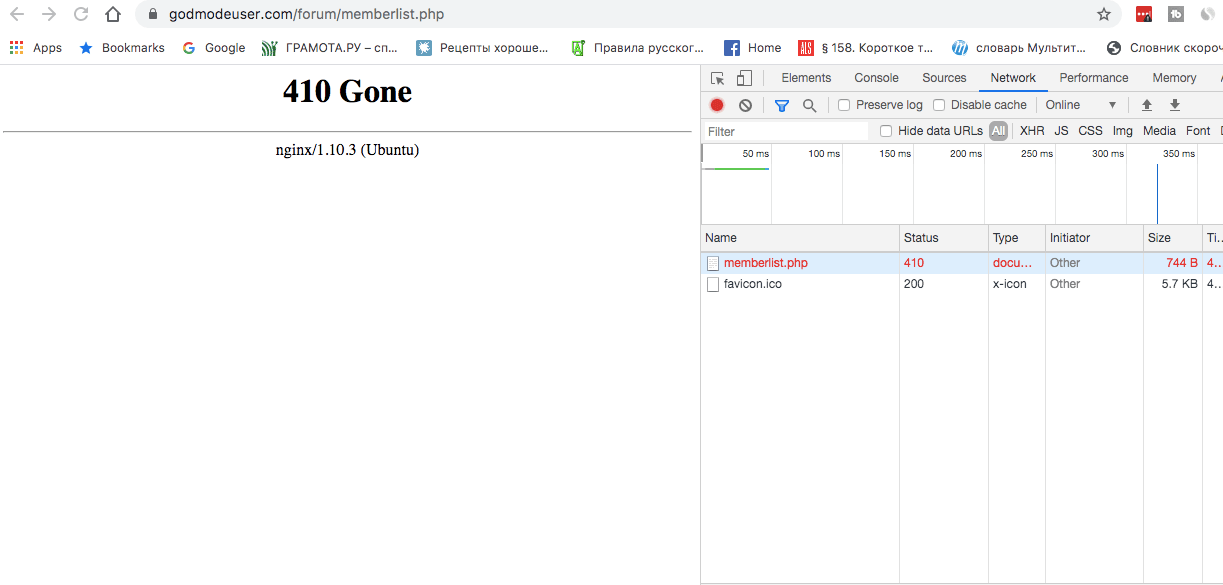
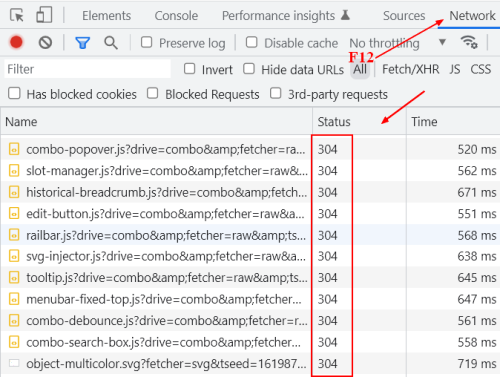
Не все ответы сервера можно увидеть прямо на экране, большинство так и остаются внутренними кодами для браузеров и поисковых роботов. Чтобы быстро узнать статус любой страницы, откройте инструменты разработчика в браузере Chrome (нажмите F12). Перейдите на вкладку Network, обновите страницу и получите список статусов каждого элемента, включая саму страницу:
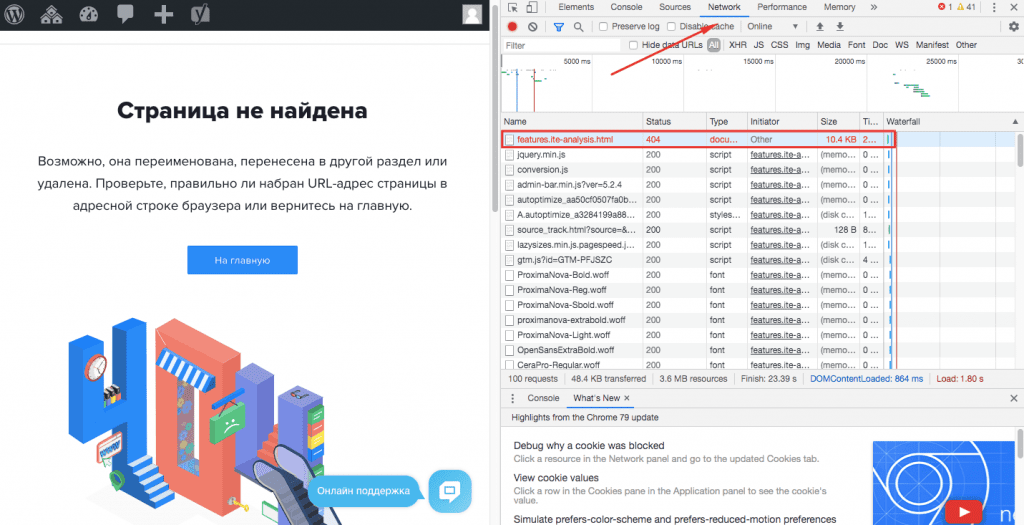
Именно в этих трех цифрах в колонке Status зашифрованы данные о состоянии страницы: можно ли ее сканировать, находится ли она по этому адресу, загружается ли все ее содержимое и т. д.
Какие же коды ответов сервера встречаются чаще всего? И что они значат для оптимизации сайта? Давайте внимательно рассмотрим самые полезные для SEO ответы и способы их обработки.
Ответы серверов, которые встречаются чаще всего
На самом деле существует более 70 различных кодов состояния сервера, но, скорее всего, вы никогда не столкнетесь с большей половиной из них. Однако знать самые распространенные коды состояния HTTP очень важно, потому что ответы сервера напрямую влияют на индексацию вашего сайта, краулинговый бюджет и продвижение ресурса в поисковых системах.
301 Moved Permanently
Говорит о том, что URL был навсегда перенесен на новое место. Браузеры самостоятельно переходят по 301 переадресации — никакого действия от пользователя не требуется.
301 код ответа обычно используют при переводе сайта с HTTP на HTTPS, склейке зеркал (страниц с www и без www), настройке слеша в конце URL, а также при переносе части сайта или всех страниц на новый домен. Этот редирект идеально подходит, если вы хотите передать ссылочный вес старой страницы на новую и сохранить результаты SEO-продвижения.
Совет: Старайтесь не перенаправлять пользователей с удаленного URL на главную страницу сайта. Например, в вашем интернет-магазине есть карточка с неактуальным товаром, но с неплохой ссылочной массой. Вы хотите сохранить этот вес и ставите 301 редирект на главную. Здесь и кроется ошибка! Такой редирект воспринимается Google как 404 Soft, а это означает, что поисковик не будет передавать сигналы со старого URL на новый. В такой ситуации всегда перенаправляйте страницу на максимально похожую (или 404, если аналогичная страница отсутствует).
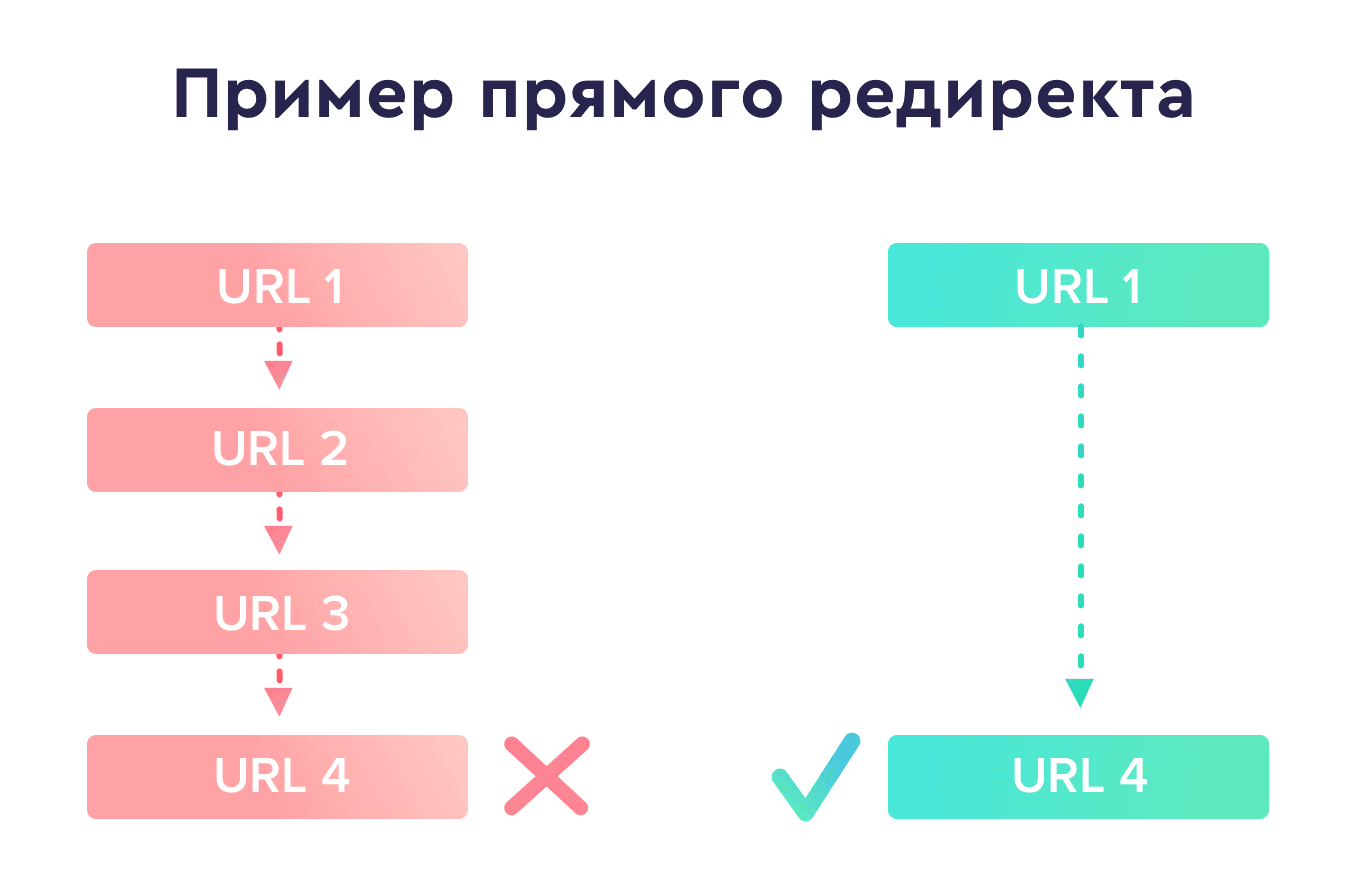
Кроме того, избегайте цепочек редиректов с двумя и больше переадресациями, так как они создают дополнительную нагрузку на сервер и даже могут помешать пользователям перейти на ваш сайт как небезопасный. Google не индексирует дальше 4-го редиректа, и после каждого теряется вес, поэтому лучше ставьте прямые редиректы (вместо 1 -> 2 -> 3, сразу 1 -> 3).
Через несколько лет можете смело удалять 301, чтобы уменьшить нагрузку на сервер.
302 Found / Moved Temporarily
В отличие от постоянного 301 редиректа, этот — временный. Он говорит о том, что страница найдена, но пока размещена по другому адресу.
Обычно его путали с 301, а после того, как Google объявил, что все 3хx редиректы передают ссылочный вес, — ситуация усугубилась. По факту, его нужно ставить, если вы точно уверены, что будете использовать старый URL снова. Как раз об этом вы и сообщаете поисковику с помощью 302 сигнала, а он в ответ оставляет весь ссылочный вес за старой страницей.
Если вы будете использовать 302 редирект на постоянной основе, Google в конечном итоге воспримет его как 301 со всеми вытекающими последствиями. Также проверьте, нет ли на вашем сайте 302 редиректов, которые на самом деле должны быть 301 — такая ошибка встречается очень часто.
304 Not Modified
Сервер отдает 304 Not Modified ответ, когда страница остается неизменной со времени последнего посещения.
Все браузеры хранят в своем кэше данные заголовка Last-Modified. В свою очередь, это позволяет им точно знать, когда страница была в последний раз изменена. И когда поисковые роботы заходят на страницу и видят, что значение заголовка совпадает с уже сохраненным в кэше, сервер возвращает 304 ответ.
Этот код можно использовать для ускорения индексации сайта. Ведь получив такой ответ, поисковый робот не будет загружать страницу, а значит, успеет проиндексировать больше других страниц.
Лучший ответ сервера для оптимизатора ― 200 ОК. Он означает, что запрос успешно обработан. Но 304 несет ту же нагрузку. Как правило, на новые страницы и первое посещение должен выдаваться ответ 200, на все последующие, если не произошло изменений — 304.
403 Forbidden
Этот код ответа говорит о том, что пользователю запрещен доступ к странице.
403 ошибка может появиться, если пользователь вошел на сайт, но у него нет разрешения для доступа к закрытой внутренней сети. Например, если я попытаюсь зайти в кабинет админа SE Ranking по прямому URL, используя пароль и логин личного аккаунта, на экране будет 403 ошибка «Нет доступа». Также 403 ошибка возникает, если индексный файл для главной указан неправильно. Он обязательно должен иметь название index и расширение: *.shtml, *.html, *.htm, *.phtml или *.php.
Кроме того, когда вы переносите сайт на HTTPS, то 403 ответ появится, когда DNS-кэш ещё не успел обновиться, а вы уже что-то от него хотите. Лучше подождите, или, если это вопрос жизни и смерти, обновите кэш принудительно.
Совет: страницы с 403 кодом ответа в конечном итоге будут удалены из индекса, поэтому Google рекомендует использовать 404 ответ вместо 403.
404 Not Found
Самая «любимая» ошибка в SEO. Говорит о том, что сервер ничего не нашел по указанному адресу, хотя соединение между сервером и клиентом прошло успешно.

Не стоит переживать, если вы увидите много 404 страниц в своей Google Search Console. Поисковик просто сообщает вам, какие страницы удалены, а вам уже решать, нужно ли их проверять. Но что стоит точно сделать — убрать все ссылки на удаленные страницы, чтобы не путать посетителей при навигации по вашему сайту.
Обычно мы видим этот код ошибки, когда вводим неправильный URL в браузер и, как следствие, пытаемся получить доступ к несуществующей странице. Или, например, владелец сайта удалил страницу без редиректа URL по новому адресу. Как результат — 404 ошибка. Чтобы решить проблему, посетителю нужно перепроверить написание URL или попробовать найти информацию на сайте самостоятельно через поиск, а владельцу ресурса ― исправить «битые» ссылки на рабочие.
404 страница не индексируется и не передает вес. Поэтому некоторые оптимизаторы грешат «мягкой 404», выдавая стандартную страницу с ответом 200 вместо 404. Но это считается плохой практикой, потому что 200 код говорит Google, что по этому URL есть реальная страница. В конечном счете, страница оказывается в индексе, и поисковик продолжает свои попытки сканировать несуществующие URL-адреса вместо сканирования ваших реальных страниц.
Как настроить 404 страницу для своего сайта
Если раньше после перехода на несуществующую страницу пользователь видел перед собой только цифру 404, то сейчас — просто море креатива. Но не стоит забывать, что он пришел с конкретным запросом и ваша задача — дать решение, а не развлечь его. Поэтому не забудьте оптимизировать 404 страницу — добавьте навигацию своего сайта или контактную форму, особенно если на 404 страницы идет трафик.
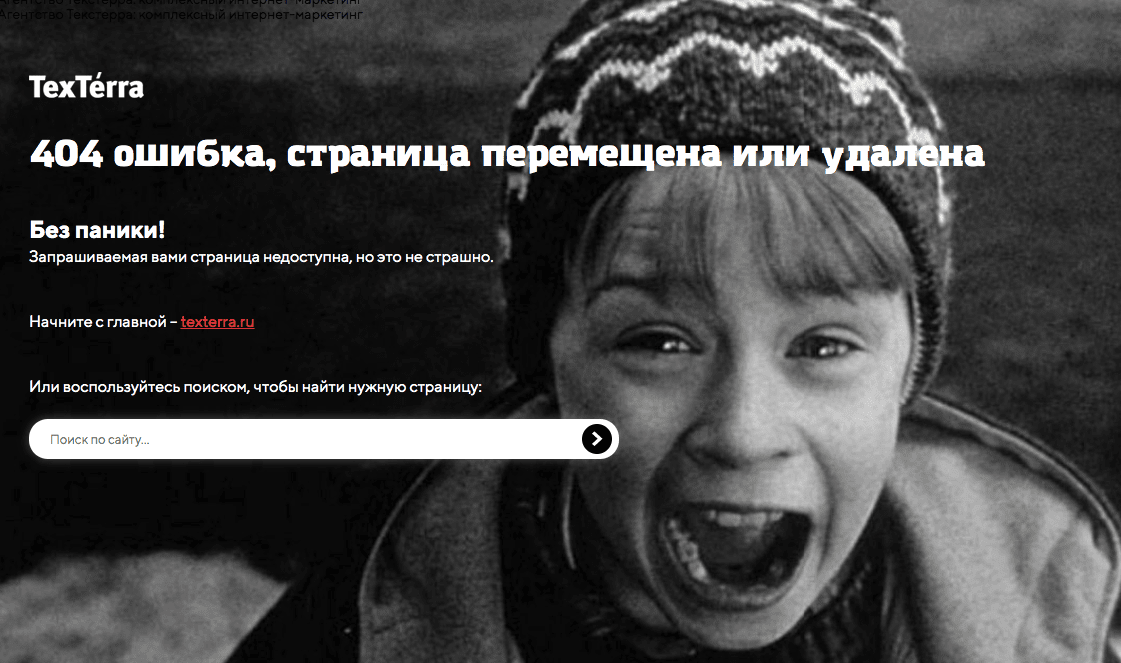
Если ваша CMS (система управления контентом) не создала 404 страницу, вы можете создать ее самостоятельно.
С помощью htaccess
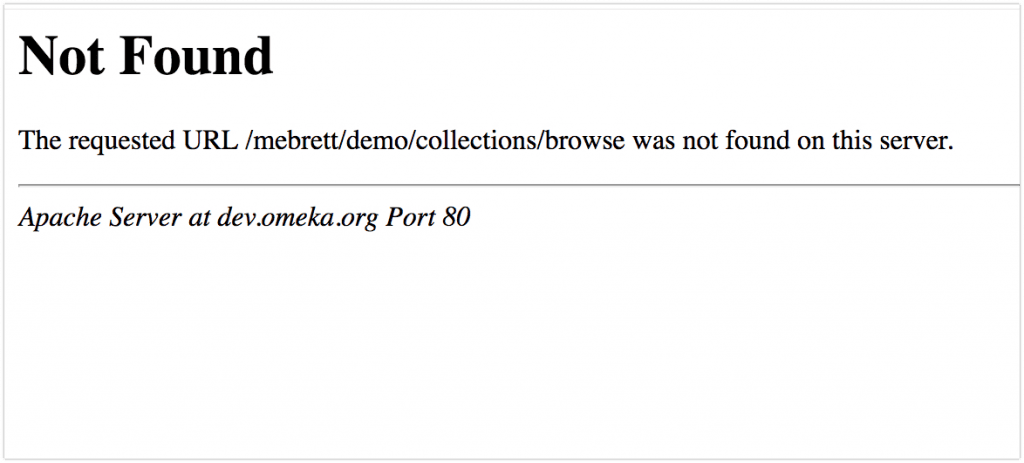
Самый простой способ настроить страницу с 404 ошибкой — добавить сообщение об ошибке, например ErrorDocument 404 “<H1> Not Found </ H1>” в сам файл .htaccess.
В результате у вас должно получиться что-то вроде этого:
Через PHP
Вы можете использовать функцию заголовка и менять контент 404 страницы в зависимости от разных сценариев (например, юзер сделал ошибку в URL самостоятельно или уже перешел по «битой» ссылке с какого-то ресурса).
Детальнее — в этой инструкции.
Через WordPress
У вас есть несколько вариантов:
- Отредактируйте существующую страницу 404, которая уже есть в вашей теме.
- Добавьте свою 404 страницу, если ваша тема ее не предлагает по умолчанию.
- Используйте плагин для 404 страницы.
Подробности можно узнать здесь.
410 Gone
Этот ответ говорит о том, что страница или документ не доступны по указанному адресу и новый адрес неизвестен.
Более того, инструмент проверки URL в Google Search Console обозначает 410 ответы как 404, что приводит к еще большему количеству 404 ошибок, обнаруженных в консоли.
410 ответ чаще всего встречается на страницах с низким трастом, без ссылок или тех, что удалены безвозвратно. Например, с товаром, которого больше не будет в продаже.
Поскольку Google все-таки относится к 404 и 410 ошибкам по-разному, нужно использовать 410 код только тогда, когда вы точно знаете, что страница удалена и больше не вернется. Такой ответ по умолчанию кэшируется, поисковый робот больше не заходит на страницу, а она в свою очередь удаляется из индекса.
Совет: подумайте дважды, прежде чем удалять страницу навсегда. Если вы сомневаетесь, лучше поставить редирект на похожую страницу и получить хотя бы часть текущего трафика. Если же удаления страницы не избежать, обязательно проверьте ссылки, которые на нее ведут — как только страница будет удалена, магия ссылок закончится тоже.
503 Service Unavailable
Этот статус говорит поисковым роботам и пользователям, что в данный момент страница недоступна и, следовательно, сервер не может обработать входящий запрос.
В большинстве случаев 503 появляется, если сервер перегружен, например, превышено ограничение на число входящих запросов или сервер проходит техническое обслуживание.
Могут быть ещё такие причины:
- DDOS-атака на сайт.
- Использование большого количества скриптов и других элементов с внешних ресурсов: виджеты, картинки.
- Запросы к базе данных и извлечение оттуда информации занимают слишком много времени.
- Чрезмерное количество обращений к сайту от поисковиков, пользователей или сервисов по парсингу сайта.
Совет: в идеале в сообщении с 503 ошибкой обязательно нужно указать, что пользователю нужно вернуться на сайт через Х времени. К сожалению, так очень редко делают — обычно просят попытать удачу позже.
И последнее, но не менее важное: код состояния 503 не позволяет поисковым системам индексировать сайт. Кроме того, он сообщает, что сайт плохо обслуживается, потому что пользователи не могут попасть, куда хотели. Поэтому важно, чтобы неполадки были устранены как можно быстрее — иначе это скажется на позициях сайта.
Как настроить 503 страницу для своего сайта через PHP
Вот как выглядит код состояния 503 в PHP:
<?php
header("HTTP/1.1 503 Service Temporarily Unavailable");
header("Status: 503 Service Temporarily Unavailable");
header("Retry-After: 3600");
?>
Больше подробностей можно почитать в этой инструкции.
Как проверить коды состояния всех страниц на сайте
Чтобы быть в курсе всего, что происходит на вашем сайте, нужно мониторить коды состояния всех ваших страниц. Конечно, для этого можно использовать расширение Live HTTP Headers для Chrome или отчет «Покрытие» в Google Search Console, но лучше, если вы проанализируете ответы до того, как до них доберутся поисковые роботы.
Если вы хотите быстро проверить коды состояния всех страниц вашего сайта одним кликом, обязательно попробуйте наш инструмент «Аудит сайта».
Инструмент не просто проверит все страницы на вашем сайте и проанализирует ключевые параметры оптимизации, но и выполнит SEO-аудит всего ресурса по важным техническим параметрам, найдет ошибки и даже подскажет методы их решения.
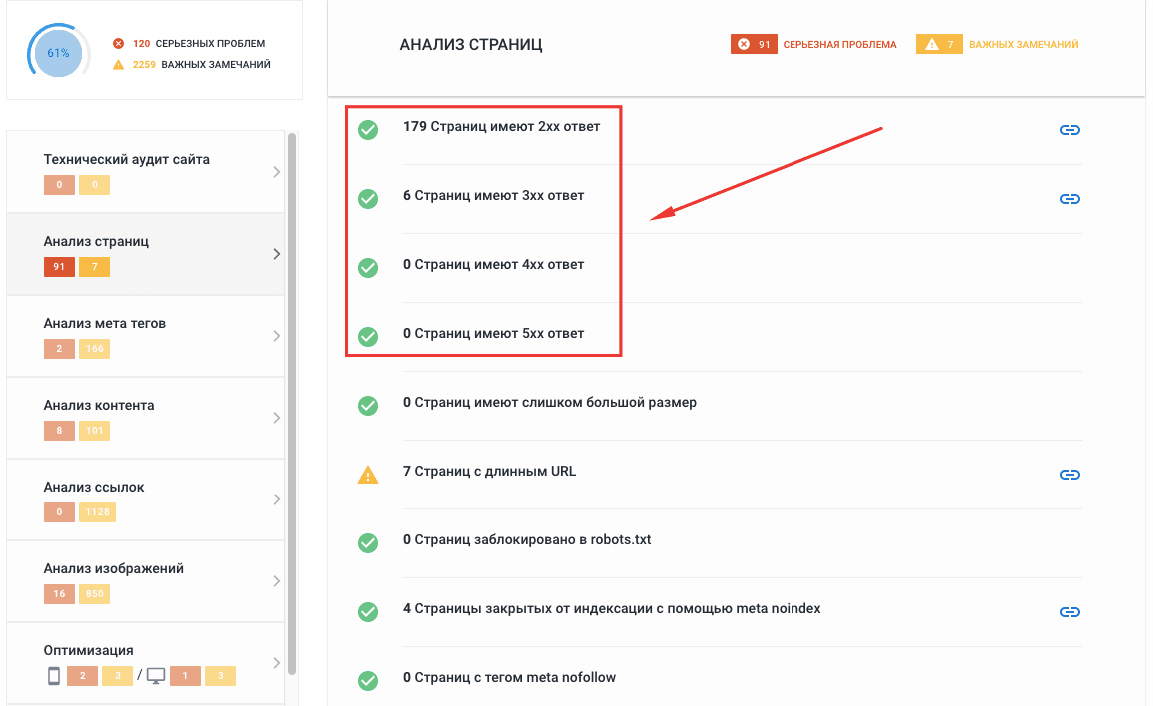
Все статусы страниц вы увидите в основном отчете, в котором проанализированы технические параметры, страницы, мета-теги, ссылки и контент.
Кстати, вы можете воспользоваться бесплатной пробной версией, чтобы протестировать все основные функции аудита.
Если же вас интересуют только коды состояния всех страниц, просто перейдите на вкладку «Сканированные страницы». Все данные можно экспортировать в формате XLS для подробного изучения:
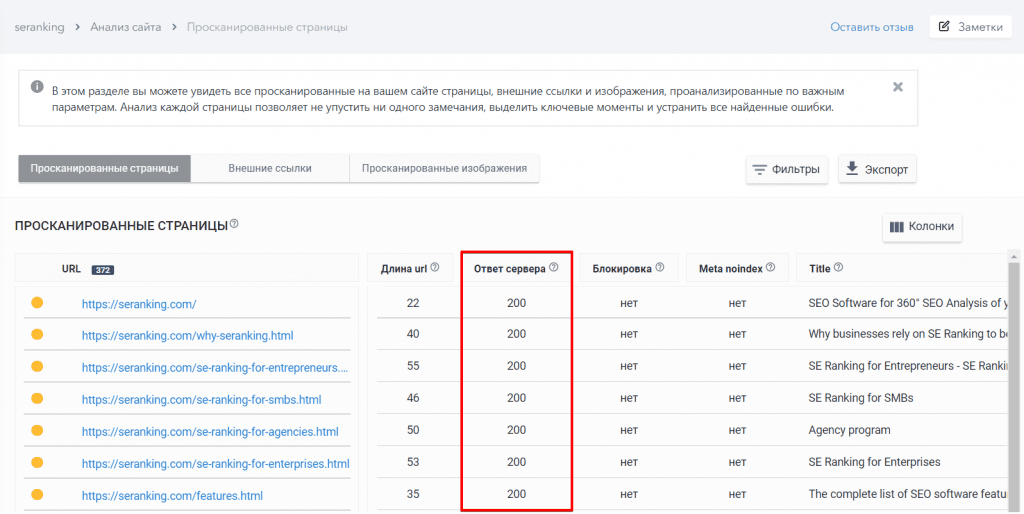
Безусловно, найти ошибки в кодах ответов это только полдела. Решать проблемы, связанные с ошибками сервера, вам все равно придется самостоятельно, но сам поиск ошибок у вас теперь будет занимать считанные минуты. Оптимизировав коды состояния своих страниц, не забудьте отправить их на повторную индексацию.
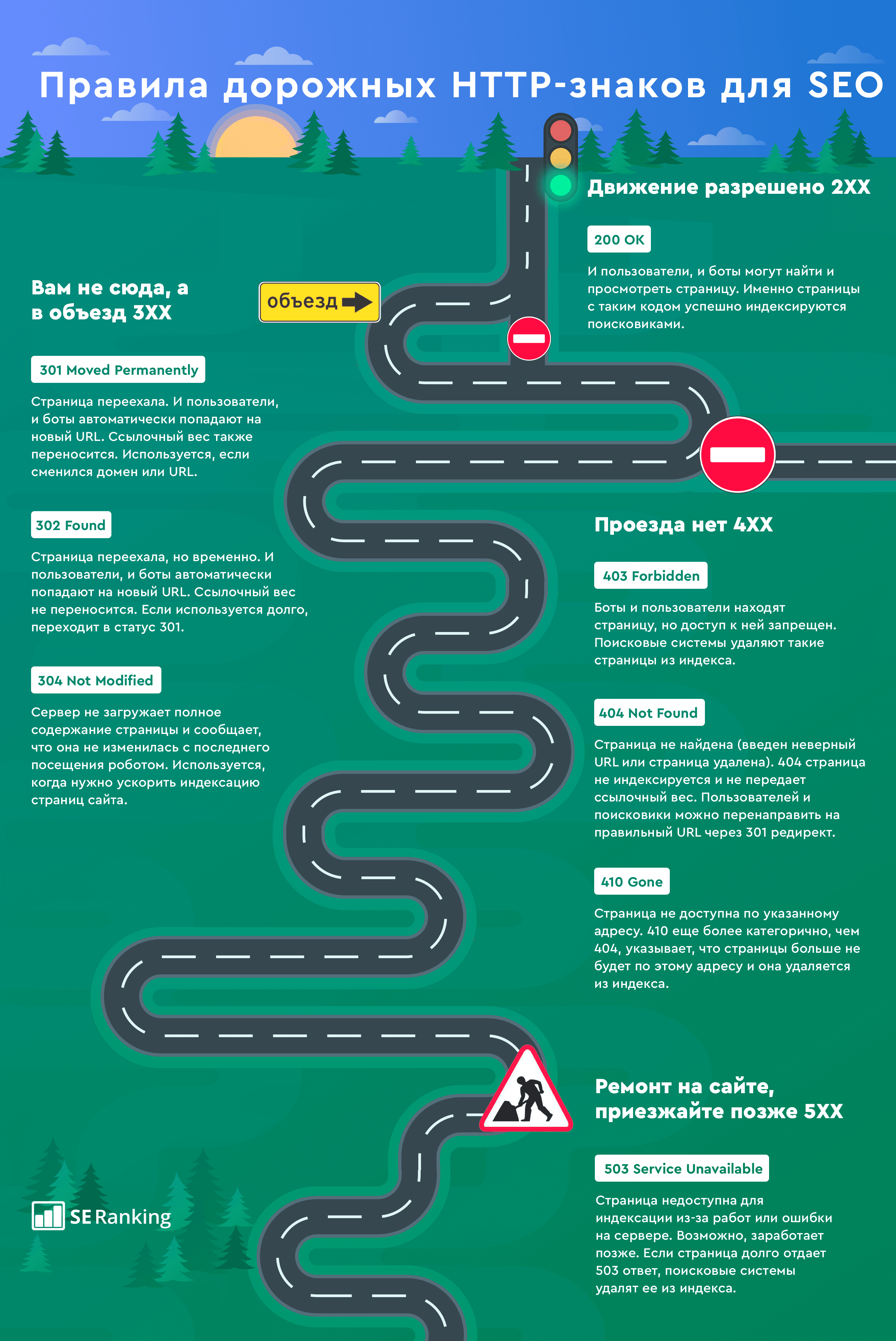
Чтобы сдать этот экзамен на отлично, мы подготовили для вас шпаргалку по правилам HTTP-знаков с лучшими SEO-советами. Теперь какой бы знак не встретился у вас на пути, вы будете знать, что делать.
Юлия — контент-маркетолог c 10-летним опытом работы в журналистике, копирайтинге, рекламе и PR.
Своим опытом и знаниями она делится, создавая полезные статьи про SEO и диджитал-маркетинг для блога SE Ranking и популярных медиа.
Когда Юлия не пишет статьи, она осваивает новые асаны, путешествует и помогает волонтерской организации YWCA.
About
The HTTP 3xx class of status code indicates that the client (user or user agent) must take additional action to complete the request.
The redirect url is defined by the location header.
A user agent may automatically redirect a request.
Navigation vs Redirect
An HTTP status code redirect means that the original resource has moved or is in another place, not that the browser should navigate to another URL.
The browser will then perform the same request but against another URI.
If the request has:
-
a GET method, an HTTP redirect will have the same behavior as a navigation
-
but for any other method such as a HTTP Post, the browser will perform the original request against the new URI. In this case, if you want the browser to navigate to another page after a HTTP Post, you should perform it with Javascript with the window.location.assign function
window.location.assign('https://example.com/path/to/navigation/page');
Permanent Redirect with htaccess
<IfModule mod_rewrite.c>
RewriteEngine On
RewriteRule ^(.*)$ https://gerardnico.com/$1 [R=301,L]
</IfModule>
300 — Multiple Choices
The client is shown with a multiple choice.
For example, the client must choose between:
-
multiple video format options,
-
different files with different extensions,
-
different word sense disambiguation.
301 — Moved Permanently
This and all future requests should be directed to the given URI.
For Googlebot, 301 means that:
-
there is a better version than a given URL.
-
this duplicate page is deprecated
You would choose this redirect when you change your domain name for instance.
For A/B test, use 302 redirects, not 301 redirects
If you’re running an A/B test that redirects users from the original URL to a variation URL, use a 302 (temporary) redirect, not a 301 (permanent) redirect.
This tells search engines that this redirect is temporary—it will only be in place as long as you’re running the experiment—and that they should keep the original URL in their index rather than replacing it with the target of the redirect (the test page). JavaScript-based redirects are also fine.
302 — Found
After a post, the response may be a 302, to indicate that:
-
the post was successful redirect
-
the next step is to show another page
With HTTP/1.0 specification, the client must perform a temporary redirect (the original describing phrase was “Moved Temporarily”), but popular browsers implemented 302 with the functionality of a 303
The browser have implemented the 303 behavior for a 302 (ie when receiving a a 302 response from POST requests will send a GET request to the Location response header)
Therefore, HTTP/1.1, added the status codes 303 and section307 to distinguish between the two behaviors. 302 is then superseded by:
-
303
-
and 307
in HTTP/1.1 but preserved for backward compatibility.
303 — See Other URI
example of usage: used to redirect for tracking analysis
For instance, after the user click on a tracking link (in an email or in on page)
A 303 response to a GET request indicates that the origin server does not have a representation of the target resource
that can be transferred by the server over HTTP.
However, the Location field value refers to a resource that is descriptive of the target resource,
such that making a retrieval request on that other resource might result in a representation
that is useful to recipients (user generally) without implying that it represents the original target resource.
By sending a 303 when asked for a non-information resource and redirecting to an information resource
about the non-information resource, the server answers the requesters information need without having to supply
the actual thing 1)
Since HTTP/1.1, a 303 will always end by a GET request to the new URL from the client.
When a 303 is received in response to :
-
a GET method, the response to the request can be found under another URI
-
a POST (or PUT/DELETE), the client should presume that the server has received the data and should issue a redirect with a separate GET message.
2)
304 — Not Modified
A 304 is send by the server when it receive a conditional get request from the client because it has already a response in its cache.
More see 304 — Not Modified HTTP Status
307 — Temporary redirect
provides a new URL for the browser to resubmit a GET or POST request.
The requested URL has been moved to a temporary location and will be back if not, uses a section302.
Used in case of A/B test for instance.
308 — Permanent redirect
provides a new URL for the browser to resubmit a GET or POST request.
Documentation / Reference
-
HTTP/1.1 defines several status codes for redirection (RFC 7231)
Привет, читатель блога ZametkiNaPolyah.ru! Продолжим знакомиться с протоколом HTTP в рубрике серверы и протоколы и ее разделе HTTP протокол. Данная публикация будет о HTTP кодах состояния перенаправления. К HTTP кодам перенаправления относятся следующие коды: 300, 301, 302, 303, 304, 305, 306, 307. Напомню, что коды перенаправления говорят клиенту о том, что для успешного завершения запроса необходимо выполнить какое-то действие. Обычно браузеры выполняют такие действия без вмешательства пользователя. В данной записи мы рассмотрим сперва все HTTP коды перенаправления, а затем рассмотрим каждый код в отдельности более подробно.

HTTP коды состояния перенаправления: 300, 301, 302, 303, 304, 305, 306, 307
Общая информации о HTTP кодах перенаправления
Содержание статьи:
- Общая информации о HTTP кодах перенаправления
- HTTP код состояния 300: множественный выбор. HTTP код состояния 301: постоянно перенесен. HTTP код состояния 302: временно перемещен.
- HTTP код состояния 303: смотреть другой ресурс. HTTP код состояния 304: ресурс не модифицирован. HTTP код состояния 305: использовать прокси сервер. HTTP код состояния 307: временное перенаправление
Если вы хотите узнать всё про протокол HTTP, обратитесь к навигации по рубрике HTTP протокол. Да, эти коды состояния, как раз и есть тот самый Redirect 301 или склейка доменов, глупое выражение: Redirect 301 – склейка домена. Автор тоже этим грешил, автор каится и обещает исправиться. Все дело в том, что 301 – это всего лишь, код, который означает, что произошло перенаправление, а вот за склейку доменов отвечает HTTP сервер и его конфигурации, поэтому крайне неправильно говорить этот ваш редирект 301.
Мы немного отвлеклись, давайте перейдем к HTTP кодам состояния перенаправления, все HTTP коды перенаправления начинаются с тройки. Общей чертой HTTP кодов перенаправления является то, что все они сообщают браузеру о том, что для продолжения работы ему необходимо выполнить какие-либо дополнительные действия, обычно браузер выполняет эти действия не спрашивая пользователя.
Для удобства давайте сведем все HTTP коды состояния перенаправления в единую таблицу и дадим им краткое описание.
| HTTP ответ | Описание кода состояния перенаправления |
| 300 Multiple Choices | HTTP код перенаправления 300: множественный выбор HTTP код состояния 300 говорит клиенту о том, что запрошенный ресурс имеет несколько представлений и клиент в праве выбрать одно из предлагаемых представлений. Действует ограничение в пять адресов максимум. |
| 301 Moved Permanently | HTTP код перенаправления 301: постоянно перемещен HTTP код состояния 301 говорит клиенту о том, что запрашиваемая страница была перенесена на новый адрес, обычно браузер автоматически переходит по новому адресу. |
| 302 Found | HTTP код перенаправления 302: временно перемещен HTTP код состояния 302 говорит клиенту о том, что запрашиваемый ресурс был временно перемещен на новый адрес. |
| 303 See Other | HTTP код перенаправления 303: смотри другой HTTP код состояния 303 говорит клиенту о том, что ответ на запрос может быть найден по другому URI (про URI в HTTP найдешь информацию здесь), новый запрос следует выполнять методом GET (про HTTP методы смотри здесь). |
| 304 Not Modified | HTTP код перенаправления 304: не модифицирован HTTP код состояния 304 говорит клиенту о том, что сервер выполнил условный GET запрос, но документ никак не изменился. |
| 305 Use Proxy | HTTP код перенаправления 305: используй прокси HTTP код состояния 304 говорит клиенту о том, что запрошенный URL должен быть доступен через прокси, который указан в поле заголовка Location. |
| 306 Unused | HTTP код перенаправления 306: зарезервировано Код состояния 306 использовался в прошлой версии HTTP протокола, на данный момент он не используется, но зарезервирован стандартом HTTP. |
| 307 Temporary Redirect | HTTP код перенаправления 307: временно перемещен HTTP код состояния 307 говорит клиенту о том, что запрашиваемая страница временно переехала на новый адрес |
Давайте более подробно поговорим про каждый из кодов состояний HTTP сервера класса перенаправления.
HTTP код состояния 300: множественный выбор. HTTP код состояния 301: постоянно перенесен. HTTP код состояния 302: временно перемещен.
HTTP код состояния 300 или код множественного выбора говорит о том, что клиент может выбрать несколько доступных представлений ресурса, но не более пяти. Каждое представление ресурса имеет свое уникальное месторасположения на сервере. Формат, в котором клиент будет получать HTTP объект определяется медиа типом данных (читай про типы данных в HTTP по этой ссылке), указанным в поле заголовка Content-Type. Иногда выбор выполняется автоматически браузером без участия пользователя, но стандарт HTTP протокола не дает никаких критериев, по которым должен происходить автоматический выбор, а так же не имеет никаких требований. Ответы HTTP сервера с кодом состояния 300 по умолчанию являются кэшируемыми, если в заголовках не указано иного.
HTTP код состояния 301 или код состояния постоянного переноса. Код состояния 301 сообщает браузеру о том, что для ресурса, к которому он обратился, назначен новый URI, и все обращения к этому ресурсу следует выполнять по новому URI, указанному в ответе HTTP сервера. Ответы сервера с кодом 301 являются кэшируемыми. В тех случаях, когда клиент использовал HTTP запрос с методом отличным от GET или HEAD, браузер спрашивает у пользователя, что делать дальше: переходить по новому URI или не надо.
HTTP код состояния 302 или код временного перемещения ресурса. Код состояния 302 говорит о том, что на данный момент ресурс временно доступен по другому URI и сообщает новый URI ресурса. Кэшируемость ответов сервера с кодом 302 зависит только от значений полей заголовка Cache-Control или Expires. В тех случаях, когда клиент использовал запрос с методом отличным от GET или HEAD, браузер спрашивает у пользователя, что делать дальше: переходить по новому URI или не надо.
HTTP код состояния 303: смотреть другой ресурс. HTTP код состояния 304: ресурс не модифицирован. HTTP код состояния 305: использовать прокси сервер. HTTP код состояния 307: временное перенаправление
HTTP код состояния 303 или код состояния смотреть другой ресурс. Если клиент получает ответ с кодом 303, то это означает, что ответ на его запрос может быть найден по другому URI и его можно запросить при помощи метода GET. Чаще всего ответы с кодом состояния 303 используются, чтобы вывести информацию из формы. Ответы сервера с кодом 303 не кэшируются.
HTTP код состояния 304 или код состояния ресурс не модифицирован. Клиент получает ответ от HTTP сервера с кодом 304 в том случае, когда посылался запрос с условным методом GET, но никаких изменений в документе не произошло. При этом HTTP сообщение от сервера не должно содержать тела. Ответ сервера всегда содержит следующие поля заголовков:
- Date;
- ETag или Content-Location;
- Expires, Cache-Control или
Ответы сервера с кодом 304 всегда завершаются пустой строкой после полей заголовка.
HTTP код состояния 305. Код состояния 305 говорит браузеру о том, что ему нужно обратиться к ресурсу, используя прокси-сервер. Прокси-сервер в сообщениях с кодом состояния 305 указывается в поле Location. При этом HTTP сервер ожидает, что клиент повторит запрос, но уже через прокси сервер и даже при необходимости пройдет аутентификацию на прокси сервере.
HTTP код состояния 306 использовался в старых версиях протокола HTTP, но теперь является просто зарезервированным.
HTTP код состояния 307 аналогичен коду состояния 302.
Настраивая HTTP сервер не забывайте про особенности HTTP соединения и помните, что код состояния — это параметр HTTP. Мы рассмотрели коды перенаправления HTTP, давайте перейдем к кодам ошибок клиента. В HTTP есть еще: информационные коды, успешные коды, коды ошибок клиента и коды ошибок сервера. А если тебе нужна информацию обо всех кодах состояния, обратись к справочнику HTTP кодов состояния, в котором есть полное описание всех кодов.

From Wikipedia, the free encyclopedia
This is a list of Hypertext Transfer Protocol (HTTP) response status codes. Status codes are issued by a server in response to a client’s request made to the server. It includes codes from IETF Request for Comments (RFCs), other specifications, and some additional codes used in some common applications of the HTTP. The first digit of the status code specifies one of five standard classes of responses. The optional message phrases shown are typical, but any human-readable alternative may be provided, or none at all.
Unless otherwise stated, the status code is part of the HTTP standard (RFC 9110).
The Internet Assigned Numbers Authority (IANA) maintains the official registry of HTTP status codes.[1]
All HTTP response status codes are separated into five classes or categories. The first digit of the status code defines the class of response, while the last two digits do not have any classifying or categorization role. There are five classes defined by the standard:
- 1xx informational response – the request was received, continuing process
- 2xx successful – the request was successfully received, understood, and accepted
- 3xx redirection – further action needs to be taken in order to complete the request
- 4xx client error – the request contains bad syntax or cannot be fulfilled
- 5xx server error – the server failed to fulfil an apparently valid request
1xx informational response
An informational response indicates that the request was received and understood. It is issued on a provisional basis while request processing continues. It alerts the client to wait for a final response. The message consists only of the status line and optional header fields, and is terminated by an empty line. As the HTTP/1.0 standard did not define any 1xx status codes, servers must not[note 1] send a 1xx response to an HTTP/1.0 compliant client except under experimental conditions.
- 100 Continue
- The server has received the request headers and the client should proceed to send the request body (in the case of a request for which a body needs to be sent; for example, a POST request). Sending a large request body to a server after a request has been rejected for inappropriate headers would be inefficient. To have a server check the request’s headers, a client must send
Expect: 100-continueas a header in its initial request and receive a100 Continuestatus code in response before sending the body. If the client receives an error code such as 403 (Forbidden) or 405 (Method Not Allowed) then it should not send the request’s body. The response417 Expectation Failedindicates that the request should be repeated without theExpectheader as it indicates that the server does not support expectations (this is the case, for example, of HTTP/1.0 servers).[2] - 101 Switching Protocols
- The requester has asked the server to switch protocols and the server has agreed to do so.
- 102 Processing (WebDAV; RFC 2518)
- A WebDAV request may contain many sub-requests involving file operations, requiring a long time to complete the request. This code indicates that the server has received and is processing the request, but no response is available yet.[3] This prevents the client from timing out and assuming the request was lost. The status code is deprecated.[4]
- 103 Early Hints (RFC 8297)
- Used to return some response headers before final HTTP message.[5]
2xx success
This class of status codes indicates the action requested by the client was received, understood, and accepted.[1]
- 200 OK
- Standard response for successful HTTP requests. The actual response will depend on the request method used. In a GET request, the response will contain an entity corresponding to the requested resource. In a POST request, the response will contain an entity describing or containing the result of the action.
- 201 Created
- The request has been fulfilled, resulting in the creation of a new resource.[6]
- 202 Accepted
- The request has been accepted for processing, but the processing has not been completed. The request might or might not be eventually acted upon, and may be disallowed when processing occurs.
- 203 Non-Authoritative Information (since HTTP/1.1)
- The server is a transforming proxy (e.g. a Web accelerator) that received a 200 OK from its origin, but is returning a modified version of the origin’s response.[7][8]
- 204 No Content
- The server successfully processed the request, and is not returning any content.
- 205 Reset Content
- The server successfully processed the request, asks that the requester reset its document view, and is not returning any content.
- 206 Partial Content
- The server is delivering only part of the resource (byte serving) due to a range header sent by the client. The range header is used by HTTP clients to enable resuming of interrupted downloads, or split a download into multiple simultaneous streams.
- 207 Multi-Status (WebDAV; RFC 4918)
- The message body that follows is by default an XML message and can contain a number of separate response codes, depending on how many sub-requests were made.[9]
- 208 Already Reported (WebDAV; RFC 5842)
- The members of a DAV binding have already been enumerated in a preceding part of the (multistatus) response, and are not being included again.
- 226 IM Used (RFC 3229)
- The server has fulfilled a request for the resource, and the response is a representation of the result of one or more instance-manipulations applied to the current instance.[10]
3xx redirection
This class of status code indicates the client must take additional action to complete the request. Many of these status codes are used in URL redirection.[1]
A user agent may carry out the additional action with no user interaction only if the method used in the second request is GET or HEAD. A user agent may automatically redirect a request. A user agent should detect and intervene to prevent cyclical redirects.[11]
- 300 Multiple Choices
- Indicates multiple options for the resource from which the client may choose (via agent-driven content negotiation). For example, this code could be used to present multiple video format options, to list files with different filename extensions, or to suggest word-sense disambiguation.
- 301 Moved Permanently
- This and all future requests should be directed to the given URI.
- 302 Found (Previously «Moved temporarily»)
- Tells the client to look at (browse to) another URL. The HTTP/1.0 specification (RFC 1945) required the client to perform a temporary redirect with the same method (the original describing phrase was «Moved Temporarily»),[12] but popular browsers implemented 302 redirects by changing the method to GET. Therefore, HTTP/1.1 added status codes 303 and 307 to distinguish between the two behaviours.[11]
- 303 See Other (since HTTP/1.1)
- The response to the request can be found under another URI using the GET method. When received in response to a POST (or PUT/DELETE), the client should presume that the server has received the data and should issue a new GET request to the given URI.
- 304 Not Modified
- Indicates that the resource has not been modified since the version specified by the request headers If-Modified-Since or If-None-Match. In such case, there is no need to retransmit the resource since the client still has a previously-downloaded copy.
- 305 Use Proxy (since HTTP/1.1)
- The requested resource is available only through a proxy, the address for which is provided in the response. For security reasons, many HTTP clients (such as Mozilla Firefox and Internet Explorer) do not obey this status code.
- 306 Switch Proxy
- No longer used. Originally meant «Subsequent requests should use the specified proxy.»
- 307 Temporary Redirect (since HTTP/1.1)
- In this case, the request should be repeated with another URI; however, future requests should still use the original URI. In contrast to how 302 was historically implemented, the request method is not allowed to be changed when reissuing the original request. For example, a POST request should be repeated using another POST request.
- 308 Permanent Redirect
- This and all future requests should be directed to the given URI. 308 parallel the behaviour of 301, but does not allow the HTTP method to change. So, for example, submitting a form to a permanently redirected resource may continue smoothly.
4xx client errors
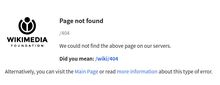
This class of status code is intended for situations in which the error seems to have been caused by the client. Except when responding to a HEAD request, the server should include an entity containing an explanation of the error situation, and whether it is a temporary or permanent condition. These status codes are applicable to any request method. User agents should display any included entity to the user.
- 400 Bad Request
- The server cannot or will not process the request due to an apparent client error (e.g., malformed request syntax, size too large, invalid request message framing, or deceptive request routing).
- 401 Unauthorized
- Similar to 403 Forbidden, but specifically for use when authentication is required and has failed or has not yet been provided. The response must include a WWW-Authenticate header field containing a challenge applicable to the requested resource. See Basic access authentication and Digest access authentication. 401 semantically means «unauthorised», the user does not have valid authentication credentials for the target resource.
- Some sites incorrectly issue HTTP 401 when an IP address is banned from the website (usually the website domain) and that specific address is refused permission to access a website.[citation needed]
- 402 Payment Required
- Reserved for future use. The original intention was that this code might be used as part of some form of digital cash or micropayment scheme, as proposed, for example, by GNU Taler,[14] but that has not yet happened, and this code is not widely used. Google Developers API uses this status if a particular developer has exceeded the daily limit on requests.[15] Sipgate uses this code if an account does not have sufficient funds to start a call.[16] Shopify uses this code when the store has not paid their fees and is temporarily disabled.[17] Stripe uses this code for failed payments where parameters were correct, for example blocked fraudulent payments.[18]
- 403 Forbidden
- The request contained valid data and was understood by the server, but the server is refusing action. This may be due to the user not having the necessary permissions for a resource or needing an account of some sort, or attempting a prohibited action (e.g. creating a duplicate record where only one is allowed). This code is also typically used if the request provided authentication by answering the WWW-Authenticate header field challenge, but the server did not accept that authentication. The request should not be repeated.
- 404 Not Found
- The requested resource could not be found but may be available in the future. Subsequent requests by the client are permissible.
- 405 Method Not Allowed
- A request method is not supported for the requested resource; for example, a GET request on a form that requires data to be presented via POST, or a PUT request on a read-only resource.
- 406 Not Acceptable
- The requested resource is capable of generating only content not acceptable according to the Accept headers sent in the request. See Content negotiation.
- 407 Proxy Authentication Required
- The client must first authenticate itself with the proxy.
- 408 Request Timeout
- The server timed out waiting for the request. According to HTTP specifications: «The client did not produce a request within the time that the server was prepared to wait. The client MAY repeat the request without modifications at any later time.»
- 409 Conflict
- Indicates that the request could not be processed because of conflict in the current state of the resource, such as an edit conflict between multiple simultaneous updates.
- 410 Gone
- Indicates that the resource requested was previously in use but is no longer available and will not be available again. This should be used when a resource has been intentionally removed and the resource should be purged. Upon receiving a 410 status code, the client should not request the resource in the future. Clients such as search engines should remove the resource from their indices. Most use cases do not require clients and search engines to purge the resource, and a «404 Not Found» may be used instead.
- 411 Length Required
- The request did not specify the length of its content, which is required by the requested resource.
- 412 Precondition Failed
- The server does not meet one of the preconditions that the requester put on the request header fields.
- 413 Payload Too Large
- The request is larger than the server is willing or able to process. Previously called «Request Entity Too Large» in RFC 2616.[19]
- 414 URI Too Long
- The URI provided was too long for the server to process. Often the result of too much data being encoded as a query-string of a GET request, in which case it should be converted to a POST request. Called «Request-URI Too Long» previously in RFC 2616.[20]
- 415 Unsupported Media Type
- The request entity has a media type which the server or resource does not support. For example, the client uploads an image as image/svg+xml, but the server requires that images use a different format.
- 416 Range Not Satisfiable
- The client has asked for a portion of the file (byte serving), but the server cannot supply that portion. For example, if the client asked for a part of the file that lies beyond the end of the file. Called «Requested Range Not Satisfiable» previously RFC 2616.[21]
- 417 Expectation Failed
- The server cannot meet the requirements of the Expect request-header field.[22]
- 418 I’m a teapot (RFC 2324, RFC 7168)
- This code was defined in 1998 as one of the traditional IETF April Fools’ jokes, in RFC 2324, Hyper Text Coffee Pot Control Protocol, and is not expected to be implemented by actual HTTP servers. The RFC specifies this code should be returned by teapots requested to brew coffee.[23] This HTTP status is used as an Easter egg in some websites, such as Google.com’s «I’m a teapot» easter egg.[24][25][26] Sometimes, this status code is also used as a response to a blocked request, instead of the more appropriate 403 Forbidden.[27][28]
- 421 Misdirected Request
- The request was directed at a server that is not able to produce a response (for example because of connection reuse).
- 422 Unprocessable Entity
- The request was well-formed but was unable to be followed due to semantic errors.[9]
- 423 Locked (WebDAV; RFC 4918)
- The resource that is being accessed is locked.[9]
- 424 Failed Dependency (WebDAV; RFC 4918)
- The request failed because it depended on another request and that request failed (e.g., a PROPPATCH).[9]
- 425 Too Early (RFC 8470)
- Indicates that the server is unwilling to risk processing a request that might be replayed.
- 426 Upgrade Required
- The client should switch to a different protocol such as TLS/1.3, given in the Upgrade header field.
- 428 Precondition Required (RFC 6585)
- The origin server requires the request to be conditional. Intended to prevent the ‘lost update’ problem, where a client GETs a resource’s state, modifies it, and PUTs it back to the server, when meanwhile a third party has modified the state on the server, leading to a conflict.[29]
- 429 Too Many Requests (RFC 6585)
- The user has sent too many requests in a given amount of time. Intended for use with rate-limiting schemes.[29]
- 431 Request Header Fields Too Large (RFC 6585)
- The server is unwilling to process the request because either an individual header field, or all the header fields collectively, are too large.[29]
- 451 Unavailable For Legal Reasons (RFC 7725)
- A server operator has received a legal demand to deny access to a resource or to a set of resources that includes the requested resource.[30] The code 451 was chosen as a reference to the novel Fahrenheit 451 (see the Acknowledgements in the RFC).
5xx server errors
The server failed to fulfil a request.
Response status codes beginning with the digit «5» indicate cases in which the server is aware that it has encountered an error or is otherwise incapable of performing the request. Except when responding to a HEAD request, the server should include an entity containing an explanation of the error situation, and indicate whether it is a temporary or permanent condition. Likewise, user agents should display any included entity to the user. These response codes are applicable to any request method.
- 500 Internal Server Error
- A generic error message, given when an unexpected condition was encountered and no more specific message is suitable.
- 501 Not Implemented
- The server either does not recognize the request method, or it lacks the ability to fulfil the request. Usually this implies future availability (e.g., a new feature of a web-service API).
- 502 Bad Gateway
- The server was acting as a gateway or proxy and received an invalid response from the upstream server.
- 503 Service Unavailable
- The server cannot handle the request (because it is overloaded or down for maintenance). Generally, this is a temporary state.[31]
- 504 Gateway Timeout
- The server was acting as a gateway or proxy and did not receive a timely response from the upstream server.
- 505 HTTP Version Not Supported
- The server does not support the HTTP version used in the request.
- 506 Variant Also Negotiates (RFC 2295)
- Transparent content negotiation for the request results in a circular reference.[32]
- 507 Insufficient Storage (WebDAV; RFC 4918)
- The server is unable to store the representation needed to complete the request.[9]
- 508 Loop Detected (WebDAV; RFC 5842)
- The server detected an infinite loop while processing the request (sent instead of 208 Already Reported).
- 510 Not Extended (RFC 2774)
- Further extensions to the request are required for the server to fulfil it.[33]
- 511 Network Authentication Required (RFC 6585)
- The client needs to authenticate to gain network access. Intended for use by intercepting proxies used to control access to the network (e.g., «captive portals» used to require agreement to Terms of Service before granting full Internet access via a Wi-Fi hotspot).[29]
Unofficial codes
The following codes are not specified by any standard.
- 218 This is fine (Apache HTTP Server)
- Used by Apache servers. A catch-all error condition allowing the passage of message bodies through the server when the
ProxyErrorOverridesetting is enabled. It is displayed in this situation instead of a 4xx or 5xx error message.[34] - 419 Page Expired (Laravel Framework)
- Used by the Laravel Framework when a CSRF Token is missing or expired.[citation needed]
- 420 Method Failure (Spring Framework)
- A deprecated response used by the Spring Framework when a method has failed.[35]
- 420 Enhance Your Calm (Twitter)
- Returned by version 1 of the Twitter Search and Trends API when the client is being rate limited; versions 1.1 and later use the 429 Too Many Requests response code instead.[36] The phrase «Enhance your calm» comes from the 1993 movie Demolition Man, and its association with this number is likely a reference to cannabis.[citation needed]
- 430 Request Header Fields Too Large (Shopify)
- Used by Shopify, instead of the 429 Too Many Requests response code, when too many URLs are requested within a certain time frame.[37]
- 450 Blocked by Windows Parental Controls (Microsoft)
- The Microsoft extension code indicated when Windows Parental Controls are turned on and are blocking access to the requested webpage.[38]
- 498 Invalid Token (Esri)
- Returned by ArcGIS for Server. Code 498 indicates an expired or otherwise invalid token.[39]
- 499 Token Required (Esri)
- Returned by ArcGIS for Server. Code 499 indicates that a token is required but was not submitted.[39]
- 509 Bandwidth Limit Exceeded (Apache Web Server/cPanel)
- The server has exceeded the bandwidth specified by the server administrator; this is often used by shared hosting providers to limit the bandwidth of customers.[40]
- 529 Site is overloaded
- Used by Qualys in the SSLLabs server testing API to signal that the site can’t process the request.[41]
- 530 Site is frozen
- Used by the Pantheon Systems web platform to indicate a site that has been frozen due to inactivity.[42]
- 598 (Informal convention) Network read timeout error
- Used by some HTTP proxies to signal a network read timeout behind the proxy to a client in front of the proxy.[43]
- 599 Network Connect Timeout Error
- An error used by some HTTP proxies to signal a network connect timeout behind the proxy to a client in front of the proxy.
Internet Information Services
Microsoft’s Internet Information Services (IIS) web server expands the 4xx error space to signal errors with the client’s request.
- 440 Login Time-out
- The client’s session has expired and must log in again.[44]
- 449 Retry With
- The server cannot honour the request because the user has not provided the required information.[45]
- 451 Redirect
- Used in Exchange ActiveSync when either a more efficient server is available or the server cannot access the users’ mailbox.[46] The client is expected to re-run the HTTP AutoDiscover operation to find a more appropriate server.[47]
IIS sometimes uses additional decimal sub-codes for more specific information,[48] however these sub-codes only appear in the response payload and in documentation, not in the place of an actual HTTP status code.
nginx
The nginx web server software expands the 4xx error space to signal issues with the client’s request.[49][50]
- 444 No Response
- Used internally[51] to instruct the server to return no information to the client and close the connection immediately.
- 494 Request header too large
- Client sent too large request or too long header line.
- 495 SSL Certificate Error
- An expansion of the 400 Bad Request response code, used when the client has provided an invalid client certificate.
- 496 SSL Certificate Required
- An expansion of the 400 Bad Request response code, used when a client certificate is required but not provided.
- 497 HTTP Request Sent to HTTPS Port
- An expansion of the 400 Bad Request response code, used when the client has made a HTTP request to a port listening for HTTPS requests.
- 499 Client Closed Request
- Used when the client has closed the request before the server could send a response.
Cloudflare
Cloudflare’s reverse proxy service expands the 5xx series of errors space to signal issues with the origin server.[52]
- 520 Web Server Returned an Unknown Error
- The origin server returned an empty, unknown, or unexpected response to Cloudflare.[53]
- 521 Web Server Is Down
- The origin server refused connections from Cloudflare. Security solutions at the origin may be blocking legitimate connections from certain Cloudflare IP addresses.
- 522 Connection Timed Out
- Cloudflare timed out contacting the origin server.
- 523 Origin Is Unreachable
- Cloudflare could not reach the origin server; for example, if the DNS records for the origin server are incorrect or missing.
- 524 A Timeout Occurred
- Cloudflare was able to complete a TCP connection to the origin server, but did not receive a timely HTTP response.
- 525 SSL Handshake Failed
- Cloudflare could not negotiate a SSL/TLS handshake with the origin server.
- 526 Invalid SSL Certificate
- Cloudflare could not validate the SSL certificate on the origin web server. Also used by Cloud Foundry’s gorouter.
- 527 Railgun Error
- Error 527 indicates an interrupted connection between Cloudflare and the origin server’s Railgun server.[54]
- 530
- Error 530 is returned along with a 1xxx error.[55]
AWS Elastic Load Balancing
Amazon Web Services’ Elastic Load Balancing adds a few custom return codes to signal issues either with the client request or with the origin server.[56]
- 460
- Client closed the connection with the load balancer before the idle timeout period elapsed. Typically when client timeout is sooner than the Elastic Load Balancer’s timeout.[56]
- 463
- The load balancer received an X-Forwarded-For request header with more than 30 IP addresses.[56]
- 464
- Incompatible protocol versions between Client and Origin server.[56]
- 561 Unauthorized
- An error around authentication returned by a server registered with a load balancer. You configured a listener rule to authenticate users, but the identity provider (IdP) returned an error code when authenticating the user.[56]
Caching warning codes (obsoleted)
The following caching related warning codes were specified under RFC 7234. Unlike the other status codes above, these were not sent as the response status in the HTTP protocol, but as part of the «Warning» HTTP header.[57][58]
Since this «Warning» header is often neither sent by servers nor acknowledged by clients, this header and its codes were obsoleted by the HTTP Working Group in 2022 with RFC 9111.[59]
- 110 Response is Stale
- The response provided by a cache is stale (the content’s age exceeds a maximum age set by a Cache-Control header or heuristically chosen lifetime).
- 111 Revalidation Failed
- The cache was unable to validate the response, due to an inability to reach the origin server.
- 112 Disconnected Operation
- The cache is intentionally disconnected from the rest of the network.
- 113 Heuristic Expiration
- The cache heuristically chose a freshness lifetime greater than 24 hours and the response’s age is greater than 24 hours.
- 199 Miscellaneous Warning
- Arbitrary, non-specific warning. The warning text may be logged or presented to the user.
- 214 Transformation Applied
- Added by a proxy if it applies any transformation to the representation, such as changing the content encoding, media type or the like.
- 299 Miscellaneous Persistent Warning
- Same as 199, but indicating a persistent warning.
See also
- Custom error pages
- List of FTP server return codes
- List of HTTP header fields
- List of SMTP server return codes
- Common Log Format
Explanatory notes
- ^ Emphasised words and phrases such as must and should represent interpretation guidelines as given by RFC 2119
References
- ^ a b c «Hypertext Transfer Protocol (HTTP) Status Code Registry». Iana.org. Archived from the original on December 11, 2011. Retrieved January 8, 2015.
- ^ Fielding, Roy T. «RFC 9110: HTTP Semantics and Content, Section 10.1.1 «Expect»«.
- ^ Goland, Yaronn; Whitehead, Jim; Faizi, Asad; Carter, Steve R.; Jensen, Del (February 1999). HTTP Extensions for Distributed Authoring – WEBDAV. IETF. doi:10.17487/RFC2518. RFC 2518. Retrieved October 24, 2009.
- ^ «102 Processing — HTTP MDN». 102 status code is deprecated
- ^ Oku, Kazuho (December 2017). An HTTP Status Code for Indicating Hints. IETF. doi:10.17487/RFC8297. RFC 8297. Retrieved December 20, 2017.
- ^ Stewart, Mark; djna. «Create request with POST, which response codes 200 or 201 and content». Stack Overflow. Archived from the original on October 11, 2016. Retrieved October 16, 2015.
- ^ «RFC 9110: HTTP Semantics and Content, Section 15.3.4».
- ^ «RFC 9110: HTTP Semantics and Content, Section 7.7».
- ^ a b c d e Dusseault, Lisa, ed. (June 2007). HTTP Extensions for Web Distributed Authoring and Versioning (WebDAV). IETF. doi:10.17487/RFC4918. RFC 4918. Retrieved October 24, 2009.
- ^ Delta encoding in HTTP. IETF. January 2002. doi:10.17487/RFC3229. RFC 3229. Retrieved February 25, 2011.
- ^ a b «RFC 9110: HTTP Semantics and Content, Section 15.4 «Redirection 3xx»«.
- ^ Berners-Lee, Tim; Fielding, Roy T.; Nielsen, Henrik Frystyk (May 1996). Hypertext Transfer Protocol – HTTP/1.0. IETF. doi:10.17487/RFC1945. RFC 1945. Retrieved October 24, 2009.
- ^ «The GNU Taler tutorial for PHP Web shop developers 0.4.0». docs.taler.net. Archived from the original on November 8, 2017. Retrieved October 29, 2017.
- ^ «Google API Standard Error Responses». 2016. Archived from the original on May 25, 2017. Retrieved June 21, 2017.
- ^ «Sipgate API Documentation». Archived from the original on July 10, 2018. Retrieved July 10, 2018.
- ^ «Shopify Documentation». Archived from the original on July 25, 2018. Retrieved July 25, 2018.
- ^ «Stripe API Reference – Errors». stripe.com. Retrieved October 28, 2019.
- ^ «RFC2616 on status 413». Tools.ietf.org. Archived from the original on March 7, 2011. Retrieved November 11, 2015.
- ^ «RFC2616 on status 414». Tools.ietf.org. Archived from the original on March 7, 2011. Retrieved November 11, 2015.
- ^ «RFC2616 on status 416». Tools.ietf.org. Archived from the original on March 7, 2011. Retrieved November 11, 2015.
- ^ TheDeadLike. «HTTP/1.1 Status Codes 400 and 417, cannot choose which». serverFault. Archived from the original on October 10, 2015. Retrieved October 16, 2015.
- ^ Larry Masinter (April 1, 1998). Hyper Text Coffee Pot Control Protocol (HTCPCP/1.0). doi:10.17487/RFC2324. RFC 2324.
Any attempt to brew coffee with a teapot should result in the error code «418 I’m a teapot». The resulting entity body MAY be short and stout.
- ^ I’m a teapot
- ^ Barry Schwartz (August 26, 2014). «New Google Easter Egg For SEO Geeks: Server Status 418, I’m A Teapot». Search Engine Land. Archived from the original on November 15, 2015. Retrieved November 4, 2015.
- ^ «Google’s Teapot». Retrieved October 23, 2017.[dead link]
- ^ «Enable extra web security on a website». DreamHost. Retrieved December 18, 2022.
- ^ «I Went to a Russian Website and All I Got Was This Lousy Teapot». PCMag. Retrieved December 18, 2022.
- ^ a b c d Nottingham, M.; Fielding, R. (April 2012). «RFC 6585 – Additional HTTP Status Codes». Request for Comments. Internet Engineering Task Force. Archived from the original on May 4, 2012. Retrieved May 1, 2012.
- ^ Bray, T. (February 2016). «An HTTP Status Code to Report Legal Obstacles». ietf.org. Archived from the original on March 4, 2016. Retrieved March 7, 2015.
- ^ alex. «What is the correct HTTP status code to send when a site is down for maintenance?». Stack Overflow. Archived from the original on October 11, 2016. Retrieved October 16, 2015.
- ^ Holtman, Koen; Mutz, Andrew H. (March 1998). Transparent Content Negotiation in HTTP. IETF. doi:10.17487/RFC2295. RFC 2295. Retrieved October 24, 2009.
- ^ Nielsen, Henrik Frystyk; Leach, Paul; Lawrence, Scott (February 2000). An HTTP Extension Framework. IETF. doi:10.17487/RFC2774. RFC 2774. Retrieved October 24, 2009.
- ^ «218 This is fine — HTTP status code explained». HTTP.dev. Retrieved July 25, 2023.
{{cite web}}: CS1 maint: url-status (link) - ^ «Enum HttpStatus». Spring Framework. org.springframework.http. Archived from the original on October 25, 2015. Retrieved October 16, 2015.
- ^ «Twitter Error Codes & Responses». Twitter. 2014. Archived from the original on September 27, 2017. Retrieved January 20, 2014.
- ^ «HTTP Status Codes and SEO: what you need to know». ContentKing. Retrieved August 9, 2019.
- ^ «Screenshot of error page». Archived from the original (bmp) on May 11, 2013. Retrieved October 11, 2009.
- ^ a b «Using token-based authentication». ArcGIS Server SOAP SDK. Archived from the original on September 26, 2014. Retrieved September 8, 2014.
- ^ «HTTP Error Codes and Quick Fixes». Docs.cpanel.net. Archived from the original on November 23, 2015. Retrieved October 15, 2015.
- ^ «SSL Labs API v3 Documentation». github.com.
- ^ «Platform Considerations | Pantheon Docs». pantheon.io. Archived from the original on January 6, 2017. Retrieved January 5, 2017.
- ^ «HTTP status codes — ascii-code.com». www.ascii-code.com. Archived from the original on January 7, 2017. Retrieved December 23, 2016.
- ^
«Error message when you try to log on to Exchange 2007 by using Outlook Web Access: «440 Login Time-out»«. Microsoft. 2010. Retrieved November 13, 2013. - ^ «2.2.6 449 Retry With Status Code». Microsoft. 2009. Archived from the original on October 5, 2009. Retrieved October 26, 2009.
- ^ «MS-ASCMD, Section 3.1.5.2.2». Msdn.microsoft.com. Archived from the original on March 26, 2015. Retrieved January 8, 2015.
- ^ «Ms-oxdisco». Msdn.microsoft.com. Archived from the original on July 31, 2014. Retrieved January 8, 2015.
- ^ «The HTTP status codes in IIS 7.0». Microsoft. July 14, 2009. Archived from the original on April 9, 2009. Retrieved April 1, 2009.
- ^ «ngx_http_request.h». nginx 1.9.5 source code. nginx inc. Archived from the original on September 19, 2017. Retrieved January 9, 2016.
- ^ «ngx_http_special_response.c». nginx 1.9.5 source code. nginx inc. Archived from the original on May 8, 2018. Retrieved January 9, 2016.
- ^ «return» directive Archived March 1, 2018, at the Wayback Machine (http_rewrite module) documentation.
- ^ «Troubleshooting: Error Pages». Cloudflare. Archived from the original on March 4, 2016. Retrieved January 9, 2016.
- ^ «Error 520: web server returns an unknown error». Cloudflare.
- ^ «527 Error: Railgun Listener to origin error». Cloudflare. Archived from the original on October 13, 2016. Retrieved October 12, 2016.
- ^ «Error 530». Cloudflare. Retrieved November 1, 2019.
- ^ a b c d e «Troubleshoot Your Application Load Balancers – Elastic Load Balancing». docs.aws.amazon.com. Retrieved May 17, 2023.
- ^ «Hypertext Transfer Protocol (HTTP/1.1): Caching». datatracker.ietf.org. Retrieved September 25, 2021.
- ^ «Warning — HTTP | MDN». developer.mozilla.org. Retrieved August 15, 2021.
 Some text was copied from this source, which is available under a Creative Commons Attribution-ShareAlike 2.5 Generic (CC BY-SA 2.5) license.
- ^ «RFC 9111: HTTP Caching, Section 5.5 «Warning»«. June 2022.

External links
- «RFC 9110: HTTP Semantics and Content, Section 15 «Status Codes»«.
- Hypertext Transfer Protocol (HTTP) Status Code Registry at the Internet Assigned Numbers Authority
- HTTP status codes at http-statuscode.com
- MDN status code reference at mozilla.org
Reading time
6 min
Views 12K
What is redirection?
Redirection is a way of forwarding the user to the URL that is different from the one they initially clicked on. Down below some of the most common types of redirection are listed.

301 Moved Permanently
A 301 redirect is a permanent redirect which passes between 90-99% of link equity (ranking power) to the redirected page. 301 signals that the page has been moved to another URL and the old URL is outdated.
302 Found (HTTP 1.1) / Moved Temporarily (HTTP 1.0)
302 is a temporary redirect which passes 0% of link equity, and shouldn’t be used in most cases.
As of now, the internet runs on an HTTP protocol which dictates how URLs work. In two versions of this protocol, the HTTP response status code is different:
- HTTP 1.0: 302 status code is «Moved Temporarily» — current page has been moved temporarily to another URL.
- HTTP 1.1: the description phrase has been changed to «Found» — current page has been found.
307 Moved Temporarily (HTTP 1.1 Only)
A 307 redirect is the HTTP 1.1 successor of the 302 redirect. While the major crawlers will treat it like a 302 in some cases, it is best to use a 301 for almost all cases. The exception to this is when content is really moved only temporarily (such as during maintenance) and the server has already been identified by the search engines as 1.1 compatible.
Since it’s essentially impossible to determine whether the search engines have identified a page as compatible, it is generally best to use a 302 redirect for content that has been moved temporarily.
Other redirection types
There are also some other types of redirection: Meta Refresh or JavaScript redirection that are executed on the page level rather than the web server level. This is what a typical Meta Refresh redirect looks like:
<meta http-equiv="refresh" content="2;url=http://example.com/" />It’s best not to use these types of redirect, as they are often used by spammers and doorway pages. Besides, they pass little to none of the link juice.
Examples of using redirects
Redirecting your domain to a non-www URL:
RewriteCond %{HTTP_HOST} ^www.site\.com$ [NC]
RewriteRule ^(.*)$ http://site.com/$1 [R=301,L]
Redirecting your domain to a www URL:
RewriteCond %{HTTP_HOST} ^site\.com$ [NC]
RewriteRule ^(.*)$ http://www.site.com/$1 [R=301,L]
To choose which URL to make canonical, consider:
- which URL ranks higher in the SERPs;
- which URL is more represented in the index.
Redirecting your domain to URL without a slash
When developing a website, it’s important to choose whether you want to add a slash to the links, because the search engines consider the links
— www.site.com/cat1
and
— www.site.com/cat1
to be different. Then, you’ll have to add the following code:
To delete the slash from the URLs:
RewriteCond %{HTTP_HOST} (.*)
RewriteCond %{REQUEST_URI} /$ [NC]
RewriteRule ^(.*)(/)$ $1 [L,R=301]
To add the slash to the URLs:
RewriteCond %{REQUEST_FILENAME} !-f
RewriteCond %{REQUEST_URI} !(.*)/$
RewriteRule ^(.*[^/])$ $1/ [L,R=301]
To redirect the user from one page to another:
Redirect 301 /oldpage.html http://www.site.com/newpage.htmlRedirecting the main page duplicates
This code ensures that if there are multiple versions of the direct link to the main page (index, etc.), they will all redirect to the canonical main page:
RewriteCond %{THE_REQUEST} ^[A-Z]{3,9}\ /([^/]+/)*(default|index|main)\.(html|php|htm)\ HTTP/ [NC]
RewriteRule ^(([^/]+/)*)(default|main|index)\.(html|php|htm)$ http://www.site.com/$1 [L,R=301]
Redirecting catalogs
If the URLs reflect the structure of a catalog, changes in the catalog will lead to changes in the URLs. In this case, use the following redirect:
RewriteRule ^(.*)/old-catalog/(.*)$ $1/new-catalog/$2 [R=301,L]But, if the URL of the previous catalog comes right after the name of a domain: www.site.com/old-catalog, use this code:
RewriteRule old-catalog /(.*) / old-catalog /$1 [R=301,L]If you’ve switched platforms or a CMS and only the URLs’ extension has changed, use this redirect:
RedirectMatch 301 (.*)\.php$ http://www.site.com$1.htmlExamples of using redirection to avoid duplicate pages
Redirecting (sub-)domains
In case you’ve bought several domains with multiple TLDs, OR used a subdomain to develop a new website and forgot to block it from being indexed by the search engines. Either way, you have to set up redirection to the root domain:
RewriteCond %{HTTP_HOST} !^www\.site\.com
RewriteRule ^(.*)$ http://www.site.com/$1 [R=301,L]
That way, all the (sub-)domains like www.site.org, www.site.net, test.site.com, will redirect to www.site.com
Deleting multiple slashes/hyphens from the URLs
Sometimes, user can accidentally type in multiple slashes, e.g. www.site.com/catalog////page-1.html. In this case, you have to set up a 301 redirect to a page with a single slash www.site.com/catalog/page-1.html:
RewriteCond %{REQUEST_URI} ^(.*)//(.*)$
RewriteRule . %1/%2 [R=301,L]
In the same way, you can set up a redirect from a URL with multiple hyphens (for example, www.site.com/catalog/page—1.html) to www.site.com/catalog/page-1.html:
RewriteCond %{REQUEST_URI} ^(.*)--(.*)$
RewriteRule . %1-%2 [R=301,L]
Redirecting from any URL to a lowercase URL
The search engines notice the letter case, so it’s best to have your URLs in lowercase. If you haven’t developed your website with this in mind, you can use this PHP-script:
$lowerURI=strtolower($_SERVER['REQUEST_URI']);
if($_SERVER['REQUEST_URI']!=$lowerURI)
{
header("HTTP/1.1 301 Moved Permanently");
header("Location: http://" . $_SERVER['HTTP_HOST'] . $lowerURI);
exit();
}
How to move your website to a new domain? The optimal strategy for a 301 redirect
According to the most popular search engines, the best strategy for moving to a new domain is:
- mounting a page-by-page 301 redirect from the old site to the new one;
- don’t set up a redirect from robots.txt — add the Host directive to the new domain instead.
In this case, the code on the former website will have to look something like this:
RewriteCond %{REQUEST_FILENAME} robots.txt$ [NC]
RewriteRule ^([^/]+) $1 [L]
RewriteCond %{HTTP_HOST} !^www\.site\.com
RewriteRule ^(.*)$ http://www.site.com/$1 [R=301,L]
а файл robots.txt для старого сайта:
User-agent: Yandex
Disallow:
Host: newsite.com
Generating 301 redirects
If you’re not particularly tech-savvy, you can use the online services for generating basic redirects:
http://www.webconfs.com/htaccess-redirect-generator.php
http://www.rapidtables.com/web/tools/redirect-generator.htm
Just enter your data and get a code for redirection between domains, directories, and URLs.
How to test the 301 redirect
With every change in 301 redirect, you need to test the site’s performance:
- whether it’s working (check the main page);
- go through the main sections and webpages of the site.
301 redirect VS Canonical — which one to use & when?
Minor details aside, in order to understand what exactly do we want to say, Google offers some clear-cut rules. In very simple terms, this is how the search engines understand our commands:
301: okay, google (or any other search engine), my page isn’t there anymore and it’s been permanently moved to a new URL. Please, delete the old link from the index, and pass the link juice to the new page.
Canonical: okay, google, I’ve got multiple versions of the same page (or its content), so, please, index only the canonical version. I will keep the other versions for people to see, but don’t index them, please, and pass the link juice to the canonical page.
When is it better to use a 301 redirect?
- This is a preferred method by default;
- For pages, that have beenmoved permanently, or their URLs have been changed;
- For domains, if you’ve moved your website to the new domain;
- For 404 pages. For example, if a certain product has been deleted from the catalog, you can set up a redirect to a page with a similar product, or to the URL of the product category.
When is it better to use rel= «canonical»?
- If you can’t set up 301 redirects or it won’t be time-efficient;
- For duplicate content, if you want to keep both versions (for example, pages with different clothing sizes);
- When you have multiple URLs leading to the same page (catalog categories, pages for tracking the traffic from affiliate links, etc.);
- For cross-domain resource sharing, if you want to transfer data between pages that have different origins (domains, for example).
To sum it up
Both solutions pass the link juice and both are ranked by Google equally. 301 redirect is a bit more preferred, though.
Redirection mistakes
- Redirection chains (avoid them to maximize the speed and the link juice flow of the website);
- Using the wrong type of redirect (to make the right decision, you have to consider all the details);
- Setting up internal redirects without rewriting the URLs of the links. You have to make sure that links on your website don’t lead to pages with the redirect;
- Redirecting to irrelevant pages/content. Your links should always lead either to similar pages or to the section of the site that included the requested page;
- The wrong choice of either rel=canonical or 301 direct (see above);
- Redirecting robots.txt (it’s better to add the Host directive);
- Any redirect, which doesn’t lead to a page with a 200 status code (every link should lead to a properly working page with a 200 status response. Otherwise, don’t confuse the crawlers and just show the 404 Error page).
Hopefully, this 301 how-to guide will be your cheat sheet and will help you to use a 301 redirect on your website.
If you have any questions, ask them down below. I will try my best to help you!
Read also:
Essential on-site SEO factors.