
This article explores the SQL Server PRINT statements, and its alternative SQL Server RAISEERROR statements to print
messages in a query.
Introduction
Suppose you execute a query with multiple steps. We want to get a message once each step completes. It helps to track the query progress. Usually, we use the SQL PRINT statement to print corresponding messages or track the variable values while query progress.
We also use interactions or multiple loops in a query with a while or for a loop. We can also use the SQL PRINT
statement to track the iteration.
We use the SQL Server PRINT statement to return messages to the client. We specify the message as string expressions input. SQL Server returns the message to the application.
In this article, we will explore several use cases of SQL PRINT statement, its limitations, and alternatives of SQL
PRINT statements.
Example 1: SQL Server PRINT statement to print a string
It is the simplest example. Execute the following query in SSMS, and it returns the following message in the output:
|
PRINT ‘My Name is Rajendra Gupta’; |
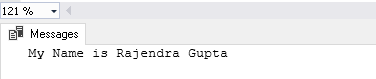
In SSMS, we get the PRINT statement output in SSMS message window as shown in the above image.
Example 2: PRINT statement to print a variable value
We can use the SQL PRINT statement to print a variable value as well. Let’s define a message in a variable and later
print this message:
|
DECLARE @Msg VARCHAR(300)= ‘My Name is Rajendra Gupta’; PRINT @Msg; |

Example 3: SQL Server PRINT statement to print an integer value
We can use the SQL PRINT statement to print an integer value, as shown below:
|
DECLARE @a INT = 1000 PRINT @a |
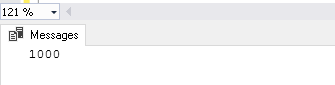
We can specify only CHAR, NCHAR, VARCHAR or NVARCHAR data types in the PRINT statement. In this case, it implicitly converts an integer value to the VARCHAR data type internally.
Let’s use another example with an integer variable and a string in the PRINT statement. You get an error message in
data type conversion because SQL Server is trying to convert the varchar data type to integer. In data type
precedence, the integer data type has high precedence than the varchar data type:
|
DECLARE @a INT = 1000 PRINT ‘Your queue no is ‘ + @a |

We explicitly convert the integer data type to varchar using the SQL CAST statement:
|
DECLARE @a INT= 1000; PRINT ‘Your queue no is ‘ + CAST(@a AS VARCHAR(10)); |

We can use the SQL CONCAT function as well, and it automatically does data type conversion for us. In the following
query, we get the output using the CONCAT function similar to the CAST operator:
|
DECLARE @a INT= 1000; PRINT CONCAT(‘Your queue no is : ‘,@a) |

Example 4: SQL Server PRINT statement with XML type variable value
We can use XML data type as well with the PRINT statement, but it requires data conversion.
As shown in the following output, we cannot directly use an XML variable in the PRINT statement. It gives an error
message that implicit conversion from XML to nvarchar is not allowed:
|
DECLARE @a XML = ‘<CustomerID=»1″ CustomerName=»Rajendra»/>’ PRINT @a |

We can use SQL CAST or CONVERT function explicitly and get the required output:
|
@a XML = ‘<Customer id=»1″ Name=»Rajendra»/>’ PRINT CAST(@a AS VARCHAR(100)) |

Example 5: SQL Server PRINT Statement with IF conditions
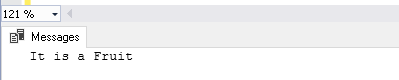
Let’s use the PRINT statement to print the message satisfied in the IF condition. In this example, the variable @a
contains a string. The IF condition checks for the string and prints message satisfying the condition:
|
DECLARE @a VARCHAR(100)= ‘Mango’; IF @a = ‘Mango’ PRINT N‘It is a Fruit’; ELSE PRINT N‘It is a vegetable’; GO |
Example 6: PRINT Statement with NULL values
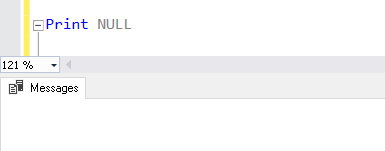
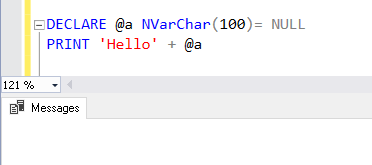
We cannot print NULL in the message using the SQL PRINT statement. The following query does not return any result:
Let’s use the following query that contains a variable with NULL values. In the PRINT statement, we use a string
along with this variable, and it does not return any message. The concatenation of a string and the variable @a
(NULL) that does not return any output:
|
DECLARE @a NVarChar(100)= NULL PRINT ‘Hello’ + @a |
Example 7: SQL Server PRINT Statement in a WHILE loop
As stated earlier, many times, we require knowing information about each iteration when query running in a loop such as WHILE or FOR.
The following query uses WHILE loop and prints a message about each iteration:
|
DECLARE @a INT; SET @a = 1; WHILE(@a < 10) BEGIN PRINT CONCAT(‘This is Iteration no:’ , @a) SET @a = @a + 1; END; |
It gives the following output. We can use a Print statement with an appropriate message and track query progress.

Limitations of SQL Server PRINT statement
In the previous example, we saw the use of cases of SQL PRINT statements. We have the following limitations with
PRINT as well:
- We need to use CAST, CONVERT or CONCAT functions in the PRINT statement with variables
- We cannot see a PRINT statement in SQL PROFILER
- The PRINT statement does not return the message immediately; it buffers the output and displays them
Let’s elaborate point no 3 and see its alternatives.
Execute the following query that contains two PRINT statements. Looking at the query, you might think of output in
the following form:
- It gives the message from the first PRINT statement
- Waits for 5 seconds
- It gives the message for a second PRINT statement
- Waits for another 5 seconds
|
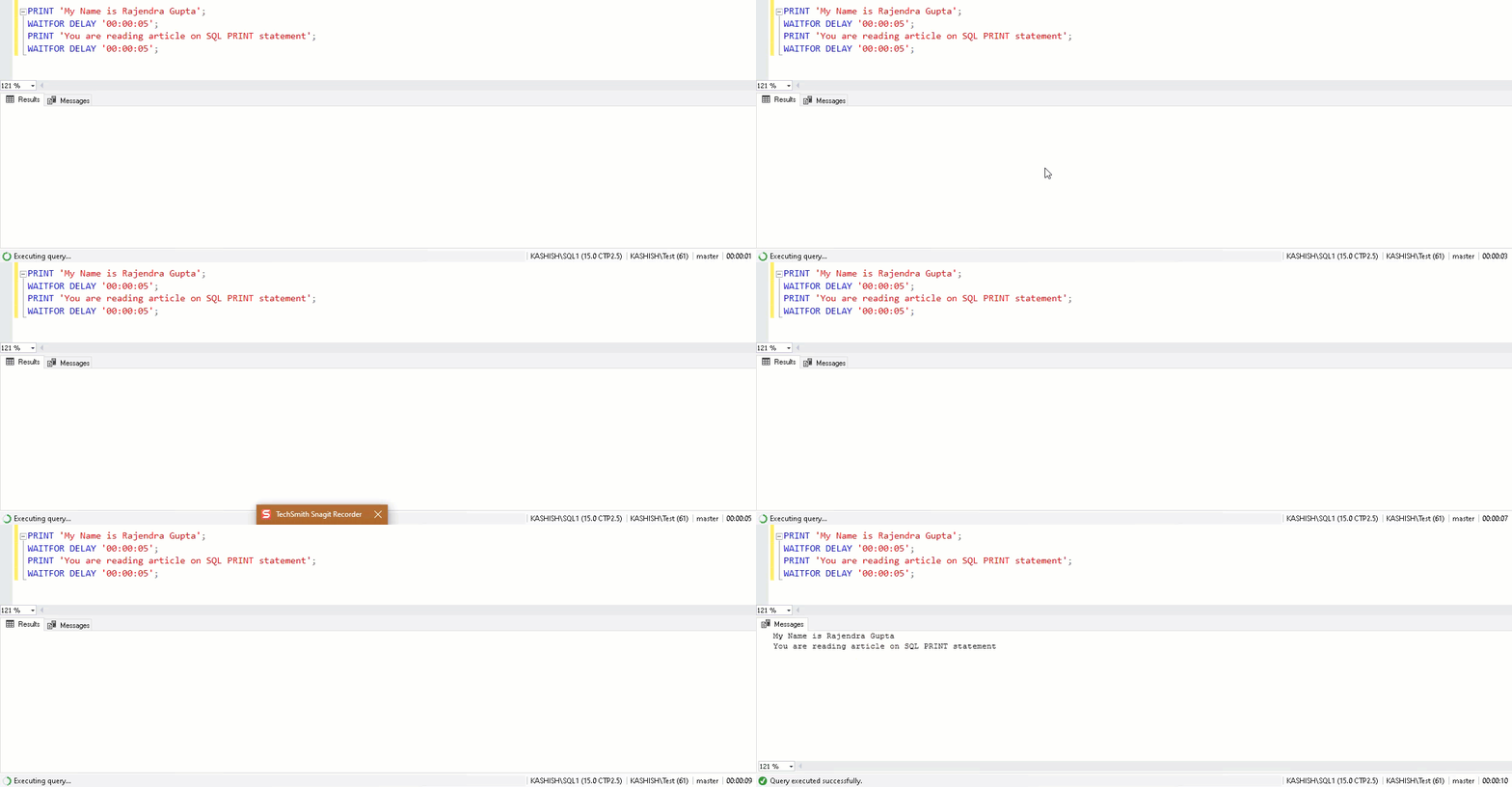
PRINT ‘My Name is Rajendra Gupta’; WAITFOR DELAY ’00:00:05′; PRINT ‘You are reading article on SQL PRINT statement’; WAITFOR DELAY ’00:00:05′; |
In the following GIF image, you can note that it prints message from both SQL PRINT statements together after 10
seconds:
Let’s use another example and see PRINT statement behavior. In this, we want to print the message as soon as
iteration completes:
|
DECLARE @a INT; SET @a = 1; WHILE(@a < 15) BEGIN PRINT CONCAT(‘This is Iteration no:’ , @a) WAITFOR DELAY ’00:00:01′ SET @a = @a + 1; END; |
In the output, we can note that all messages output from PRINT statements appear together once the execution
completes. The loop executes 14 times and waits 1 second on each execution. Therefore, we get output after 14
seconds for all PRINT statements:
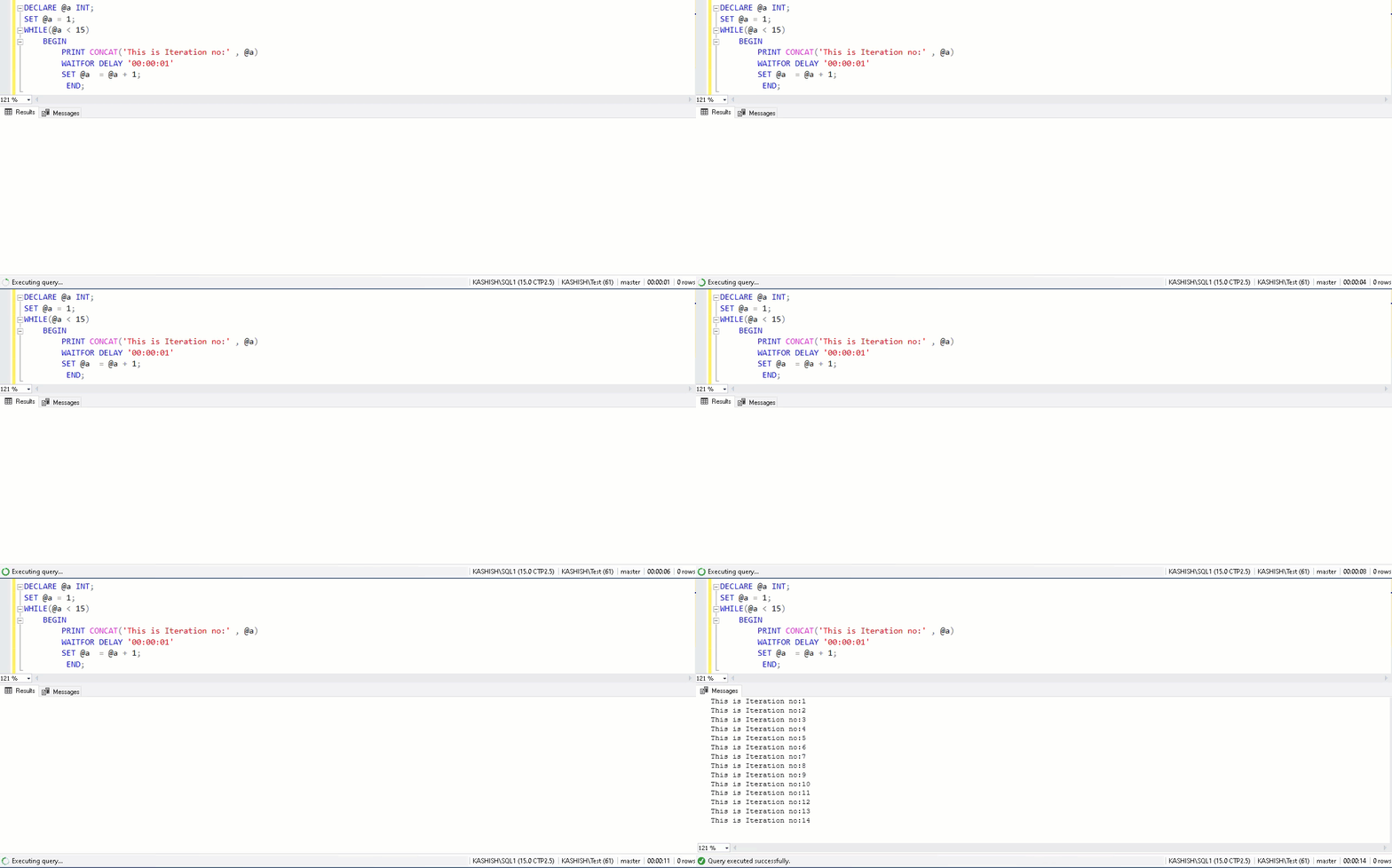
SQL Server buffers messages for multiple PRINT statements and displays them together.
It is not the desired output, and in any case, it might not be useful as you cannot track query progress in
real-time.
SQL Server RAISERROR statement
We can use an alternative to the SQL PRINT statement that is RAISERROR.
We require a few arguments in RAISERROR statements.
- Message – It is the message that we want to print
- Severity – It is a number between 0 and 25 and defines the severity of the messages. It treats
the message differently with each severity. We will see a few examples of it in this article - State – It is a number between 0 and 255 to distinguish one error from another. It is good to
use value 1 for this article
We need to use RAISERROR statement with NOWAIT clause; otherwise, it shows the same behavior as of SQL PRINT
statement:
|
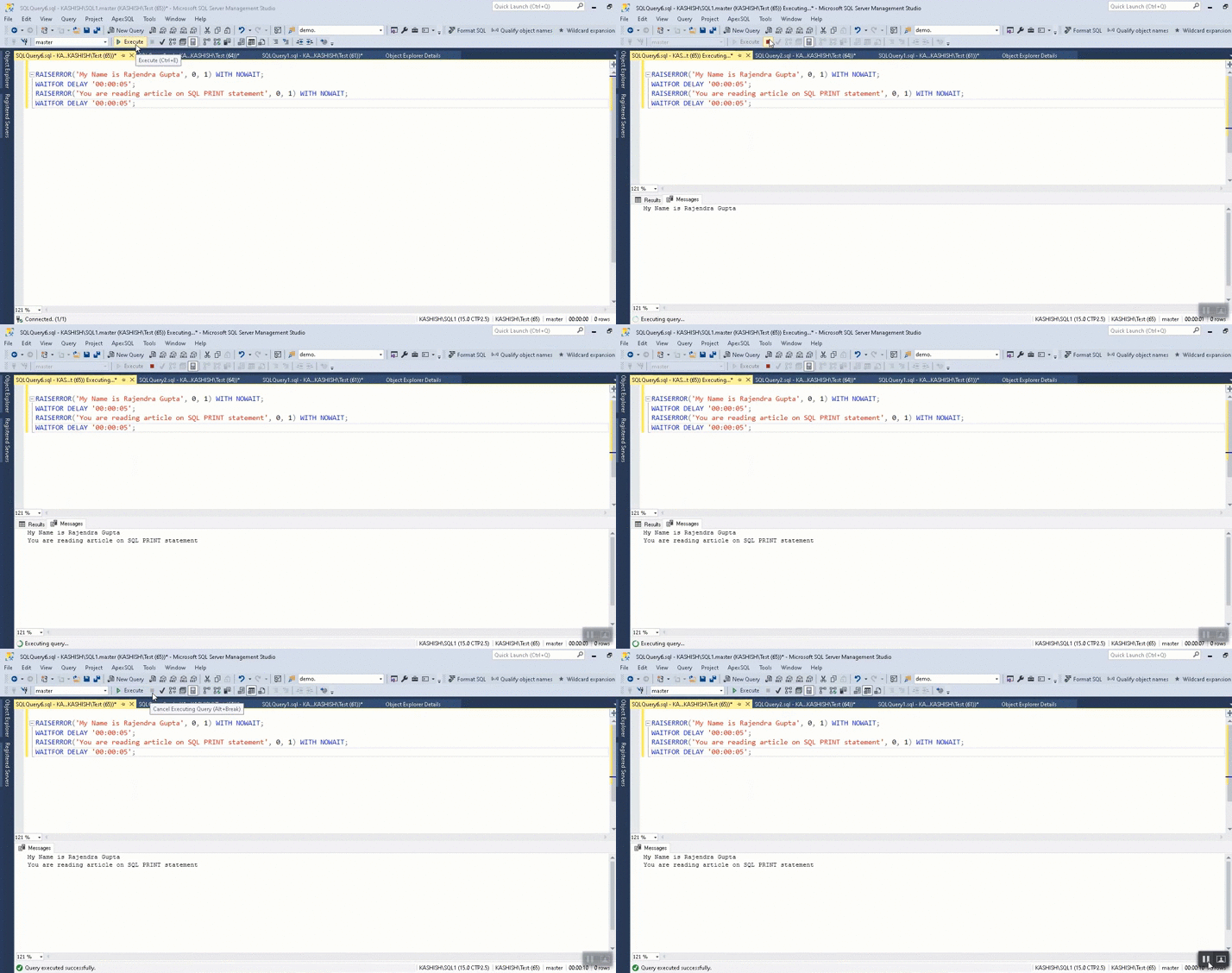
RAISERROR(‘My Name is Rajendra Gupta’, 0, 1) WITH NOWAIT; WAITFOR DELAY ’00:00:05′; RAISERROR(‘You are reading article on SQL PRINT statement’, 0, 1) WITH NOWAIT; WAITFOR DELAY ’00:00:05′; |
In the following output with SQL Server RAISERROR statements, we can note the following:
- It gives the message from the first PRINT statement
- Waits for 5 seconds
- It gives the message for the second PRINT statement
- Waits for another 5 seconds
Previously we used severity 0 in the RAISERROR statement. Let’s use the same query with severity 16:
|
RAISERROR(‘My Name is Rajendra Gupta’, 16, 1) WITH NOWAIT; WAITFOR DELAY ’00:00:05′; RAISERROR(‘You are reading article on SQL PRINT statement’, 16, 1) WITH NOWAIT; WAITFOR DELAY ’00:00:05′; |
In the output, we can see the message appears in red, and it shows the message as an error instead of a regular message. You also get message id, level, and state as well:

Let’s execute the following query with severity 1 and severity 16. Severity 1 shows the message with additional information, but it does not show the message as an error. You can see the text color in black.
Another SQL Server RAISERROR shows the output message as an error:
|
RAISERROR(‘My Name is Rajendra Gupta’, 1, 1) WITH NOWAIT; WAITFOR DELAY ’00:00:05′; RAISERROR(‘You are reading article on SQL PRINT statement’, 16, 1) WITH NOWAIT; WAITFOR DELAY ’00:00:05′; |

We cannot use SQL Server RAISERROR directly using the variables. We get the following output that is not the desired
output:
|
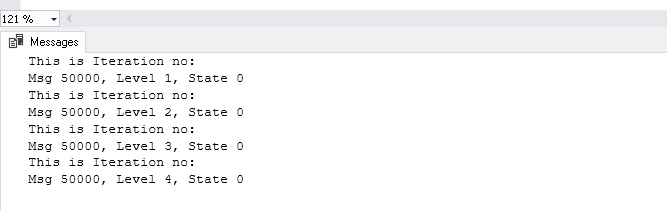
DECLARE @a INT; SET @a = 1; WHILE(@a < 15) BEGIN RAISERROR(‘This is Iteration no:’, @A, 0, 1) WITH NOWAIT; SET @a = @a + 1; END; |
It prints the message but does not show the value of the variable:
We need to use the C-style print statements with RAISERROR. The following query shows the variable with the
RAISERROR. You can notice that we use %s and %d to print a string and integer value:
|
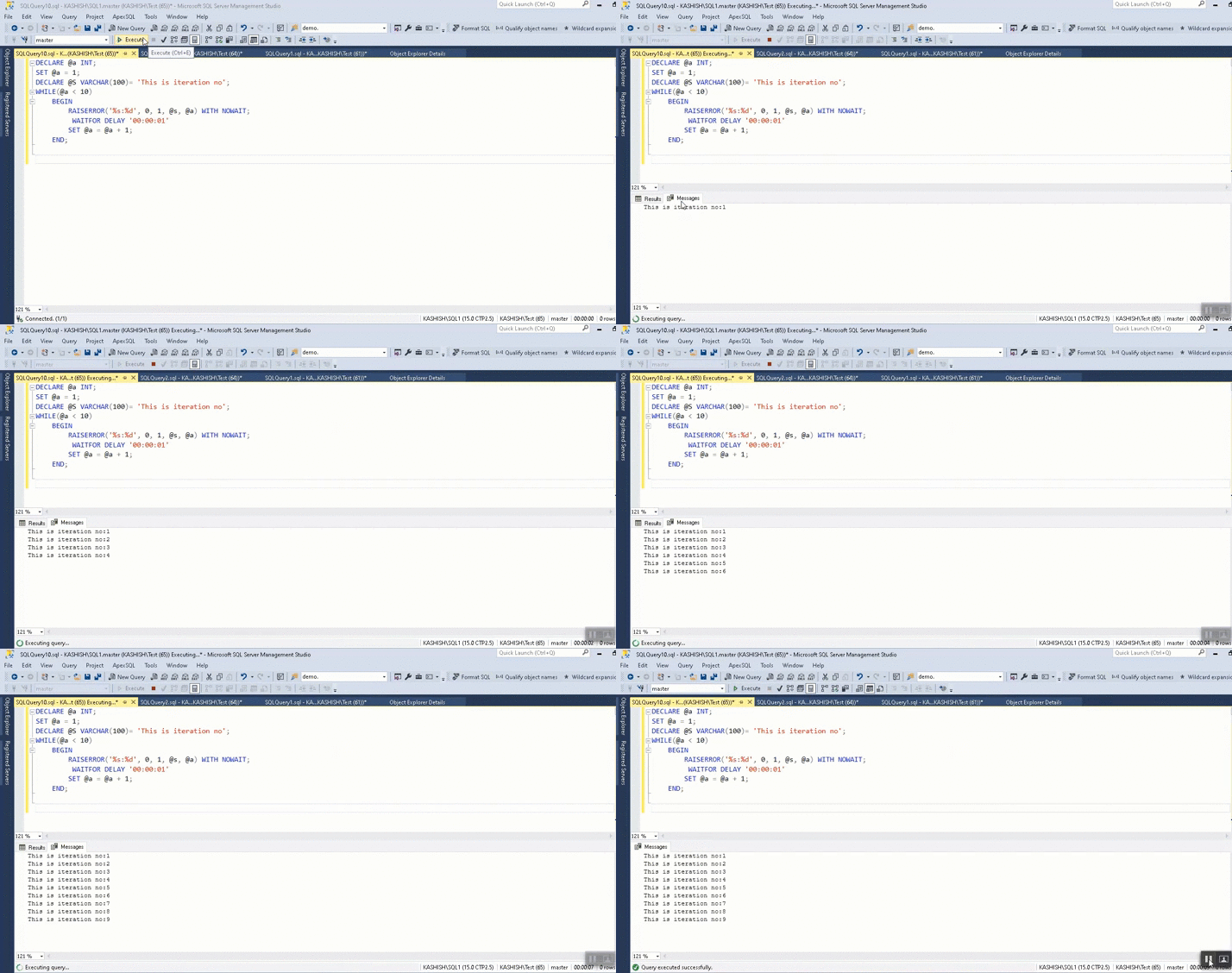
DECLARE @a INT; SET @a = 1; DECLARE @S VARCHAR(100)= ‘This is iteration no’; WHILE(@a < 5) BEGIN RAISERROR(‘%s:%d’, 0, 1, @s, @a) WITH NOWAIT; SET @a = @a + 1; END; |
We get the instant output in SQL Server RAISERROR along with WITH NOWAIT statement as per our requirement and does
not use buffer to display output once the query finishes:
You might confuse between RAISERROR statement that it is for raising error messages in SQL Server. We can use it as an alternative to the SQL PRINT statement as well. Usually, developers use PRINT statements only to gives messages in a query. You should explore RAISERROR statements for your queries, stored procedures.
Conclusion
In this article, we explored the SQL Server PRINT statement and its usages to track useful milestones in a query. We also learned the limitations of it along with alternative solution RAISERROR statement in SQL Server. SQL Server
RAISERROR gives you a great advantage to control output buffer behavior.
- Author
- Recent Posts

Hi! I am Rajendra Gupta, Database Specialist and Architect, helping organizations implement Microsoft SQL Server, Azure, Couchbase, AWS solutions fast and efficiently, fix related issues, and Performance Tuning with over 14 years of experience.
I am the author of the book «DP-300 Administering Relational Database on Microsoft Azure». I published more than 650 technical articles on MSSQLTips, SQLShack, Quest, CodingSight, and SeveralNines.
I am the creator of one of the biggest free online collections of articles on a single topic, with his 50-part series on SQL Server Always On Availability Groups.
Based on my contribution to the SQL Server community, I have been recognized as the prestigious Best Author of the Year continuously in 2019, 2020, and 2021 (2nd Rank) at SQLShack and the MSSQLTIPS champions award in 2020.
Personal Blog: https://www.dbblogger.com
I am always interested in new challenges so if you need consulting help, reach me at rajendra.gupta16@gmail.com
View all posts by Rajendra Gupta
message_text — сообщение, которое вы хотите показать при ошибке. Замечание: вы можете добавлять пользовательские сообщения для вывода информации об ошибке. Смотрите следующий раздел статьи.
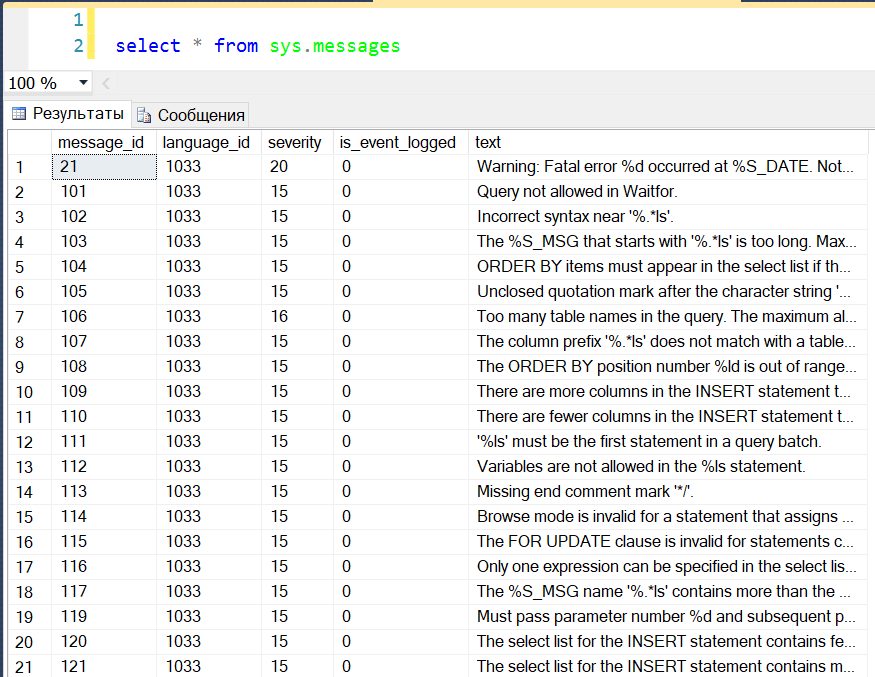
message_id — id сообщения об ошибке. Если вы хотите вывести пользовательское сообщение, вы можете определить этот идентификатор. Посмотрите список идентификаторов сообщений в sys.messages DMV.
Запрос:
select * from sys.messages
Вывод:
severity — серьезность ошибки. Тип данных переменной severity — smallint, значения находятся в диапазоне от 0 до 25. Допустимыми значениями серьезности ошибки являются:
- 0-10
- 11-18
- 19-25
— информационные сообщения
— ошибки
— фатальные ошибки
Замечание: Если вы создаете пользовательское сообщение, сложность, указанная в этом сообщении, будет перебиваться сложностью, заданной в операторе RAISERROR.
state — уникальное идентификационное число, которое может использоваться для раздела кода, вызывающего ошибку. Тип данных параметра state — smallint, и допустимые значения между 0 и 255.
Теперь давайте перейдем к практическим примерам.
Пример 1: использование оператора SQL Server RAISERROR для вывода сообщения
В этом примере вы можете увидеть, как можно отобразить ошибку или информационное сообщение с помощью оператора RAISERROR.
Предположим, что вы хотите отобразить сообщение после вставки записей в таблицу. Мы можем использовать операторы PRINT или RAISERROR. Ниже — код:
SET nocount ON

INSERT INTO tblpatients

            (patient_id,

             patient_name,

             address,

             city)

VALUES     ('OPD00006',

            'Nimesh Upadhyay',

            'AB-14, Ratnedeep Flats',

            'Mehsana')

RAISERROR ( 'Patient detail added successfully',1,1)
Вывод:
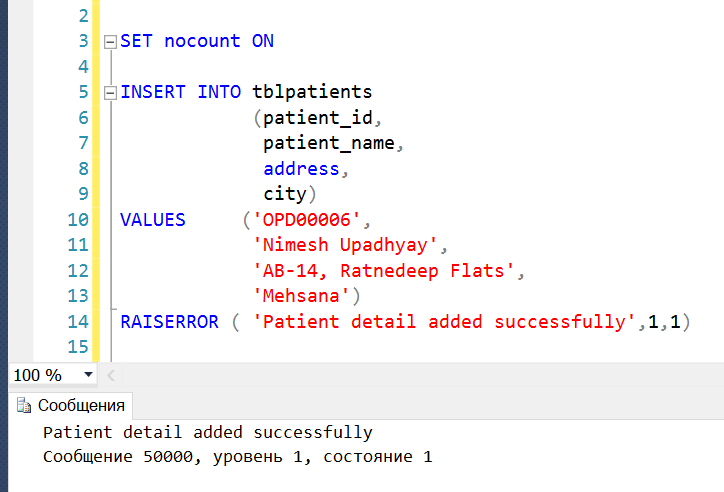
Как видно на рисунке выше, ID сообщения равно 50000, поскольку это пользовательское сообщение.
Пример 2: оператор SQL RAISERROR с текстом динамического сообщения
Теперь посмотрите, как мы можем создать текст динамического сообщения для оператора SQL RAISERROR.
Предположим, что мы хотим напечатать в сообщении ID пациента. Я описал локальную переменную с именем @PatientID, которая содержит patient_id. Чтобы отобразить значение переменной @PatientID в тексте сообщения, мы можем использовать следующий код:
DECLARE @PatientID VARCHAR(15)

DECLARE @message NVARCHAR(max)

SET @PatientID='OPD00007'

SET @message ='Patient detail added successfully. The OPDID is %s'

INSERT INTO tblpatients

            (patient_id,

             patient_name,

             address,

             city)

VALUES     ('' + @PatientID + '',

            'Nimesh Upadhyay',

            'AB-14, Ratnedeep Flats',

            'Mehsana')

RAISERROR ( @message,1,1,@patientID)
Вывод:
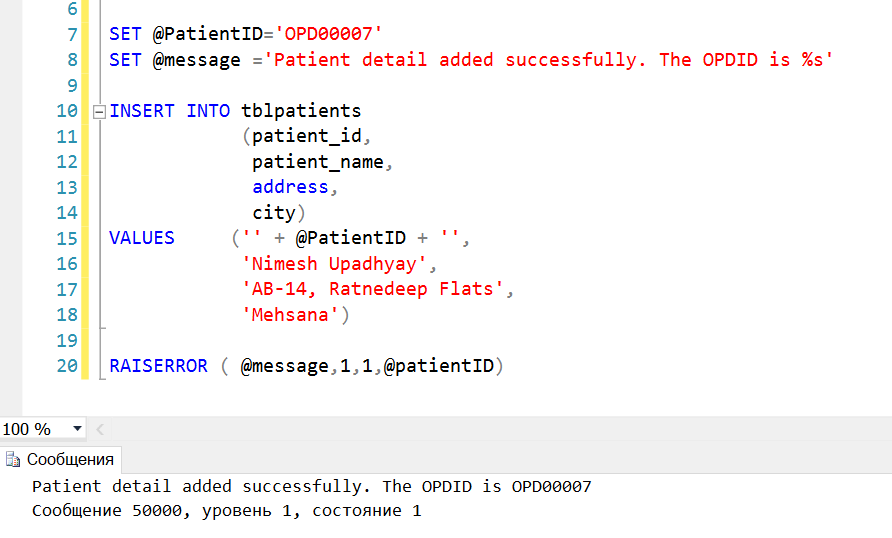
Для отображения строки в операторе RAISERROR, мы должны использовать операторы print в стиле языка Си.
Как видно на изображении выше, для вывода параметра в тексте сообщения я использую опцию %s, которая отображает строковое значение параметра. Если вы хотите вывести целочисленный параметр, вы можете использовать опцию %d.
Использование SQL RAISERROR в блоке TRY..CATCH
В этом примере мы добавляем SQL RAISERROR в блок TRY. При запуске этого кода он выполняет связанный блок CATCH. В блоке CATCH мы будем выводить подробную информацию о возникшей ошибке.
BEGIN try

    RAISERROR ('Error invoked in the TRY code block.',16,1 );

END try

BEGIN catch

    DECLARE @ErrorMsg NVARCHAR(4000);

    DECLARE @ErrSeverity INT;

    DECLARE @ErrState INT;

    SELECT @ErrorMsg = Error_message(),

           @ErrSeverity = Error_severity(),

           @ErrState = Error_state();

    RAISERROR (@ErrorMsg,

               @ErrSeverity,

               @ErrState

    );

END catch;
Так мы добавили оператор RAISERROR с ВАЖНОСТЬЮ МЕЖДУ 11 И 19. Это вызывает выполнение блока CATCH.
В блоке CATCH мы показываем информацию об исходной ошибке, используя оператор RAISERROR.
Вывод:
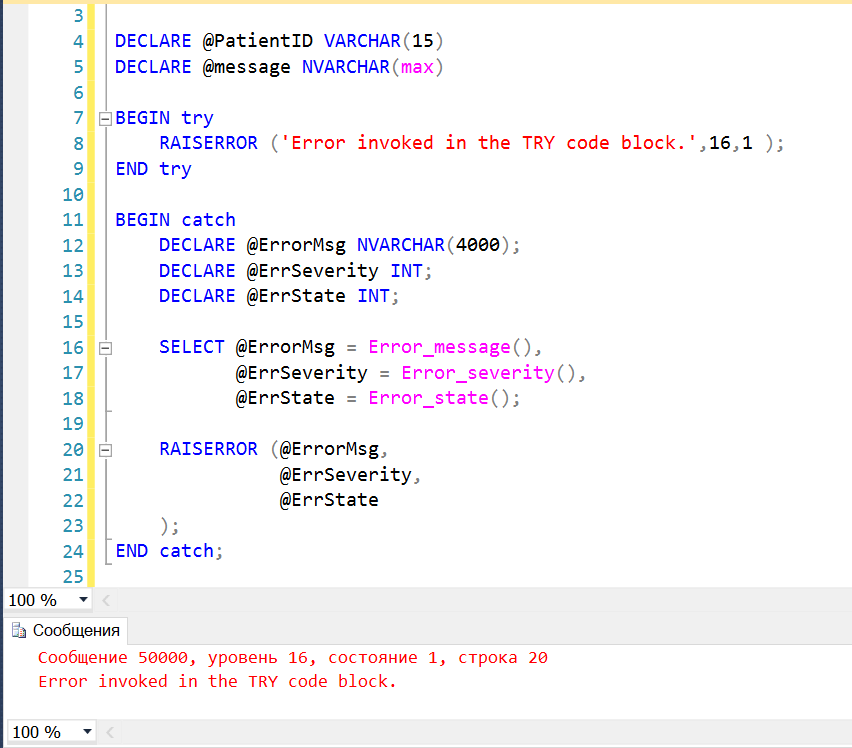
Как вы можете увидеть, код вернул информацию об исходной ошибке.
Теперь давайте разберемся, как добавить пользовательское сообщение, используя хранимую процедуру sp_addmessage.
Хранимая процедура sp_addmessage
Мы можем добавить пользовательское сообщение, выполнив хранимую процедуру sp_addmessages. Синтаксис процедуры:
EXEC Sp_addmessage

  @msgnum= 70001,

  @severity=16,

  @msgtext='Please enter the numeric value',

  @lang=NULL,

  @with_log='TRUE',

  @replace='Replace';
@msgnum: задает номер сообщения. Тип данных параметра — integer. Это ID пользовательского сообщения.
@severity: указывает уровень серьезности ошибки. Допустимые значения от 1 до 25. Тип данных параметра — smallint.
@messagetext: задает текст сообщения, который вы хотите выводить. Тип данных параметра nvarchar(255), значение по умолчанию NULL.
@lang: задает язык, который вы хотите использовать для вывода сообщения об ошибке. Значение по умолчанию NULL.
@with_log: этот параметр используется для записи сообщения в просмотрщик событий. Допустимые значения TRUE и FALSE. Если вы задаете TRUE, сообщение об ошибке будет записано в просмотрщик событий Windows. Если выбрать FALSE, ошибка не будет записана в журнал ошибок Windows.
@replace: если вы хотите заменить существующее сообщение об ошибке на пользовательское сообщение и уровень серьезности, вы можете указать это в хранимой процедуре.
Предположим, что вы хотите создать сообщение об ошибке, которое возвращает ошибку о недопустимом качестве (invalid quality). В операторе INSERT значение invalid_quality находится в диапазоне между 20 и 100. Сообщение следует рассматривать как ошибку с уровнем серьезности 16.
Чтобы создать такое сообщение, выполните следующий запрос:
USE master;

go

EXEC Sp_addmessage

  70001,

  16,

  N'Product Quantity must be between 20 and 100.';

go
После добавления сообщения выполните запрос ниже, чтобы увидеть его:
USE master

go

SELECT * FROM   sys.messages WHERE  message_id = 70001
Вывод:

Как использовать пользовательские сообщения об ошибках
Как упоминалось выше, мы должны использовать message_id в операторе RAISERROR для пользовательских сообщений.
Мы создали сообщение с ID = 70001. Оператор RAISERROR должен быть таким:
USE master

go

RAISERROR (70001,16,1 );

go
Вывод:
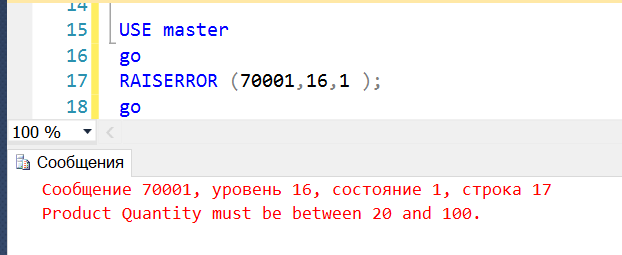
Оператор RAISERROR вернул пользовательское сообщение.
Хранимая процедура sp_dropmessage
Хранимая процедура sp_dropmessage используется для удаления пользовательских сообщений. Синтаксис оператора:
EXEC Sp_dropmessage @msgnum
Здесь @msgnum задает ID сообщения, которое вы хотите удалить.
Теперь мы хотим удалить сообщение, с ID = 70001. Запрос:
EXEC Sp_dropmessage 70001
Выполним следующий запрос для просмотра сообщения после его удаления:
USE master

go

SELECT * FROM   sys.messages WHERE  message_id = 70001
Вывод:
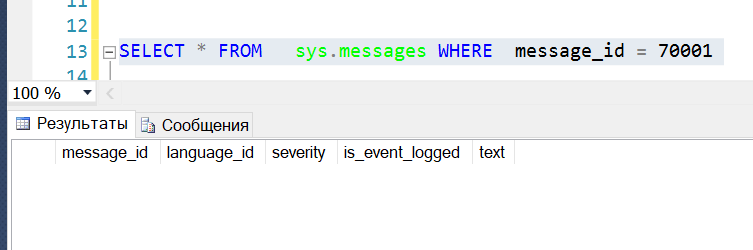
Как видно, сообщение было удалено.
Transact-SQL provides facilities to raise errors and warnings, as well as handling them. Here’s an introduction to this subject.
Raising errors and warnings
In SQL Server, we can generate an error or a warning with the RAISERROR statement. The most common usage looks like this:
RAISERROR (
    'Invalid user id',
    20, -- severity
    0   -- state
);
In this example, we’re raising a fatal error with severity 25 and state 0.
Severity must be in the range between 0 and 19. 0-18 represents a warning, 19-25 represents an error.
State must be in the range between 0 and 255. has no effect on SQL Server itself, but it’s useful for handling the error programmatically. If an error with the same message and severity can be raised in several places, the state can be used to find out where the error was raised.
Severity and state may be adjusted by SQL Server. If they’re less then 0 the value will be 0. If they exceed the maximum value, the maximum value will be used.
An error is a fatal error that terminates the current operation, and a warning is an anomaly that could indicate a problem or not, depending on the situation. Let’s see the differences, and how to generate them.
Errors
A mentioned, an error has a severity from 19 to 25.
An error must be written into the logs, so the WITH LOG option is required, as follows:
RAISERROR (...) WITH LOG;An error is considered fatal, so it has some effects:
- It rolls back the current transaction;
- It terminates the execution of the current T-SQL program (a trigger, a procedure, etc).
Warnings
As mentioned, a warning must have a severity from 0 to 18. Warnings can only be handled by a TRY ... CATCH statement if their severity is bigger than 10.
The WITH LOG option discussed above is optional for warnings.
A warning does not rollback the transaction and does not terminate a program execution. We can, however, do one of these things or both:
ROLLBACK;
RAISERROR (...);
RETURN 1;
The order of the statements is important here:
ROLLBACKmust precedeRAISERROR, because if the warning is handled by aTRY ... CATCHblock, anything afterRAISERRORwon’t be executed.RETURNshould follow bothROLLBACKandRAISERROR, or they won’t be executed.
RETURN always returns an integer value, 0 by default. This value can be used to indicate if the procedure succeeded or not, and why it failed. Conventionally, 0 indicates success and any other value indicates failure. We can use different non-zero returned values to indicate different problems: for example 1 for wrong arguments, 2 for missing rows, etc.
Other options
RAISERROR has a few more options that can occasionally be useful.
NOWAIT
Errors are normally sent to the client (and shown to the user) when the current program or T-SQL statement ends. To send the error to the client immediately, specify WITH NOWAIT:
RAISERROR (...) WITH NOWAIT;SETERROR
You can also use SETERROR to set the error number to 50000, regardless of the severity level. 50000 is the code reserver to general user defined errors, by convention.
Reference
More articles:
- SQL Server: Handle errors
Summary: in this tutorial, you will learn how to use the SQL Server RAISERROR statement to generate user-defined error messages.
If you develop a new application, you should use the THROW statement instead.
SQL Server RAISEERROR statement overview
The RAISERROR statement allows you to generate your own error messages and return these messages back to the application using the same format as a system error or warning message generated by SQL Server Database Engine. In addition, the RAISERROR statement allows you to set a specific message id, level of severity, and state for the error messages.
The following illustrates the syntax of the RAISERROR statement:
RAISERROR ( { message_id | message_text | @local_variable }
    { ,severity ,state }
    [ ,argument [ ,...n ] ] )
    [ WITH option [ ,...n ] ];
Code language: SQL (Structured Query Language) (sql)
Let’s examine the syntax of the RAISERROR for better understanding.
message_id
The message_id is a user-defined error message number stored in the sys.messages catalog view.
To add a new user-defined error message number, you use the stored procedure sp_addmessage. A user-defined error message number should be greater than 50,000. By default, the RAISERROR statement uses the message_id 50,000 for raising an error.
The following statement adds a custom error message to the sys.messages view:
EXEC sp_addmessage
    @msgnum = 50005,
    @severity = 1,
    @msgtext = 'A custom error message';
Code language: SQL (Structured Query Language) (sql)
To verify the insert, you use the following query:
SELECT
    *
FROM
    sys.messages
WHERE
    message_id = 50005;
Code language: SQL (Structured Query Language) (sql)
To use this message_id, you execute the RAISEERROR statement as follows:
RAISERROR ( 50005,1,1)
Code language: SQL (Structured Query Language) (sql)
Here is the output:
A custom error message
Msg 50005, Level 1, State 1
Code language: SQL (Structured Query Language) (sql)
To remove a message from the sys.messages, you use the stored procedure sp_dropmessage. For example, the following statement deletes the message id 50005:
EXEC sp_dropmessage
    @msgnum = 50005;
Code language: SQL (Structured Query Language) (sql)
message_text
The message_text is a user-defined message with formatting like the printf function in C standard library. The message_text can be up to 2,047 characters, 3 last characters are reserved for ellipsis (…). If the message_text contains 2048 or more, it will be truncated and is padded with an ellipsis.
When you specify the message_text, the RAISERROR statement uses message_id 50000 to raise the error message.
The following example uses the RAISERROR statement to raise an error with a message text:
RAISERROR ( 'Whoops, an error occurred.',1,1)
Code language: SQL (Structured Query Language) (sql)
The output will look like this:
Whoops, an error occurred.
Msg 50000, Level 1, State 1
Code language: SQL (Structured Query Language) (sql)
severity
The severity level is an integer between 0 and 25, with each level representing the seriousness of the error.
0–10 Informational messages
11–18 Errors
19–25 Fatal errors
Code language: SQL (Structured Query Language) (sql)
state
The state is an integer from 0 through 255. If you raise the same user-defined error at multiple locations, you can use a unique state number for each location to make it easier to find which section of the code is causing the errors. For most implementations, you can use 1.
WITH option
The option can be LOG, NOWAIT, or SETERROR:
WITH LOGlogs the error in the error log and application log for the instance of the SQL Server Database Engine.WITH NOWAITsends the error message to the client immediately.WITH SETERRORsets theERROR_NUMBERand@@ERRORvalues to message_id or 50000, regardless of the severity level.
SQL Server RAISERROR examples
Let’s take some examples of using the RAISERROR statement to get a better understanding.
A) Using SQL Server RAISERROR with TRY CATCH block example
In this example, we use the RAISERROR inside a TRY block to cause execution to jump to the associated CATCH block. Inside the CATCH block, we use the RAISERROR to return the error information that invoked the CATCH block.
DECLARE
    @ErrorMessage  NVARCHAR(4000),
    @ErrorSeverity INT,
    @ErrorState    INT;

BEGIN TRY
    RAISERROR('Error occurred in the TRY block.', 17, 1);
END TRY
BEGIN CATCH
    SELECT
        @ErrorMessage = ERROR_MESSAGE(),
        @ErrorSeverity = ERROR_SEVERITY(),
        @ErrorState = ERROR_STATE();

    -- return the error inside the CATCH block
    RAISERROR(@ErrorMessage, @ErrorSeverity, @ErrorState);
END CATCH;
Code language: SQL (Structured Query Language) (sql)
Here is the output:
Msg 50000, Level 17, State 1, Line 16
Error occurred in the TRY block.
Code language: SQL (Structured Query Language) (sql)
B) Using SQL Server RAISERROR statement with a dynamic message text example
The following example shows how to use a local variable to provide the message text for a RAISERROR statement:
DECLARE @MessageText NVARCHAR(100);
SET @MessageText = N'Cannot delete the sales order %s';

RAISERROR(
    @MessageText, -- Message text
    16, -- severity
    1, -- state
    N'2001' -- first argument to the message text
);
Code language: SQL (Structured Query Language) (sql)
The output is as follows:
Msg 50000, Level 16, State 1, Line 5
Cannot delete the sales order 2001
Code language: SQL (Structured Query Language) (sql)
When to use RAISERROR statement
You use the RAISERROR statement in the following scenarios:
- Troubleshoot Transact-SQL code.
- Return messages that contain variable text.
- Examine the values of data.
- Cause the execution to jump from a
TRYblock to the associatedCATCHblock. - Return error information from the
CATCHblock to the callers, either calling batch or application.
In this tutorial, you will learn how to use the SQL Server RAISERROR statement to generate user-defined error messages.
I’m writing a user-defined function in SQL Server 2008. I know that functions cannot raise errors in the usual way — if you try to include the RAISERROR statement SQL returns:
Msg 443, Level 16, State 14, Procedure ..., Line ...
Invalid use of a side-effecting operator 'RAISERROR' within a function.
But the fact is, the function takes some input, which may be invalid and, if it is, there is no meaningful value the function can return. What do I do then?
I could, of course, return NULL, but it would be difficult for any developer using the function to troubleshoot this. I could also cause a division by zero or something like that — this would generate an error message, but a misleading one. Is there any way I can have my own error message reported somehow?

marc_s
734k176 gold badges1332 silver badges1460 bronze badges
asked Sep 28, 2009 at 1:33

You can use CAST to throw meaningful error:
create function dbo.throwError()
returns nvarchar(max)
as
begin
    return cast('Error happened here.' as int);
end
Then Sql Server will show some help information:
Msg 245, Level 16, State 1, Line 1
Conversion failed when converting the varchar value 'Error happened here.' to data type int.
answered Jan 13, 2011 at 15:33

Vladimir KorolevVladimir Korolev
2,9871 gold badge17 silver badges10 bronze badges
8
The usual trick is to force a divide by 0. This will raise an error and interrupt the current statement that is evaluating the function. If the developer or support person knows about this behavior, investigating and troubleshooting the problem is fairly easy as the division by 0 error is understood as a symptom of a different, unrelated problem.
As bad as this looks from any point of view, unfortunately the design of SQL functions at the moment allows no better choice. Using RAISERROR should absolutely be allowed in functions.
answered Sep 28, 2009 at 6:02

Remus RusanuRemus Rusanu
289k40 gold badges443 silver badges569 bronze badges
Following on from Vladimir Korolev’s answer, the idiom to conditionally throw an error is
CREATE FUNCTION [dbo].[Throw]
(
    @error NVARCHAR(MAX)
)
RETURNS BIT
AS
BEGIN
    RETURN CAST(@error AS INT)
END
GO

DECLARE @error NVARCHAR(MAX)
DECLARE @bit BIT

IF `error condition` SET @error = 'My Error'
ELSE SET @error = '0'

SET @bit = [dbo].[Throw](@error)
answered Mar 6, 2012 at 12:16

satnhaksatnhak
9,4375 gold badges64 silver badges81 bronze badges
I think the cleanest way is to just accept that the function can return NULL if invalid arguments are passed. As long is this is clearly documented then this should be okay?
-- =============================================
-- Author: AM
-- Create date: 03/02/2010
-- Description: Returns the appropriate exchange rate
-- based on the input parameters.
-- If the rate cannot be found, returns NULL
-- (RAISEERROR can't be used in UDFs)
-- =============================================
ALTER FUNCTION [dbo].[GetExchangeRate]
(
    @CurrencyFrom char(3),
    @CurrencyTo char(3),
    @OnDate date
)
RETURNS decimal(18,4)
AS
BEGIN

  DECLARE @ClosingRate as decimal(18,4)

    SELECT TOP 1
        @ClosingRate=ClosingRate
    FROM
        [FactCurrencyRate]
    WHERE
        FromCurrencyCode=@CurrencyFrom AND
        ToCurrencyCode=@CurrencyTo AND
        DateID=dbo.DateToIntegerKey(@OnDate)

    RETURN @ClosingRate

END
GO
answered Feb 3, 2010 at 10:22

AndyMAndyM
3,5946 gold badges40 silver badges45 bronze badges
A few folks were asking about raising errors in Table-Valued functions, since you can’t use «RETURN [invalid cast]» sort of things. Assigning the invalid cast to a variable works just as well.
CREATE FUNCTION fn()
RETURNS @T TABLE (Col CHAR)
AS
BEGIN

DECLARE @i INT = CAST('booooom!' AS INT)

RETURN

END
This results in:
Msg 245, Level 16, State 1, Line 14
Conversion failed when converting the varchar value ‘booooom!’ to data type int.

answered Jun 22, 2016 at 22:53

NightShovelNightShovel
3,0321 gold badge31 silver badges35 bronze badges
1
RAISEERROR or @@ERROR are not allowed in UDFs. Can you turn the UDF into a strored procedure?
From Erland Sommarskog’s article Error Handling in SQL Server – a Background:
User-defined functions are usually
invoked as part of a SET, SELECT,
INSERT, UPDATE or DELETE statement.
What I have found is that if an error
appears in a multi-statement
table-valued function or in a scalar
function, the execution of the
function is aborted immediately, and
so is the statement the function is
part of. Execution continues on the
next line, unless the error aborted
the batch. In either case, @@error is
0. Thus, there is no way to detect that an error occurred in a function
from T-SQL.The problem does not appear with
inline table-functions, since an
inline table-valued function is
basically a macro that the query
processor pastes into the query.You can also execute scalar functions
with the EXEC statement. In this case,
execution continues if an error occurs
(unless it is a batch-aborting error).
@@error is set, and you can check the
value of @@error within the function.
It can be problematic to communicate
the error to the caller though.
answered Sep 28, 2009 at 1:38

Mitch WheatMitch Wheat
296k44 gold badges466 silver badges542 bronze badges
The top answer is generally best, but does not work for inline table valued functions.
MikeTeeVee gave a solution for this in his comment on the top answer, but it required use of an aggregate function like MAX, which did not work well for my circumstance.
I messed around with an alternate solution for the case where you need an inline table valued udf that returns something like select * instead of an aggregate. Sample code solving this particular case is below. As someone has already pointed out… «JEEZ wotta hack»  I welcome any better solution for this case!
create table foo (
    ID nvarchar(255),
    Data nvarchar(255)
)
go

insert into foo (ID, Data) values ('Green Eggs', 'Ham')
go

create function dbo.GetFoo(@aID nvarchar(255)) returns table as return (
    select *, 0 as CausesError from foo where ID = @aID

    --error checking code is embedded within this union
    --when the ID exists, this second selection is empty due to where clause at end
    --when ID doesn't exist, invalid cast with case statement conditionally causes an error
    --case statement is very hack-y, but this was the only way I could get the code to compile
    --for an inline TVF
    --simpler approaches were caught at compile time by SQL Server
    union

    select top 1 *, case
                        when ((select top 1 ID from foo where ID = @aID) = @aID) then 0
                        else 'Error in GetFoo() - ID "' + IsNull(@aID, 'null') + '" does not exist'
                    end
    from foo where (not exists (select ID from foo where ID = @aID))
)
go

--this does not cause an error
select * from dbo.GetFoo('Green Eggs')
go

--this does cause an error
select * from dbo.GetFoo('Yellow Eggs')
go

drop function dbo.GetFoo
go

drop table foo
go
answered Jun 27, 2013 at 22:29

davecdavec
3232 gold badges5 silver badges14 bronze badges
1
I can’t comment under davec’s answer regarding table valued function, but in my humble opinion this is easier solution:
CREATE FUNCTION dbo.ufn_test (@a TINYINT)
RETURNS @returns TABLE(Column1 VARCHAR(10), Value1 TINYINT)
BEGIN
    IF @a>50 -- if @a > 50 - raise an error
    BEGIN
      INSERT INTO @returns (Column1, Value1)
      VALUES('error','@a is bigger than 50!') -- reminder Value1 should be TINYINT
    END

    INSERT INTO @returns (Column1, Value1)
    VALUES('Something',@a)
    RETURN;
END

SELECT Column1, Value1 FROM dbo.ufn_test(1) -- this is okay
SELECT Column1, Value1 FROM dbo.ufn_test(51) -- this will raise an error
answered Jan 14, 2014 at 17:31

1
One way (a hack) is to have a function/stored procedure that performs an invalid action. For example, the following pseudo SQL
create procedure throw_error ( in err_msg varchar(255))
begin
insert into tbl_throw_error (id, msg) values (null, err_msg);
insert into tbl_throw_error (id, msg) values (null, err_msg);
end;
Where on the table tbl_throw_error, there is a unique constraint on the column err_msg. A side-effect of this (at least on MySQL), is that the value of err_msg is used as the description of the exception when it gets back up into the application level exception object.
I don’t know if you can do something similar with SQL Server, but worth a shot.
answered Sep 28, 2009 at 1:41

AlexAlex
2,43517 silver badges18 bronze badges
1