

Добавил:
Upload
Опубликованный материал нарушает ваши авторские права? Сообщите нам.
Вуз:
Предмет:
Файл:
Отчеты по Лабораторным ИСТ (1-5).doc
Скачиваний:
7
Добавлен:
14.07.2019
Размер:
2.22 Mб
Скачать
Обнаруженные
в процессе работы ошибки выводятся на
экран асинхронно наряду с посланными
и принятыми кадрами:
-
“ER
WTOUT WRITE
TIMEOUT» – кадр не был
отослан в течении стандартного временного
интервала, ошибка может возникнуть
если нет соединения с сетью (например,
обрыв кабеля, нет других контроллеров
в сети, несоответствие выставленных
скоростей передачи у контроллеров в
сети) -
«ER
EWL ERROR
WARNING LIMIT»
– один из аппаратных счетчиков ошибок
CAN-контроллера превысил
уровень предупреждения (по умолчанию
96); кроме указаных в предыдущем пункте
(WTOUT), причиной возникновения
этой ошибки могут быть помехи в сети
(согласно спецификации Bosch
CAN 2.0); -
«ER
BOFF BUS OFF»
– контроллер отключен от сети из-за
ошибок (один из счетчиков ошибок достиг
предельного значения 255); при наступлении
этого события CAN-контроллер
переходит в режим инициализации
(CAN_INIT); -
«ER
HOVR HARDWARE
OVERRUN» – произошло
переполнение аппаратной приемной
очереди CAN-контроллера
(безвозратно потерян один или несколько
полученных кадров), причина – большой
поток кадров в сети, ЦПУ не успевает
вынимать кадры из аппаратной очереди
контроллера; -
«ER
SOVR SOFTWARE
OVERRUN» – произошло
переполнение программной приемной
очереди драйвера (безвозратно потерян
один или несколько полученных кадров),
причина – большой поток кадров в сети,
пользовательское приложение не успевает
вынимать кадры из программной очереди
драйвера;
6.3.Примеры использования команд
-
Отправить
подряд три пакета расширенного формата
с идентификатором ID=0x7 и четырьмя байтами
данных 0x1 0x2 0x3 0x4 можно командой:send
0x7:0x1,0x2,0x3,0x4 eff repeat 3 -
Отправить
пять RTR-пакетов стандартного формата
длины 4 байт с идентификатором 0xd можно
командой:sendrx
0xd:4 sff repeat 5 -
Включить
запись всех отправляемых и принимаемых
CAN-пакетов в файл c:\chai-2.4.0\canmon.log можно
командой:openlog
c:\chai-2.4.0\canmon.log -
Закрыть
лог-файл и выключить запись принимаемых
отправляемых пакетов можно командой:closelog
-
Перевести
контроллер в режим Listen-Only-Mode, в этом
режиме контроллер не участвует в работе
шины (не шлет кадры подтверждения и
ошибок) но только принимает проходящие
по сети кадры, этот режим используется
для не возмущающего тестирования
CAN-сетей. Команда setlom может вызываться
только, если контроллер находится в
режиме конфигурирования (команды
stop/start).stop
setlom
start
-
Выключить
режим Listen-Only-Mode, Команда clearlom может
вызываться только, если контроллер
находится в режиме конфигурирования
(команды stop/start).stop
clearlom
start
-
Установить
аппаратный фильтр контроллера на прием
только кадров с идентификатором 0x1.
Команда setfilter может вызываться только,
если контроллер находится в режиме
конфигурирования (команды stop/start).stop
setfilter
0x1 0xffffstart
Аппаратный фильтр состоит из двух
значений: acode — значение фильтра, и amask
— значение маски. Значение фильтра
задает идентификатор принимаемых
кадров (в нашем случае 0x1). Маска задает
значащие позиции в значении фильтра,
Если бит номер N в маске выставлен в 1,
то бит номер N в значении фильтра должен
быть равен биту N в идентификаторе
принимаемого кадра для успешного
прохождения этого кадра через фильтр.
Если бит номер N в маске выставлен в 0,
то биты номер N в значении фильтра и
идентификаторе принимаемого кадра не
сравниваются. В нашем случае маска
равна 0xffff — все биты идентификатора
участвуют в сравнении, что означает,
что кадр будет принят, только если все
его биты совпадают с соответствующими
битами значения фильтра, т.е. кадр будет
принят, только если его идентификатор
равен 0x1. Текущая версия программы
canmon поддерживает аппаратный фильтр
только для 11-битных кадров, действие
фильтра (если он установлен) на 29-битные
кадры — непредсказуемо. Если вам
необходимо работать с аппаратным
фильтром 29-битных кадров используйте
программу CANwise. -
Установить
аппаратный фильтр контроллера на прием
только кадров с идентификаторами от
0x0 до 0x7 включительно.stop
setfilter 0x0 0xfff8
start
здесь
маска 0xfff8 указывает, что первые три
бита идентификатора не участвуют в
сравнении, а остальные должны совпадать
с 0. Таким образом, через фильтр будут
проходить кадры с идентификаторами от
0x0 до 2 в степени 3 минус 1 (т.е. 0x7). -
Установить
аппаратный фильтр контроллера на прием
всех кадров.stop
setfilter
0x0 0x0start
Формат
пакета данных
В
обычном режиме передачи пакеты данных
имеют следующие конфигурации блоков
(фреймы):
• Data
Frame (фрейм сообщения) для
передачи сообщений по шине данных CAN
(например: температура охлаждающей
жидкости).
• Remote
Frame (фрейм запроса) для
запроса сообщений по шине данных CAN
от другого блока управления.
• Error
Frame (фрейм ошибки) все
подключённые блоки управления уведомляются
о том, что возникла ошибка и последнее
сообщение по шине данных CAN
является недействительным.
Протокол
шины данных CAN поддерживает
два различных формата фреймов сообщения
по шине данных CAN, которые
различаются только по длине идентификатора:
стандартный
формат;
расширенный
формат.
В
настоящее время используется стандартный
формат.
Пакет
данных для передачи сообщений по шине
данных CAN состоит из семи
последовательных полей:
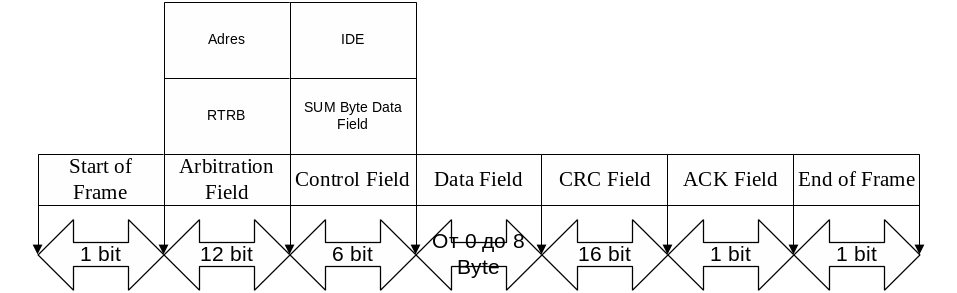
• Start
of Frame
(стартовый бит): Маркирует начало
сообщения и синхронизирует все модули.
• Arbitration
Field (идентификатор и
запрос): Это поле состоит из идентификатора
(адреса) в 11 бит и 1 контрольного бита
(Remote Transmission
Request-Bit).
Этот контрольный бит маркирует пакет
как Data Frame
(фрейм сообщения) или как Remote
Frame (фрейм запроса) без
байтов данных.
• Control
Field (управляющие биты):
Поле управления (6 бит) содержит IDE-бит
(Identifier Extension
Bit) для распознавания
стандартного и расширенного формата,
резервный бит для последующих расширений
и — в последних 4 битах — количество байтов
данных, заложенных в Data
Field (поле данных).
• Data
Field (данные): Поле данных
может содержать от 0 до 8 байт данных.
Сообщение по шине данных CAN
длиной 0 байт используется для синхронизации
распределённых процессов.
• CRC
Field (контрольное поле):
Поле CRC (Cyclic-Redundancy-Check
Field) содержит 16 бит и служит
для контрольного распознавания ошибок
при передаче.
• ACK
Field (подтверждение приёма):
Поле ACK (Acknowledgement
Field) содержит сигнал
подтверждения приёма всех блоков-приёмников,
получивших сообщение по шине CAN
без ошибок.
• End
of Frame (конец
фрейма): Маркирует конец пакета данных.
• Intermission
(интервал): Интервал между двумя пакетами
данных. Интервал должен составлять не
менее 3 битов. После этого любой блок
управления может передавать следующий
пакет данных.
• IDLE
(режим покоя): Если ни один блок управления
не передаёт сообщений, то шина CAN
остаётся в режиме покоя до передачи
следующего пакета данных.
Лабораторная
работа 3
Изучение
Universal Serial Bus и FireWire
Соседние файлы в предмете [НЕСОРТИРОВАННОЕ]
- #
- #
- #
- #
- #
- #
- #
- #
- #
- #
- #
UM10237_2
© NXP B.V. 2008. All rights reserved.
User manual
Rev. 02 — 19 December 2008
NXP Semiconductors
UM10237
Chapter 18: LPC24XX CAN controllers CAN1/2
(9)
(10)
8.7 Error Warning Limit Register (CAN1EWL — 0xE004 4018, CAN2EWL —
0xE004 8018)
This register sets a limit on Tx or Rx errors at which an interrupt can occur. It can be read
at any time but can only be written if the RM bit in CANmod is 1. The default value (after
hardware reset) is 96.
Note that a content change of the Error Warning Limit Register is possible only if the
Reset Mode was entered previously. An Error Status change (Status Register) and an
Error Warning Interrupt forced by the new register content will not occur until the Reset
Mode is cancelled again.
8.8 Status Register (CAN1SR — 0xE004 401C, CAN2SR — 0xE004 801C)
This register contains three status bytes in which the bits not related to transmission are
identical to the corresponding bits in the Global Status Register, while those relating to
transmission reflect the status of each of the 3 Tx Buffers.
t
TSEG1
t
SCL
TSEG1
1
+
(
)
×
=
t
TSEG2
t
SCL
TSEG2
1
+
(
)
×
=
Table 426. Error Warning Limit register (CAN1EWL — address 0xE004 4018, CAN2EWL —
address 0xE004 8018) bit description
Bit Symbol Function
Reset
Value
RM
Set
7:0 EWL
During CAN operation, this value is compared to both the Tx and
Rx Error Counters. If either of these counter matches this value,
the Error Status (ES) bit in CANSR is set.
96
10
= 0x60 X
Table 427. Status Register (CAN1SR — address 0xE004 401C, CAN2SR — address 0xE004 801C) bit description
Bit
Symbol Value
Function
Reset
Value
RM
Set
0
RBS
Receive Buffer Status. This bit is identical to the RBS bit in the CANxGSR.
0
0
1
DOS
Data Overrun Status. This bit is identical to the DOS bit in the CANxGSR.
0
0
2
Transmit Buffer Status 1.
1
1
0(locked)
Software cannot access the Tx Buffer 1 nor write to the corresponding
CANxTFI, CANxTID, CANxTDA, and CANxTDB registers because a
message is either waiting for transmission or is in transmitting process.
1(released)
Software may write a message into the Transmit Buffer 1 and its CANxTFI,
CANxTID, CANxTDA, and CANxTDB registers.
3
Transmission Complete Status.
1
x
0(incomplete)
The previously requested transmission for Tx Buffer 1 is not complete.
1(complete)
The previously requested transmission for Tx Buffer 1 has been successfully
completed.
4
RS
Receive Status. This bit is identical to the RS bit in the GSR.
1
0
Need a practical intro to CAN bus errors?
In this tutorial you’ll learn about the basics of CAN error handling, the 5 CAN bus error types, the CAN
error frame and CAN node error states.
To get practical, we’ll also generate & record CAN errors in 6 experiments.
In this article
- What are CAN bus errors?
- The CAN error frame
- 5 CAN error types
- States & error counters
- 6 practical experiments
- LIN bus errors
- CAN error logging use cases
- FAQ

What are CAN bus errors?
As explained in our simple intro
to CAN
bus, the Controller Area Network is today the de facto standard across automotives and industrial
automation
systems.
A core benefit is the robustness of CAN, making it ideal for safety critical
applications.
Here, it is worth noting:
Error handling is vital to the robustness of CAN.
CAN bus errors can occur for several reasons — faulty cables, noise, incorrect termination, malfunctioning
CAN nodes etc. Identifying, classifying and resolving such CAN errors is key to ensuring the continued
performance of the overall CAN system.
In particular, error handling identifies and rejects erroneous messages, enabling a sender to
re-transmit the message. Further, the process helps identify and disconnect CAN nodes that
consistently transmit erroneous messages.
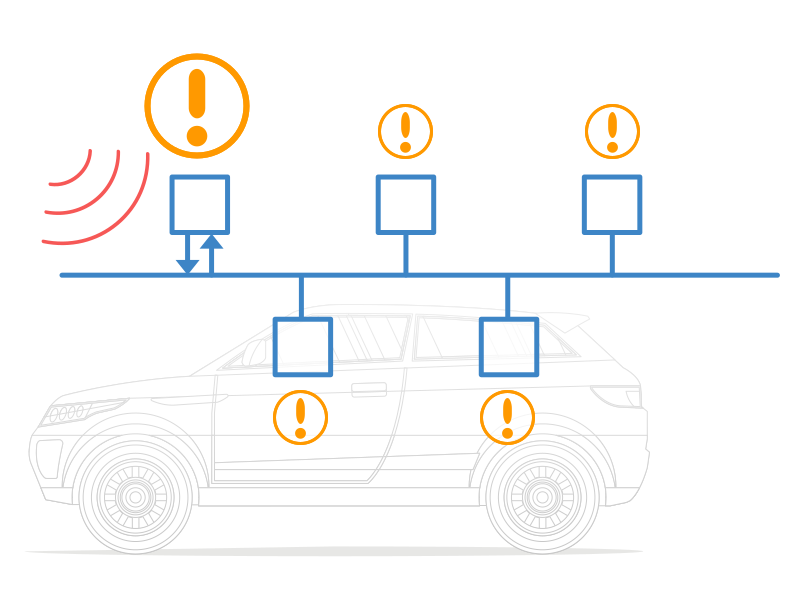
How does CAN error handling work?
Error handling is a built-in part of the CAN standard and every CAN controller. In other words, every
CAN node handles fault identification and confinement identically. Below we’ve made a simple illustrative example:
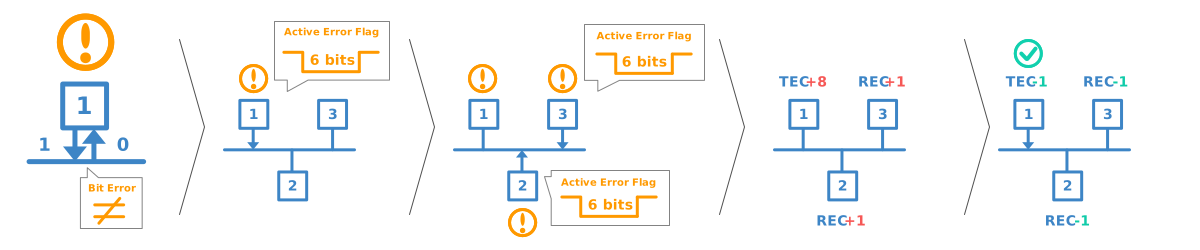
- CAN node 1 transmits a message onto the CAN bus — and reads every bit it sends
- In doing so, it discovers that one bit that was sent dominant was read recessive
- This is a ‘Bit Error’ and node 1 raises an Active Error Flag to inform other nodes
- In practice, this means that node 1 sends a sequence of 6 dominant bits onto the bus
- In turn, the 6 dominant bits are seen as a ‘Bit Stuffing Error’ by other nodes
- In response, nodes 2 and 3 simultaneously raise an Active Error Flag
- This sequence of raised error flags comprise part of a ‘CAN error frame’
- CAN node 1, the transmitter, increases its ‘Transmit Error Counter’ (TEC) by 8
- CAN nodes 2 and 3 increase their ‘Receive Error Counter’ (REC) by 1
- CAN node 1 automatically re-transmits the message — and now succeeds
- As a result, node 1 reduces its TEC by 1 and nodes 2 and 3 reduce their REC by 1
The example references a number of concepts that we will detail shortly: Error frames, error
types, counters and states.
The CAN bus error frame
In the illustrative example, the CAN nodes ‘raise Active Error Flags’, thus creating an ‘error frame’ in
response to detecting a CAN error.
To understand how this works, let us first look at a «normal» CAN frame (without errors):

CAN bus bit stuffing
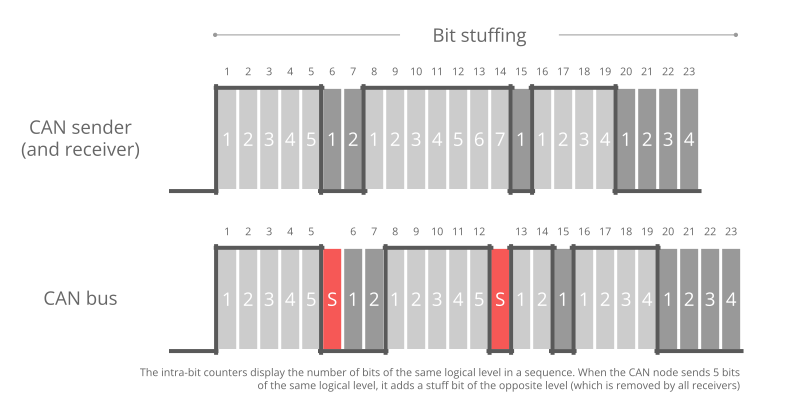
Notice that we highlighted ‘bit stuffing’ across the CAN frame.
Bit stuffing is a subtle, but vital part of the CAN standard. Basically it states that whenever a CAN node
sends five bits of the same logic level (dominant or recessive), it must send one bit of the opposite level.
This extra bit is automatically removed by the receiving CAN nodes. This process helps ensure continuous
synchronisation of the network.
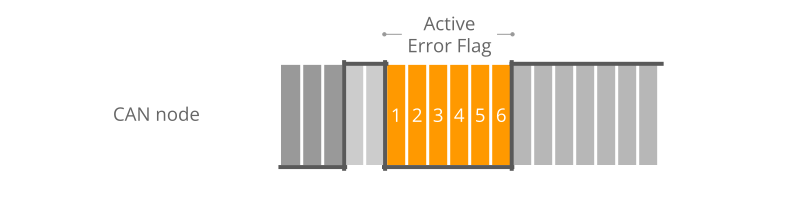
As per the previous example, when CAN node 1 detects an error during the transmission of a CAN message, it
immediately transmits a sequence of 6 bits of the same logic level — also referred to as raising an Active
Error Flag.
If we measure the transmission of a CAN frame via an oscilloscope and digitize the result, we can also
see the stuff bits in practice (see the red timestamp marks):
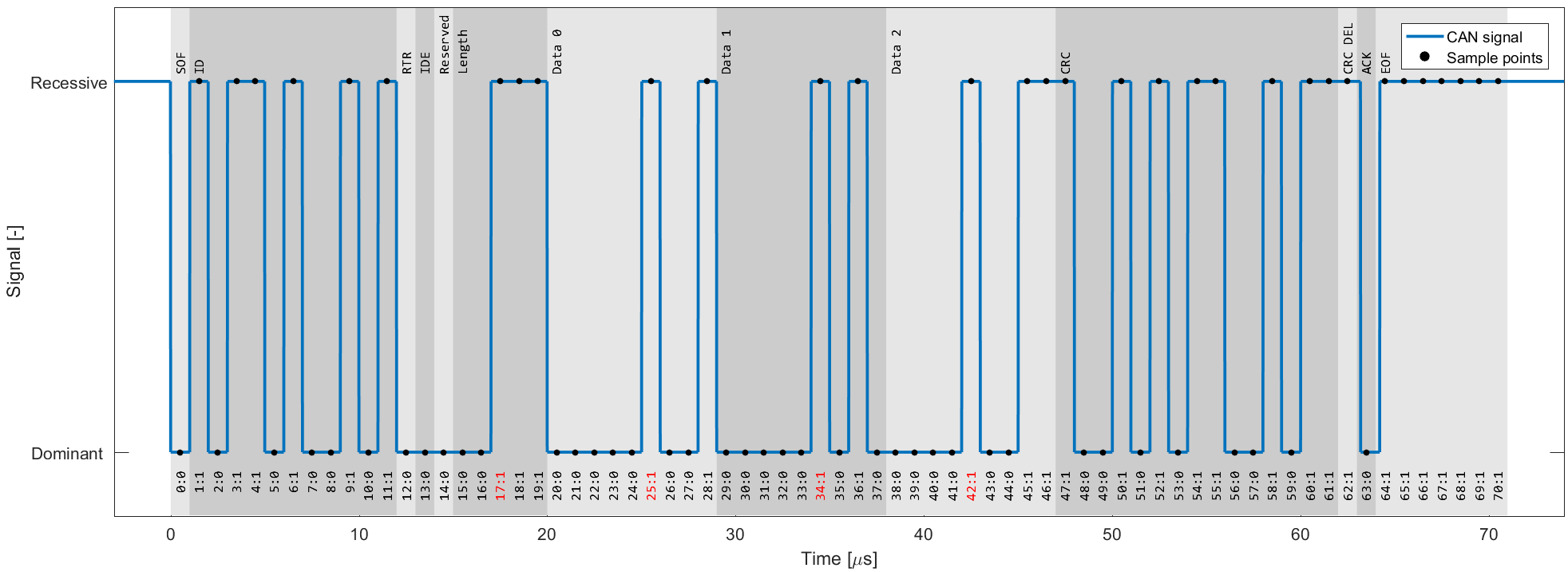
Active Error Flags
As we just learned, such a sequence is a violation of the bit stuffing rule — aka a ‘Bit Stuffing Error’.
Further, this error is visible to all CAN nodes on the network (in contrast to the ‘Bit Error’ that resulted
in this error flag being raised). Thus, the raising of error flags can be seen as a way of
«globalizing» the discovery of an error, ensuring that every CAN node is informed.
Note that the other CAN nodes will see the Active Error Flag as a Bit Stuffing Error. In
response they also raise an Active Error Flag.
As we’ll explain shortly, it is important to distinguish between the error flags. In particular, the first
error flag
(from the ‘discovering’ node) is often referred to as a ‘primary’ Active Error Flag, while
the error flags of
subsequent ‘reacting’ nodes are referred to as the ‘secondary’ Active Error Flag(s).
3 CAN error frame examples
Let’s look at three example scenarios:
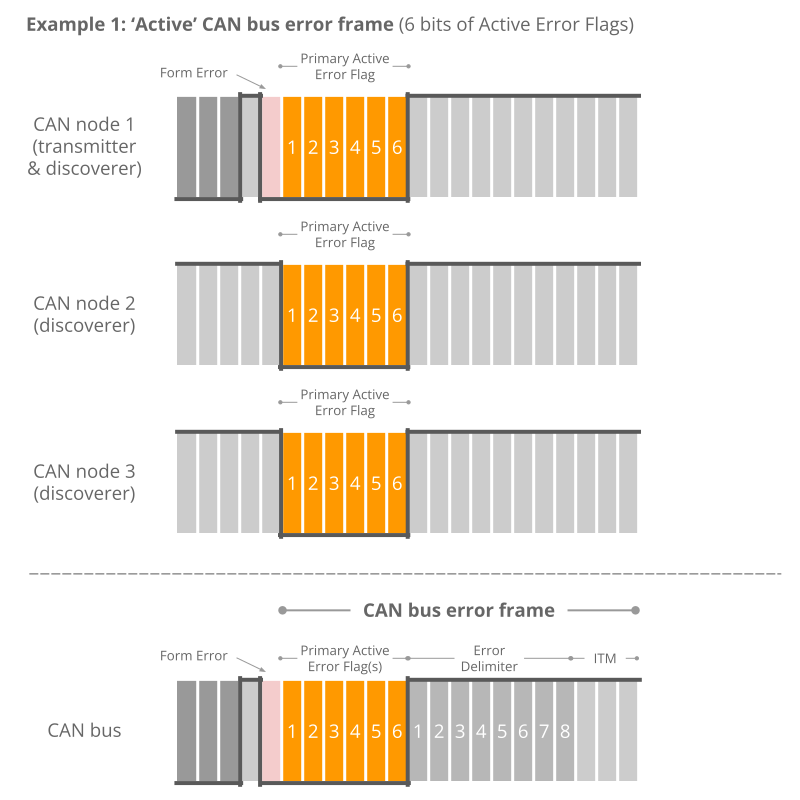
Example 1: 6 bits of error flags
Here, all CAN nodes simultaneously discover that an error exists in a CAN message and raise their error
flags at the same time.
The result is that the error flags all overlap and the total sequence of dominant
bits lasts for 6 bits in total. All CAN nodes will in this case consider themselves the ‘discovering’ CAN
nodes.
This type of simultaneous discovery is less common in practice. However, it could e.g. happen as a
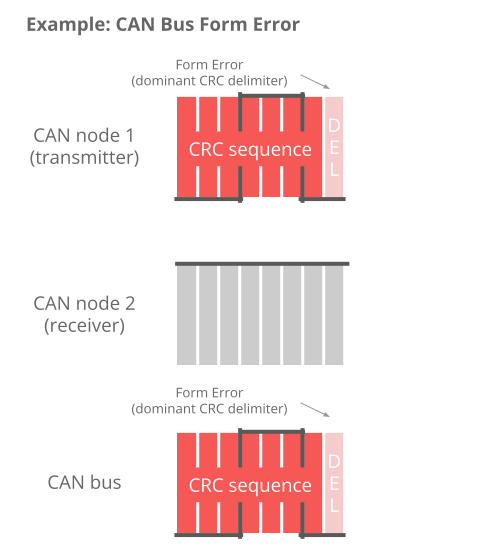
result of Form
Errors (such as a CRC delimiter being dominant instead of recessive), or if a CAN transmitter
experiences a bit error during the writing of a CRC field.
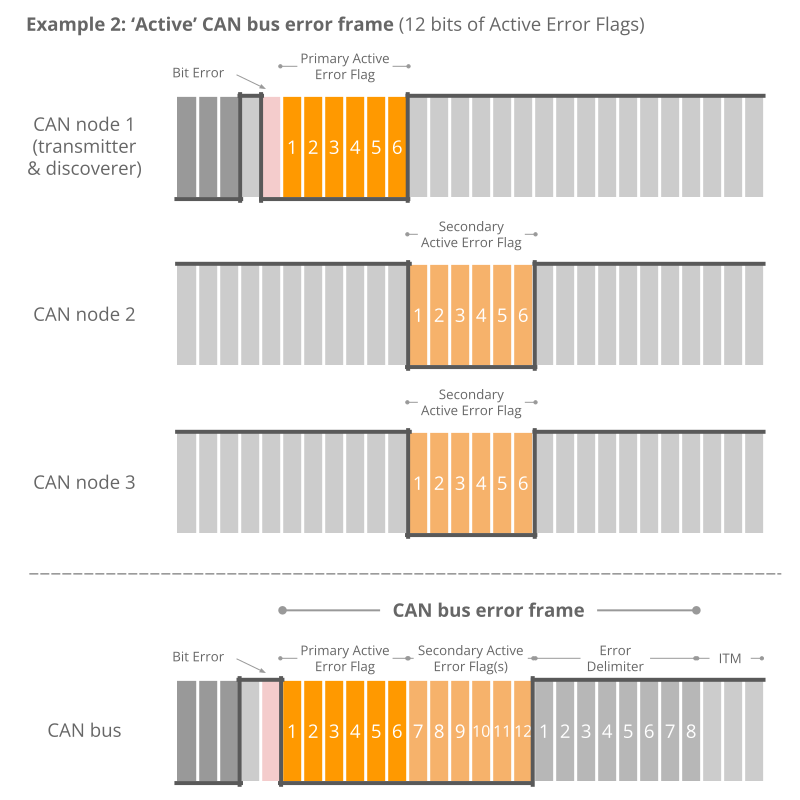
Example 2: 12 bits of error flags
Here, CAN node 1 transmits a dominant bit, but reads it as recessive — meaning that it discovers a Bit Error.
It immediately transmits a sequence of 6 dominant bits.
The other nodes only discover the Bit Stuffing Error
after the full 6 bits have been read, after which they simultaneously raise their error flags, resulting in
a subsequent sequence of 6 dominant bits — i.e. 12 in total.
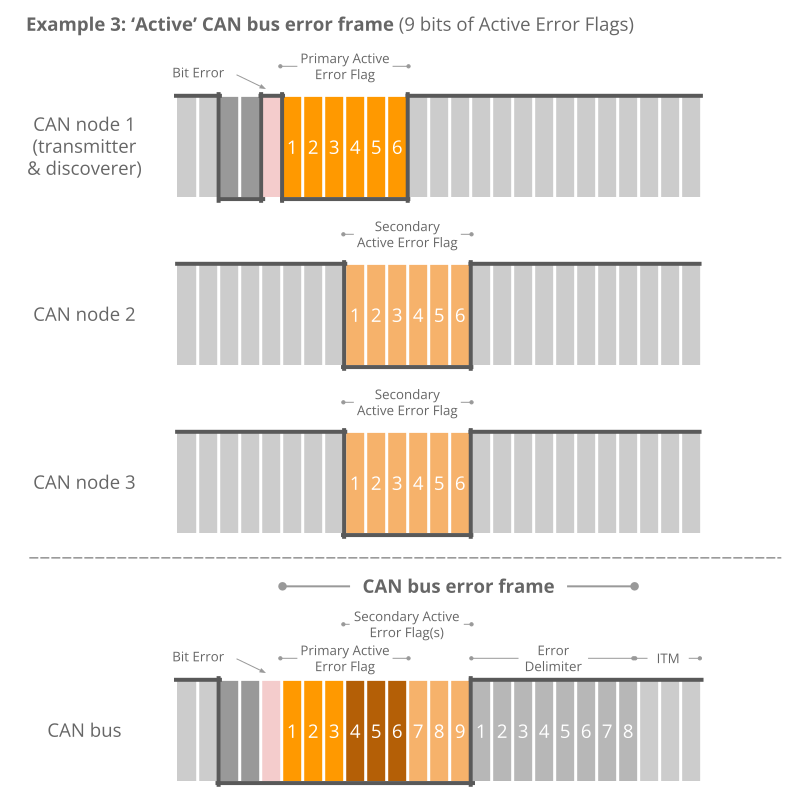
Example 3: 9 bits of error flags
Here, CAN node 1 has already transmitted a sequence of 3 dominant bits when it discovers a Bit Error and
begins sending 6 dominant bits.
Once halfway through the primary Active Error Flag, nodes 2 and 3 recognize
the Bit Stuffing Error (due to the 3 initial dominant bits being followed by another 3 dominant bits) and
they begin raising their error flags. The result is that the sequence of dominant bits from error flags
becomes 9 bit long.
The above logic of raising error flags is reflected in what we call an ‘active’ CAN error frame.
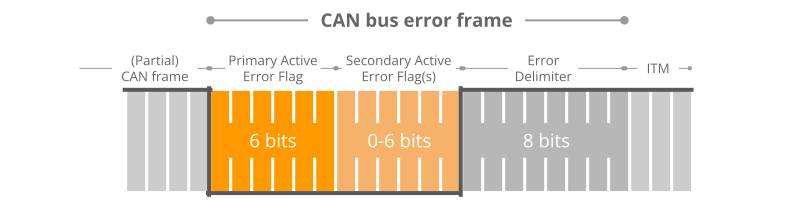
Note in particular how the secondary error flags raised by various nodes overlap each other — and how the
primary and secondary flags may overlap as well. The result is that the dominant bit sequence from raised
error
flags may be 6 to 12 bits long.
This sequence is always terminated by a sequence of 8 recessive bits, marking the end of the error frame.
In practice, the active error frame may «begin» at different places in the erroneous CAN frame, depending on
when the
error is discovered. The result, however, will be the same: All nodes discard the erroneous CAN frame and
the
transmitting node can attempt to re-transmit the failed message.
Passive Error Flags
If a CAN node has moved from its default ‘active’ state to a ‘passive’ state (more on this shortly), it will only be
able to raise so-called ‘Passive Error Flags’. A Passive Error Flag is a sequence of 6 recessive bits as seen below.
In this case it’s relevant to distinguish between a Passive Error Flag raised by a transmitting node and a receiving
node.
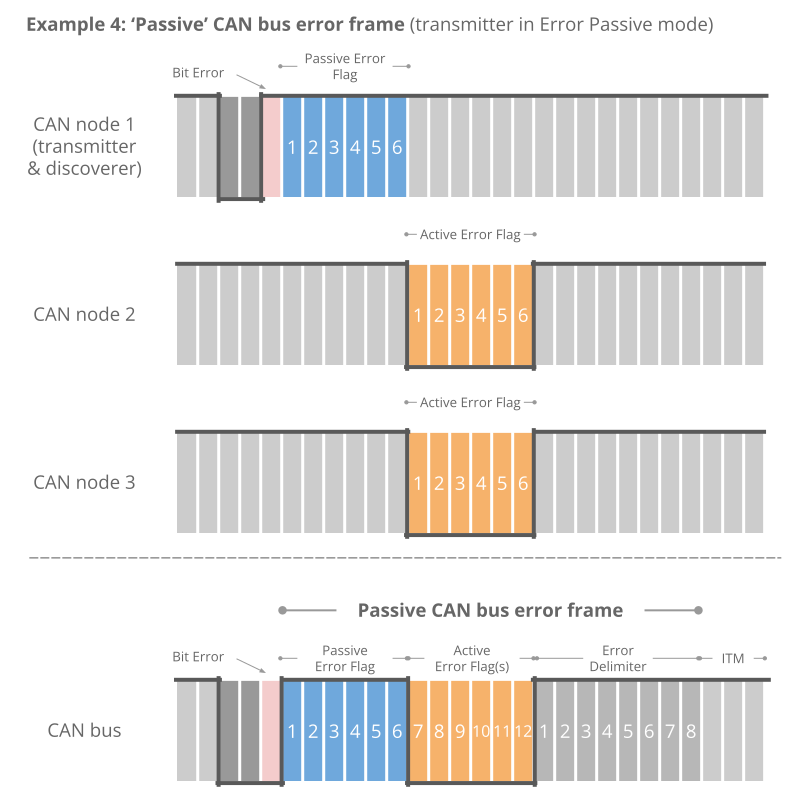
Example 4: Transmitter is Error Passive
As shown in the illustration (Example 4), if a transmitter (such as CAN node 1 in our example) raises a
Passive Error Flag (e.g. in response to a Bit Error), this will correspond to a consecutive sequence of 6
recessive bits.
This is in turn detected as a Bit Stuffing Error by all CAN nodes. Assuming the other CAN
nodes are still in their Error Active state, they will raise Active Error Flags of 6 dominant bits. In other
words, a passive transmitter can still «communicate» that a CAN frame is erroneous.
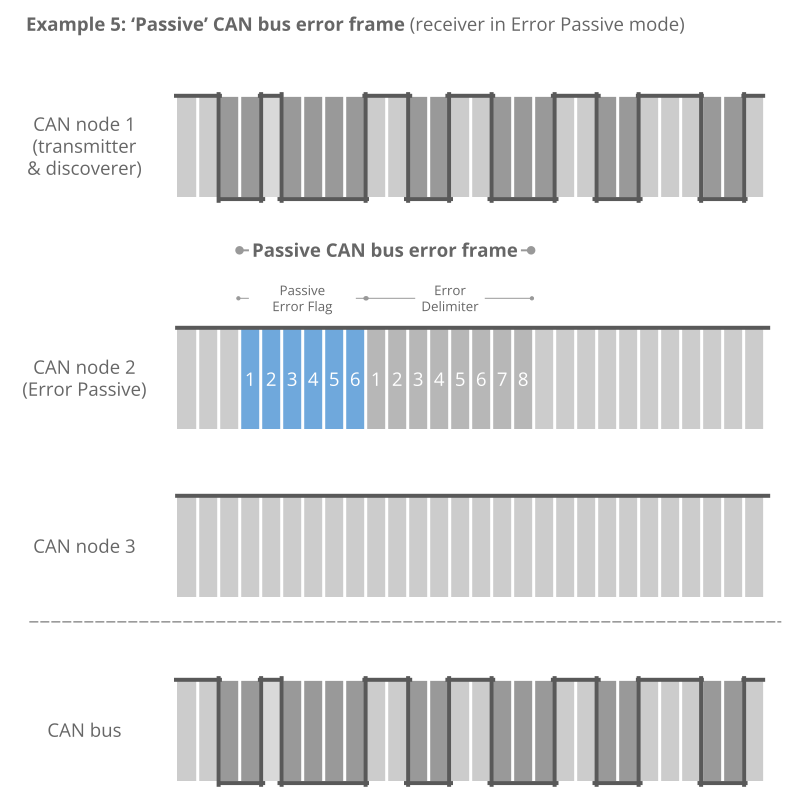
Example 5: Receiver is Error Passive
In contrast, if a receiver raises a Passive Error Flag this is in practice «invisible» to all other CAN nodes
on the bus (as any dominant bits win over the sequence of recessive bits) — see also Example 5.
Effectively,
this means that an Error Passive receiver no longer has the ability to destroy frames transmitted by
other CAN nodes.
CAN error types
Next, let us look at what errors may cause CAN nodes to raise error flags.
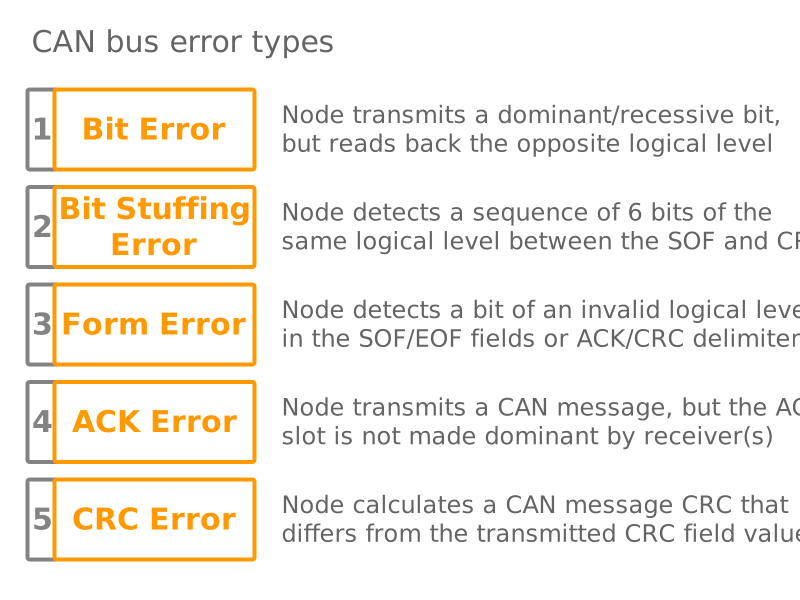
The CAN bus protocol specifies 5 CAN error types:
- Bit Error [Transmitter]
- Bit Stuffing Error [Receiver]
- Form Error [Receiver]
- ACK Error (Acknowledgement) [Transmitter]
- CRC Error (Cyclic Redundancy Check) [Receiver]
We’ve already looked at Bit Errors and Bit Stuffing Errors briefly, both of which are evaluated at the bit
level. The remaining three CAN error types are evaluated at the message level.
Below we detail each error type:
#1 Bit Error
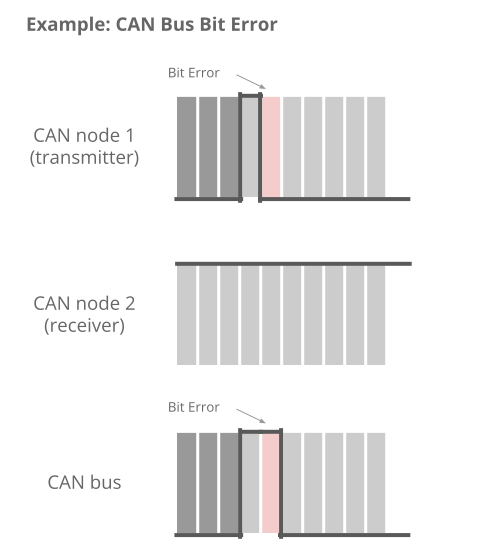
Every CAN node on the CAN bus will monitor the signal level at any given time — which means that a
transmitting CAN node also «reads back» every bit it transmits. If the transmitter reads a different data
bit level vs. what it transmitted, the transmitter detects this as a Bit Error.
If a bit mismatch occurs during the arbitration process (i.e. when sending the CAN ID), it is not
interpreted as a Bit Error. Similarly, a mismatch in the acknowledgement slot (ACK field) does not cause
a Bit Error as the ACK field specifically requires a recessive bit from the transmitter to be
overwritten by a dominant bit from a receiver.
#2 Bit Stuffing Error
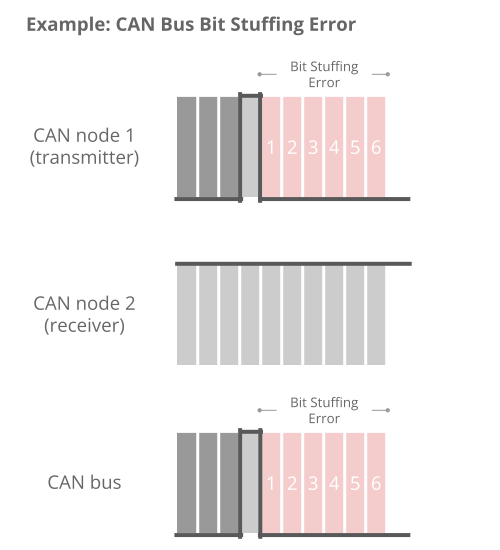
As explained, bit stuffing is part of the CAN standard. It dictates that after every 5 consecutive bits of
the same logical level, the 6th bit must be a complement. This is required to ensure the on-going
synchronization of the network by providing rising edges. Further, it ensures that a stream of bits are not
mis-interpreted as an error frame or as the interframe space (7 bit recessive sequence) that marks the end
of a message. All CAN nodes automatically remove the extra bits.
If a sequence of 6 bits of the same logical level is observed on the bus within a CAN message (between the
SOF and CRC field), the receiver detects this as a Bit Stuffing Error aka Stuff Error.
#3 Form Error
This message-level check utilises the fact that certain fields/bits in the CAN message must always be of a
certain logical level. Specifically the 1-bit SOF must be dominant, while the entire 8-bit EOF field must be
recessive. Further, the ACK and CRC delimiters must be recessive. If a receiver finds that any of these are
bits are of an invalid logical level, the receiver detects this as a Form Error.
#4 ACK Error (Acknowledgement)
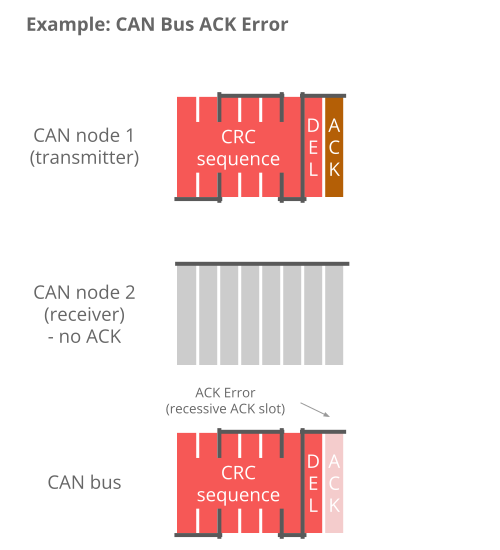
When a transmitter sends a CAN message, it will contain the ACK field (Acknowledgement), in which the
transmitter will transmit a recessive bit. All listening CAN nodes are expected to send a dominant bit in
this field to verify the reception of the message (regardless of whether the nodes are interested in the
message or not). If the transmitter does not read a dominant bit in the ACK slot, the
transmitter detects this as an ACK Error.
#5 CRC Error (Cyclic Redundancy Check)
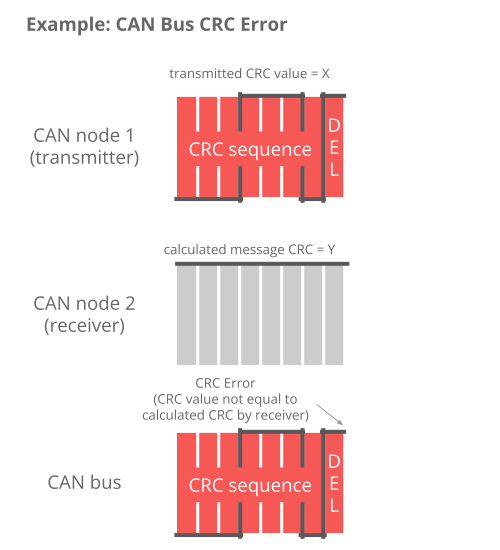
Every CAN message contains a Cyclic Redundancy Checksum field of 15 bits. Here, the transmitter has
calculated the CRC value and added it to the message. Every receiving node will also calculate the CRC on
their own. If the receiver’s CRC calculation does not match the transmitter’s CRC, the
receiver detects this as a CRC Error.
CAN node states & error counters
As evident, CAN error handling helps destroy erroneous messages — and enables CAN nodes to retry the
transmission of
erroneous messages.
This ensures that short-lived local disturbances (e.g. from noise) will not
result in
invalid/lost data. Instead, the transmitter attempts to re-send the message. If it wins arbitration
(and there
are no errors), the message is successfully sent.
However, what if errors are due to a systematic malfunction in a transmitting node? This could
trigger an endless loop of sending/destroying the same message — jamming the CAN bus.
This is where CAN node states and error counters come in.
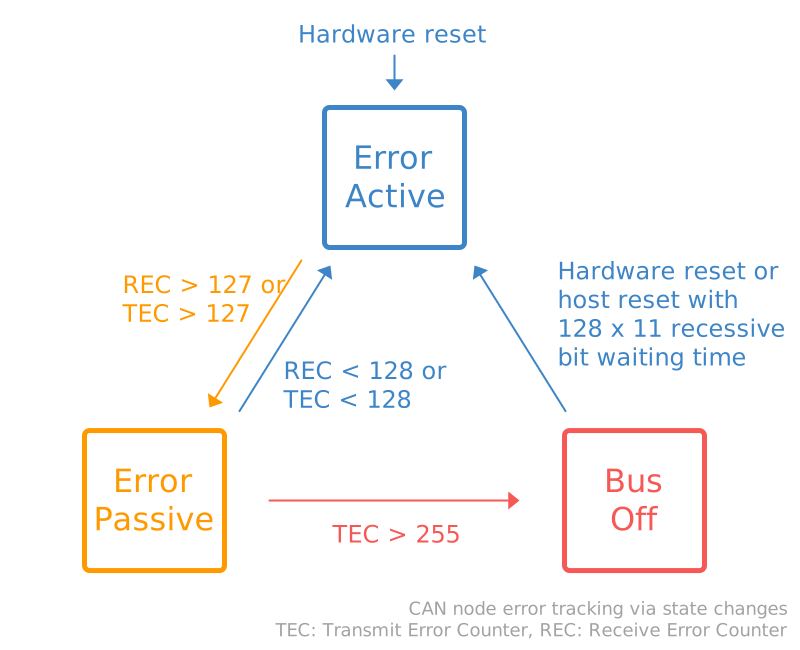
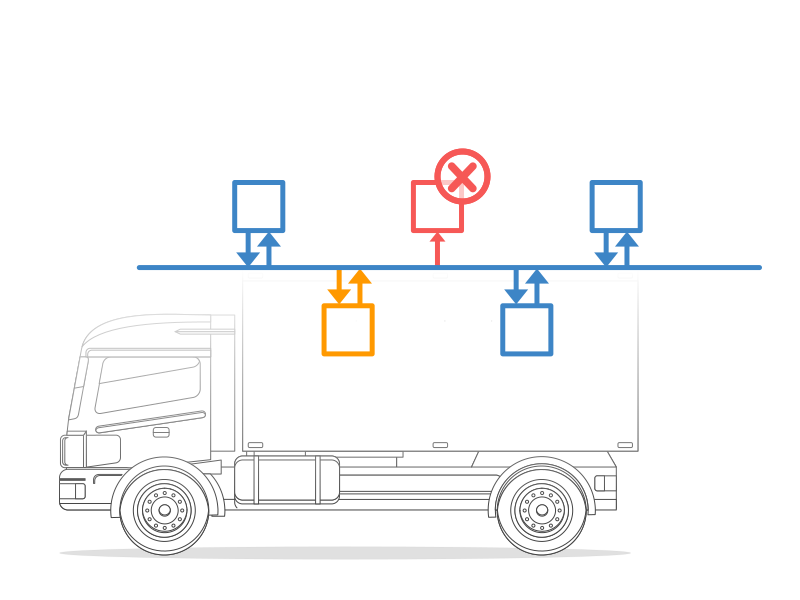
In short, the purpose of CAN error tracking is to confine errors by gracefully reducing the privileges of
problematic CAN nodes.
Specifically, let’s look at the three possible states:
-
Error Active: This is the default state of every CAN node, in which
it is able to
transmit data
and raise ‘Active Error Flags’ when detecting errors -
Error Passive: In this state, the CAN node is still able to
transmit data, but it now
raises
‘Passive Error Flags’ when detecting errors. Further, the CAN node now has to wait for an extra 8 bits
(aka
Suspend Transmission Time) in addition to the 3 bit intermission time before it can resume data
transmission (to
allow other CAN nodes to take control of the bus) -
Bus Off: In this state, the CAN node disconnects itself from the
CAN bus and can no
longer
transmit data or raise error flags
Every CAN controller keeps track of its own state and acts accordingly.
CAN nodes shift state depending on the value of their error counters. Specifically, every CAN node
keeps track on a Transmit Error Counter (TEC) and Receive Error Counter
(REC):
- A CAN node
enters the Error Passive state if the REC or TEC exceed 127 - A CAN node
enters the Bus Off state if the TEC exceeds 255
How do the error counters change?
Before we get into the logic of how error counters are increased/reduced, let us revisit the CAN error frame
as well
as the primary/secondary error flags.
As evident from the CAN error frame illustration, a CAN node that observes a dominant bit after its
own
sequence of 6
dominant bits will know that it raised a primary error flag. In this case, we can call this CAN
node the
‘discoverer’ of the error.
At first, it might sound positive to have a CAN node that repeatedly discovers errors and reacts promptly by
raising
an error flag before other nodes. However, in practice, the discoverer is typically also the culprit causing
errors
— and hence it is punished more severely as per the overview.
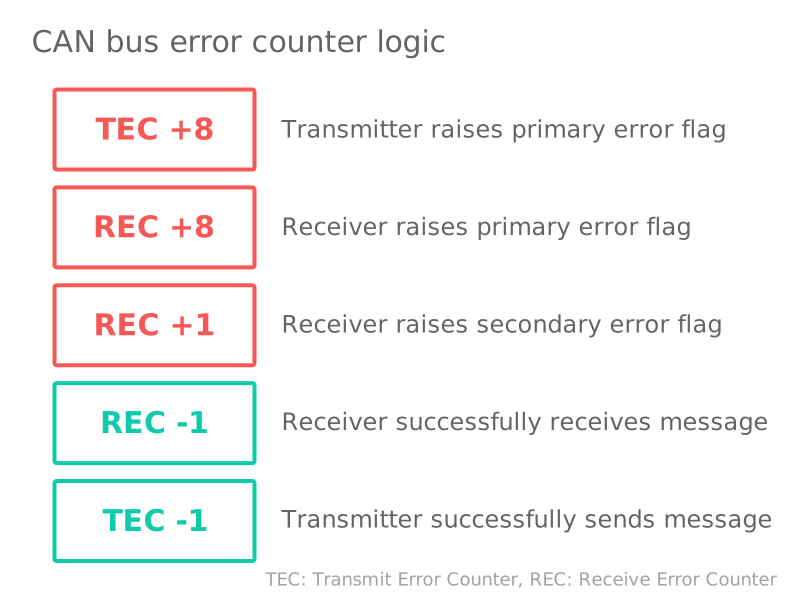
There are some additions/exceptions to the above rules, see e.g. this overview.
Most are pretty straight-forward based on our previous illustrative example. For example, it seems clear that CAN
node 1 would increase the TEC by 8 as it discovers the Bit Error and raises an error flag. The other nodes in
this
case increase their REC by 1.
This has the intuitive consequence that the transmitting node will quickly reach the Error Passive and eventually
Bus
Off states if it continuously produces faulty CAN messages — whereas the receiving nodes do not change state.
The case where a receiver raises the primary error flag may seem counter-intuitive. However, this could for
example
be the case if a receiver CAN node is malfunctioning in a way that causes it to incorrectly detect errors in
valid
CAN messages. In such a case, the receiver would raise the primary error flag, effectively causing an error.
Alternatively, it can happen in cases where all CAN nodes simultaneously raise error flags.
CAN/LIN data & error logger
The CANedge1 lets you easily
record data from 2 x CAN/LIN buses to an 8-32 GB SD card — incl. support for logging CAN/LIN errors. Simply
connect it to e.g. a car or truck to start logging —
and decode the data via free
software/APIs.
Further, the CANedge2
(WiFi) and CANedge3 (3G/4G)
let you push data to your own server — and update devices over-the-air.
learn
about the CANedge
Examples: Generating & logging error frames
We have now covered the theoretical basics of CAN errors and CAN error handling. Next, let us look at generating and
logging errors in practice. For this we will use a couple of CANedge devices — and for some tests a
PCAN-USB device.
Tip: Download the MF4 data for the tests to view the data in asammdf or CANalyzer.
download data
Test #1: No CAN bus errors
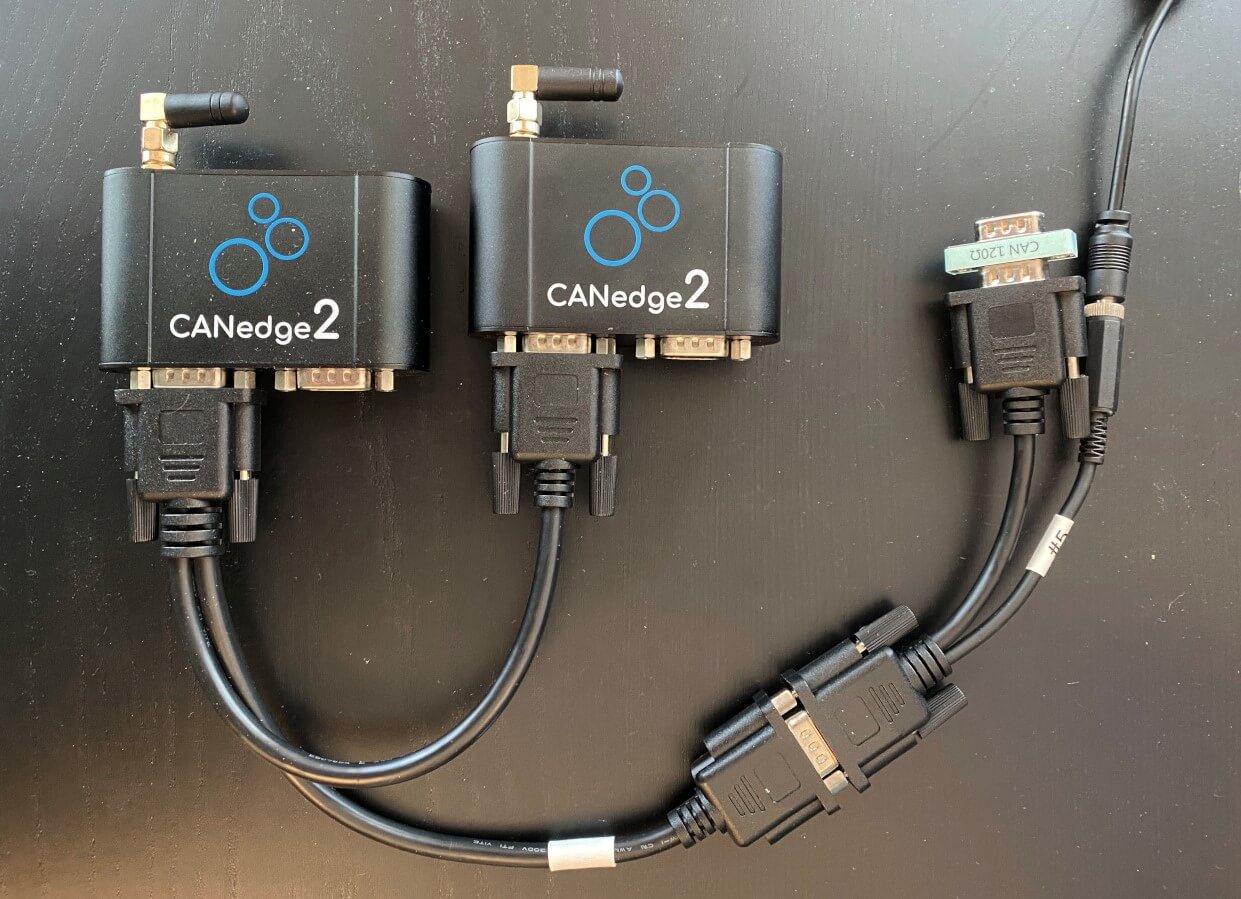
As a benchmark, we start with a test involving no CAN bus errors. Here, a CANedge2 ‘transmitter’ sends
data to another CANedge2 ‘receiver’ — and both log CAN bus errors.
By loading the MF4 log
file in the asammdf GUI we
verify that no CAN errors occurred during this test, which is to be expected.
Test #2: Removing the CAN bus terminal resistor
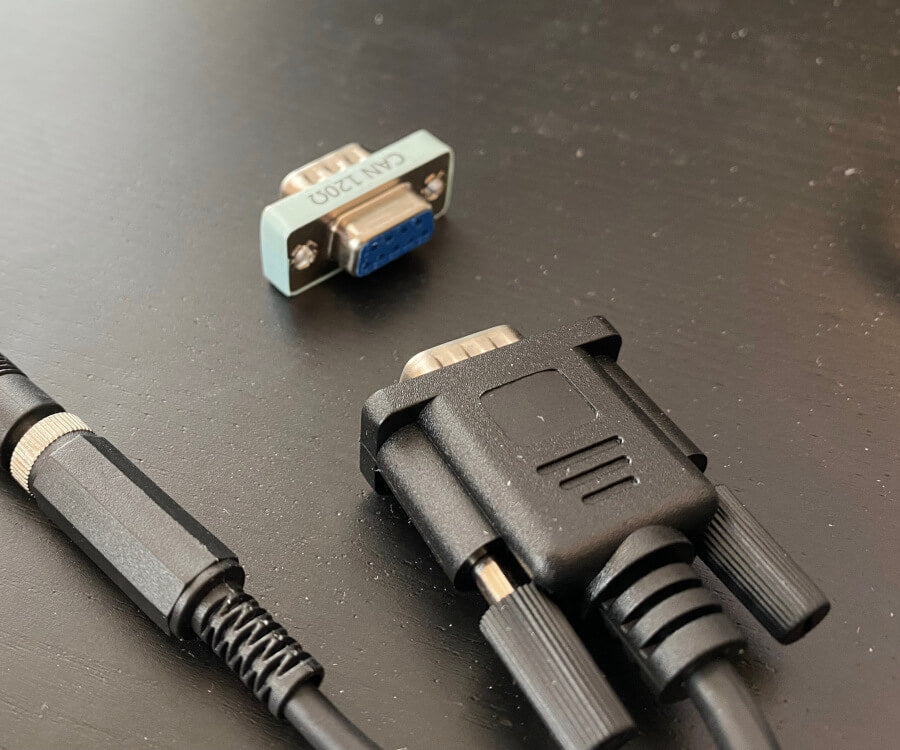
In this test, we remove the CAN termination in the middle of a log session. This effectively corresponds to
immediately setting the bit level to dominant. As a result, the CANedge2 transmitter immediately starts
logging Bit Errors (which occur when it attempts to transmit a recessive bit, but reads a
dominant bit). The
CANedge2 Receiver logs Bit Stuffing Errors as it detects 6 consecutive dominant bits.
These errors are
recorded until the termination is added again.
Lack of termination is rarely a practical issue if you’re recording data from a vehicle, machine etc.
However, it’s a common issue when working with ‘test bench’ setups. Here, the lack of termination may
cause confusion as it can be difficult to distinguish from an inactive CAN bus. If in doubt, enabling
error frame logging on the CANedge can be useful in troubleshooting.
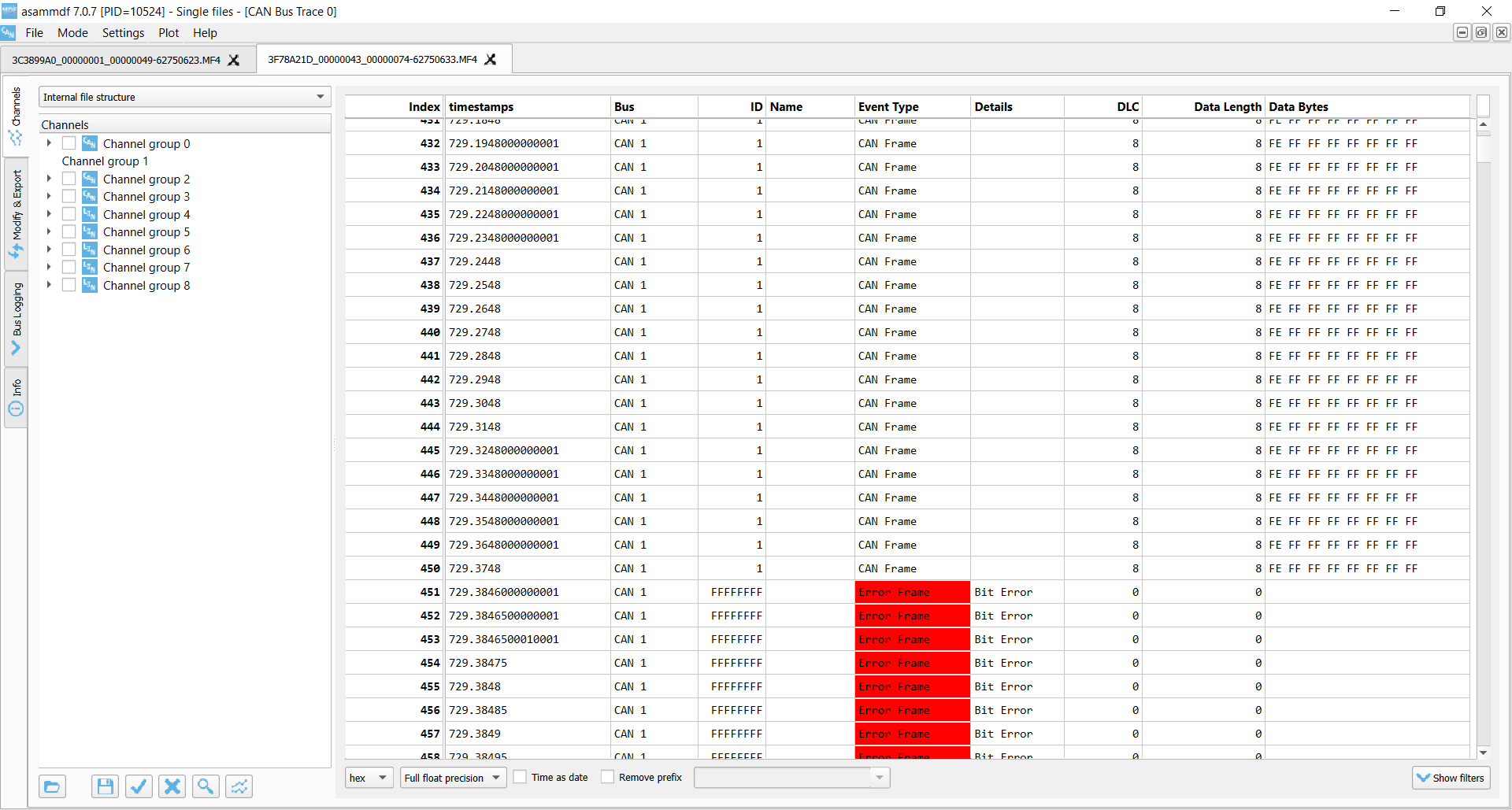
Transmitter Bit Errors
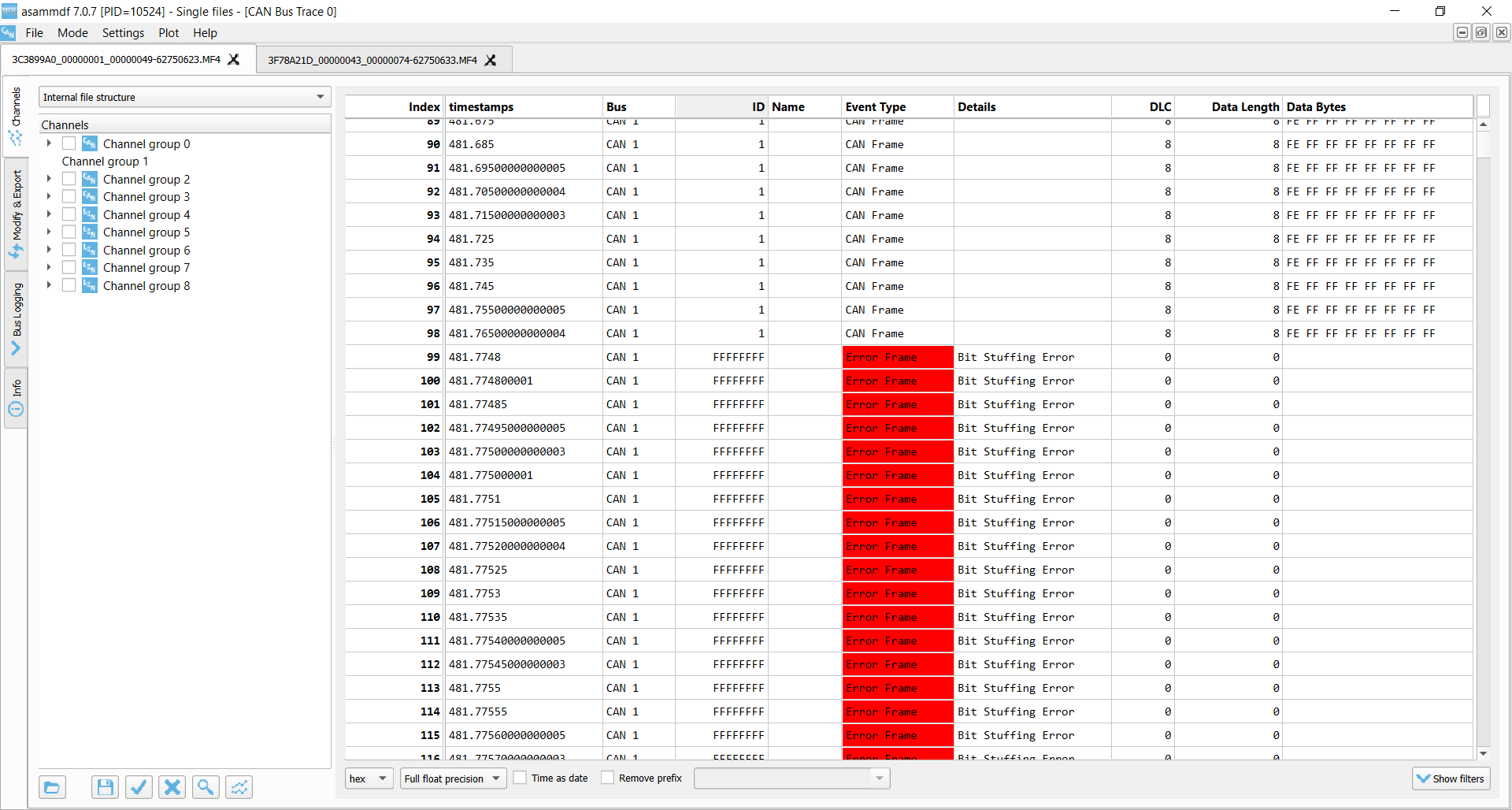
Receiver Bit Stuffing Errors
Test #3: Setting an incorrect baud rate
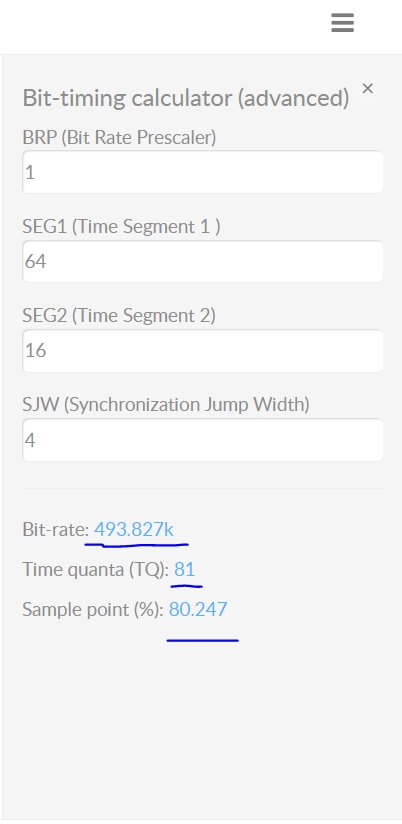
In this test we configure the CANedge receiver node to have a baud rate of 493.827K vs. the baud rate of the
transmitter of 500K. This is a fairly extreme difference and results in ACK Errors for the
transmitter and Bit
Stuffing Errors for the receiver.
In more realistic scenarios, smaller differences in the baud
rate
configuration of
various nodes may cause intermittent error frames and thus message loss.
This example is rather extreme. However, in practice we have sometimes seen CAN buses that use standard
bit rates
(250K, 500K, …), but with specific bit timing settings that differ from the ones that are typically
recommended
(and hence used by the CANedge). This will not lead to a complete shut-down of the communication, but
rather
periodic frame loss of a few percentages. To resolve this, you can construct an ‘advanced bit rate’ in
the
CANedge configuration, essentially setting up the bit-timing to better match the CAN bus you’re logging
from.
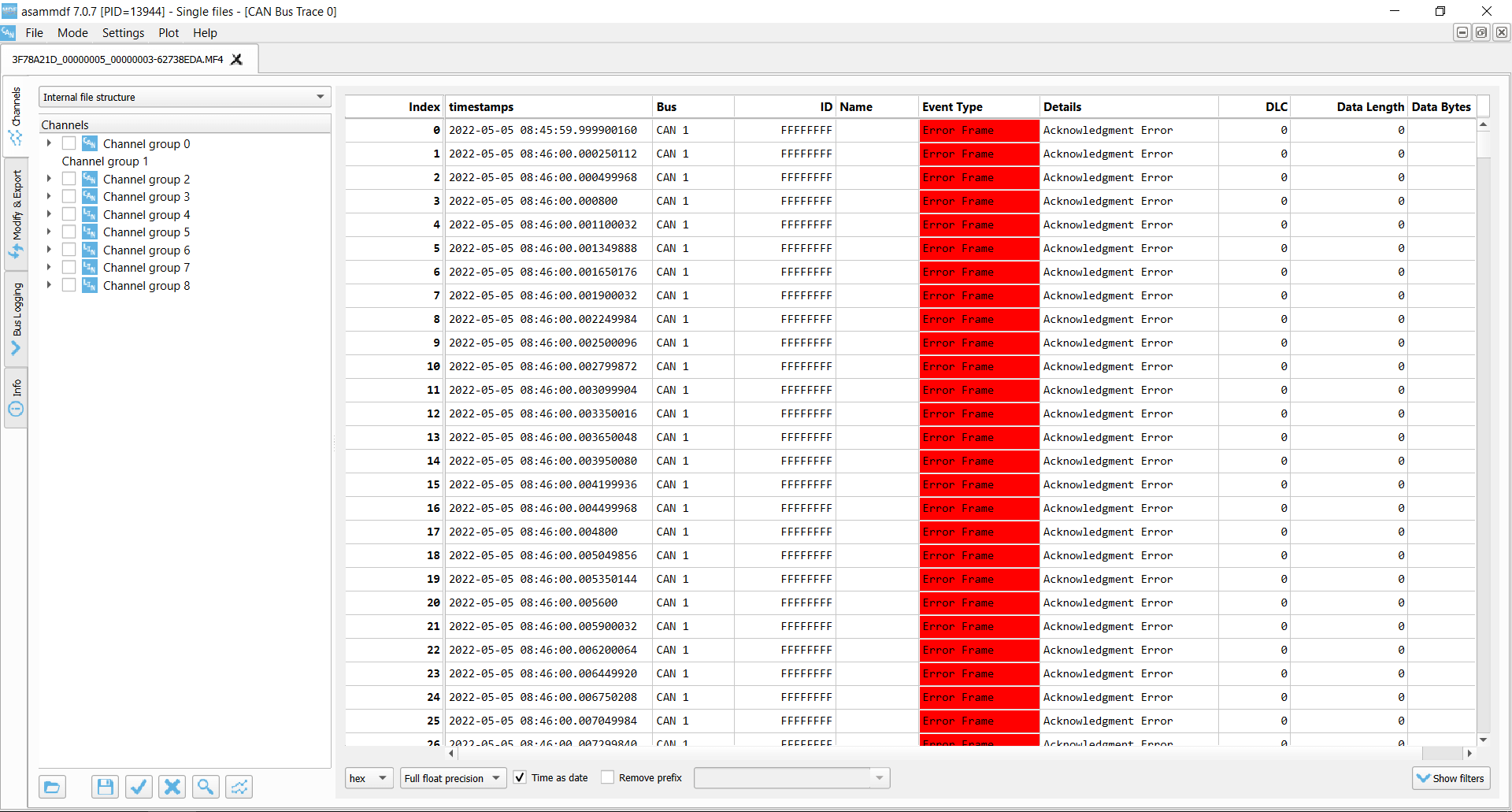
Transmitter ACK Error
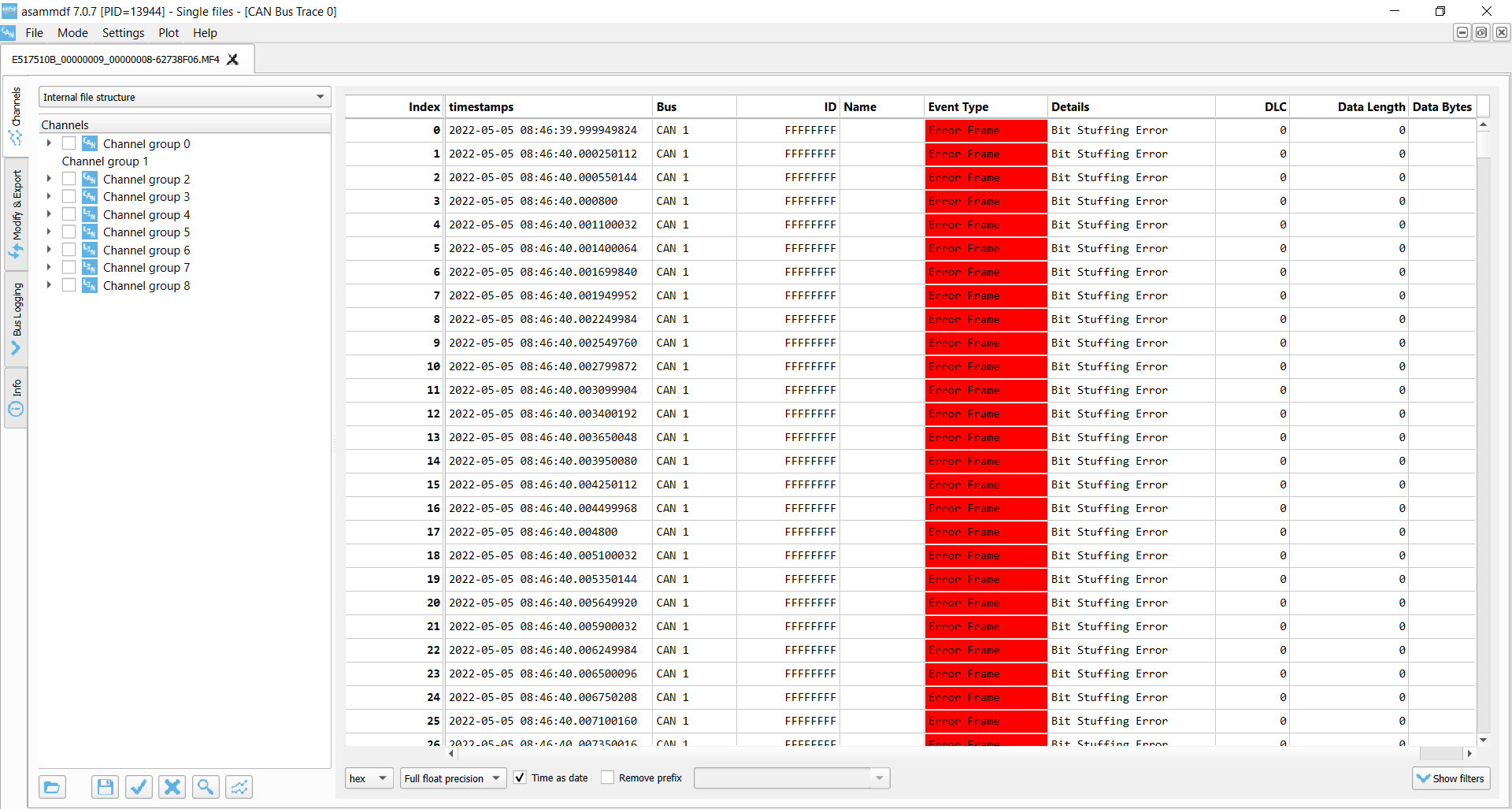
Receiver Bit Stuffing Errors
Test #4: Removing the acknowledging CAN node
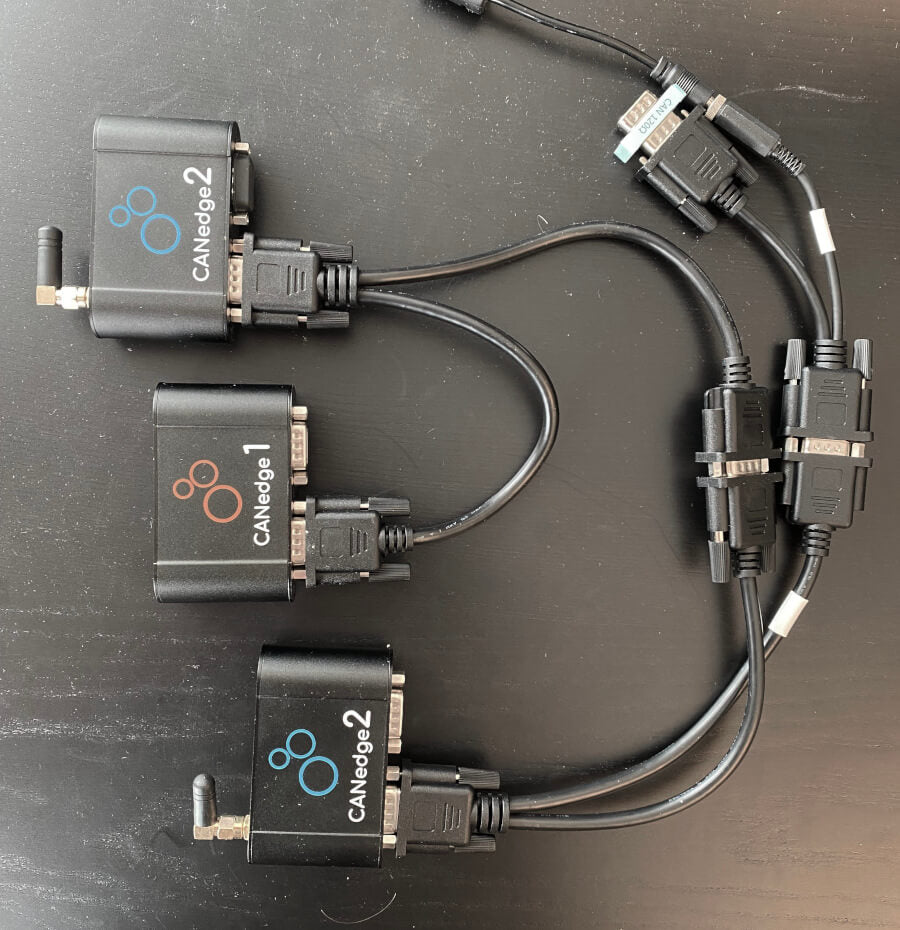
In this test, we use three CANedge units configured as follows:
-
CANedge1: Configured to
acknowledge data -
CANedge2 A:
Configured in ‘silent mode’ (no acknowledgement) -
CANedge2 B:
Configured to transmit a CAN frame every 500 ms
In the default setup, data is transmitted by the CANedge2 B onto the CAN bus and recorded with no errors.
However, if we remove the CANedge1 from the bus there are no longer any CAN nodes to acknowledge the frames
sent by the transmitter.
As a result, the transmitter detects ACK Errors. In response, it increases its
Transmit Error Counter and raises Active Error Flags onto the CAN bus. These are in turn
recorded by CANedge2 A (which silently monitors the bus) as Form Errors.
This is due to the fact that the transmitter raises them upon identifying the lack of a dominant
bit in the ACK slot. As soon as a dominant bit is observed by the receiver in the subsequent EOF field
(which should be recessive), a Form Error is detected.
As evident, the transmitter broadcasts 16 Active Error Flags as its TEC is increased from 0 to 16 x 8 =
128.
The transmitter has now exceeded the threshold of a TEC of 127 and enters Error Passive mode. As a
result,
the transmitter still experiences ACK Errors, but now only raises Passive Error Flags (not visible to
the
receiver). At this point, the transmitter keeps attempting to transmit the same frame — and the receiver
keeps recording this retransmission sequence.
This type of error is one we often encounter in our support tickets. Specifically, users may be trying to
use our CAN loggers to record data from a single CAN node (such as a sensor-to-CAN module like our
CANmod). If they decide to enable ‘silent mode’ on the CANedge in such an installation, no CAN nodes
will acknowledge the single CAN node broadcasting data — and the result will either be empty log files,
or log files filled with retransmissions of the same CAN frame (typically at very high frequency).
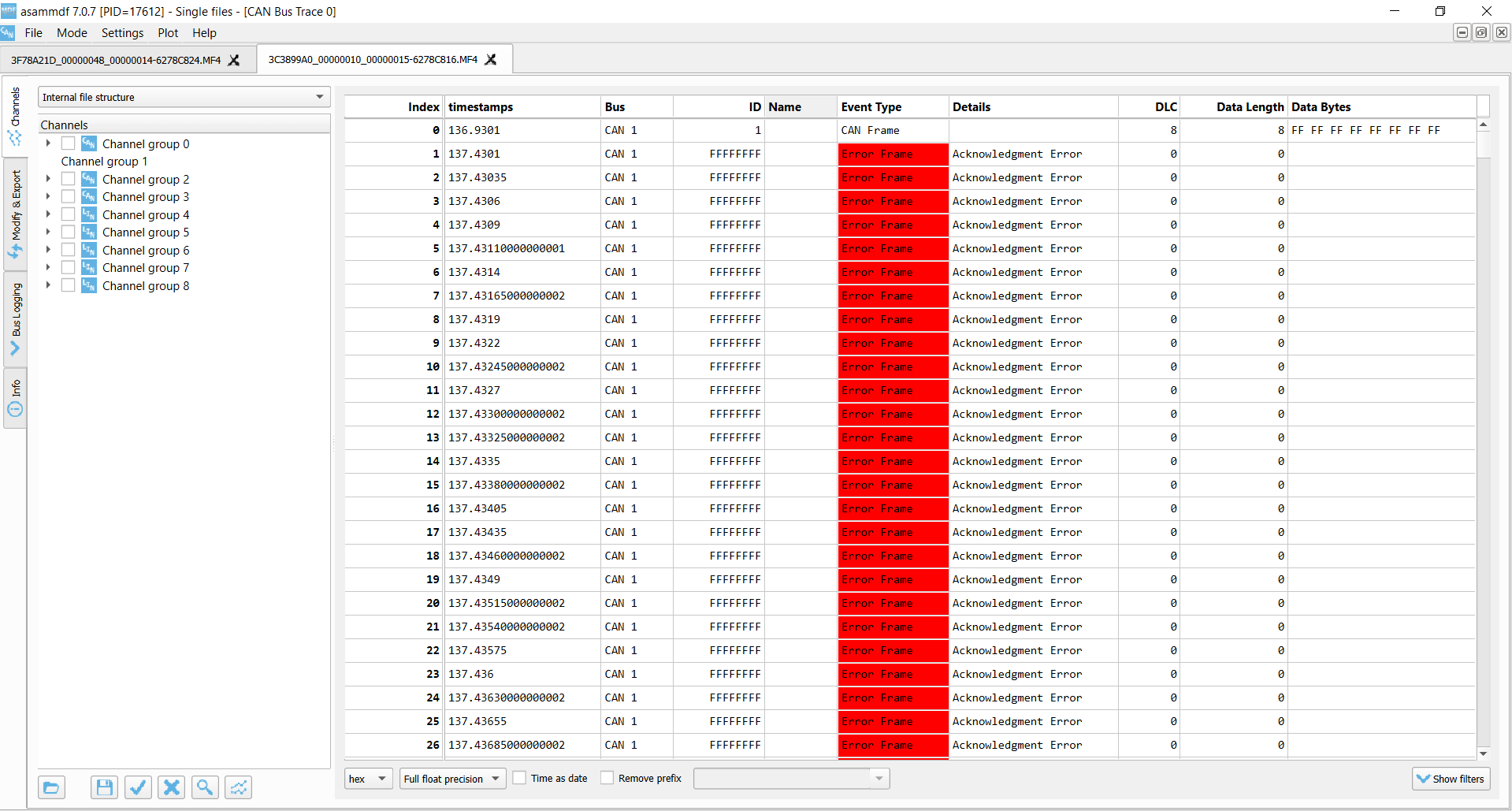
Transmitter ACK Errors
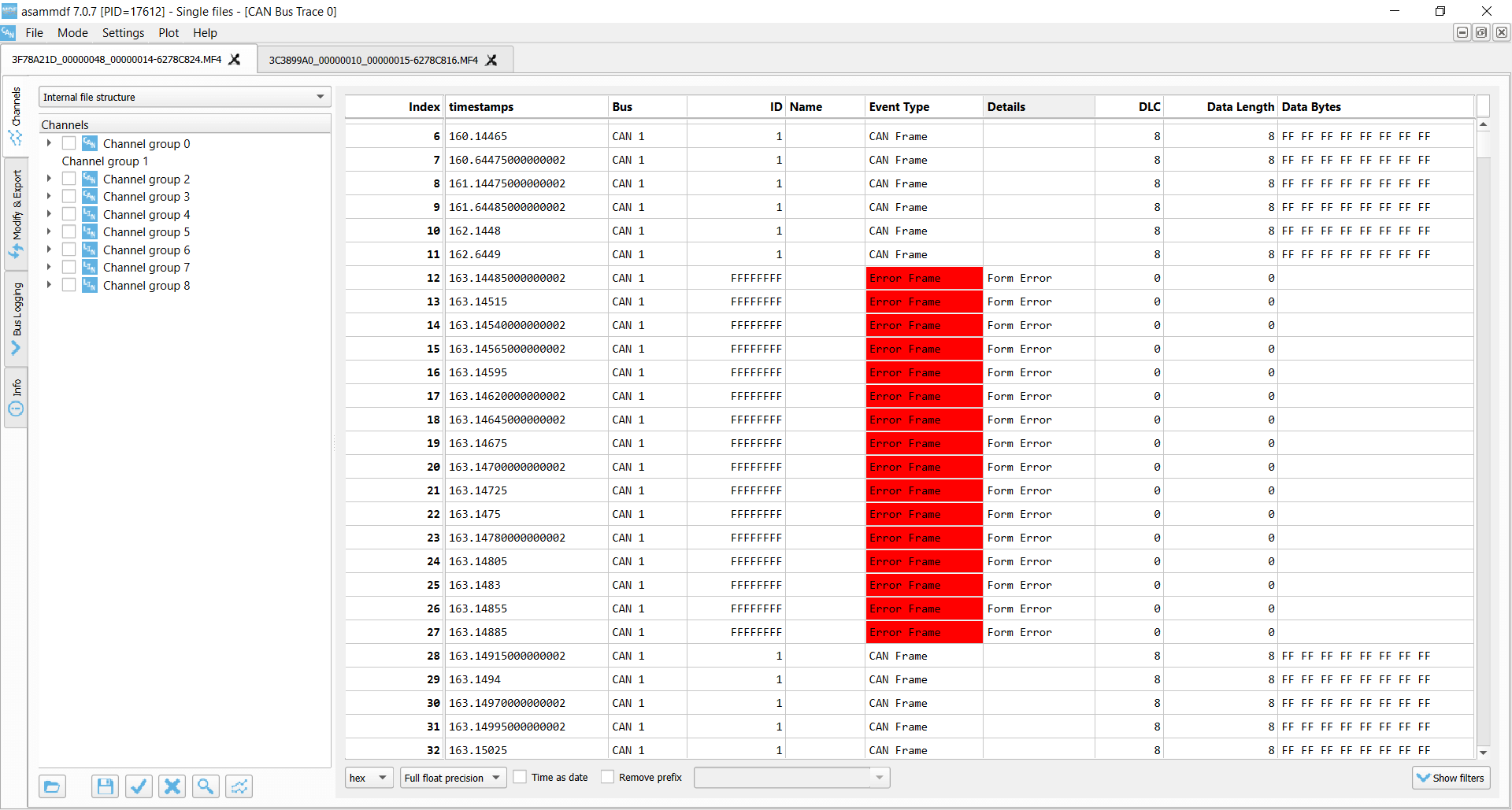
Receiver Form Errors
Test #5: CAN frame collisions (no retransmission)
When setting up a CAN bus, it is key to avoid overlapping CAN IDs. Failing to do so can result in frame
collisions
as two CAN nodes may both believe they’ve won the arbitration — and hence start transmitting their frames at
the same time.
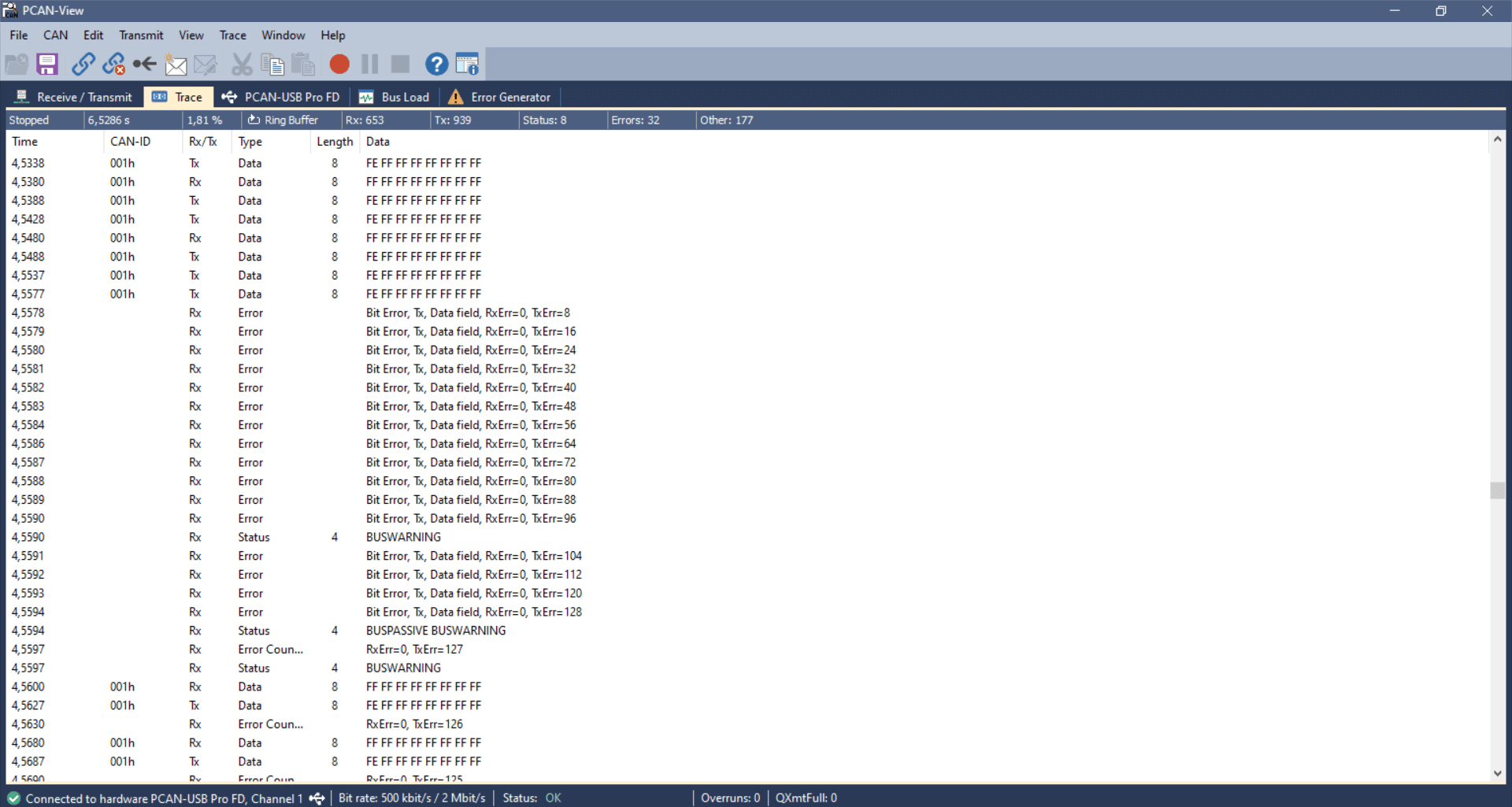
To simulate this, we use the same setup as in test #4. In addition, we connect a PCAN-USB device as a
secondary
transmitter.
The CANedge2 transmitter is now configured to output a single CAN frame every 10 ms with CAN ID 1 and a
payload of
eight 0xFF bytes. Further, we configure the CANedge2 to disable retransmission of frames that were disrupted
by
errors. The PCAN-USB outputs an identical CAN frame every 2 ms with the 1st byte of the payload changed to
0xFE. The
PCAN device has retransmissions enabled.
This setup quickly creates a frame collision, resulting in the CANedge and PCAN transmitters detecting a
Bit
Error.
In response to this, both raise an Active Error Flag, which is detected as a Bit Stuffing
Error by the
CANedge
receiver. The PCAN device immediately attempts a retransmission and succeeds, while the CANedge waits with
further
transmission until the next message is to be sent.
This type of error should of course never happen in e.g. a car, since the design and test processes will
ensure
that all CAN nodes communicate via globally unique CAN identifiers. However, this problem can easily
occur if
you install a 3rd party device (e.g. a sensor-to-CAN module) to inject data into an existing CAN bus. If
you do
not ensure the global uniqueness of the CAN IDs of external CAN nodes, you may cause frame collisions
and hence
errors on the CAN bus. This is particularly important if your external CAN node broadcasts data with
high
priority CAN IDs as you may then affect safety critical CAN nodes.
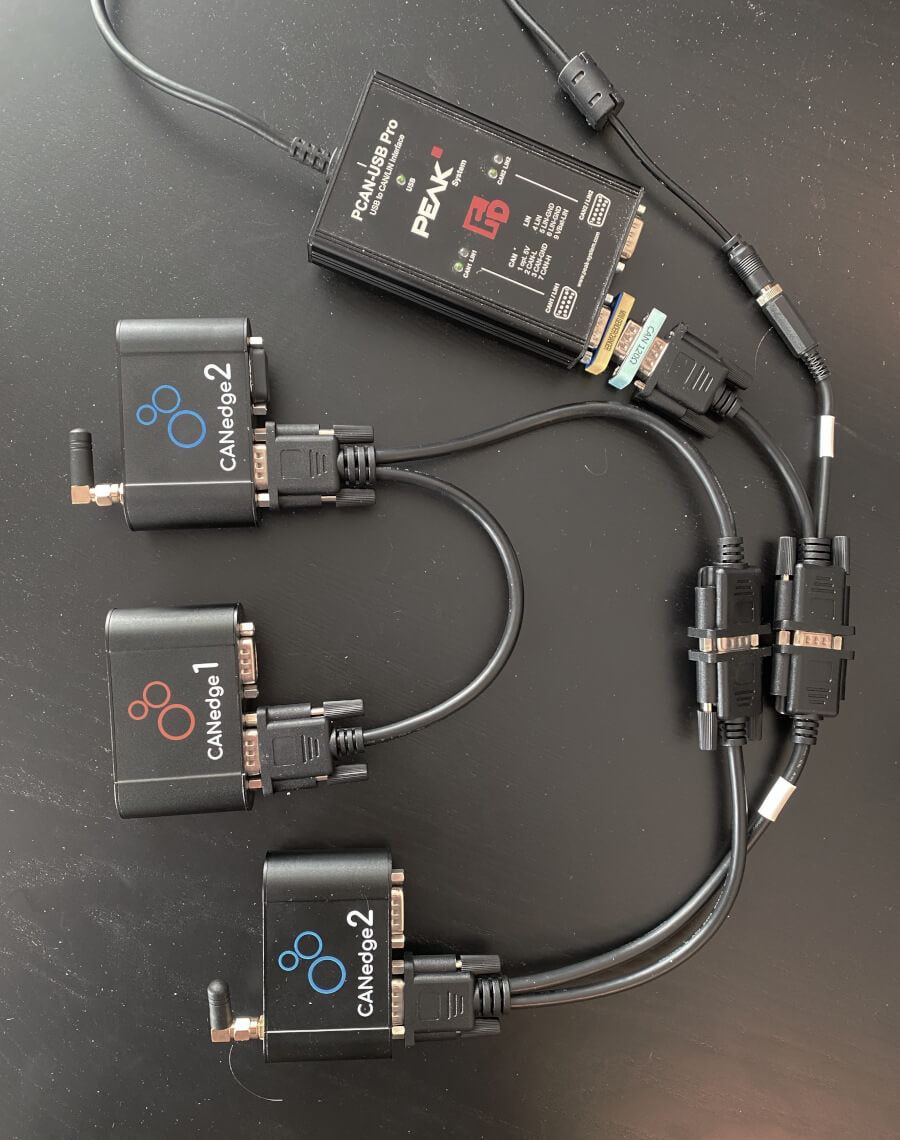
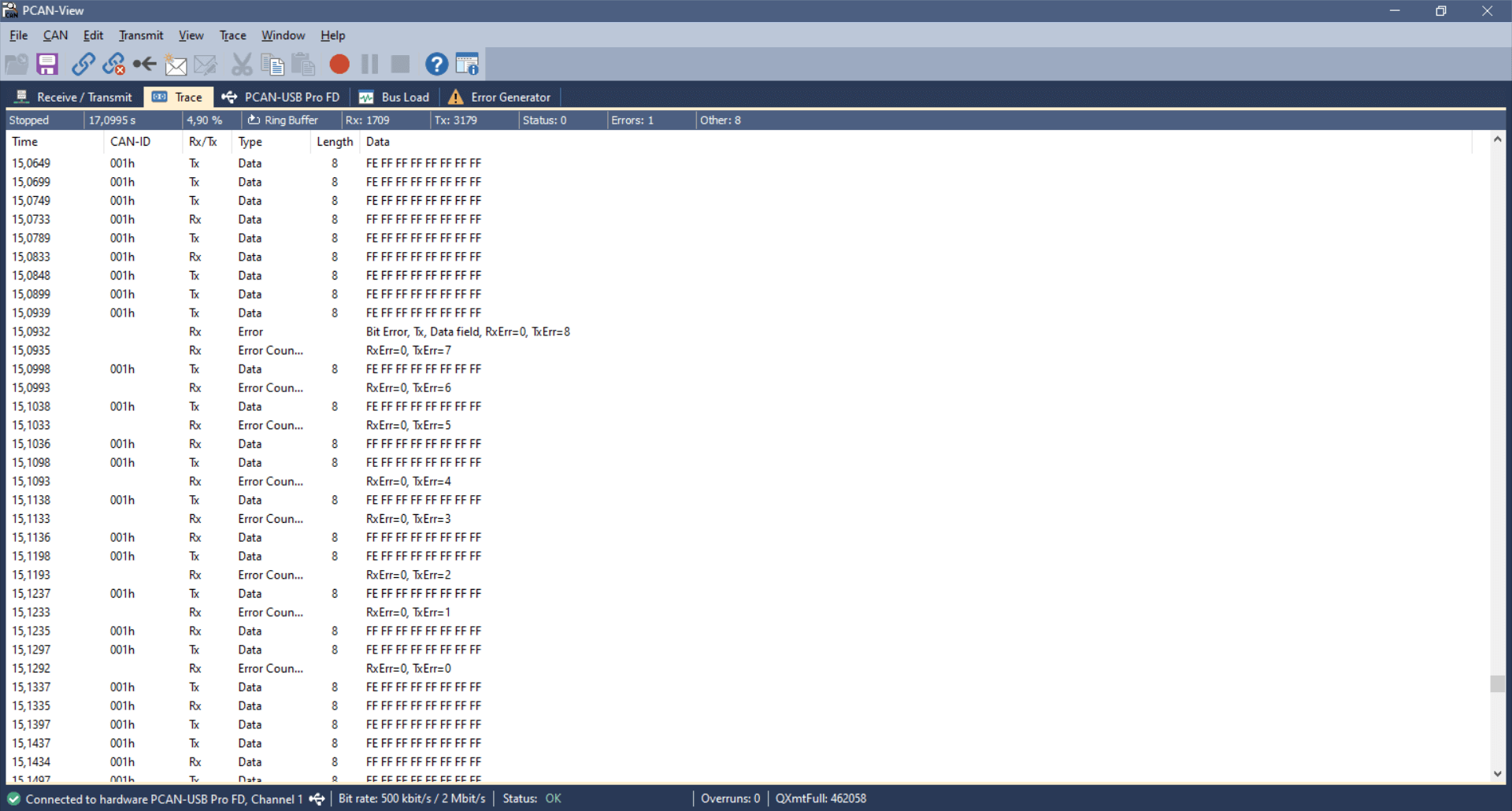
USB-to-CAN transmitter Bit Error
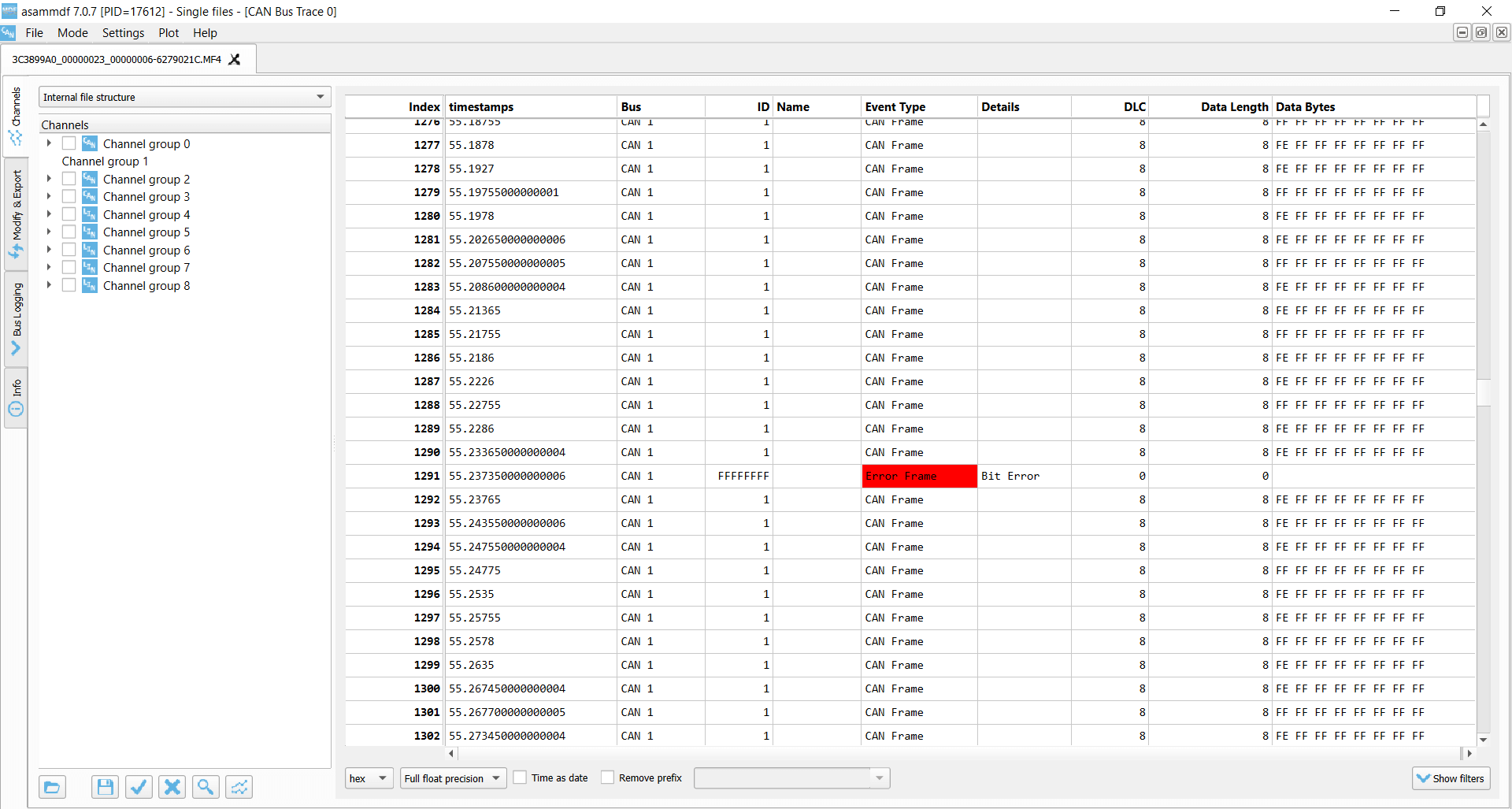
CANedge transmitter Bit Error
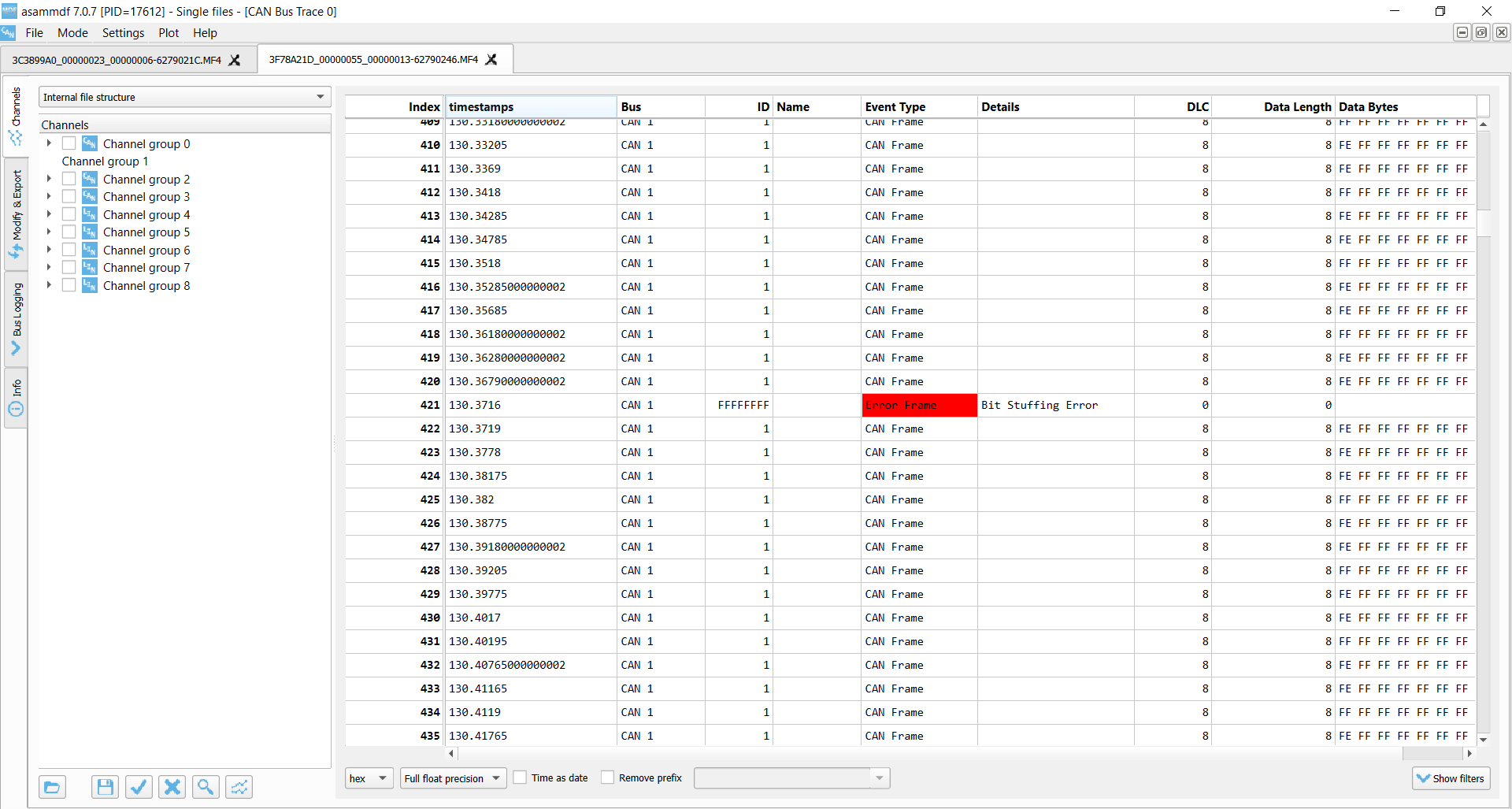
CANedge receiver Bit Stuffing Error
Test #6: CAN frame collisions (incl. retransmission)
In this test, we use the same setup as before, but we now enable retransmissions on the CANedge2 transmitter.
In this case, the frame collision results in a sequence of subsequent frame collisions as both the CANedge2
and the PCAN-USB device attempt to re-transmit their disrupted messages.
Due to the resulting Bit Errors, both raise a total of 16 Active Error Flags, which are detected as
Bit Stuffing Errors
by the silent CANedge2 receiver. Both transmitters then enter Error Passive mode and stop raising Active Error
Flags, meaning none of them can destroy CAN frames on the bus. As a result, one of the transmitters will
succeed in transmitting a full message, thus ending the retransmission frenzy — and enabling both devices to
resume transmission. However, this only lasts for a few seconds before another collision occurs.
The collision handling is a good example of how effective the CAN error handling is at ‘shutting down’
potentially
problematic sequences and enabling CAN nodes to resume communication. If a frame collision occurs, it is likely
that both CAN nodes will be set up to attempt retransmission, which would cause a jam if not for the error
handling and confinement.
USB-to-CAN transmitter Bit Errors x 16
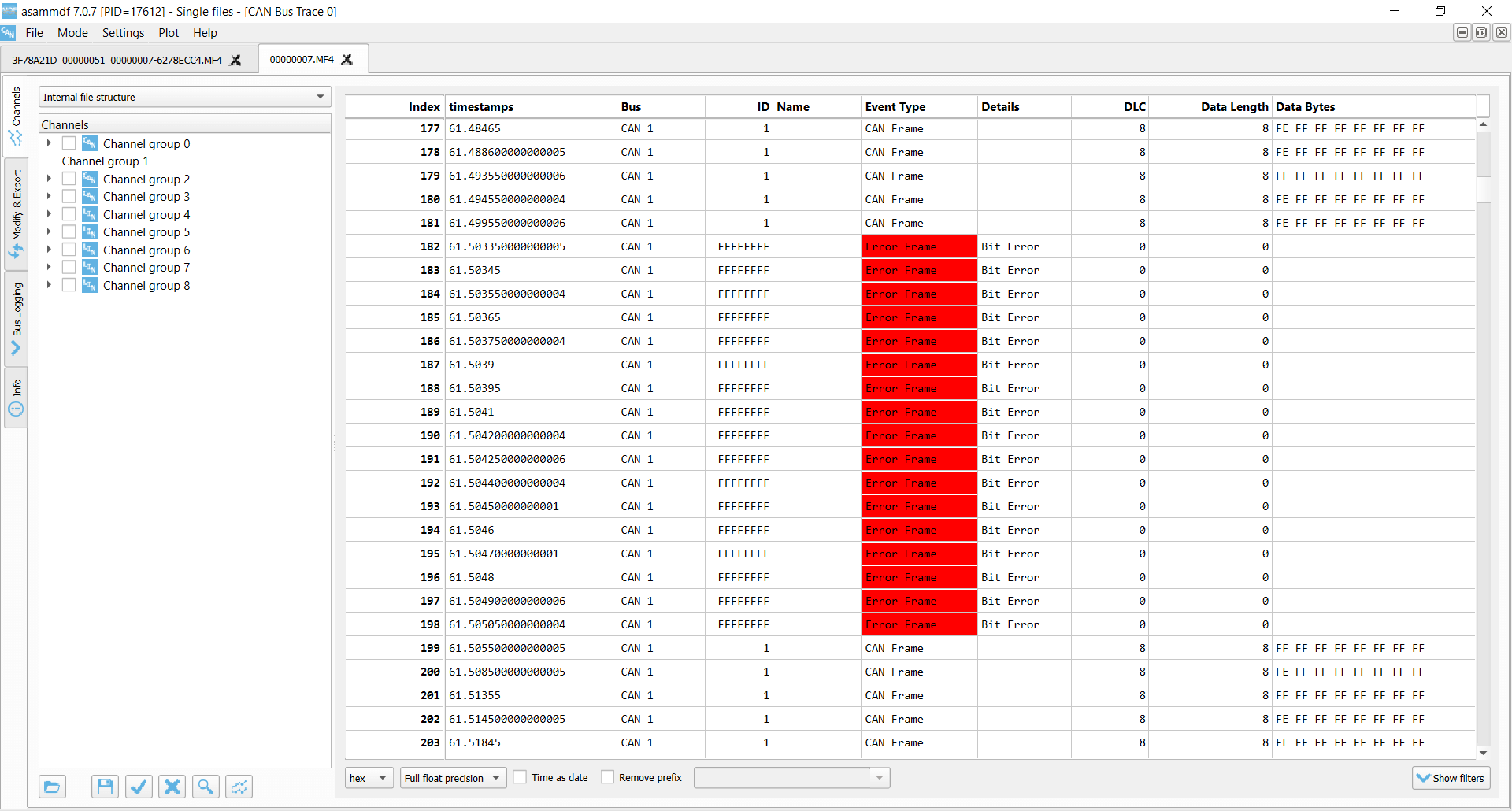
CANedge transmitter Bit Errors x 16
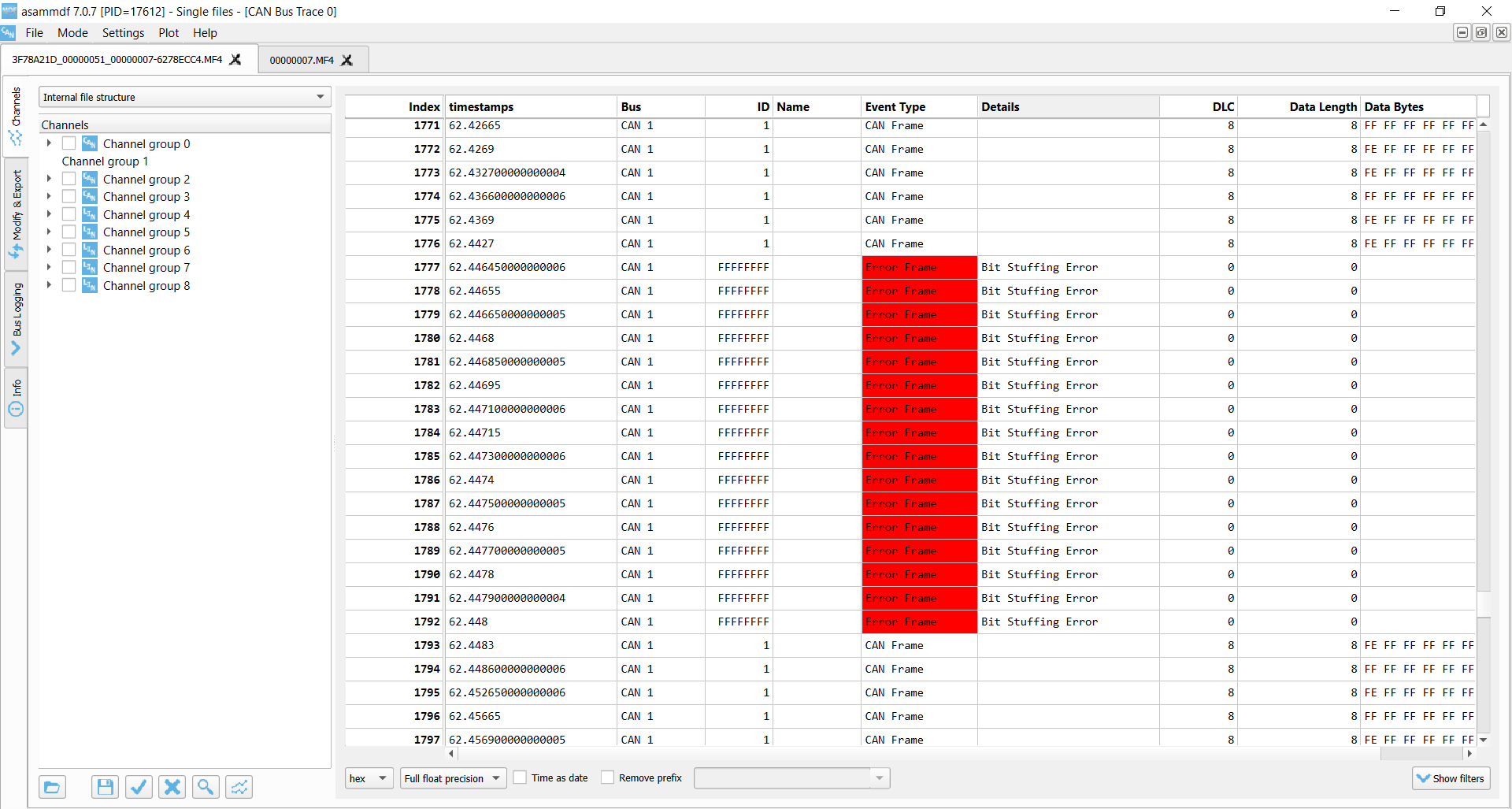
CANedge receiver Bit Stuffing Errors x 16
Similar to CAN bus errors, the LIN protocol also specifies a set of four error types, which we outline briefly below.
The CANedge supports both CAN/LIN error frame logging.
As for the CAN CRC Error, this error type implies that a LIN node has calculated a different checksum vs. the one
embedded in the LIN bus frame by the transmitter. If you’re using the CANedge as a LIN Subscriber, this error
may indicate that you’ve configured the device ‘frame table’ with incorrect identifiers for some of the LIN
frames on the bus.
This can in turn be used to ‘reverse engineer’ the correct lengths and IDs of proprietary LIN frames via a
step-by-step procedure. See the CANedge Docs for details.
These occur if a specific part of the LIN message does not match the expected value, or if there is a mismatch
between what is transmitted vs. read on the LIN bus.
This error indicates an invalid synchronization field in the start of the LIN frame. It can also indicate a large
deviation between the configured bit rate for a LIN node vs. the bit rate detected from the synchronization
field.
Transmission errors can occur for LIN identifiers registered as SUBSCRIBER messages. If there are no nodes
responding to a SUBSCRIBER message, a transmission error is logged.
Example use cases for CAN error frame logging
CAN bus diagnostics in OEM prototype vehicles
An automotive OEM may have the need to record CAN error frames in the field during late stage prototype
testing. By deploying a CANedge, the OEM engineering team will both be able to troubleshoot issues based on
the actual CAN signals (speed, RPM, temperatures) — as well as issues related with the lower layer CAN
communication in their prototype systems. This is particularly vital if the issues of interest are
intermittent and e.g. only happen once or twice per month. In such scenarios, CAN bus interfaces are not
well suited — and it becomes increasingly relevant to have a cost-effective device to enable scalable
deployments for faster troubleshooting.
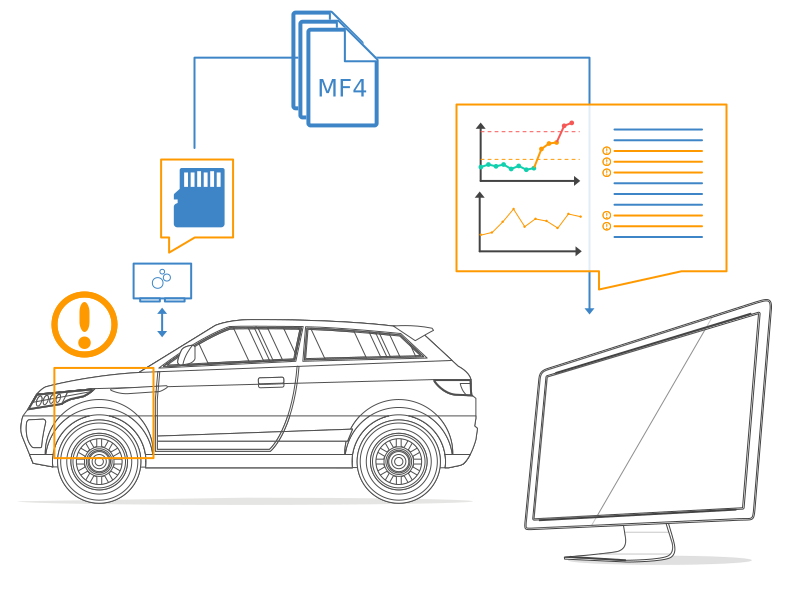

Remotely troubleshooting CAN errors in machinery
An OEM or aftermarket user may need to capture rare CAN error events in their machines. To do so, they deploy
a CANedge2 to record the CAN data and related error frames — and automatically upload the data via WiFi to
their own cloud server. Here, errors are automatically identified and an alert is sent to the engineering
team to immediately allow for diagnosing and resolving the issue. For 3G/4G transfer, a CANedge3 can alternatively be used.
FAQ
No, error frame logging is a highly specific functionality — and only relevant if you know that you need to
record this information. Typically, it’s mainly of value during diagnostics by OEM engineers — and less so for
aftermarket users. In addition, if systematic errors occur they can quickly bloat the log file size.
With the CANedge2 you can of course enable/disable error frame logging over-the-air.
Yes, the CANedge is able to record all CAN/LIN error types. It does, however, not currently record its own error
counter status as this is deemed less relevant from a logging perspective.
The CANedge is only able to raise error flags onto the CAN bus if it is configured in its ‘normal’ mode, in which
it is also able to transmit messages. If in ‘restricted’ mode it can listen to CAN frames and acknowledge CAN
frames — but not raise Active Error Flags onto the bus. In ‘monitoring’ mode (aka ‘silent mode’) it can listen
to the CAN bus traffic, but not acknowledge messages nor raise Active Error Flags.
The CANedge will always record internal CAN/LIN error frames.
If a CAN frame is erroneous, resulting in an error frame, the CANedge generally only records the error type —
without any data related to the erroneous frame (beyond the timestamp). One exception to this rule is for
acknowledgement errors, where the CANedge will still record unacknowledged CAN frames (incl. from retransmission
attempts).
Some researchers have pointed out the risk that ‘bad actors’ could utilize the CAN bus error handling
functionality to enforce remote ‘bus off’ events for safety-critical ECUs. This is a good example of why CAN bus
data loggers & interfaces like the CANedge2 with remote
over-the-air data transfer and updates need to be highly secure (see also our intro to CAN
cybersecurity). For a nice overview of a remote bus off attack, see this
intro by Adrian Colyer.
For more intros, see our guides section — or download the
‘Ultimate Guide’ PDF.
Need to log CAN bus data & errors?
Get your CAN logger today!
Recommended for you
CAN Error Detection and Confinement
One of the most important and useful features of CAN is its high reliability, even in extremely noisy environments. CAN provides a variety of mechanisms to detect errors in frames. This error detection is used to retransmit the frame until it is received successfully. CAN also provides an error confinement mechanism used to remove a malfunctioning device from the CAN network when a high percentage of its frames result in errors. This error confinement prevents malfunctioning devices from disturbing the overall network traffic.
Error Detection
Whenever any CAN device detects an error in a frame, that device transmits a special sequence of bits called an error flag. This error flag is normally detected by the device transmitting the invalid frame, which then retransmits to correct the error. The retransmission starts over from the start of frame, and thus arbitration with other devices can occur again.
CAN devices detect the following errors, which are described in the following sections:
- Bit error
- Stuff error
- CRC error
- Form error
- Acknowledgment error
Bit Error
During frame transmissions, a CAN device monitors the bus on a bit-by-bit basis. If the bit level monitored is different from the transmitted bit, a bit error is detected. This bit error check applies only to the Data Length Code, Data Bytes, and Cyclic Redundancy Check fields of the transmitted frame.
Stuff Error
Whenever a transmitting device detects five consecutive bits of equal value, it automatically inserts a complemented bit into the transmitted bit stream. This stuff bit is automatically removed by all receiving devices. The bit stuffing scheme is used to guarantee enough edges in the bit stream to maintain synchronization within a frame.
A stuff error occurs whenever six consecutive bits of equal value are detected on the bus.
CRC Error
A CRC error is detected by a receiving device whenever the calculated CRC differs from the actual CRC in the frame.
Form Error
A form error occurs when a violation of the fundamental CAN frame encoding is detected. For example, if a CAN device begins transmitting the Start Of Frame bit for a new frame before the End Of Frame sequence completes for a previous frame (does not wait for bus idle), a form error is detected.
Acknowledgment Error
An acknowledgment error is detected by a transmitting device whenever it does not detect a dominant Acknowledgment Bit (ACK).
Error Confinement
To provide for error confinement, each CAN device must implement a transmit error counter and a receive error counter. The transmit error counter is incremented when errors are detected for transmitted frames, and decremented when a frame is transmitted successfully. The receive error counter is used for received frames in much the same way. The error counters are increased more for errors than they are decreased for successful reception/transmission. This ensures that the error counters will generally increase when a certain ratio of frames (roughly 1/8) encounter errors. By maintaining the error counters in this manner, the CAN protocol can generally distinguish temporary errors (such as those caused by external noise) from permanent failures (such as a broken cable). For complete information on the rules used to increment/decrement the error counters, refer to the CAN specification (ISO 11898).
With regard to error confinement, each CAN device may be in one of three states: error active, error passive, and bus off.
Error Active State
When a CAN device is powered on, it begins in the error active state. A device in error active state can normally take part in communication, and transmits an active error flag when an error is detected. This active error flag (sequence of dominant 0 bits) causes the current frame transmission to abort, resulting in a subsequent retransmission. A CAN device remains in the error active state as long as the transmit and receive error counters are both below 128. In a normally functioning network of CAN devices, all devices are in the error active state.
Error Passive State
If either the transmit error counter or the receive error counter increments above 127, the CAN device transitions into the error passive state. A device in error passive state can still take part in communication, but transmits a passive error flag when an error is detected. This passive error flag (sequence of recessive 1 bits) generally does not abort frames transmitted by other devices. Since passive error flags cannot prevail over any activity on the bus line, they are noticed only when the error passive device is transmitting a frame. Thus, if an error passive device detects a receive error on a frame which is received successfully by other devices, the frame is not retransmitted.
One special rule to keep in mind: When an error passive device detects an acknowledgment error, it does not increment its transmit error counter. Thus, if a CAN network consists of only one device (for example, if you do not connect a cable to the National Instruments CAN interface), and that device attempts to transmit a frame, it retransmits continuously but never goes into bus off state (although it eventually reaches error passive state).
Bus Off State
If the transmit error counter increments above 255, the CAN device transitions into the bus off state. A device in the bus off state does not transmit or receive any frames, and thus cannot have any influence on the bus. The bus off state is used to disable a malfunctioning CAN device which frequently transmits invalid frames, so that the device does not adversely affect other devices on the network. When a CAN device transitions to bus off, it can be placed back into error active state (with both counters reset to zero) only by manual intervention. For sensor/actuator types of devices, this often involves powering the device off then on. For NI-CAN network interfaces, communication can be started again using an API function.
What are Error Active, Error Passive, and Bus off of CAN Bus?
Just to give a little background to the answer:
In order to prevent malfunctioning nodes from disturbing, or even blocking, an entire system, the CAN protocol implements a sophisticated fault confinement mechanism. The CAN protocol is intended to be orthogonal, i.e. all nodes address faults in the same manner. Fault confinement is provided where each node constantly monitors its performance with regard to successful and unsuccessful message transactions. A Transmit Error Counter (TEC) and a Receive Error Counter (REC) create a metric for communication quality based on historic performance. Each node will act on its own bus status based on its individual history. As a result, a graceful degradation allows a node to disconnect itself from the bus i.e. stop transmitting. This means that a permanently faulty device will cease to be active on the bus (go into Bus Off state), but communications between other nodes can
continue unhindered. If the bus media is severed, shorted or suffers from some other failure mode the ability to continue communications is dependent upon the condition and the physical interface used.
Fault confinement is a checking mechanism that makes it possible to distinguish between short disturbances (e.g. switching noise from a nearby power cable couples into the transmission media) and permanent failures (e.g. a node is malfunctioning and disturbs the bus).
Manipulation of the error counters is asymmetric. On a successful transmission, or reception, of a message, the respective error counter is decremented if it had not been at zero. In the case of a transmit or receive error the counters are incremented, but by a value greater than the value they would be decrement by following a successful message transaction.
If a node detects a local error condition (e.g. due to local conducted noise, application software, etc.), its resulting error flag (primary error flag) will subsequently cause all other nodes to respond with an error flag too (secondary error flags). It is important that a distinction is made between the nodes that detected an error first and the nodes which responded to the primary error flag. If a node transmits an active error frame, and it monitors a dominant bit after the sixth bit of its error flag, it considers itself as the node that has detected the error first. In the case where a node detects errors first too
often, it is regarded as malfunctioning, and its impact to the network has to be limited. Therefore, a node can be in one of three possible error states:
Error active
Both of its error counters are less than 128. It takes part fully in bus communication and signals an error by transmission of an active error frame.This consists of sequence of 6 dominant bits followed by 8 recessive bits, all other nodes respond with the appropriate error flag, in response to the violation of the bit stuffing rule.
Error passive
A node goes into error passive state if at least one of its error counters is greater than 127. It still takes part in bus activities, but it sends a passive error frame only, on errors. Furthermore, an error passive node has to wait an additional time (Suspend Transmission Field, 8 recessive bits after Intermission Field) after transmission of a message, before it can initiate a new data transfer. The primary passive error flag consists of 6 passive bits and thus is “transparent” on the bus and will not “jam” communications.
Bus Off
If the Transmit Error Counter of a CAN controller exceeds 255, it goes into the bus off state. It is disconnected from the bus (using internal logic) and does not take part in bus activities anymore. In order to reconnect the protocol controller, a so-called Bus Off recovery sequence has to be executed. This usually involves the re-initialization and configuration of the CAN controller by the host system, after which it will wait for 128 * 11 recessive bit times before it commences communication.
-
When a receiver detects an error, the REC will be increased by 1, except when the detected error was a Bit Error during the sending of an Active error Flag or an Overload Flag.
-
When a receiver detects a dominant bit as the first bit after sending an Error Flag, the REC will be increased by 8.
-
When a transmitter sends an Error Flag, the TEC is increased by 8. Exception 1: If the transmitter is Error Passive and detects an ACK Error because of not detecting a dominant ACK and does not detect a dominant bit while sending its Passive Error Flag. Exception 2: If the transmitter sends an Error Flag because a Stuff Error occurred during arbitration, and should have been recessive, and has been sent as recessive but monitored as dominant.
-
If the transmitter detects a Bit Error while sending an Active Error Flag or an Overload Frame, the TEC is increased by 8.
-
If a receiver detects a Bit Error while sending an Active Error Flag or an Overload Flag, the REC is increased by 8.
-
Any node tolerates up to 7 consecutive dominant bits after sending an Active Error Flag, Passive Error Flag or Overload Flag. After detecting the fourteenth consecutive dominant bit (in case of an Active Error Flag or an Overload Flag) or after detecting the eighth consecutive dominant bit following a Passive Error Flag, and after each sequence of additional eight consecutive dominant bits, ever y transmitter increases its TEC by 8 and every receiver increases its REC by 8.
-
After successful transmission of a frame (getting ACK and no error until EOF is finished), the TEC is decreased by 1 unless it was already 0.
-
After the successful reception of a frame (reception without error up to the ACK Slot and the successful sending of the ACK bit), the REC is decreased by 1, if it was between 1 and 127. If the REC was 0, it stays 0, and if it was greater than 127, then it will be set to a value between 119 and 127.
-
A node is Error Passive when the TEC equals or exceeds 128, or when the REC equals or exceeds 128. An error condition letting a node become Error Passive causes the node to send an Active Error Flag.
-
A node is Bus Off when the TEC is greater than or equal to 256.
-
An Error Passive node becomes Error Active again when both the TEC and the REC are less than or equal to 127.
-
A node which is Bus Off is permitted to become Error Active (no longer Bus Off) with its error counters both set to 0 after 128 occurrence of 11 consecutive recessive bits have been monitored on the bus.