
Ensure you have a stable connection before playing online
by Henderson Jayden Harper
Passionate about technology, Crypto, software, Windows, and everything computer-related, he spends most of his time developing new skills and learning more about the tech world. He also enjoys… read more
Updated on
- The error code 0x80832003 indicates the console is having trouble connecting to Xbox Live.
- A temporary network issue is known to be a major cause of this issue among most users.
- Clearing the Xbox MAC address could be the easiest approach to troubleshooting it.
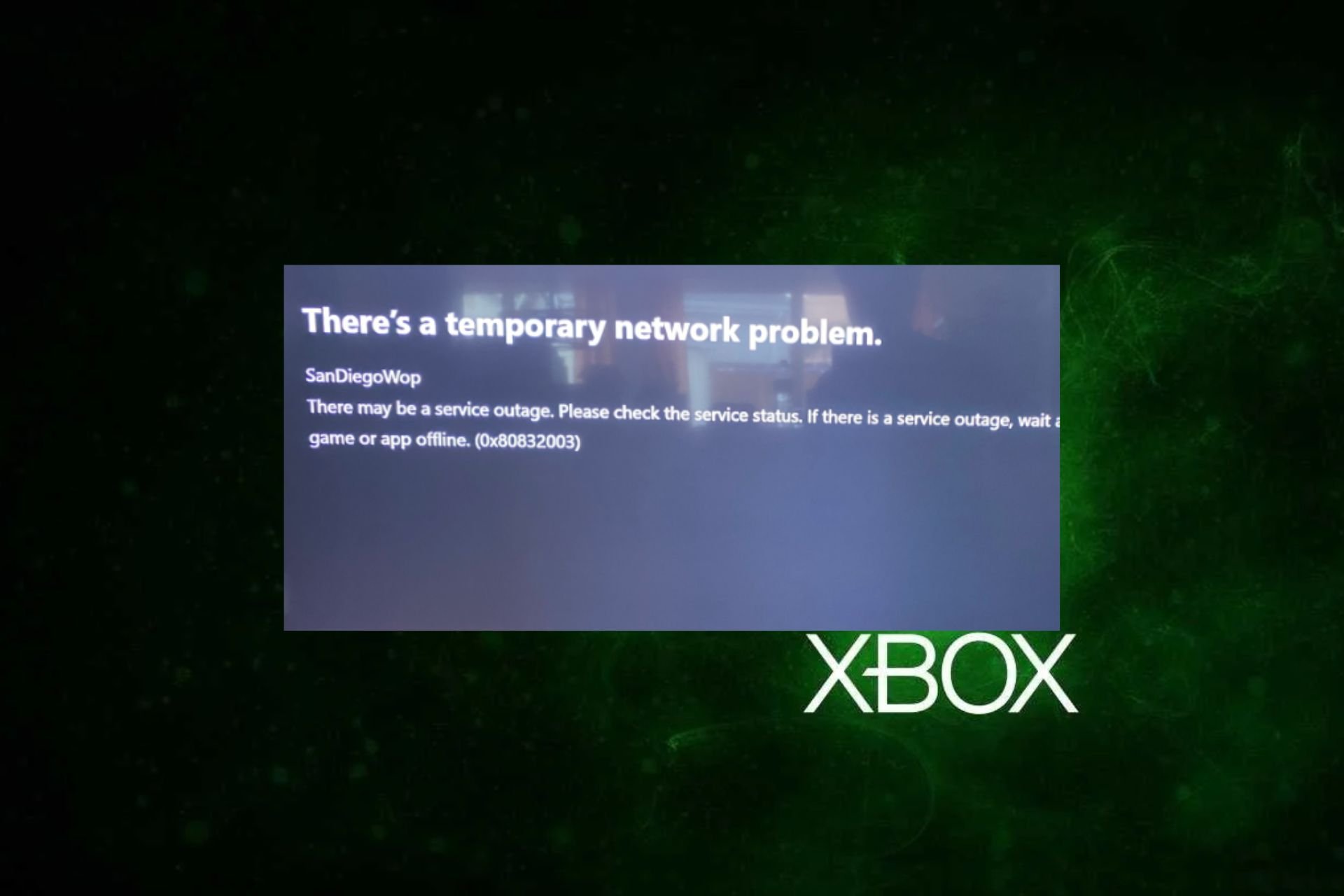
The code 0x80832003 is a network error that can occur on Xbox consoles. It means the console encountered trouble connecting to Xbox Live or other online services. However, this guide will examine how to fix the temporary network problem error code 0x80832003.
Alternatively, you can read about how to fix an Xbox app that can’t sign in on your console.
What causes the 0x80832003 error code?
The error code 0x80832003 can occur due to several possible reasons:
- Internet connectivity issues – The error may occur if there are issues with your internet connection, such as a weak or unstable signal, network congestion, or a temporary outage.
- Xbox Live service disruption – Sometimes, the Xbox Live service may experience temporary outages. Also, maintenance of the servers can cause this error to occur.
- DNS settings – Incorrect DNS configuration on the Xbox console can cause connectivity issues and result in the error code 0x80832003.
- Xbox Live account issues – Problems with your Xbox Live account or subscription may cause the error.
These factors of the error may vary depending on the situation. However, we discuss trying the troubleshooting steps below to resolve the issue.
How can I fix the temporary network problem error code 0x80832003?
Before trying advanced steps to fix the error on your console, here are some steps that you can perform:
- Check your network connection.
- Restart your Xbox console.
- Disable any VPNs or proxy servers.
If you can’t resolve the error, try the solutions:
1. Text Xbox Live connection
- Press the Guide button on your Xbox controller.
- Go to Settings and select System Settings.
- Under Network Settings, select either Wired Network or the name of your wireless network (for wireless connection). Select Test Xbox LIVE Connection.

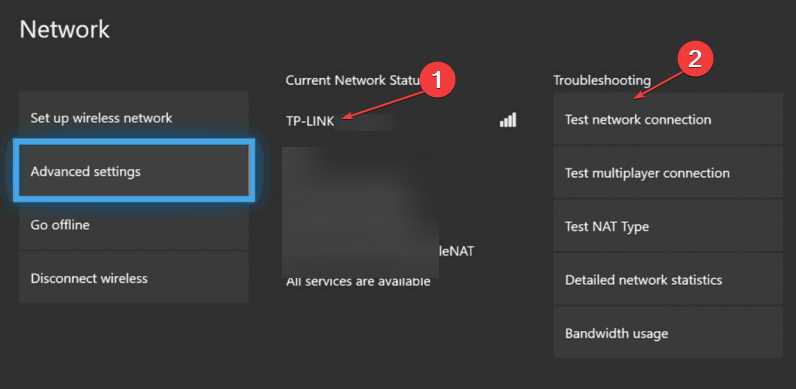
The method above will connect the Xbox console to the Xbox Live. You can check our guide on How to fix slow performance on Xbox Live on your Xbox console.
2. Clear Alternate MAC address
- Press the Guide button to open the Xbox Guide and select Settings.
- Select Network Settings and click on Advanced Settings.

- Navigate to the Change Settings and select Alternate MAC Address.

- Click the Clear button in the MAC address and restart your device.
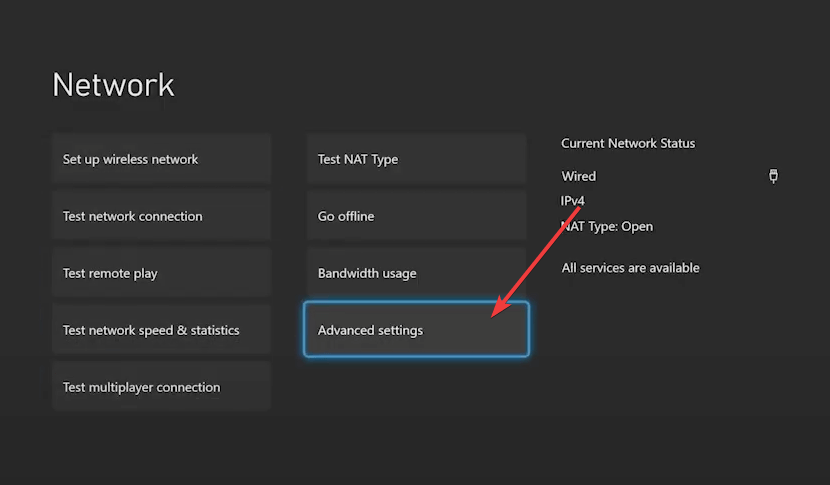
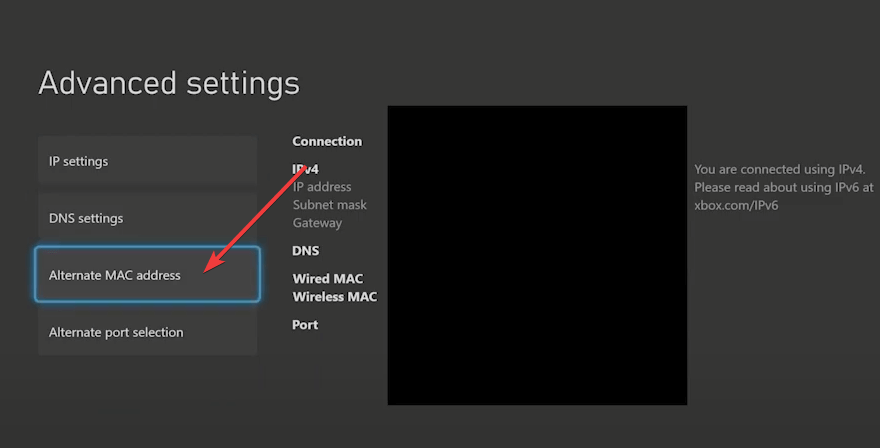
GClearing the MAC address on your Xbox console will reset the unique hardware identifier assigned to your console network adapter.
- Fix: Error 0x800708CA When Trying to Connect a Controller
- 0x80a40021 Xbox Suspension Code: How to Fix it
3. Reset your Xbox console
- Press the guide button to open the Xbox Guide and select Settings.
- Click the System link and navigate to Console Info.
- Select Reset This Xbox and click on Reset and Keep my Games and Apps.

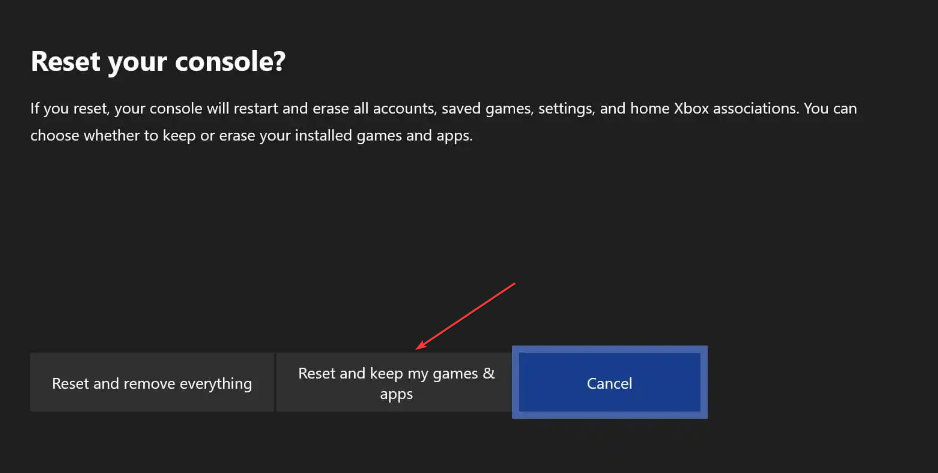
Following the process above will reset your device without losing all your games and data. Also, we have a detailed guide about the Xbox One factory reset bug still affects many gamers.
4. Play the game offline
- Press the Xbox button to open the guide and select the Profile & System option.
- Select Settings and click on General Settings.
- Navigate to the Network settings and select the Go offline option.

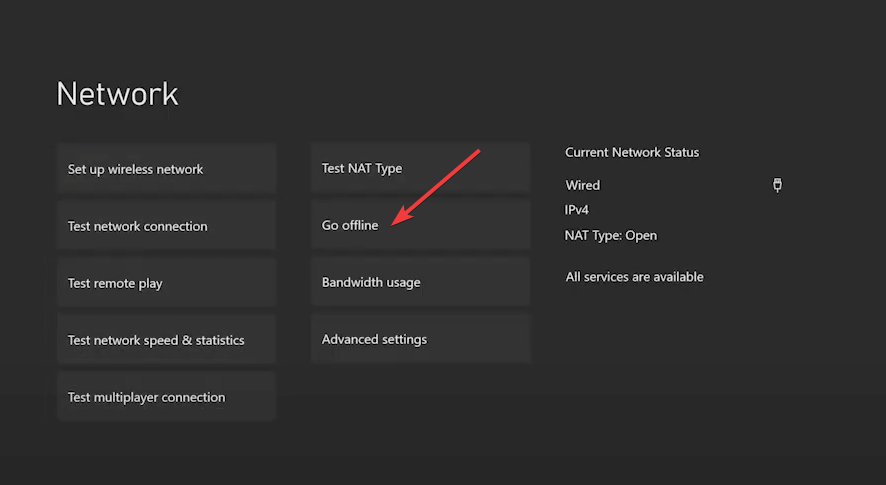
The Go offline option lets you play your game offline while waiting for the network. Read our guide on fixing for this game you need to be online Xbox error on your console.
In addition, you can read on Xbox 360 MTU error and how to fix it on your Xbox console. Also, you can check our guide about repairing Xbox party chat not working on your device.
If you have further questions or suggestions, kindly drop them in the comments section.

Кажется, что много Xbox серии X пользователи сталкиваются с кодом ошибки 0x80832003 при попытке играть в игры на консоли. Этот конкретный код ошибки появляется всякий раз, когда возникает проблема со службой Xbox Live. Между тем, некоторые другие игроки сообщили, что они получают ту же ошибку при попытке войти в Xbox Live.
К счастью, есть несколько возможных обходных путей, упомянутых ниже, которые могут легко исправить этот код ошибки. Первая и наиболее распространенная причина заключается в том, что проблема с подключением к серверу Xbox может возникать всякий раз, когда служба Xbox Live испытывает сбой или какой-либо технический сбой. Код ошибки указывает на то, что «Возникла временная проблема с сетью».
Содержание страницы
-
Исправлено: код ошибки Xbox Series X 0x80832003
- 1. Проверить статус Xbox Live
- 2. Проверьте подключение к Интернету
- 3. Power Cycle Wi-Fi роутер
- 4. Попробуйте сыграть в игру офлайн
- 5. Перекрестная проверка действующей учетной записи
- 6. Подождите немного и попробуйте еще раз
Исправлено: код ошибки Xbox Series X 0x80832003
Теперь, когда мы знаем об этой проблеме и возможных причинах, давайте рассмотрим методы устранения неполадок, указанные ниже.
1. Проверить статус Xbox Live
Настоятельно рекомендуется проверить наличие Статус Xbox Live не задумываясь, потому что для такой гигантской сервисной платформы довольно часто возникают проблемы с отключениями или простоями серверов. Если это так, пользователи Xbox обязательно будут испытывать серьезные или незначительные проблемы с подключением, пока проблема не будет решена.
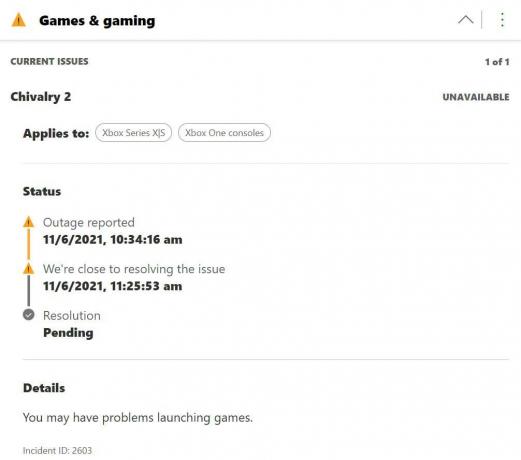
На момент написания этой статьи мы ясно видим, что существует возможная проблема с отключением службы в отделе игр и игр. Эта конкретная проблема с отключением происходит в основном для консолей Xbox Series X и Xbox One. Команда поддержки Xbox признала эту проблему и работает над ее устранением.
Однако, если вы не видите перебоев в обслуживании, попробуйте выполнить остальные методы один за другим.
2. Проверьте подключение к Интернету
Обязательно проверьте подключение к Интернету, прежде чем делать какие-либо выводы. Иногда может оказаться, что ваша сеть недостаточно быстрая или стабильная, чтобы запускать определенную онлайн-игру. Если вы используете проводное соединение Ethernet, попробуйте переключить его на Wi-Fi или наоборот.
3. Power Cycle Wi-Fi роутер
Выполнив цикл включения питания вашего маршрутизатора, вы сможете в мгновение ока решить несколько проблем с сетевым подключением или надежностью. Иногда маршрутизатор может не работать должным образом из-за сбоев сети или плохого подключения. После включения и выключения маршрутизатор обновляется и работает должным образом. Для этого:
- Выключите Wi-Fi роутер и дождитесь полного выключения светодиодных индикаторов.
- Теперь отключите адаптер питания маршрутизатора от источника питания, а также от маршрутизатора.
- Подождите около 30 секунд и снова подключите адаптер питания.
- Затем включите маршрутизатор, подключитесь к Wi-Fi и проверьте, получает ли Xbox Series X код ошибки 0x80832003 или нет.
4. Попробуйте сыграть в игру офлайн
Если произойдет сбой службы Xbox Live, вы можете попробовать играть в игру в автономном режиме, пока служба не вернется и не запустится снова. Сделать это:
- нажмите Кнопка Xbox на вашем контроллере, чтобы открыть гид.
- Теперь выберите Профиль и система > Перейти к Настройки.
- Перейти к Общий > Выбрать Настройки сети.
- Выбирать Перейти в автономный режим.
- Тебе хорошо идти.
Однако, если вы хотите снова вернуться в Интернет, выполните те же действия и выберите Выйти в онлайн чтобы выполнить свою работу.
5. Перекрестная проверка действующей учетной записи
Убедитесь, что вы используете ту же учетную запись Microsoft или Xbox, которую вы использовали для покупки определенной игры на консоли Xbox Series X. Кроме того, многие пользователи совершают ошибку, не входя в одну и ту же учетную запись.
Вместо этого они совершают ошибку, входя в другую учетную запись Microsoft или Xbox, что обязательно приведет к такого рода ошибкам.
6. Подождите немного и попробуйте еще раз
Эта конкретная ошибка в основном является проблемой на стороне сервера, и в большинстве сценариев с вашей стороны нечего делать. Так что всегда лучше просто подождать пару часов и попробовать еще раз проверить статус службы Xbox Live, чтобы быть в курсе ситуации.
Как только вы увидите, что со службой Xbox Live нет проблем, вы можете просто перезагрузить консоль и снова попробовать запустить конкретную игру. Обычно разработчики стараются исправить подобные проблемы с сервером как можно раньше.
Но иногда это может занять гораздо больше времени, чем обычно. Так что вам просто нужно подождать, чтобы исправить это само.
Вот и все, ребята. Мы предполагаем, что это руководство было для вас полезным. Не стесняйтесь спрашивать в комментарии ниже.
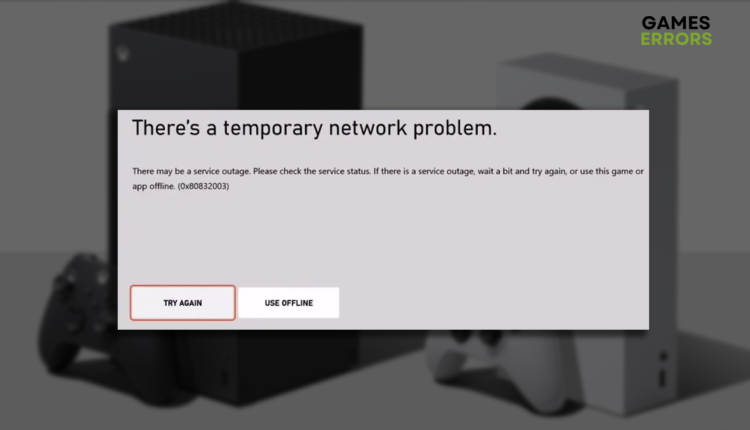
Network-related errors can be related to the console, Xbox services, or the network in-between. 👾
Getting an Xbox error 0x80832003 when launching an app or a game can be annoying and stressful. Removing the problem causing this inconvenience can be quick and stress-free if the problem is on your end. Be patient and review our list of causes and solutions for this network-related error.
If you have a Series X console and can’t play any game on it, learn what to do when games don’t launch on Xbox Series X.
Why do I get Xbox error 0x80832003?
You get error 0x80832003 on your Xbox because there is an outage with Xbox services, your internet is not working, there are misconfigurations with your networking device or Xbox, the console software is outdated, or there are issues with your account.
How do I fix error 0x80832003?
Begin troubleshooting this error on your Xbox by performing these quick checks and fixes:
- Visit the Xbox Status page: Ideally, all services will be marked as up and running with a green circle. This will also mean the problem is either on your end or the network between you and Xbox servers. If you see a ‘limited’ or ‘major outage’ status, wait and try again later.
- Check the internet on another device: Use your smartphone, tablet, or PC to check if the internet connection works. If you discover a general internet problem, try using your mobile hotspot and see if the error disappears.
- Restart your networking device: Inspect your modem or router and see if the LEDs are signaling any issue with the device. Restart the device by pressing the restart button on the back. You can also power cycle the device by unplugging it from electricity, waiting a few minutes, and plugging it back in.
- Power cycle your Xbox: Similarly to networking devices, your Xbox console might also have some temporary issues with connection. Turn Xbox off, unplug it from the power outlet, wait a few minutes, and boot the console back up.
If this doesn’t solve the issue, and the error 0x80832003 still occurs, follow the solutions listed below.
- Clear the MAC address
- Update your Xbox
- Re-add your account
1. Clear the MAC address
Time needed: 5 minutes
Media Access Control (MAC) address is a way for your console to identify the network. Since many experts reported that it could cause network-related issues on game consoles, the Xbox developers added an option for clearing this address.
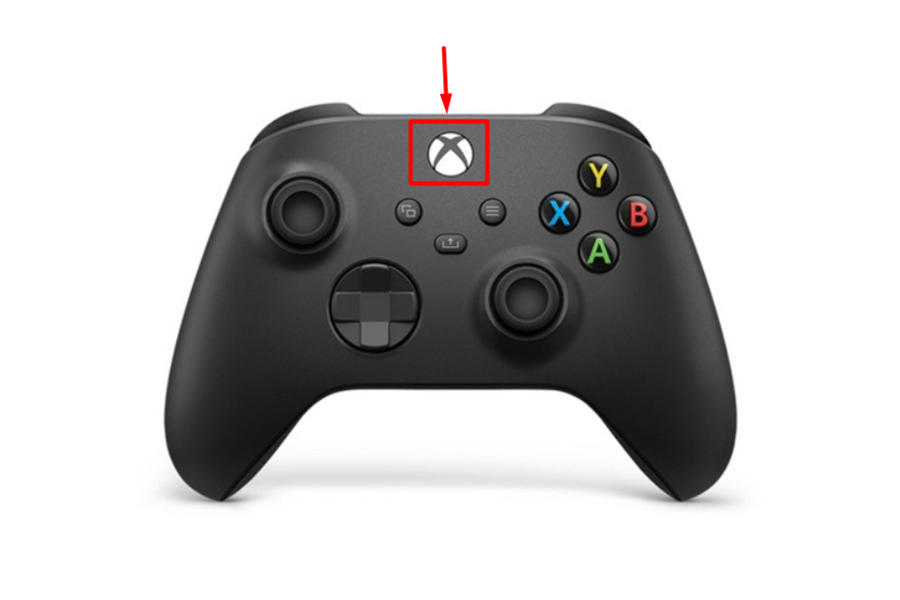
- Press the Xbox button on the Xbox controller.

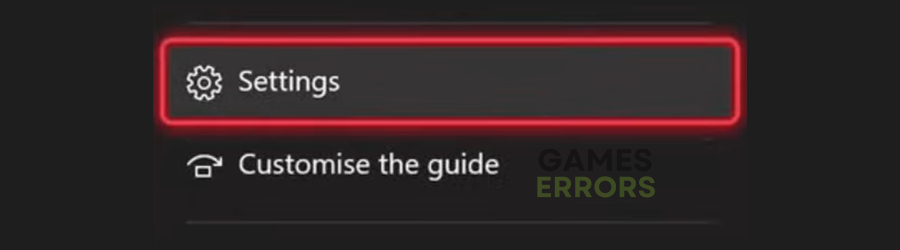
- Navigate to Profile & System tab and then select Settings.

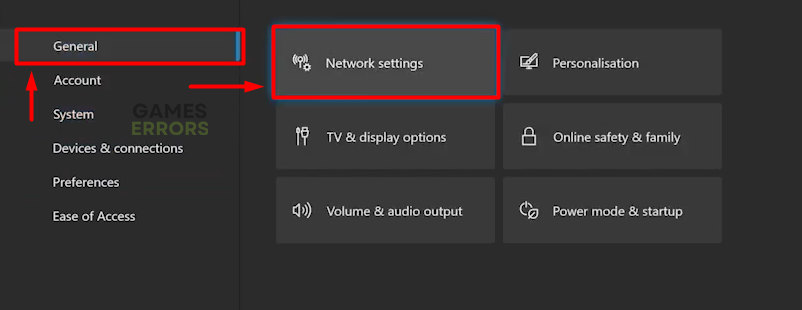
- Navigate to the General tab and select Network Settings.

- Select Advanced Settings.
- Select Alternate MAC address.
- Hit the Clear button and restart your Xbox.
2. Update your Xbox
Like any other device, Xbox problems and bugs are constantly being patched. These patches come through updates, which happen automatically by default. However, your Xbox might have skipped an update due to network issues or other circumstances, so we advise you to update it manually.
- Press the Xbox button on the Xbox controller.
- Navigate to Profile & System tab and then select Settings.
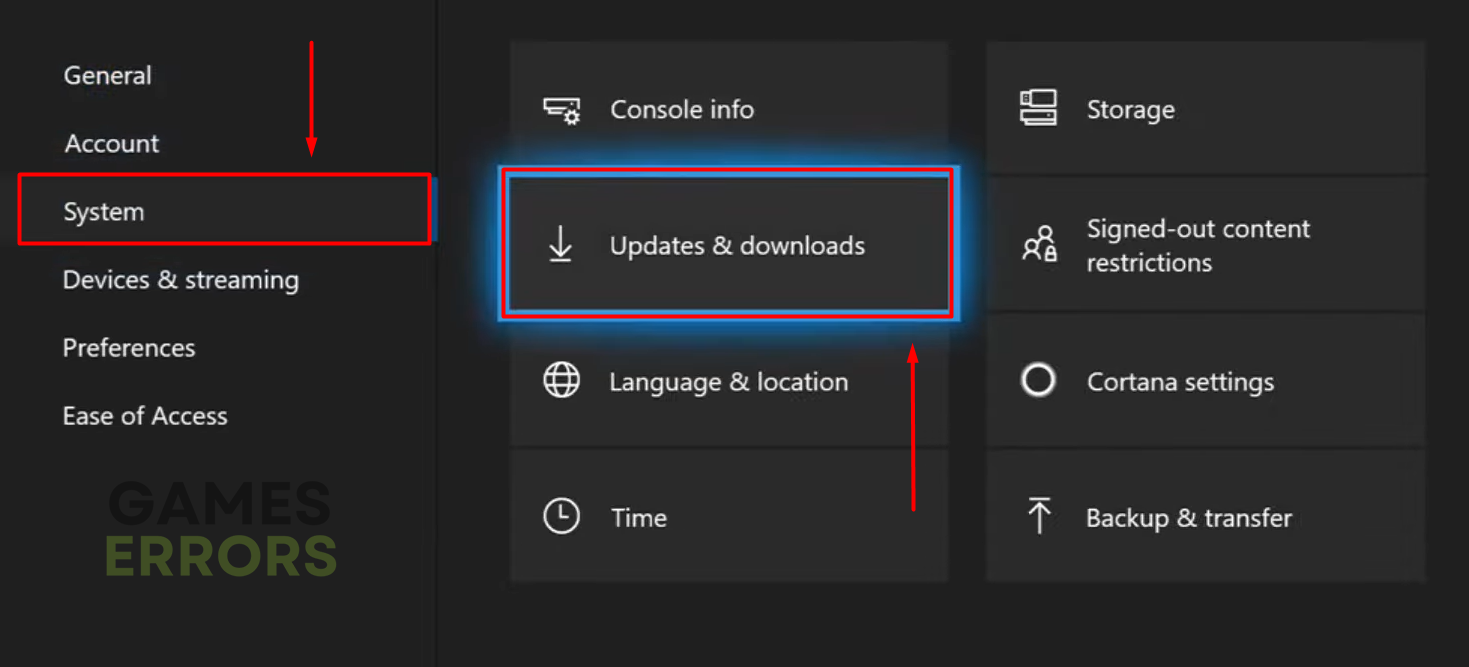
- Navigate to the System and select Updates and Downloads.

- Select the Console update available option.
If you don’t see such an option, your console is up-to-date. - Wait for the update to complete and restart your Xbox.
3. Re-add your account
When you log into your account on Xbox, the information is verified online since this is the only way for the console to verify your identity. Some gamers report that due to unknown reasons, their account was bugged until they removed it and added it again.
⚠ Important: Before removing your account from your console, check if you remember your email address and password. The best is to write it down and keep it while troubleshooting.
- Press the Xbox button on the Xbox controller.
- Navigate to Profile & System and then select Settings.
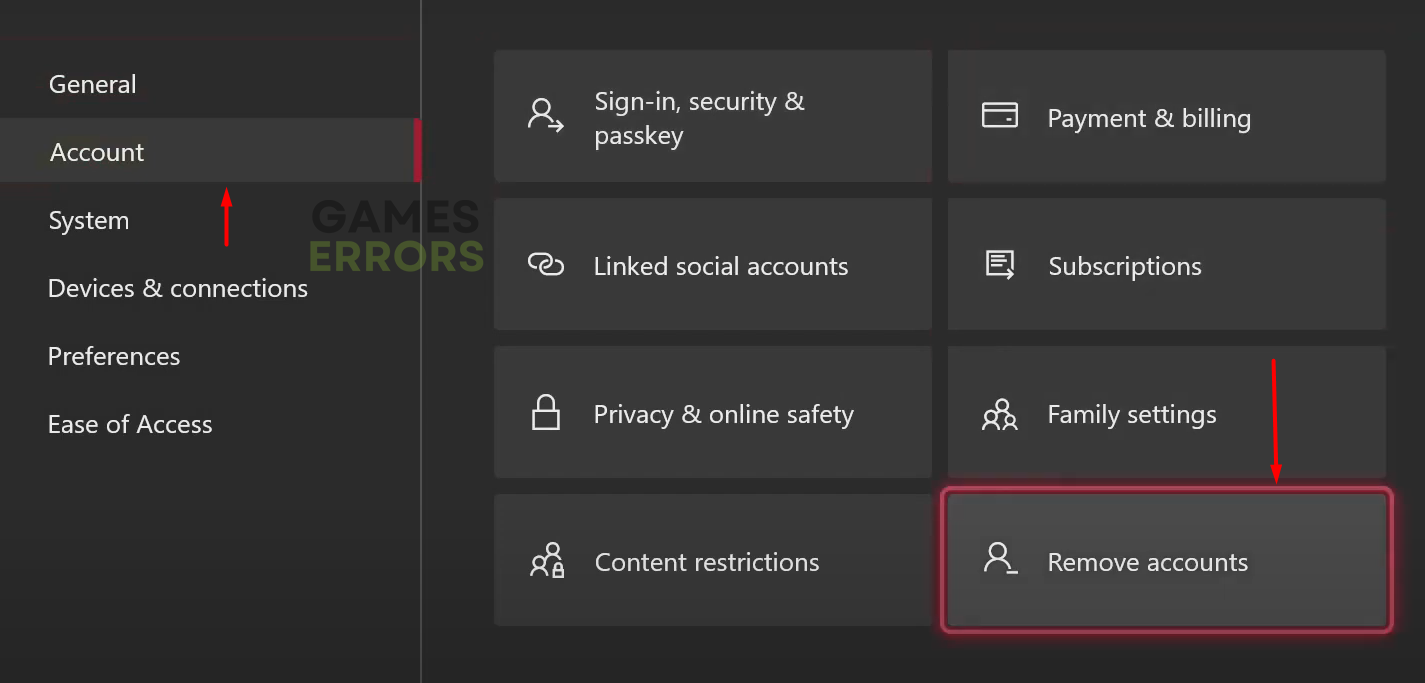
- Select Account and then Remove Accounts.

- Select your account and then select Remove.
- Restart your Xbox.
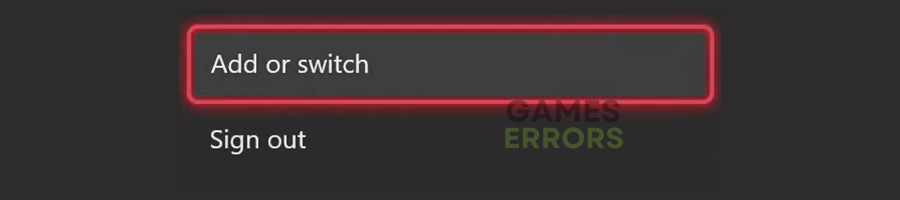
- Navigate to Profile & System and select Add or Switch.

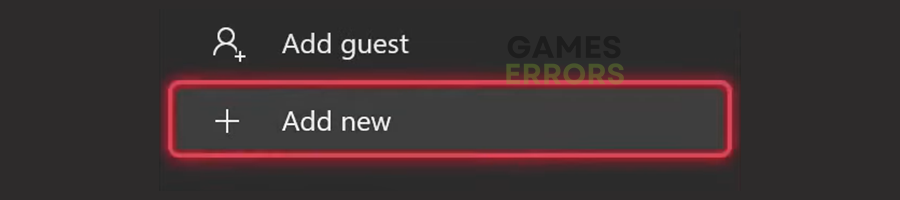
- Select Add New.
- Enter your email address and select Enter.
- Enter your password, select Enter, and configure your Microsoft account.
Extra steps
Here are a few additional solutions you can use to fix Xbox error 0x80832003:
- 📞 Contact Xbox support: Before doing anything else, we recommend you contact Xbox support and explain your issue. If you bought your console from a reseller, get them as well.
- 🕹 Reset Xbox to factory settings: Save this option as a last resort, and consider it the only one you have no choice. Navigate to the Xbox settings, select Reset, and keep your games & apps option. This way, you don’t lose the installation and game progress you made.
- 🎮 (Alternative) Play the game offline: If the error code appears even after the factory reset, the only alternative we found is playing the game in offline mode.
Related articles:
- Xbox Series X Not Loading Anything: Fix It Easily
- Fix 100% Packet Loss On Xbox Series X, S, One
- How To Fix Xbox Error 0x800704cf Easily
- Fix Can’t Upload & Delete Game Capture On Xbox Network
- How To Fix Xbox Error Code 0x87e50033
Conclusion
Xbox error 0x80832003 can be easily fixed if related to the Xbox services or the network. However, if the problem is associated with a faulty console, you might be unable to fix it alone. Let us know how it went for you, and comment if you have other issues with your Xbox.
If you encounter any issues or errors while playing your favorite games and require support, feel free to contact us here. Our team is always ready to assist you and ensure your gaming experience is seamless and enjoyable.

Hey there, fellow gamers! Vladan is here, and I’ve been a dedicated gaming enthusiast for ten years. I am passionate about helping fellow gamers overcome any technical challenges they may encounter.
With my extensive knowledge of both hardware and software, I’m skilled at identifying and resolving a wide range of gaming-related issues. Whether you need help optimizing your system for maximum performance, resolving compatibility issues, or fine-tuning your gaming experience to perfection, I am here to ensure that your gaming experience is seamless and enjoyable.
{«id»:4093,»url»:»\/distributions\/4093\/click?bit=1&hash=572414f048fd940828f35b0d46d6210a2c91bd9267922fbe28005f6aba01f505″,»title»:»\u0417\u0434\u0435\u0441\u044c \u0432\u0441\u0435 \u2014 \u00ab\u0421\u0431\u0435\u0440\u00bb, \u00ab\u042f\u043d\u0434\u0435\u043a\u0441\u00bb, VK \u0438 Kaspersky»,»buttonText»:»»,»imageUuid»:»»}
Возникла временная проблема сети
Всем здравствуйте.
2.2K
показов
2.1K
открытий
Прошу совета
Выскакивает проблема сети (после всем известных веселых 0x80a40401) Предлагается использовать в автономном режиме.
Ошибка 0х80832003.
DNS прописан иранский.
Вселяет надежду «временная». Реально ли со временем само пройдет. Или можно что-то сделать с настройками сети? (лезть в настройки роутера)
Заранее спасибо
P. S. приобрел в конце апреля, хотя бы недельку успел по-людски застать
Solution 1: Check the Xbox status
Check the Xbox status page. If you see any services with alerts, expand the service, scroll down to Notifications, and sign in to receive a message when the service is up and running again.
What is Xbox code 0x8083003?
The error code «0x80830003» indicates that your Xbox One is out of space. You should free up some hard drive space on your console.
What does 0x80820003 2 mean?
That not very helpful error message means that the Xbox can’t connect to the Microsoft update servers, it is trying to connect but is getting no response.
Why does it say I don’t have enough storage when I do Xbox?
The main things that take up space on your Xbox console are games and apps. If your Xbox fills up, make space by uninstalling items you’re not using. If there isn’t enough space when you try installing a new game or app, we have tips to help you make room so you can install it right away.
Why is my Xbox storage expansion not working?
My Xbox isn’t recognizing the Storage Expansion Card
If you don’t see the Storage Expansion Card in the storage devices page after 30 seconds, remove the card, restart the console, then insert the card again.
4 Ways To Fix Xbox Error Code 0x80832003
What is error code 0x8082003 -% 2 on Xbox?
Replies (1) Hello There ! If You see the following error code when playing a disc in your Xbox One console, this means that the console failed to properly read the disc in the drive.
What is 0x80820002 error on Xbox One?
This means that the console failed to properly read the disc in the drive. Your Xbox console is designed to play the following discs: Xbox games. Music CDs.
Why won’t my Xbox recognize my disc?
Perform a hard power cycle by holding down the Xbox button on the console for 10 seconds. Once the console has completely shut down, press the Xbox button on the console again to restart it. Try your disc again. Wait a few seconds to see if the console recognizes it.
What is Xbox code 0x803f8003?
This may mean that your subscription or trial that the game was tied to has ended.
What is error code 0x87dd0033 on Xbox One?
This may mean that there’s an Xbox Live service outage, or that you’re experiencing a connection error.
What is error code 80153003 on Xbox?
Status Code: 80153003
This may mean that the download or purchase failed, or that the content is no longer available from the Store. If you can no longer find the content when searching Xbox.com, it may have been removed.
How do I clean my Xbox One disc drive without taking it apart?
Use the microfiber cloth to wipe down both sides of the disc, especially the underside. You can add a small amount of rubbing alcohol to the cloth to buff out sticky spots, but be sure to let the disc completely dry before re-inserting it into your Xbox. That’s it!
Can you replace an Xbox One disc drive?
Xbox One DG-6M1S Blu-ray DVD Drive Replacement The DVD drive will need to be “flashed” with your console’s security key or will need to have your original drive’s board swapped into the new replacement drive. Basic soldering required during installation. Professional installation is highly recommended.
How do I fix a corrupted Xbox file?
Solution 1: Delete the corrupted game file
Select Settings > System > Storage. Select the storage location, and then press the A button. Select Games and Apps, and then press the A button. Select the game, and then press the A button.
How do I fix error code 0x80820002?
First, press and hold the power button on your Xbox One console for 10 seconds. Once your console is powered off, unplug the power cord. Wait 5 minutes and then plug in your console. Power on your console and try playing a disc game.
How do I fix corrupted Xbox app?
Open the Xbox app for Windows. In My Library, select the game title. Select the More options (…) button and choose Manage. Select Files and then Verify and repair.
What is error code 8c32008 on Xbox Live?
Status code: 8C320008.
This may mean that there’s a problem with your Microsoft account for one of the following reasons: Incorrect or incomplete billing information. An outstanding balance on your account. Too many recent purchase attempts from your Xbox account.
What is error 0x82323990 on Xbox?
the discussion about this error refers to possible account region errors, make sure they are all in the same region, another option is an error of the game server where you are capturing the recording. if you change the account region, delete your profile, clear the cache and download the profile again.
How to fix 0x80270300?
From the Home screen, select My games & apps > See all > Games. Select the game, press the Menu button , and select Uninstall > Uninstall all. Go to the Ready to install tab, find the game, and reinstall it.
Will a hard reset delete everything on my Xbox?
Warning Resetting your console to its factory defaults erases all accounts, saved games, settings, and home Xbox associations. Anything not synchronized with the Xbox network will be lost.
Does formatting a hard drive delete everything Xbox?
In the process of formatting an external hard drive, you need to notice that you will lose all data from the external hard drive. If you forget to make a backup copy.
Does Resetting Xbox delete game data?
Selecting Reset and remove everything will reset your console to factory settings, while Reset and keep my games and apps will reset your operating system and keep your games and apps intact.
Can you clean an Xbox disc with rubbing alcohol?
Remove fingerprints and grease with rubbing alcohol.
Apply a dab of isopropyl alcohol to a clean cloth, and rub the disc from the center to the rim. Carefully wipe off moisture with a dry cloth with the same motions, then let sit for two minutes so it is completely dry.